1. Introdução
This manual provides detailed instructions for the safe and effective use of your Amplim 3-in-1 Infrared Thermometer, Model 2001F1. This device is designed for accurate and non-contact temperature measurement for individuals of all ages, including infants, toddlers, children, and adults. It offers multiple measurement modes for versatility and convenience.
2. Produto acabadoview
2.1 Conteúdo da embalagem
- Amplim 3-in-1 Infrared Thermometer
- Suporte de base
- 2 pilhas AAA
- Manual do usuário (este documento)
- Cartão de garantia
- Certificado
2.2 Principais Características
- 3-in-1 Measurement Modes: Forehead, Ear, and Object/Room temperature.
- Non-Contact Infrared Technology: Allows for hygienic and comfortable temperature readings.
- Rápido e preciso: Provides quick and reliable results.
- Color-Coded LCD Display: Green for normal, yellow for slightly elevated, and red for fever temperatures.
- Audible Fever Alarm: Alerts when a high temperature is detected.
- Armazenamento de memória: Stores up to 60 previous readings for tracking.
- Troca de unidade: Alterne facilmente entre Fahrenheit (°F) e Celsius (°C).
- Modo de espera automático: Desliga-se automaticamente após 15 segundos de inatividade para economizar bateria.
- Tela giratória: Para melhor legibilidade.
- Relógio integrado: Exibe a hora atual.
- Operado por bateria: Uses 2 AAA batteries (included).
2.3 componentes do produto
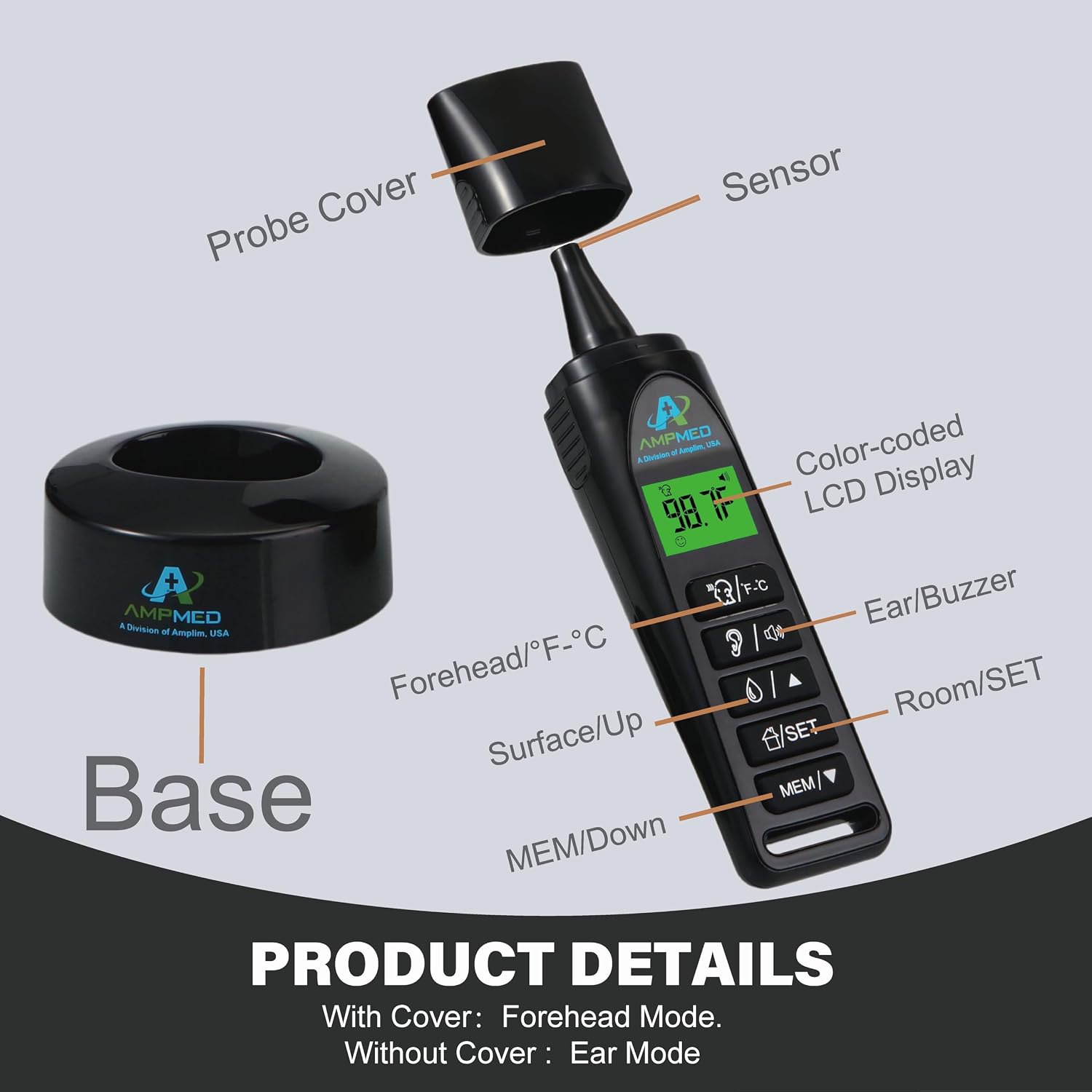
The image above illustrates the main components of your thermometer, including the probe cover, sensor, LCD display, and various function buttons for mode selection, settings, and memory recall. The device also comes with a base stand for convenient storage.
3. Configuração
3.1 Instalação da bateria
Your thermometer requires 2 AAA batteries, which are included in the package. To install or replace batteries:
- Localize a tampa do compartimento da bateria na parte traseira do termômetro.
- Deslize a tampa aberta.
- Insira as 2 pilhas AAA, certificando-se da polaridade correta (+ e -) conforme indicado dentro do compartimento.
- Feche bem a tampa do compartimento da bateria.
This video demonstrates the battery installation process for Amplim thermometers, ensuring correct placement of positive and negative terminals.
4. Instruções de operação
4.1 Ligar/Desligar
- Ligar: Press any button to turn on the thermometer. It will display the last measurement or enter standby mode.
- Desligar: The thermometer will automatically power off after 15 seconds of inactivity. To manually turn off, hold the 'SET' and 'MEM' buttons simultaneously for 3 seconds.
4.2 Mode Selection (Forehead, Ear, Surface, Room)
The thermometer features multiple modes for different measurement needs:
- Modo testa: For non-contact body temperature measurement.
- Modo de ouvido: For in-ear body temperature measurement. Remove the probe cover to activate this mode.
- Surface/Liquid Mode: For measuring the temperature of objects or liquids (e.g., milk, bathwater).
- Modo Quarto: Para medir a temperatura ambiente.
To switch between modes, press the dedicated mode buttons on the device. The display will show the active mode icon.

This image illustrates the three primary measurement modes: Ear, Surface, and Room, highlighting the thermometer's versatility.
This video demonstrates how to switch between the different measurement modes available on the Amptermômetro lim.
4.3 Temperature Measurement (Forehead Mode)
Ensure the probe cover is attached for forehead mode.
- Point the thermometer at the center of the forehead, maintaining a distance of 0.3 to 1.2 inches (1-3 cm).
- Press the Forehead mode button.
- The temperature reading will appear on the display within 1 second, accompanied by an audible beep.
4.4 Temperature Measurement (Ear Mode)
To use Ear Mode:
- Gently remove the probe cover. The thermometer will automatically switch to Ear Mode.
- Carefully insert the probe into the ear canal.
- Press the Ear mode button.
- The temperature reading will appear on the display within 1 second, accompanied by an audible beep.

This image shows the thermometer with its probe cover removed, ready for ear temperature measurement.
4.5 Temperature Measurement (Surface/Liquid Mode)
To measure the temperature of an object or liquid:
- Select the Surface/Liquid mode.
- Point the thermometer at the object or liquid.
- Press the measurement button. The temperature will be displayed.
4.6 Temperature Measurement (Room Mode)
To measure ambient room temperature:
- Select the Room mode.
- The current room temperature will be displayed on the screen.
4.7 Comutação Fahrenheit/Celsius
Para alternar entre Fahrenheit (°F) e Celsius (°C):
- With the thermometer powered on, hold the 'SET' button for 3 seconds until 'SET' appears on the screen.
- Press the 'F/°C' button to toggle between Fahrenheit and Celsius.
- Press 'SET' again to confirm your selection and exit the settings menu.
This video provides a step-by-step guide on how to switch the temperature unit between Fahrenheit and Celsius on your Amptermômetro lim.
4.8 Recuperação de Memória
The thermometer can store up to 60 previous temperature readings.
- Press the 'MEM' button to view the last recorded temperature.
- Use the 'MEM ▲' (Up) and 'MEM ▼' (Down) buttons to scroll through previous readings.
This video demonstrates how to access and review previous temperature readings stored in the thermometer's memory.
4.9 Sound/Buzzer Control
The thermometer features an audible buzzer for fever alerts and measurement completion. Refer to the quick guide for specific instructions on how to turn the buzzer ON or OFF.
5. Manutenção
5.1 Limpeza e cuidados
Para garantir leituras precisas e prolongar a vida útil do seu termômetro:
- Limpe o corpo do termômetro com um pano macio e seco.
- For the probe and sensor, use an alcohol swab or a cotton swab lightly moistened with alcohol. Gently wipe the surface.
- Não mergulhe o termômetro em água ou qualquer outro líquido.
- Evite usar produtos de limpeza abrasivos ou produtos químicos agressivos.
5.2 Armazenamento
Store the thermometer in a cool, dry place, away from direct sunlight and extreme temperatures. Use the provided base stand for convenient and safe storage.

This image shows the thermometer securely placed in its base stand, ready for storage or display.
6. Solução De Problemas
6.1 Problemas e soluções comuns
- Leituras imprecisas: Ensure the sensor is clean and free of debris. Verify correct measurement distance (0.3-1.2 inches for forehead mode). Allow the thermometer to acclimate to room temperature if it has been in a different environment.
- Sem problemas de exibição/energia: Verifique se as pilhas estão instaladas corretamente e se têm carga suficiente. Substitua as pilhas, se necessário.
- Fever Alarm Not Working: Check the sound/buzzer settings to ensure it is enabled.
- Mensagem de erro exibida: Refer to the quick guide or contact customer support for specific error code interpretations.
7. Especificações
| Recurso | Detalhe |
|---|---|
| Número do modelo do item | 2001F1 |
| Baterias | São necessárias 2 pilhas AAA (incluídas) |
| Marca | Amplimite |
| Características especiais | Buzzer ON/OFF, Ultra Fast, 60X Memory, 15 sec Auto Standby Mode, ℉/℃ Switchable, Forehead and ear dual mode, Room and liquid temperature modes, Large Display, Ultra Clear Screen, High Accuracy, 3 Colors Fever Alarm, No Mercury, Battery Operated, Low Battery Indicator, Touchless, Rotatable color display with clock |
| Cor | Preto |
| Faixa etária (Descrição) | Recém-nascido, bebê, criança pequena, criança, jovem, adulto, todas as idades |
| Material externo | Plástico |
| Especificação Atendida | FDA CE, FSA/HSA Eligible |
| Tipo de exibição | LCD |
| Tecnologia de Conectividade | Infravermelho |
| Instruções de cuidados com o produto | Limpe |
8. Garantia e Suporte
Seu Amplim 3-in-1 Infrared Thermometer comes with a warranty card included in the package. Please refer to the warranty card for details regarding coverage and terms. Amplim is a trusted American company committed to quality products and customer satisfaction. For any support needs or inquiries, please refer to the contact information provided on your warranty card or visit the official Amplimite website.