Introdução
This manual provides detailed instructions for the proper use and maintenance of your Casio G-Shock DW-5610SU-3 digital watch. Designed for durability and functionality, this watch features shock resistance, 200-meter water resistance, an electro-luminescent backlight, and various timekeeping functions.

Imagem: Frente view of the Casio G-Shock DW-5610SU-3 digital watch, showcasing its square case and digital display.
Funções dos botões
Your G-Shock watch has four buttons, typically labeled as follows:
- AJUSTAR (Canto superior esquerdo): Utilizado para entrar e sair dos modos de configuração e para confirmar as configurações.
- MODO (Canto inferior esquerdo): Used to cycle through the watch's various modes (Timekeeping, Stopwatch, Countdown Timer, Alarm).
- LUZ (Canto superior direito): Activates the electro-luminescent backlight.
- START/STOP (Bottom Right): Used to start/stop stopwatch operations, change selections in setting modes, and activate the flash alert.

Imagem: Lado view of the watch, highlighting the top left (ADJUST) and bottom left (MODE) buttons.

Image: Opposite side view of the watch, showing the top right (LIGHT) and bottom right (START/STOP) buttons.
Setup: Setting Time and Date
- No modo de cronometragem, pressione e mantenha pressionado o AJUSTAR button until the city code starts to flash, indicating the setting screen.
- Use o INICIAR/PARAR button to cycle through the settings (City Code, DST, 12/24-hour format, Seconds, Hour, Minute, Year, Month, Day).
- Use o LUZ button to increase a value or the INICIAR/PARAR button to decrease a value (for time/date settings).
- Após configurar todas as opções, pressione o AJUSTAR botão para sair do modo de configuração.
Instruções de operação
Modos de navegação
Pressione o MODO botão para percorrer os seguintes modos:
- Modo de exibição do tempo (hora atual, data, dia)
- Modo cronômetro
- Modo de cronômetro regressivo
- Modo de alarme
- Hourly Time Signal Mode
Usando o cronômetro
- Enter Stopwatch Mode by pressing the MODO botão.
- Pressione o INICIAR/PARAR botão para iniciar o cronômetro.
- Pressione o INICIAR/PARAR button again to stop it.
- Pressione o AJUSTAR botão para zerar o cronômetro.
- The stopwatch measures up to 23 hours, 59 minutes, 59.99 seconds.
Usando o cronômetro de contagem regressiva
- Enter Countdown Timer Mode by pressing the MODO botão.
- Pressione e segure o AJUSTAR button until the hour setting flashes.
- Use o LUZ e INICIAR/PARAR buttons to set the desired countdown time (up to 24 hours).
- Imprensa AJUSTAR to confirm and exit the setting mode.
- Imprensa INICIAR/PARAR para iniciar a contagem regressiva.
- Imprensa INICIAR/PARAR novamente para pausar/retomar.
- Quando a contagem regressiva chegar a zero, um alarme soará. Pressione qualquer botão para parar o alarme.
Configurando alarmes
- Enter Alarm Mode by pressing the MODO botão.
- Pressione e segure o AJUSTAR button until the hour setting flashes.
- Use o LUZ e INICIAR/PARAR buttons to set the alarm hour and minute.
- Imprensa AJUSTAR to confirm and exit the setting mode.
- Pressione o INICIAR/PARAR button to toggle the alarm ON/OFF. An indicator will show when the alarm is active.
Electro-luminescent Backlight
Pressione o LUZ botão para iluminar o visor para facilitar o uso viewing in low-light conditions. The backlight duration is typically a few seconds.
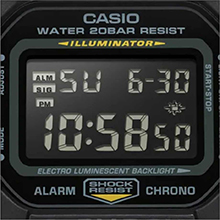
Image: Close-up of the watch display showing the electro-luminescent backlight active, illuminating the time and date.
Manutenção
Limpeza
Limpe o relógio com um pano macio e seco. Para sujeira persistente, use um pano macio.ampLimpe com água e um detergente neutro suave e, em seguida, seque com um pano. Evite usar agentes voláteis como diluente ou benzina.
Resistência à água
This watch is water resistant to 200 meters. It is suitable for showering, swimming, and shallow diving. Do not operate buttons while the watch is wet or submerged to prevent water ingress.

Image: The Casio G-Shock DW-5610SU-3 watch partially submerged in water, illustrating its 200-meter water resistance.
Substituição da bateria
The watch uses one CR2016 battery with an approximate life of 2 years. When the display becomes dim or functions malfunction, it may be time for a battery replacement. It is recommended to have the battery replaced by an authorized service center to ensure water resistance is maintained.
Solução de problemas
- A tela está em branco ou com brilho reduzido: A bateria pode estar fraca. Substitua a bateria.
- Os botões não respondem: Ensure the watch is not in a locked mode (if applicable, though this model typically doesn't have a lock). If issues persist, a full reset might be needed (consult service center).
- O horário está incorreto: Re-set the time and date as per the "Setting Time and Date" section. If inaccuracy continues, the watch may require servicing.
- Água dentro do relógio: Leve o relógio imediatamente a uma assistência técnica autorizada. Não tente abri-lo você mesmo.
Especificações
| Recurso | Especificação |
|---|---|
| Número do modelo | DW-5610SU-3 |
| Case/Bezel Material | Resina |
| Material da banda | Resina |
| Tipo de vidro | Vidro Mineral |
| Resistência à água | 200 metros (20 BAR) |
| Resistência ao choque | Sim |
| Luz de fundo | Electro-luminescent backlight with Afterglow |
| Cronômetro | 1/100-second, measuring capacity 23:59'59.99" |
| Contagem regressiva | Measuring unit 1 second, range 24 hours, auto-repeat |
| Alarme | Multi-function alarm, Hourlsinal de tempo y |
| Calendário | Calendário automático completo (até o ano de 2099) |
| Formato de hora | Formato 12/24 horas |
| Precisão | ± 15 segundos por mês |
| Tipo de Bateria | CR2016 |
| Duração aproximada da bateria | 2 anos |
| Case Dimensions (H×W×D) | 48.9 × 43.8 × 13.5 mm |
| Peso total | 52 g |

Image: Diagram showing the dimensions of the Casio G-Shock DW-5610SU-3 watch, with a credit card for scale, indicating a case height of 48.9 mm and width of 43.8 mm.
Garantia e Suporte
Your Casio G-Shock DW-5610SU-3 watch comes with a Limited Warranty. For warranty claims, service, or technical support, please contact Casio India Co Pvt Ltd.
Contato do fabricante/importador:
Casio India Co Pvt Ltd
A-41, 1st Floor, MCIE, Mathura Road,
New Delhi-110044, Índia
For additional information and support, please visit the official Casio website or an authorized service center.


