Introdução
Obrigado pela compra.asing the Altec Lansing AL-5003 Multimedia DJ Trolly Speaker. This speaker is designed to deliver powerful audio for various applications, including parties and surround sound systems. Featuring wireless connectivity, a built-in trolley for portability, and multiple input options, the AL-5003 offers a versatile audio experience. Please read this manual carefully to ensure proper setup, operation, and maintenance of your speaker.
Instruções importantes de segurança
- Read these instructions thoroughly before operating the speaker.
- Guarde este manual para referência futura.
- Não exponha o alto-falante à chuva ou umidade.
- Não bloqueie nenhuma abertura de ventilação.
- Não instale perto de fontes de calor, como radiadores, registros de calor, fogões ou outros aparelhos (incluindo amplificadores) que produzem calor.
- Proteja o cabo de alimentação para que não seja pisado ou comprimido, principalmente nos plugues, nas tomadas de conveniência e no ponto de saída do aparelho.
- Utilize somente acessórios/anexos especificados pelo fabricante.
- Desligue este aparelho durante tempestades com raios ou quando não for utilizado por longos períodos de tempo.
- Deixe toda a manutenção a cargo de pessoal qualificado.
Conteúdo da embalagem
Por favor, verifique se a embalagem contém os seguintes itens:
- Altec Lansing AL-5003 Multimedia DJ Trolly Speaker
- Cabo de alimentação
- Controle remoto
- Manual do usuário
- Cabo auxiliar (pode variar conforme a região)
Produto acimaview
The AL-5003 speaker features a robust design with integrated wheels and a handle for easy transport. It includes a powerful 10-inch speaker and a 1-inch tweeter, providing clear and dynamic sound. The control panel is located on the top of the unit, offering easy access to various functions.
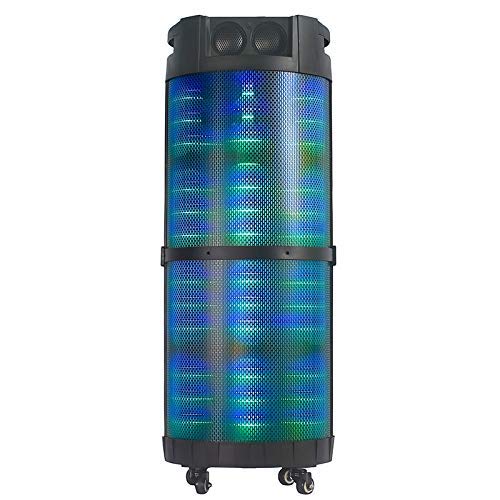
Imagem 1: Frente view of the Altec Lansing AL-5003 speaker, showcasing its cylindrical design and illuminated grille. The speaker features a sturdy build with integrated wheels at the base for portability.
Painel de controle e conexões
The top panel of the speaker houses the main controls and input/output ports.
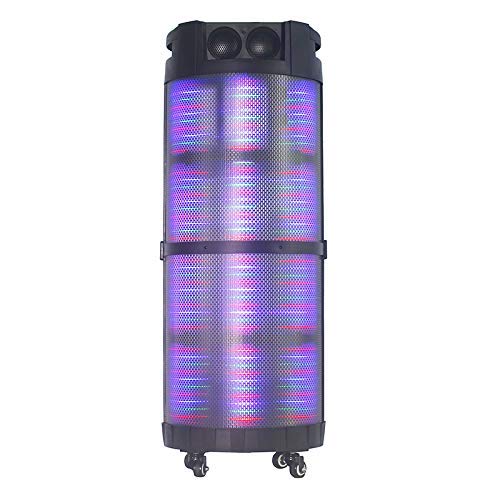
Imagem 2: Careca view of the AL-5003 speaker, highlighting the control panel with various buttons and knobs, along with the top-mounted speakers. This view also shows the integrated handle for easy transport.
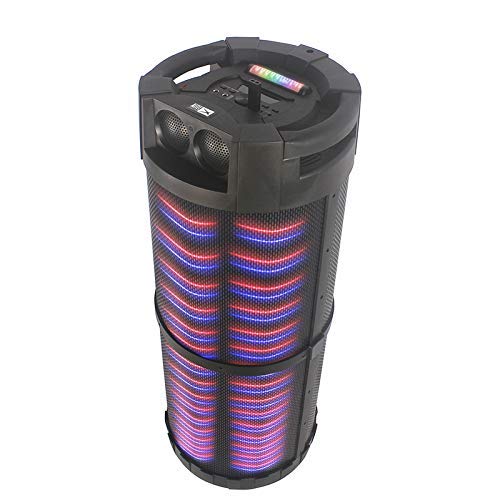
Imagem 3: Angulado view of the AL-5003 speaker, providing a perspective of its overall structure, including the side grille and the top control area. The dynamic lighting effects are visible through the mesh.
Common controls include Power, Volume, Mode selection, Play/Pause, Track Skip, and inputs for USB, Auxiliary, and potentially Microphone (if available on the model).
Instruções de configuração
- Desembalagem: Carefully remove the speaker and all accessories from the packaging. Retain the packaging for future transport or storage.
- Colocação: Place the speaker on a stable, flat surface. Ensure there is adequate ventilation around the unit. For optimal sound, position the speaker in a central location within the listening area.
- Conexão de energia: Connect the provided power cord to the AC input on the speaker and then plug it into a standard wall outlet (AC 100-240V, 50/60Hz).
- Initial Charge (if applicable): If the speaker has an internal battery (Lead Acid battery mentioned in specs), it is recommended to fully charge it before first use. The charging indicator light will typically show charging status.
- Ligar: Press the Power button on the control panel or remote control to turn on the speaker.
Instruções de operação
1. Modo Bluetooth
- Ative o Bluetooth: Turn on the speaker. Press the "Mode" button on the control panel or remote until "Bluetooth" or "BT" is displayed (or indicated by a blue LED). The speaker will enter pairing mode, indicated by a flashing light or audible prompt.
- Emparelhamento com dispositivo: On your mobile device (smartphone, tablet, laptop), go to Bluetooth settings and enable Bluetooth. Procurar available devices. You should see "AL-5003" or "Altec Lansing" in the list. Select it to pair.
- Confirmação de conexão: Once successfully paired, the speaker will emit a confirmation sound, and the Bluetooth indicator light will become solid.
- Reprodução: Start playing audio on your connected device. Use the speaker's volume controls or your device's volume controls to adjust the sound level. Use the Play/Pause, Next, and Previous buttons on the speaker or remote to control playback.
2. Auxiliary (AUX) Mode
- Conecte o cabo AUX: Insert one end of a 3.5mm auxiliary cable into the AUX input port on the speaker. Connect the other end to the headphone jack or audio output of your external audio device (e.g., MP3 player, laptop).
- Selecione o modo AUX: Press the "Mode" button on the speaker or remote until "AUX" is displayed or indicated.
- Reprodução: Play audio from your connected device. Adjust volume using both the speaker's controls and your device's volume.
3. Modo de reprodução USB
- Insira a unidade USB: Insira um pen drive USB contendo arquivos de áudio MP3. fileInsira o cabo na porta USB da caixa de som.
- Selecione o modo USB: The speaker may automatically switch to USB mode. If not, press the "Mode" button until "USB" is displayed or indicated.
- Reprodução: O alto-falante começará a reproduzir áudio automaticamente. files from the USB drive. Use the Play/Pause, Next, and Previous buttons to control playback.
4. Karaoke Function (if applicable)
If your AL-5003 model includes a microphone input, you can use it for karaoke:
- Conectar microfone: Plug a wired microphone into the designated microphone input jack.
- Ajustar volume: Use the dedicated Microphone Volume knob (if present) to adjust the microphone's volume.
- Controle de eco: Some models may have an Echo knob to add an echo effect to the microphone audio.
5. Operação de controle remoto
The included remote control provides convenient access to all major functions:
- Poder: Turn the speaker On/Off.
- Modo: Switch between Bluetooth, AUX, USB, and other available modes.
- Volume +/-: Ajuste o volume principal.
- Reproduzir/Pausar: Iniciar ou pausar a reprodução.
- Anterior Próximo: Pule para a faixa anterior ou seguinte.
- EQ: Selecione diferentes predefinições do equalizador (se disponíveis).
- Mudo: Mute or unmute the audio.
Manutenção
- Limpeza: Use um pano macio e seco para limpar a parte externa da caixa de som. Não use produtos de limpeza líquidos ou materiais abrasivos.
- Armazenar: Quando não estiver em uso por longos períodos, guarde a caixa de som em local fresco e seco, longe da luz solar direta e de temperaturas extremas.
- Cuidados com a bateria: If the speaker has a built-in rechargeable battery, avoid fully discharging it frequently. For long-term storage, charge the battery to approximately 50-70% every few months to prolong its lifespan.
- Ventilação: Certifique-se de que as aberturas de ventilação não estejam bloqueadas para evitar superaquecimento.
Solução de problemas
| Problema | Possível causa | Solução |
|---|---|---|
| Sem energia | Power cord not connected; Power outlet not working; Speaker is off; Battery drained. | Ensure power cord is securely connected. Try a different outlet. Press the Power button. Charge the battery. |
| Sem som | Volume too low; Incorrect mode selected; Device not connected properly; Mute function active. | Increase volume on speaker and source device. Select the correct input mode (Bluetooth, AUX, USB). Reconnect device. Check if mute is active on remote. |
| Falha no emparelhamento Bluetooth | Speaker not in pairing mode; Device Bluetooth off; Speaker too far from device; Interference. | Ensure speaker is in Bluetooth pairing mode. Turn on Bluetooth on your device. Move device closer to speaker. Turn off other Bluetooth devices nearby. |
| A reprodução USB não está funcionando | Unidade USB não inserida corretamente; Incompatível file Formatação; unidade USB corrompida. | Reinsira a unidade USB. Certifique-se de que... fileOs arquivos estão em formato MP3. Tente usar outro pen drive. |
| Controle remoto não funciona | Batteries drained; Obstruction between remote and speaker; Remote not pointed at sensor. | Replace remote control batteries. Remove any obstructions. Point remote directly at the speaker's IR sensor. |
Especificações
| Recurso | Detalhe |
|---|---|
| Nome do modelo | Altec Lansing AL-5003 Multimedia DJ Trolly Speaker |
| Tipo de alto-falante | Som Surround |
| Recurso especial | Sem fio |
| Usos recomendados | For Surround Sound Systems, Party |
| Dispositivos compatíveis | Gaming Console, Karaoke Machine, Laptop, MP3 Player, Smartphone, Tablet |
| Configuração do canal de som surround | 1.0 |
| Método de controle | Remoto |
| Tecnologia de comunicação sem fio | Bluetooth |
| Tamanho do alto-falante | 10 polegadas |
| Fonte de energia | Elétrico com fio |
| Diâmetro do tweeter | 1 polegadas |
| Compatível com entrada de áudio | Auxiliar, USB |
| Conectividade do alto-falante | Wired (for power), Wireless (Bluetooth) |
| Wat de áudiotage | 100 Watts |
| Composição da célula da bateria | Chumbo ácido |
| Tipo de montagem | Posição do assoalho |
Garantia e Suporte
Altec Lansing products are manufactured to the highest quality standards. For information regarding warranty coverage, technical support, or service inquiries, please refer to the warranty card included with your product or visit the official Altec Lansing website. Please have your model number (AL-5003) and purchase details ready when contacting support.
Website: www.alteclansing.com (This is a generic link, actual link might vary by region)