1. Introdução
Thank you for choosing the HiLook HIKVISION 204U-K1 4-Channel 5MP HD DVR. This manual provides essential information for the proper installation, operation, and maintenance of your digital video recorder. Please read this manual thoroughly before using the product and retain it for future reference.
2. Instruções importantes de segurança
- Fonte de energia: Use only the power adapter specified for this device. Ensure the power voltage is stable and meets the requirements.
- Ventilação: Não obstrua as aberturas de ventilação. Instale de acordo com as instruções do fabricante.
- Água e Umidade: Do not expose the device to rain or moisture. Do not place objects filled with liquids, such as vases, on the apparatus.
- Temperatura: Utilize o dispositivo dentro da faixa de temperatura especificada. Evite ambientes extremamente quentes ou frios.
- Limpeza: Limpe apenas com um pano seco. Não use limpadores líquidos ou em aerossol.
- Manutenção: Não tente consertar este produto sozinho. Encaminhe todos os serviços de manutenção para pessoal de serviço qualificado.
- Disco rígido: Handle the hard drive with care. Improper installation or removal can cause data loss or damage.
3. Conteúdo da embalagem
Ao desembalar, verifique se todos os itens estão presentes e em boas condições. Caso algum item esteja faltando ou danificado, entre em contato com o vendedor.
- HiLook HIKVISION 204U-K1 DVR Unit
- Adaptador de energia
- Mouse USB
- SATA Data Cable (for HDD connection)
- SATA Power Cable (for HDD connection)
- Guia de início rápido

Figure 3.1: The HiLook HIKVISION 204U-K1 DVR unit, shown with an optional hard drive and included accessories such as a mouse and cables.
4. Configuração inicial
4.1. Connecting the DVR
Follow these steps to connect your DVR to cameras, a monitor, and the network.
- Instalar disco rígido (opcional): If your DVR did not come with a pre-installed hard drive, open the DVR casing, connect the SATA data and power cables to the HDD, and secure the HDD inside the DVR.
- Conectar câmeras: Connect your surveillance cameras to the BNC video input ports on the rear panel of the DVR. This model supports 4 channels.
- Conectar monitor: Connect a monitor to the HDMI or VGA output port on the rear panel.
- Conectar Rede: Connect an Ethernet cable from the DVR's LAN port to your router or network switch for remote access and network features.
- Conectar mouse USB: Plug the included USB mouse into one of the USB ports for navigation.
- Conecte a energia: Connect the power adapter to the DVR's power input and then plug it into a power outlet.

Figure 4.1: Rear panel of the DVR, illustrating the various input and output ports including video in, audio in/out, VGA, HDMI, USB, network interface, and power supply.
4.2. Ligando
After all connections are made, the DVR will power on automatically. The system will boot up, and you should see the HiLook logo on your connected monitor. Follow the on-screen prompts for initial setup, including setting up an administrator password and configuring network settings.
5. Guia de operação
5.1. Interface de usuário finalizadaview
The DVR's graphical user interface (GUI) can be navigated using the USB mouse. Right-click to access the main menu, and left-click to select options. The live view displays feeds from connected cameras.
5.2. Gravação e reprodução
- Gravação manual: Do show view, click the record icon to start or stop manual recording for a specific channel.
- Gravação programada: Acesse o menu principal e navegue até Registro > Agendamento to set up continuous or motion-triggered recording schedules for each camera.
- Reprodução: No menu principal, selecione Reprodução. Choose the date, time, and camera channel to review foo gravadotage.
5.3. Detecção de movimento e alertas
The DVR supports smart motion detection and can send alerts via email or push notifications to a mobile application.
- Configurar detecção de movimento: Vá para Main Menu > Alarm > Motion Detection. Select the camera channel, enable motion detection, and define the detection area and sensitivity.
- Set Up Email Alerts: In Main Menu > Network > Email, configure your SMTP server settings and recipient email addresses. Enable email linkage for motion detection events.
- Mobile App Notifications: Download the official HiLook mobile application. Add your DVR to the app and enable push notifications for alarm events.

Figure 5.1: A smartphone screen showing a real-time email notification triggered by smart motion detection.

Figure 5.2: A smartphone displaying multiple smart motion-triggered alerts, indicating movement detected in specific areas monitored by surveillance cameras.
6. Manutenção
- Limpeza: Regularly clean the exterior of the DVR with a soft, dry cloth. Ensure ventilation openings are free from dust.
- Atualizações de firmware: Confira o site oficial da HiLook website for the latest firmware updates. Updating firmware can improve performance and add new features. Follow the provided instructions carefully.
- Gerenciamento de disco rígido: Periodically check the health of your hard drive through the DVR's system settings. Ensure sufficient storage space is available for recordings.
- Segurança da senha: Regularly change your administrator password to maintain system security.
7. Solução De Problemas
If you encounter issues with your DVR, refer to the table below for common problems and solutions.
| Problema | Possível causa | Solução |
|---|---|---|
| Sem saída de vídeo no monitor | Loose HDMI/VGA cable; Incorrect monitor input; DVR not powered on. | Check cable connections; Select correct input on monitor; Verify power supply. |
| Nenhuma imagem da câmera | Camera not powered; Loose BNC cable; Faulty camera. | Ensure camera power; Check BNC connections; Test camera with another input if possible. |
| Não consigo acessar o DVR remotamente. | Network cable disconnected; Incorrect network settings; Firewall blocking access. | Verify Ethernet connection; Check IP address, gateway, DNS settings; Configure router/firewall. |
| Sem gravação | Hard drive not installed/initialized; Recording schedule not set; HDD full. | Install/initialize HDD; Configure recording schedule; Check HDD status and capacity. |
| A detecção de movimento não funciona | Motion detection disabled; Sensitivity too low; Detection area not set. | Enable motion detection; Adjust sensitivity; Define detection area. |
8. Especificações técnicas
Below are the key technical specifications for the HiLook HIKVISION 204U-K1 DVR.
| Recurso | Especificação |
|---|---|
| Modelo | 204U-K1 |
| Entrada de vídeo | 4-channel BNC interface (supports HDTVI/AHD/CVI/CVBS/IP) |
| Compressão de vídeo | H.265 Pro+/H.265 Pro/H.265/H.264 |
| Saída de vídeo | 1 HDMI, 1 VGA (saída simultânea) |
| Resolução de saída HDMI | Up to 4K (3840 × 2160) for 204U-K1 |
| Entrada/Saída de Áudio | 1-ch RCA (2-way audio) / 1-ch RCA |
| Unidade de disco rígido (HDD) | 1 interface SATA, capacidade de até 10 TB |
| interface de rede | 1 interface Ethernet autoadaptável RJ45 10M/100M |
| Interface USB | 2 × USB 2.0 |
| Fonte de energia | 12 VCC |
| Dimensões (L × P × A) | Approx. 200 × 200 × 45 mm (7.9 × 7.9 × 1.8 inch) |
| Peso (sem HDD) | Aprox. 1 kg (2.2 lb) |
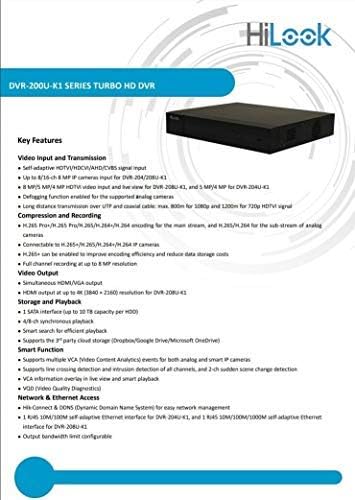
Figure 8.1: A detailed list of key features for the DVR-200U-K1 series, including video input/transmission, compression, video output, storage, smart functions, and network access.
9. Garantia e Suporte ao Cliente
Your HiLook HIKVISION 204U-K1 DVR comes with a limited warranty. Please refer to the warranty card included in your package or visit the official HiLook website for detailed warranty terms and conditions. For technical assistance, troubleshooting, or service inquiries, please contact your authorized HiLook dealer or customer support.
Recursos on-line: For additional support, firmware downloads, and FAQs, please visit the official HiLook support website.


