1. Informações importantes de segurança
Leia atentamente todas as instruções antes da montagem e utilização. O não cumprimento destas instruções pode resultar em ferimentos ou danos ao produto.
- Esta mesa foi projetada apenas para uso interno.
- Ensure all screws are tightened securely before use. Periodically check and re-tighten all fasteners.
- Do not overload the desk. The maximum weight recommendation is 176 pounds (80 kg).
- Mantenha crianças e animais de estimação afastados da mesa durante o funcionamento.
- Avoid placing the desk in direct sunlight or in damp ambientes.
- Não desmonte nem modifique os componentes elétricos da mesa. Para obter assistência técnica, entre em contato com o suporte ao cliente.
Warning: The product will arrive in two separate packages and may be shipped separately. Do not discard any packaging until assembly is complete and the desk is fully functional.
2. Conteúdo da embalagem
Your FLEXISPOT EN2 Electric Standing Desk is shipped in two packages. Please ensure you have received both packages before beginning assembly.
- Pacote 1: Desktop (48" Mahogany Top)
- Pacote 2: Desk Frame (Gray Frame), Motor, Control Panel, Power Strip, Cable Management Tray, Hardware, and User Manual.

Figure 2.1: The FlexiSpot EN2 desk components are shipped in two separate packages for safe delivery.
3. Configuração e montagem
Assembly typically requires one person and approximately 30-60 minutes. An electric drill (not included) may be helpful for certain steps.
- Descompacte os componentes: Carefully remove all parts from both packages and lay them out on a soft, clean surface to prevent scratches. Verify all components are present against the packing list.
- Montagem da estrutura da mesa: Attach the lifting columns to the feet. Ensure the crossbeam is correctly oriented.
- Attach Crossbeam: Secure the crossbeam to the lifting columns. Note that while some holes are pre-drilled for legs, the center holes for the crossbeam and cable tray may require self-tapping screws. Apply firm pressure with an electric drill for easy installation.
- Install Motors and Control Box: Follow the manual to connect the motor cables to the control box and secure the control box to the frame.
- Conectar área de trabalho: Carefully place the desktop onto the assembled frame. Align the pre-drilled holes on the desktop with the frame and secure with screws.
- Install Control Panel and Power Strip: Mount the 6-button digital control panel and the clamp-on power strip to the desired location on the desktop. The power strip can be clipped to the back or side.
- Gerenciamento de cabos: Utilize the included cable management device to organize and secure all power and data cables underneath the desk. This helps prevent cables from snagging during height adjustments.

Figure 3.1: Assembled FLEXISPOT EN2 Electric Standing Desk.

Figure 3.2: Effective cable management keeps your workspace tidy and safe.
4. Instruções de operação
The desk features a 6-button digital controller for easy height adjustment and memory presets.
4.1 Ajuste de Altura
- Elevar a mesa: Press and hold the 'Up' arrow button (▲) to raise the desk. The LED display will show the current height.
- Mesa inferior: Press and hold the 'Down' arrow button (▼) to lower the desk. The LED display will show the current height.
- The motorized system adjusts smoothly from 28.1 inches to 45.7 inches. The motor operates quietly at less than 50 dB.
4.2 Predefinições de memória
The controller features 4 programmable memory presets to quickly switch between your preferred sitting and standing heights.
- Ajuste a mesa à altura desejada usando os botões de seta para cima/para baixo.
- Press the 'M' button (Memory). The display will show 'S-'.
- Press one of the number buttons (1, 2, 3, or 4) within 3 seconds. The display will show 'S-1', 'S-2', etc., indicating the height is saved to that preset.
- Para recuperar uma altura salva, basta pressionar o botão numérico correspondente (1, 2, 3 ou 4). A mesa se moverá automaticamente para a posição salva.
4.3 Integrated Power Strip and USB Ports
The desktop is equipped with a removable power strip for convenient device charging and power access.
- The power strip includes 3 AC outlets (125V/12A) and 2 USB charging ports (5V/2A).
- It can be clipped to the back or side of your desk to suit your setup.

Figure 4.1: Digital control panel for height adjustment and memory presets.

Figure 4.2: Integrated power strip with AC outlets and USB charging ports.
4.4 Timer Function (if available on your model)
Some models may include a timer function to remind you to switch between sitting and standing positions. Refer to your specific model's manual for details on setting and using this feature.
5. Características
- Desktop de peça inteira: The 1-inch eco-friendly desktop provides a seamless and spacious work surface, offering enhanced stability compared to multi-piece desktops.
- Construção durável: Constructed with an industrial-grade steel frame and solid tabletop, the desk can support up to 176 pounds (80 kg). Each frame undergoes rigorous testing for performance and durability.
- Cantos arredondados: The desktop features rounded corners for safety and to prevent accidental bumps or damage.
- Operação silenciosa: The motor operates at less than 50 dB, ensuring a quiet work environment during height adjustments.

Figure 5.1: The whole-piece desktop offers enhanced stability and a smooth surface.

Figure 5.2: The desk operates with a quiet motor, producing less than 50 dB of noise.

Figure 5.3: The desk's robust construction supports up to 176 lbs.
6. Manutenção
- Limpeza: Limpe a mesa e a moldura com um pano macio e seco.amp pano. Evite produtos de limpeza abrasivos ou produtos químicos agressivos que possam danificar o acabamento.
- Inspeção: Verifique periodicamente todos os parafusos e porcas para garantir que estejam bem apertados. Reaperte-os, se necessário.
- Gerenciamento de cabos: Ensure cables remain neatly organized and are not pinched or strained during height adjustments.
7. Solução De Problemas
- Mesa não se move: Check all cable connections, especially the power cord and motor cables. Ensure the power outlet is functional.
- Movimento irregular: Perform a reset procedure (refer to the full user manual for specific steps). Ensure the desk is not overloaded or obstructed.
- Códigos de erro: If an error code appears on the LED display, consult the comprehensive user manual for specific troubleshooting steps related to that code.
8. Especificações
| Recurso | Detalhe |
|---|---|
| Marca | PONTO FLEXI |
| Número do modelo | EN2 |
| Tamanho da área de trabalho | 48"D x 24"W (Dimensions may vary slightly by 0 to 1") |
| Material de mesa | Wood (Mahogany Top) |
| Material da estrutura | Alloy Steel (Gray Frame) |
| Faixa de ajuste de altura | 28.1" a 45.7" |
| Mecanismo de elevação | Elétrico |
| Nível de ruído do motor | Menos de 50 dB |
| Capacidade Máxima de Carga | 176 libras (80 kg) |
| Painel de controle | 6-button digital controller with 4 memory presets |
| Tomada | 3 tomadas CA (125V/12A) |
| Portas de carregamento USB | 2 portas USB (5V/2A) |
| Montagem necessária | Sim |
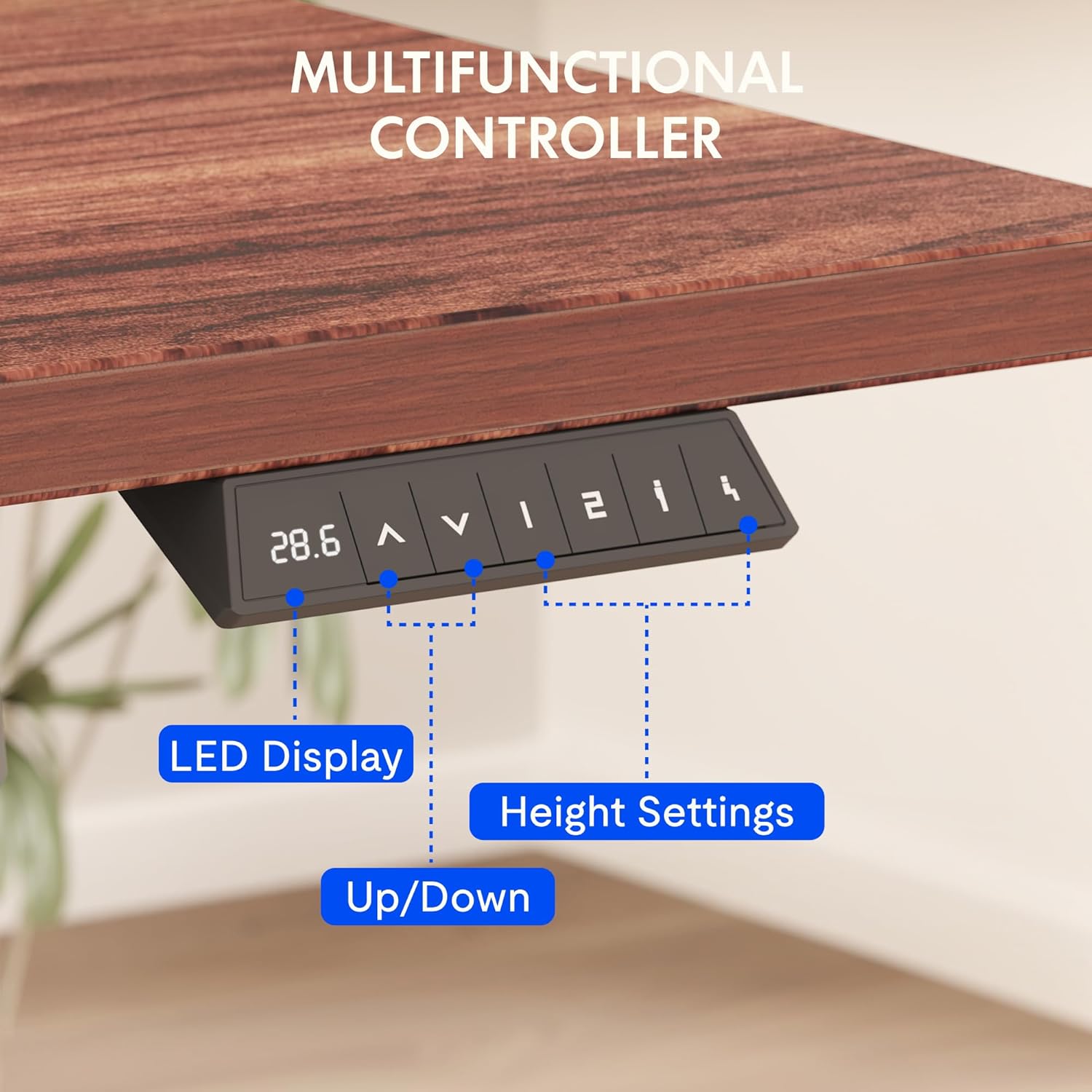
Figure 8.1: Key dimensions and features of the FLEXISPOT EN2 desk.
9. Garantia e Suporte
A FLEXISPOT oferece cobertura de garantia abrangente para sua mesa elétrica de altura ajustável EN2:
- Garantia de 5 anos: Applies to frames, motors, and other mechanical devices.
- Garantia de 2 anos: Applies to controllers, switches, and electronics.
For customer support, troubleshooting assistance, or warranty claims, please visit the official FLEXISPOT webou entre em contato diretamente com o departamento de atendimento ao cliente.
10. Vídeos oficiais do produto
10.1 Computer Workstation Table Test
Video 10.1: A demonstration of the FLEXISPOT EN2 desk's stability and functionality as a computer workstation.
10.2 Flexispot Classic Height Adjustable Standing Desk Series
Vídeo 10.2: Um excessoview of the FlexiSpot Classic Height Adjustable Standing Desk Series, highlighting key features and design.
10.3 FLEXISPOT Brand Introduction
Video 10.3: A brief introduction to the FLEXISPOT brand and its commitment to ergonomic solutions.


