Introdução
Thank you for choosing the COMISO X26M Bluetooth Speaker. This compact and powerful speaker is designed to deliver high-quality 360° HD sound with enhanced bass, making it ideal for various environments, from home to outdoor adventures. Featuring Bluetooth 5.3 for stable connectivity, TWS stereo pairing capability, a built-in microphone for hands-free calls, and IP65 waterproof and dustproof rating, the X26M offers versatility and durability. This manual provides detailed instructions on setting up, operating, and maintaining your speaker to ensure optimal performance.

Image: The COMISO X26M Bluetooth Speaker, black in color, held in a hand, demonstrating its portable size and water-resistant design with visible water droplets.
Conteúdo da embalagem
Ao abrir a embalagem, verifique o conteúdo para garantir que todos os itens estejam presentes:
- 1 x COMISO X26M Bluetooth Speaker
- 1 x cabo de carregamento USB
- 1 x Guia de início rápido
- 1 x Service Card
- 1 x Hook (detachable)
Principais características
Omnidirectional 360° HD Sound
The X26M speaker delivers balanced, detailed sound in a 360° radius. A built-in amplifier powers the speaker for full sound, offering a rich audio experience and enhanced bass that exceeds expectations for its compact size.

Image: A black COMISO X26M speaker with visual representations of sound waves expanding outwards, highlighting its 360° HD sound capability.
Bluetooth 5.3 & Built-in Microphone
Equipped with the latest Bluetooth 5.3 technology, the speaker ensures lower power consumption, faster transmission, and a more stable signal without delay. The integrated microphone allows for convenient hands-free calling.
Emparelhamento True Wireless Stereo (TWS)
For an immersive audio experience, you can connect two X26M mini portable speakers to create a true stereo sound setup. This feature is easy to operate and enhances the soundstage significativamente.

Image: Two COMISO X26M speakers positioned on either side of a tablet, illustrating their dual pairing capability for stereo sound.
IP65 à prova d'água e à prova de poeira
The speaker boasts an IP65 rating, providing protection against water jets and dust ingress. This makes it suitable for outdoor sports, hiking, or worry-free use in environments like bathrooms and kitchens.
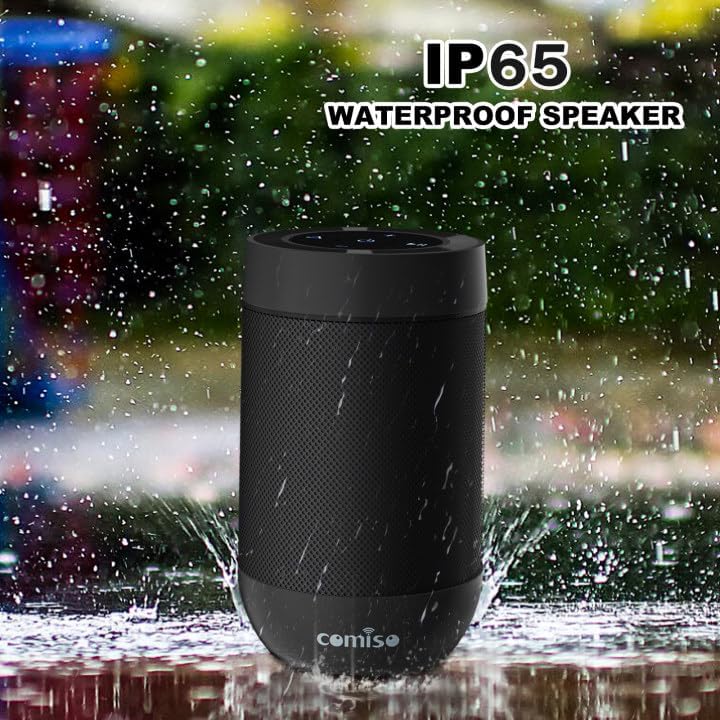
Image: The COMISO X26M speaker shown with water splashing around it, emphasizing its IP65 waterproof feature.
Suporte para cartão TF
In addition to Bluetooth streaming, the speaker supports TF (Micro SD) cards, allowing you to play music directly from your stored music library.
Design ultraportátil
Weighing under 5.5 ounces and measuring 3.2 inches tall with a 2.2-inch diameter, the cylindrical design is ultra-compact. Its pocket-handheld size and detachable hook make it perfect for travel, hiking, or desktop use.

Image: A person riding a bicycle outdoors with the COMISO X26M speaker attached to their backpack, demonstrating its suitability for outdoor activities and portability.
Configurar
1. Carregando o alto-falante
Before first use, fully charge the speaker. Connect the provided USB charging cable to the speaker's charging port (located under the silicon cover near the base) and a USB power source (e.g., computer USB port, wall adapter). The charging indicator light will illuminate. A full charge takes approximately 2 hours.
2. Ligar/desligar
- Para ligar: Pressione e segure o botão Liga/Desliga (⏻) por aproximadamente 2 a 3 segundos, até ouvir um sinal sonoro e a luz indicadora acender.
- Para desligar: Pressione e segure o botão Liga/Desliga (⏻) por aproximadamente 2 a 3 segundos, até ouvir um sinal sonoro e a luz indicadora se apagar.
3. Emparelhamento Bluetooth
- Ensure the speaker is powered on and in Bluetooth pairing mode (the indicator light will typically flash blue rapidly).
- No seu dispositivo (smartphone, tablet, computador), ative o Bluetooth e procure por dispositivos disponíveis.
- Select "COMISO X26M" from the list of found devices.
- Após a conexão, você ouvirá um sinal sonoro de confirmação e a luz indicadora ficará azul fixa.
The speaker has a Bluetooth range of up to 10 meters (33 feet) in an open area.
4. True Wireless Stereo (TWS) Pairing (for two X26M speakers)
To achieve a true stereo sound experience, you can pair two COMISO X26M speakers together:
- Ensure both X26M speakers are powered on and not connected to any Bluetooth device.
- On um of the speakers (this will become the primary speaker), long-press the TWS button (often indicated by a triangle or chain link icon) for approximately 2 seconds. You will hear a "DI~DI" prompt tone, and the light will flash.
- The two speakers will automatically search for and pair with each other. Once successfully paired, you will hear a confirmation tone, and the indicator light on the primary speaker will flash, while the secondary speaker's light will be solid.
- Now, turn on Bluetooth on your device and connect to the primary "COMISO X26M" speaker. Both speakers will play audio in stereo.
The speakers will remember their TWS pairing for future use.
5. Utilização do cartão TF
To play music directly from a TF (Micro SD) card:
- Insert a TF card (with pre-loaded music files) into the TF card slot on the speaker (under the silicon cover).
- A caixa de som alternará automaticamente para o modo de reprodução do cartão TF.
- Use the speaker's control buttons to play, pause, skip tracks, and adjust volume.
Instruções de operação
Button Functions (Refer to speaker top panel for layout)
| Botão/Ícone | Função |
|---|---|
| ⏻ (Botão de energia) | Pressione e segure para ligar/desligar. |
| + (Aumentar o volume) | Pressione rapidamente para aumentar o volume. Pressione e segure para a próxima faixa. |
| - (Volume baixo) | Pressione rapidamente para diminuir o volume. Pressione e segure para voltar à faixa anterior. |
| ▶‖ (Reproduzir/Pausar) | Pressione rapidamente para reproduzir/pausar a música. |
| ⟁ (TWS/Mode Button) | Long press for TWS pairing (when two speakers are present). Short press to switch between Bluetooth and TF Card modes. |
Fazendo e recebendo chamadas
When connected to a smartphone via Bluetooth, the built-in microphone allows for hands-free calling:
- Atender chamada: Pressione rapidamente o botão Reproduzir/Pausar (▶‖) when an incoming call rings.
- Encerrar chamada: Pressione rapidamente o botão Reproduzir/Pausar (▶‖) durante uma chamada.
- Rejeitar chamada: Pressione e segure o botão Reproduzir/Pausar (▶‖) when an incoming call rings.
- Rediscar último número: Pressione duas vezes o botão Reproduzir/Pausar (▶‖).
Manutenção
- Limpeza: Limpe o alto-falante com um suave, damp pano. Não use produtos químicos agressivos ou produtos de limpeza abrasivos.
- Armazenar: Guarde a caixa de som em local fresco e seco, longe de temperaturas extremas e da luz solar direta, quando não estiver em uso por longos períodos.
- Cuidados com a bateria: Para prolongar a vida útil da bateria, evite descarregá-la completamente com frequência. Carregue a caixa de som regularmente, mesmo que não a esteja usando constantemente.
- Resistência à água: While IP65 rated, avoid submerging the speaker in water. Ensure the silicon cover for charging port and TF card slot is securely closed to maintain water resistance.
Solução de problemas
| Problema | Solução possível |
|---|---|
| Alto-falante não liga. | Verifique se a caixa de som está carregada. Conecte-a a uma fonte de energia e tente novamente. |
| Não é possível emparelhar com o dispositivo Bluetooth. |
|
| Sem som ou volume muito baixo. |
|
| O emparelhamento TWS falha. |
|
| Qualidade de som ruim/distorção. |
|
Especificações
| Recurso | Detalhe |
|---|---|
| Nome do modelo | X26M |
| Marca | comiso |
| Tecnologia de Conectividade | Bluetooth 5.3 |
| Tipo de alto-falante | Alto-falante portátil externo |
| Modo de saída de áudio | Estéreo (com emparelhamento TWS) |
| Potência máxima de saída do alto-falante | 8 Watts (total for TWS pair, 5W per speaker) |
| Nível de resistência à água | IP65 (Resistente à água e à poeira) |
| Duração da bateria | Até 12 horas |
| Tempo de carregamento | Aproximadamente 2 horas |
| Alcance Bluetooth | 10 metros (33 pés) |
| Microfone embutido | Sim |
| Suporte para cartão TF | Sim |
| Dimensões do produto | 4"D x 2"W x 2"H (approx. 3.2 inches tall, 2.2 inches diameter) |
| Peso do item | 4.2 onças |
Garantia e Suporte
The COMISO X26M Bluetooth Speaker comes with a Limited Warranty. For specific warranty terms and conditions, please refer to the included Service Card or visit the official COMISO website. If you encounter any issues or require technical assistance, please contact COMISO customer support through their official channels or the retailer from whom you purchased the product.
Para obter mais assistência, você pode visitar o Loja COMISO na Amazon.