1. Introdução
This manual provides detailed instructions for the installation, operation, and maintenance of your EZoneTronics Android 10.1 2DIN Car Stereo. This unit features a 9-inch capacitive touchscreen, Android 10.1 operating system, GPS navigation, Bluetooth 4.0, Wi-Fi, AM/FM/RDS radio, and support for Mirror Link, Apple CarPlay, and Android Auto. Please read this manual thoroughly before using the product to ensure proper function and safety.
2. Compatibilidade do veículo
This car stereo is designed for specific Mercedes-Benz models:
- Mercedes-Benz ML-W164 / ML300 / ML350 / ML450 / ML500 / ML320 / ML63 AMG (2005-2012)
- Mercedes-Benz GL-X164 / GL320 / GL350 / GL420 / GL450 / GL500 (2005-2012)
Nota importante: If your vehicle is equipped with a Harman, Kardon, or BOSE amplification system, an additional fiber optic decoder box (e.g., ASIN B08K49SQSM) may be required for proper audio functionality. Consult a professional installer if you are unsure.
3. Conteúdo da embalagem
Verifique se todos os itens listados abaixo estão incluídos em seu pacote:
- 1 x EZoneTronics Android Car Stereo Unit
- 1 x Antena GPS
- 1 x Chicote de Alimentação
- 1 x RCA Output Cable
- 2 adaptadores USB
- 1 x Cabo de Entrada da Câmera
- 1 x Manual do Usuário (este documento)
- 1 x Caixa Canbus
4. Configuração e instalação
Installation of this car stereo requires technical knowledge and experience with automotive electrical systems. Professional installation is highly recommended to prevent damage to the unit or your vehicle.
4.1 Verificação de pré-instalação
- Certifique-se de que a ignição do veículo esteja desligada e a bateria desconectada antes de iniciar a instalação.
- Confirme se todos os itens da embalagem estão presentes.
- Review your vehicle's wiring diagram for specific connections.
4.2 Etapas de Instalação (Geral)
- Carefully remove the original car stereo unit from your dashboard.
- Connect the provided power harness to the vehicle's wiring. Ensure all connections are secure.
- Conecte a antena GPS e direcione-a para um local com sinal desobstruído. view do céu (por exemplo, canto do painel).
- Connect the USB adapters and route them to an accessible location (e.g., glove compartment).
- If installing a rear camera, connect the camera input cable and route it to the camera location.
- Connect the RCA output cable for external ampAmplificadores ou subwoofers, se aplicável.
- Connect the Canbus box as per the wiring diagram to enable steering wheel controls and other vehicle-specific functions.
- Carefully slide the new EZoneTronics unit into the dashboard opening.
- Fixe a unidade no lugar.
- Reconnect the vehicle battery and test the unit's functionality.

Figura 4.1: Comparison of the car dashboard before and after the EZoneTronics car stereo installation. The top image shows the new unit installed, while the bottom images show the original radio (left) and the new unit (right) for direct comparison.
5. Instruções de operação
5.1 Operação básica
- Ligar/desligar: Press and hold the power button (usually on the front panel) to turn the unit on or off. A short press typically mutes/unmutes audio.
- Tela sensível ao toque: The 9-inch capacitive touchscreen responds to touch gestures similar to a smartphone. Tap to select, swipe to scroll.
- Tela inicial: The main interface provides access to various functions like Radio, Music, Navigation, Bluetooth, and Apps.
5.2 Radio (AM/FM/RDS)
The unit features a built-in AM/FM/RDS radio tuner for clear signal reception.
- Accessing Radio: Toque no ícone "Rádio" na tela inicial.
- Digitalização: Use the 'Scan' or 'Seek' buttons on the screen to automatically search for available stations.
- Salvando predefinições: Once a station is tuned, press and hold a preset number button on the screen to save it.
- Função RDS: Radio Data System (RDS) displays station information like song title or program type where available.

Figura 5.2: The FM/AM/RDS Radio interface on the EZoneTronics car stereo, showing frequency display and preset buttons for easy station selection.
5.3 Bluetooth 4.0
Conecte seu smartphone via Bluetooth para chamadas em modo mãos-livres e streaming de áudio.
- Emparelhamento: Go to the 'Bluetooth' menu on the stereo. Enable Bluetooth on your phone and search for available devices. Select 'EZoneTronics' (or similar name) and confirm the pairing code.
- Chamadas com viva-voz: Once paired, you can make and receive calls directly from the stereo screen. Your phone's contact list may sync automatically.
- Transmissão de áudio (A2DP): Play music from your phone through the car stereo speakers. Control playback (play/pause, skip) from the stereo.

Figura 5.3: The Bluetooth 4.0 interface showing music playback controls and icons for phone video, dial-up, hang-up, and phone music functions.
5.4 Navegação GPS
The unit includes an integrated GPS receiver and comes with Google Maps pre-installed. Other navigation apps can be downloaded from the Google Play Store.
- Navegação online: Connect to Wi-Fi to use online maps and real-time traffic information.
- Navegação offline: Download offline map data for specific regions via Wi-Fi for navigation without an internet connection.
- Using Navigation Apps: Tap the 'Navigation' icon to launch the default map application. Follow on-screen prompts to enter destinations and start routes.
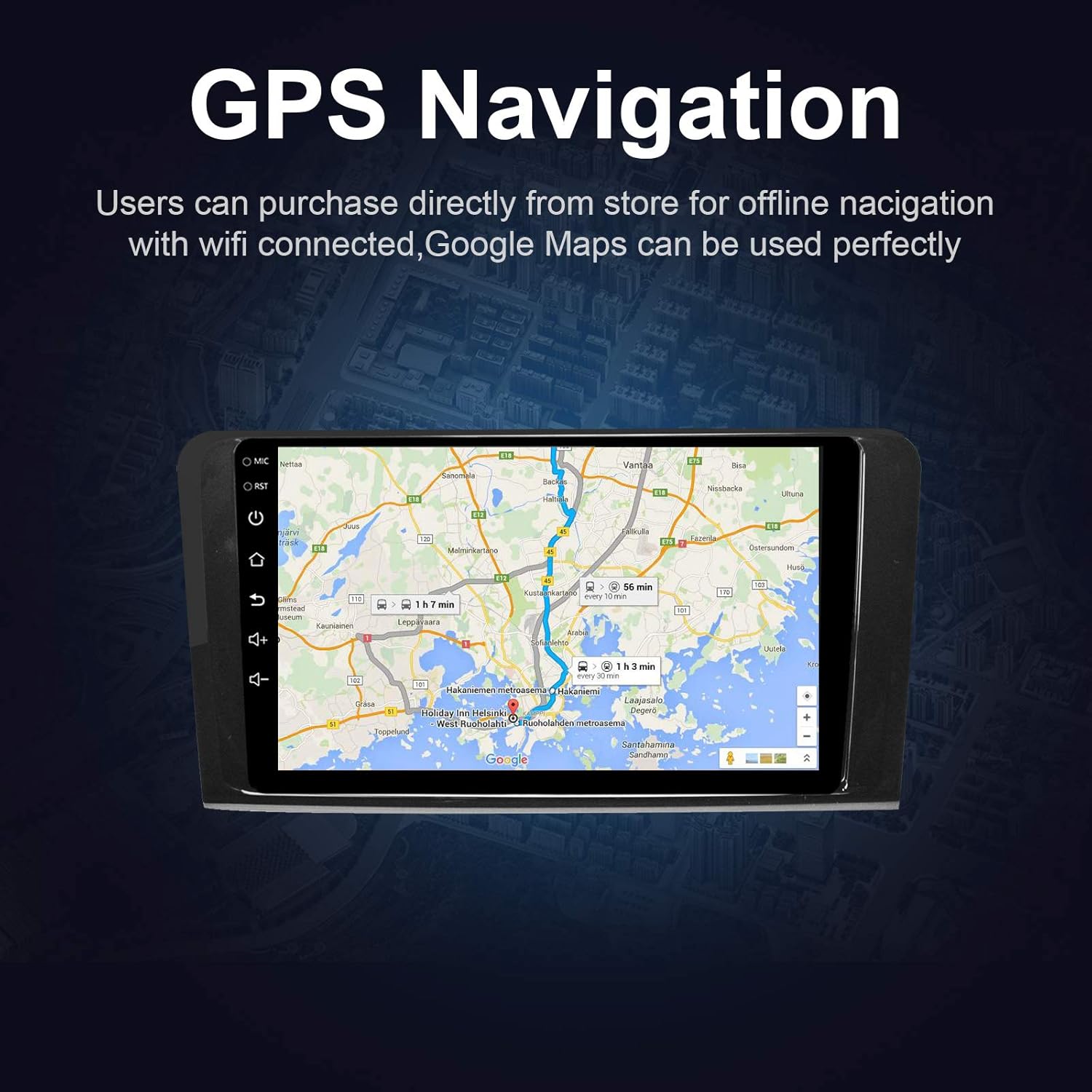
Figura 5.4: The GPS Navigation screen showing a map with a highlighted route and estimated travel time.
5.5 Apple CarPlay e Android Auto
A unidade é compatível com Apple CarPlay sem fio e Android Auto com fio, permitindo uma integração perfeita com seu smartphone.
- Apple CarPlay (Wireless): Connect your iPhone via Bluetooth and Wi-Fi. Follow the on-screen prompts to enable CarPlay.
- Android Auto (Wired): Connect your Android phone via a USB cable. Ensure Android Auto is installed on your phone.
- Características: Access phone calls, messages, music, and navigation apps directly from the car stereo interface, optimized for driving.
5.6 Link alternativo
Mirror Link allows you to display your smartphone's screen directly on the car stereo.
- Para dispositivos iOS: Supports AirPlay mirroring wirelessly.
- Para dispositivos Android: Connect via a USB cable.
- Ativação: Select the 'Mirror Link' app on the stereo and follow the instructions for your specific phone model.

Figura 5.6: The Mirror Link function showing a smartphone screen mirrored onto the car stereo display.
5.7 Função de tela dividida
The Android 10.1 system supports multitasking, allowing you to run two applications simultaneously on the screen.
- Ativação: While one app is open, press and hold the recent apps button (or swipe up from the bottom and hold, depending on the Android version) and drag another compatible app to the other half of the screen.
- Uso: Por exemploample, you can use navigation on one side and play music or radio on the other.

Figura 5.7: The Split Screen function in action, showing a navigation map on one side and a music player on the other, enabling multitasking.
5.8 Digital Sound Processor (DSP) / Equalizer
Customize your audio experience with the built-in 14-band equalizer and sound processor.
- Acessando a QE: Tap the 'Equalizer' or 'Sound Settings' icon from the home screen or audio playback interface.
- Ajustes: Adjust individual frequency bands (bass, treble, mid-range) to your preference.
- Predefinições: Select from various pre-defined sound modes (e.g., Pop, Rock, Classic, Jazz) or create custom profiles.
- Volume/Fader/Balance: Control overall volume, and adjust audio distribution between front/rear and left/right speakers.

Figura 5.8: The Digital Sound Processor (DSP) system interface, showing a 14-band equalizer for precise audio adjustments.
5.9 Reprodução multimídia (USB)
Reproduzir áudio e vídeo files de dispositivos de armazenamento USB.
- Conectando o USB: Insert a USB drive into one of the provided USB ports.
- Acessando Files: The unit will automatically detect the USB device. Navigate to the 'Music' or 'Video' app to browse and play files.
- Formatos suportados: The unit supports various audio and video formats, including high-definition 1080P video.

Figura 5.9: The car stereo displaying high-definition 1080P video content, demonstrating its multimedia playback capabilities.
6. Manutenção
A manutenção adequada garante a longevidade e o desempenho ideal do seu aparelho de som automotivo.
- Limpeza de tela: Use um pano macio e sem fiapos levementeampened with water or a screen cleaner specifically designed for electronics. Do not use abrasive cleaners or solvents.
- Limpeza geral: Wipe the unit's exterior with a soft, dry cloth. Avoid getting liquids into openings.
- Atualizações de software: Periodically check for available software updates through the unit's settings menu (requires Wi-Fi connection) to ensure optimal performance and access to new features.
- Evite temperaturas extremas: Não exponha o aparelho a temperaturas extremas (calor ou frio) por períodos prolongados, pois isso pode afetar o desempenho e a vida útil.
7. Solução De Problemas
If you encounter issues with your EZoneTronics car stereo, refer to the following common problems and solutions:
| Problema | Possível causa | Solução |
|---|---|---|
| A unidade não liga. | Incorrect wiring, blown fuse, vehicle battery disconnected. | Check power connections and fuses. Ensure battery is connected. Consult a professional installer. |
| Nenhum som. | Volume too low, mute activated, incorrect speaker wiring, fiber optic box needed. | Increase volume, check mute status. Verify speaker connections. If your car has a premium sound system, ensure a fiber optic decoder box is installed. |
| O sinal de GPS está fraco ou não foi detectado. | Antena GPS mal instalada ou obstruída. | Certifique-se de que a antena GPS esteja posicionada em um local com boa visibilidade. view do céu e está conectado com segurança. |
| Problemas de conexão Bluetooth. | Telefone não está em modo de emparelhamento, código de emparelhamento incorreto, interferência. | Ensure Bluetooth is enabled on both devices and in pairing mode. Re-pair the devices. Restart both the stereo and phone. |
| Os comandos do volante não estão funcionando. | Canbus box not connected or configured correctly. | Verify the Canbus box connection and ensure it is properly configured in the unit's settings. Refer to installation instructions. |
| Tela sensível ao toque não responde ou está lenta. | Temporary software glitch, excessive background apps. | Restart the unit. Close unnecessary background applications. If the issue persists, perform a factory reset (note: this will erase all user data). |
8. Especificações
Key technical specifications of the EZoneTronics Android Car Stereo:
| Recurso | Especificação |
|---|---|
| Número do modelo | RMCT-BENZ-ML05-2G16-IP |
| Sistema operacional | Androide 10.1 |
| Tamanho da tela | LCD de 9 polegadas |
| Tipo de tela | Touchscreen capacitivo |
| Resolução | 1024 x 600 pixels |
| Processador | Quad Core 1.3G |
| BATER | 2 GB DDR3 |
| Armazenamento interno | Memória Flash de 32 GB |
| Conectividade | Bluetooth 4.0 (A2DP, Hands-free), Wi-Fi, USB (2 rear inputs) |
| Receptor GPS | Built-in, compatible with Waze, Google Maps, etc. |
| Sintonizador de rádio | AM/FM/RDS |
| Saída de áudio | 4 x 45W Power Output, 2.1 Channel RCA/Sub Output |
| Entrada de vídeo | 1 Channel (for rear camera) |
| Entrada de áudio | 2 canais |
| Características especiais | Steering Wheel Control, Mirror Link, CarPlay, Android Auto, Multi-EQ Presets, Spotify, Digital Sound Processor |
| Dimensões do produto (C x L x A) | 32 x 26 x 13 cm |
| Peso | 1.38 kg |
9. Garantia e Suporte
9.1 Garantia do Produto
This EZoneTronics car stereo comes with a Garantia do fabricante de 1 anos A garantia é válida a partir da data da compra. Esta garantia cobre defeitos de materiais e de fabricação sob uso normal. Não cobre danos causados por instalação incorreta, uso indevido, acidentes ou modificações não autorizadas.
9.2 Suporte Técnico
For technical assistance, troubleshooting beyond this manual, or warranty claims, please contact our support team:
- E-mail: sales2@rhythmhk.com
When contacting support, please provide your product model number (RMCT-BENZ-ML05-2G16-IP) and a detailed description of the issue.


