Introdução
This manual provides comprehensive instructions for setting up, operating, maintaining, and troubleshooting your Mercusys MR50G AC1900 Dual-Band Wi-Fi 5 Router. The MR50G is designed to deliver high-speed wireless connectivity with AC1900 speeds, Gigabit Ethernet ports, and advanced features like MU-MIMO and Beamforming.

Imagem: Frente view of the Mercusys MR50G router, illustrating its dual-band capabilities with 5GHz (1300 Mbps) and 2.4GHz (600 Mbps) speeds.
Guia de configuração
1. Conteúdo da embalagem
Verifique se seu pacote contém os seguintes itens:
- Mercusys MR50G AC1900 Dual-Band Wi-Fi 5 Router
- Adaptador de energia
- Cabo Ethernet
- Quick Installation Guide (User Guide)
2. Conexão Física
Siga estas etapas para conectar seu roteador:
- Desligar: Desligue a alimentação do modem e do roteador (se aplicável).
- Conecte o modem ao roteador: Connect one end of the provided Ethernet cable to the WAN port (usually blue) on your MR50G router and the other end to your modem's Ethernet port.
- Conectar dispositivos (opcional): For wired connections, connect your computer or other devices to the LAN ports (yellow) on the MR50G router using Ethernet cables.
- Ligar: Connect the power adapter to the router's power port and plug it into a power outlet. Power on your modem, then power on the MR50G router.
- Aguarde os indicadores: Wait for the router's LED indicators to stabilize. The Power LED should be solid green.
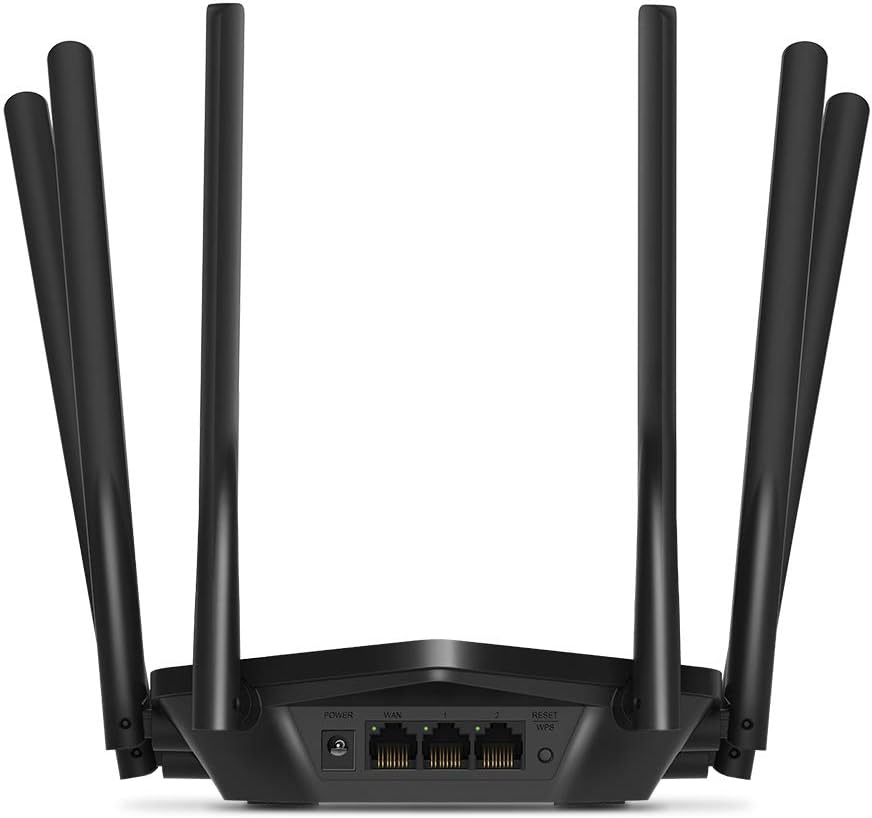
Imagem: Traseira view of the Mercusys MR50G router, illustrating the power input, WAN port (blue), and three LAN ports (yellow) for wired connections, along with the Reset/WPS button.
3. Configuração inicial
Para configurar seu roteador pela primeira vez:
- Conectar ao Wi-Fi: Connect your computer or mobile device to the router's default Wi-Fi network (SSID and password are typically printed on a label on the bottom of the router).
- Acesso Web Interface: Abra um web navegador e tipo
mwlogin.netor192.168.1.1na barra de endereço. - Create Login Password: Follow the on-screen instructions to create a login password for the router's management page.
- Follow Quick Setup: The Quick Setup wizard will guide you through basic internet and wireless settings.
Instruções de operação
1. Configurações básicas de Wi-Fi
Após efetuar login no web interface:
- Nome da rede (SSID): Navigate to the Wireless settings to change your Wi-Fi network names (SSIDs) for both 2.4 GHz and 5 GHz bands.
- Senha: Set a strong, unique password for your Wi-Fi networks. The MR50G supports WPA3 for enhanced security.
- Tipo de segurança: It is recommended to use WPA2-PSK/WPA3-Personal for optimal security.
2. Dual-Band Operation
The MR50G operates on two frequency bands:
- 2.4 GHz: Provides wider coverage and better penetration through walls, suitable for general internet use and older devices.
- 5 GHz: Offers faster speeds and less interference, ideal for bandwidth-intensive activities like 4K streaming and online gaming, but with a shorter range.
You can configure separate SSIDs for each band or use Smart Connect to combine them into a single SSID, allowing the router to automatically assign devices to the optimal band.
3. Modo Ponto de Acesso
To use the MR50G as an Access Point (AP) to extend an existing wired network:
- Conectar: Connect an Ethernet cable from your existing router's LAN port to one of the MR50G's LAN ports (not the WAN port).
- Configurar: Log into the MR50G's web interface, navigate to the Operation Mode settings, and select "Access Point Mode". Follow the prompts to complete the setup.
4. Recursos avançados
- MU-MIMO: A tecnologia Multi-User, Multiple-Input, Multiple-Output (MUMO) permite que o roteador se comunique com vários dispositivos simultaneamente, melhorando a eficiência da rede.
- Formação de feixes: Direciona os sinais Wi-Fi para os dispositivos conectados, aumentando a intensidade e o alcance do sinal.
- Suporte VPN: The router supports VPN functionality, allowing for secure remote access or connection to VPN services. Refer to the router's web interface for specific VPN client/server configurations.
- Controles parentais: Gerencie e restrinja o acesso à internet para dispositivos ou usuários específicos.
- Rede de convidados: Crie uma rede Wi-Fi separada para os convidados, mantendo a segurança da sua rede principal.
Manutenção
1. Atualizações de firmware
Regularly check for and install firmware updates to ensure optimal performance, security, and access to new features. Firmware updates can typically be found in the router's web interface under System Tools or Advanced settings.
2. Reiniciando o roteador
If you encounter persistent issues or forget your login password, you may need to reset the router to its factory default settings:
- With the router powered on, press and hold the Reset/WPS button on the back panel for approximately 5-10 seconds until the LED indicators flash.
- Release the button and wait for the router to restart. All settings will be restored to factory defaults.
3. Posicionamento ideal
For the best Wi-Fi coverage and performance:
- Coloque o roteador em um local central em sua casa ou escritório.
- Avoid placing it near obstructions like thick walls, metal objects, or large appliances (microwaves, refrigerators) that can interfere with Wi-Fi signals.
- Elevate the router if possible, as Wi-Fi signals tend to spread downwards.

Image: Mercusys MR50G router positioned on a table, demonstrating a typical placement for optimal signal distribution within a living space.
Solução de problemas
1. Sem acesso à Internet
- Verifique as conexões: Certifique-se de que todos os cabos Ethernet estejam conectados firmemente às portas corretas (WAN ao modem, LAN aos dispositivos).
- Reiniciar dispositivos: Power cycle your modem, then the router, and then your connected devices.
- Verifique o LED WAN: Verify that the WAN LED on the router is lit, indicating a connection to the modem.
- Status do provedor de internet: Contate seu provedor de serviços de internet (ISP) para confirmar se não há interrupções de serviço.tagestá na sua área.
2. Velocidades lentas de Wi-Fi
- Posicionamento do roteador: Ensure the router is placed optimally (refer to "Optimal Placement" section).
- Interferência: Move the router away from other electronic devices that may cause interference.
- Seleção de banda: For speed-critical applications, ensure your device is connected to the 5 GHz band.
- Otimização de canais: No roteador web interface, try changing the Wi-Fi channel for both 2.4 GHz and 5 GHz bands to a less congested one.
- Firmware: Certifique-se de que o firmware do seu roteador esteja atualizado.
3. Não é possível acessar a página de gerenciamento do roteador
- Endereço IP: Ensure you are using the correct address (
mwlogin.netor192.168.1.1). - Conexão com fio: Try accessing the page from a computer connected directly to the router via an Ethernet cable.
- Limpar o cache do navegador: Limpe seu web Limpe o cache e os cookies do seu navegador ou tente usar um navegador diferente.
- Firewall/Antivírus: Desative temporariamente qualquer firewall ou software antivírus em seu computador que possa estar bloqueando o acesso.
- Reiniciar o roteador: If all else fails, perform a factory reset (refer to "Resetting the Router" section).
Especificações
| Modelo | MR50G (EU) |
| Padrões sem fio | IEEE 802.11a / b / g / n / ac |
| Freqüência | 2.4 GHz e 5 GHz (Banda Dupla) |
| Taxa de dados | AC1900 (600 Mbps em 2.4 GHz, 1300 Mbps em 5 GHz) |
| Portas Ethernet | 1 porta WAN Gigabit, 3 portas LAN Gigabit |
| Antenas | 6x Fixed Omni-Directional Antennas |
| Segurança | WPA-PSK / WPA2-PSK / WPA3-Personal |
| Dimensões (L x P x A) | 15.72 x 17.56 x 4.5 cm |
| Peso | 450 g |
| Características especiais | MU-MIMO, Beamforming, Access Point Mode, VPN Support, Parental Controls, Guest Network |
| Entrada de energia | 100-240 V ~ 50/60 Hz |
Garantia e Suporte
Mercusys products come with a limited warranty. For detailed warranty information, please refer to the warranty card included with your product or visit the official Mercusys website.
For technical support, firmware updates, and additional resources, please visit the Mercusys support website. Normalmente, você encontra informações de contato e perguntas frequentes lá.
Official Mercusys Website: www.mercusys.com