1. Introdução
This manual provides instructions for the ZdalaMit Replacement Remote Control, model 101018E0055. This remote is designed to be compatible with various JVC Roku Smart TV models, offering a direct replacement without the need for complex programming. Its ergonomic design ensures comfortable handling.
Compatible JVC Roku TV Models include:
- LT-49MAW598
- LT-55MAW595
- LT-32MAW388
- LT-65MAW595
- LT-32MAW205
- LT-43MAW595
- LT-70MAW795
- LT-50MAW595
2. Configuração
The ZdalaMit Replacement Remote Control requires no programming or pairing. Simply install the batteries, and it will be ready for immediate use with your compatible JVC Roku Smart TV.
2.1 Instalação da bateria
- Localize a tampa do compartimento da bateria na parte traseira do controle remoto.
- Deslize a tampa para baixo ou pressione a trava e levante para abrir o compartimento.
- Insert two (2) new 1.5V AAA alkaline batteries, ensuring the positive (+) and negative (-) terminals match the diagrams inside the compartment.
- Recoloque a tampa do compartimento da bateria deslizando-a de volta para o lugar até ouvir um clique.

Imagem: Angulada view of the ZdalaMit Replacement Remote Control, highlighting its buttons and ergonomic shape. The battery compartment is located on the back.
Observação: Batteries are not included with the remote control. Always use new alkaline batteries for optimal performance.
3. Operação
This section describes the functions of the buttons on your ZdalaMit Replacement Remote Control.
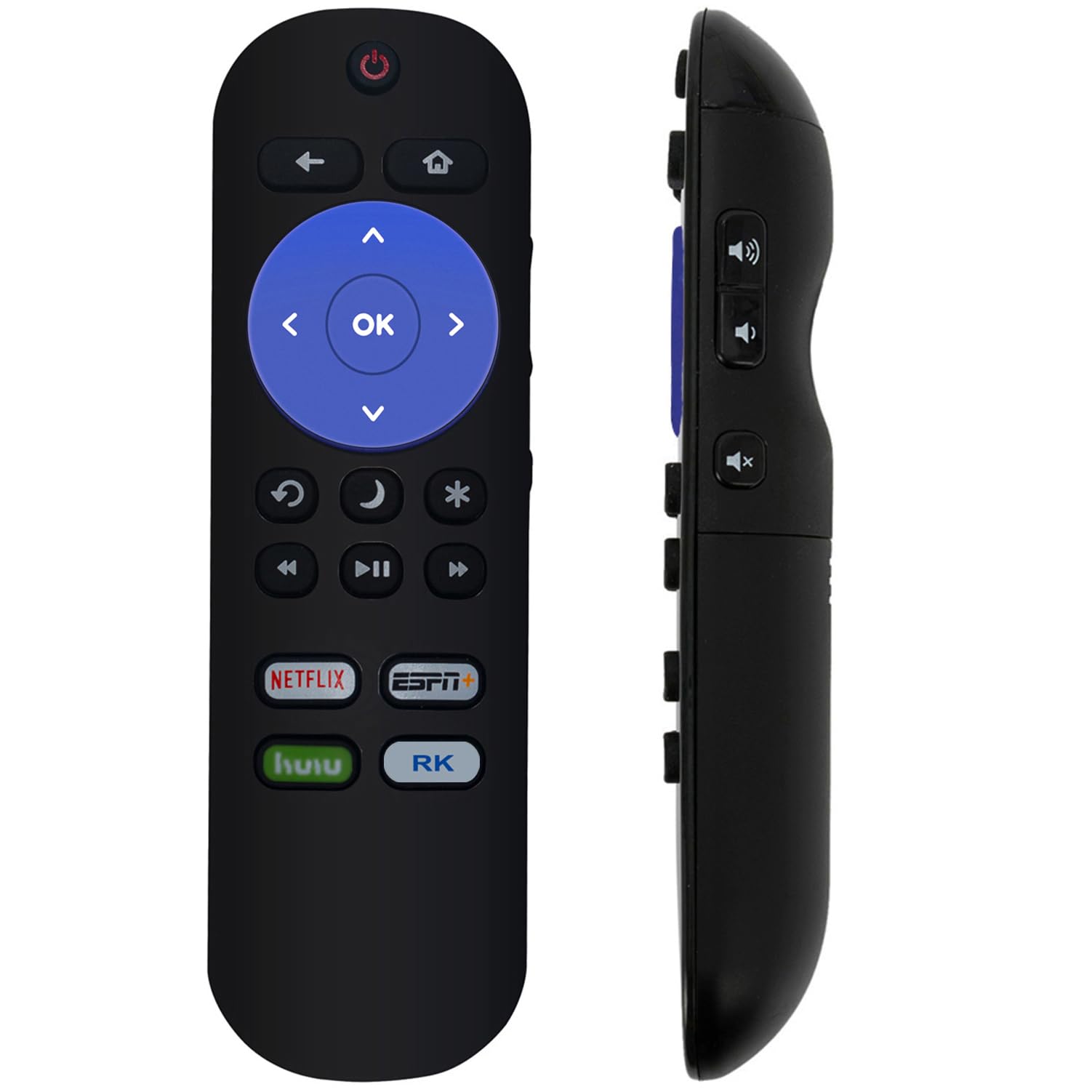
Imagem: Frente view of the ZdalaMit Replacement Remote Control, displaying all functional buttons.
| Botão | Função |
|---|---|
| Poder (⏻) | Liga ou desliga a TV. |
| De volta (↶) | Volta para a tela ou menu anterior. |
| Lar (⌂) | Navigates to the Roku Home screen. |
| Teclado direcional (para cima, para baixo, para a esquerda, para a direita) | Navigates through menus and content. |
| OK | Confirma seleções. |
| Rebobinar (⏮) | Rewinds video playback. |
| A pausa (⏯) | Plays or pauses video playback. |
| Avanço rápido (⏭) | Fast forwards video playback. |
| Replay (↻) | Replays the last few seconds of content. |
| Dormir (🌙) | Activates the TV's sleep timer function. |
| Star (✱) | Accesses options or settings within certain apps. |
| Netflix | Acesso direto ao aplicativo Netflix. |
| ESPN+ | Direct access to the ESPN+ application. |
| Hulu | Direct access to the Hulu application. |
| RK (Roku Channel) | Direct access to The Roku Channel application. |
4. Manutenção
4.1 Substituição da bateria
Replace batteries when the remote's response becomes sluggish or stops working. Refer to section 2.1 for battery installation instructions. Always replace both batteries simultaneously with new 1.5V AAA alkaline batteries.
4.2 Limpeza
Para limpar o controle remoto, limpe suavemente a superfície com um pano macio e seco. Para sujeira mais persistente, esfregue levemente com um pano úmido.ampMolhe o pano com água. Evite usar produtos químicos agressivos, produtos de limpeza abrasivos ou umidade excessiva, pois podem danificar o controle remoto.
4.3 Armazenamento
Guarde o controle remoto em local fresco e seco, longe da luz solar direta e de temperaturas extremas. Caso o controle remoto não seja utilizado por um longo período, recomenda-se remover as pilhas para evitar vazamentos e possíveis danos.
5. Solução De Problemas
| Problema | Possível causa | Solução |
|---|---|---|
| O controle remoto não está respondendo. | Baterias descarregadas ou instaladas incorretamente. | Replace batteries with new 1.5V AAA alkaline batteries, ensuring correct polarity. |
| Remote has limited range or intermittent response. | Weak batteries; Obstruction between remote and TV; Remote sensor on TV is blocked. | Replace batteries. Ensure a clear line of sight between the remote and the TV. Remove any objects blocking the TV's remote sensor. |
| Alguns botões específicos não estão funcionando. | Dirt or debris under the button; Remote malfunction. | Clean the remote as described in section 4.2. If the issue persists, the remote may need replacement. |
| Remote does not control the TV. | Incompatible TV model; Remote malfunction. | Verify your JVC Roku TV model is listed in the compatible models section (Section 1). If compatible and troubleshooting steps above fail, contact support. |
6. Especificações
| Número do modelo | 101018E0055 |
| Marca | ZdalaMitGenericName |
| Dispositivos compatíveis | JVC Roku Smart Televisions (Specific models listed in Section 1) |
| Fonte de energia | 2 x 1.5V AAA Alkaline Batteries |
| Dimensões do produto | 5 x 1.2 x 0.5 polegadas (aproximadamente) |
| Peso do item | 1.41 onças (aproximadamente) |
| Cor | Preto |
| Recurso especial | Design ergonômico |
7. Suporte
If you encounter any issues not covered in this manual or require further assistance, please contact the seller or manufacturer for support. Refer to your purchase documentation for specific contact details.


