1. Produto acabadoview
This YUSTDA USB Charger Cable is designed to provide reliable power to your iRulu AL101 10-inch Android Tablet. It features a high-quality construction for efficient and safe charging.
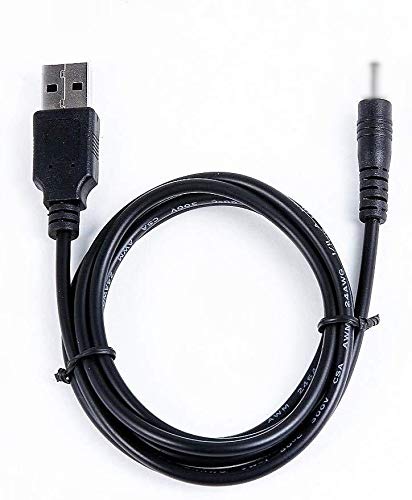
Image 1.1: The YUSTDA USB Charger Cable, featuring a DC power cord on one end and a USB A connector on the other, designed for charging compatible tablets.
Principais características:
- High-quality USB 2.0 charger cable.
- Connectors: DC power cord on one end, USB A on the other.
- Designed for use with a USB AC/Car charger (not included).
- Incorporates multiple safety features for protection during charging.
2. Instruções de configuração
Follow these steps to properly set up your YUSTDA USB Charger Cable for use:
- Identifique os conectores: Locate the DC power cord end and the USB A connector end of the cable.
- Conecte à fonte de alimentação: Insert the USB A connector end of the cable into a compatible USB AC wall adapter or a USB car charger (sold separately). Ensure the power source is functioning correctly.
- Conectar ao tablet: Carefully insert the DC power cord end into the charging port of your iRulu AL101 10-inch Android Tablet. Ensure a secure connection.
- Verifique a conexão: Once connected, your tablet should indicate that it is charging. If not, check all connections and the power source.
3. Instruções de operação
Once the cable is set up, operating it is straightforward:
- Carregamento: With the cable connected to both a power source and your tablet, the tablet will begin to charge automatically. The charging indicator on your tablet will confirm this.
- Tempo de carregamento: Charging time may vary depending on the tablet's battery level, the power output of your USB adapter, and whether the tablet is in use during charging.
- Desconexão: To disconnect, first unplug the DC power cord from your tablet, then unplug the USB A connector from the power source.

Image 3.1: Illustration of the cable's internal structure, highlighting the high-quality copper wire and durable PVC insulation jacket for efficient power delivery.
4. Safety Features and Precautions
The YUSTDA USB Charger Cable is designed with multiple safety protections to ensure safe operation:
- Proteção contra sobrecorrente: Impede danos causados por fluxo de corrente excessivo.
- Total Power Protection: Proteção contra picos de energia.
- Mais de Voltage Proteção: Protege contra voltage flutuações.
- Proteção contra curto-circuito: Desliga automaticamente a energia em caso de curto-circuito.

Image 4.1: Visual representation of the integrated safety features, including protection against over-temperature, over-voltage, sobrecorrente e curto-circuitos.
Precauções gerais:
- Do not expose the cable to water or extreme temperatures.
- Evite dobrar ou torcer excessivamente o cabo.
- Do not attempt to modify or repair the cable.
- Utilize apenas com dispositivos e adaptadores de energia compatíveis.
5. Manutenção
Proper maintenance ensures the longevity and performance of your charger cable:
- Limpeza: Wipe the cable gently with a dry, soft cloth to remove dust or dirt. Do not use liquid cleaners.
- Armazenar: When not in use, store the cable in a cool, dry place, away from direct sunlight and extreme temperatures. Avoid tightly coiling the cable to prevent internal damage.
- Inspeção: Inspecione periodicamente o cabo para verificar se há sinais de desgaste, fios soltos ou danos nos conectores. Interrompa o uso caso observe qualquer dano.

Image 5.1: The durable and compact design of YUSTDA products ensures long-lasting performance and ease of storage, reflecting the quality of the charger cable.
6. Solução De Problemas
If you encounter issues with your charger cable, refer to the following common problems and solutions:
| Problema | Possível causa | Solução |
|---|---|---|
| Tablet não carrega | Conexão solta, fonte de alimentação defeituosa, cabo danificado. | Ensure all connections are secure. Try a different USB AC adapter or power outlet. Inspect the cable for visible damage. |
| Carregamento lento | Low power output from adapter, tablet in heavy use, background apps running. | Use a higher-output USB AC adapter. Close unnecessary apps on the tablet. Charge the tablet when it is not in active use. |
| O cabo está quente. | Funcionamento normal, carga excessiva, ventilação inadequada. | A slight warmth is normal. If it feels excessively hot, disconnect immediately and contact support. Ensure adequate ventilation around the tablet and adapter. |
Se o problema persistir após tentar essas soluções, entre em contato com o suporte ao cliente.
7. Especificações
- Tipo de produto: USB 2.0 Charger Cable
- Conectores: DC Power Cord (for tablet), USB A (for power adapter)
- Compatibilidade: iRulu AL101 10-inch Android Tablet
- Fabricante: YUSTDA
- ASIN: B08G9PCR31
- Primeira data disponível: 19 de agosto de 2020
8. Informações de garantia
YUSTDA products are manufactured with quality and reliability in mind. For specific warranty details regarding your USB Charger Cable, please refer to the documentation provided at the time of purchase or contact YUSTDA customer support. Standard warranty policies typically cover manufacturing defects for a limited period from the date of purchase.
9. Suporte
If you have any questions, require assistance, or experience issues not covered in this manual, please do not hesitate to contact our customer support team.
E-mail: epcustomerservice@yahoo.com
Please provide your product model (YUSTDA USB Charger Cable) and a detailed description of your inquiry when contacting support to ensure a prompt and accurate response.


