1. Introdução
This user manual provides comprehensive instructions for the UNIWA E1801 Senior Mobile Phone. Designed with large buttons and a clear display, this phone is ideal for users seeking simplicity and essential communication features. Please read this manual carefully before using your device to ensure proper operation and longevity.
2. Conteúdo da embalagem
Ao abrir a embalagem, verifique se todos os seguintes itens estão incluídos:
- 1 x UNIWA E1801 Mobile Phone
- 1 x BL-5C 800 mAh Battery
- 1 x Carregador
- 1 x Manual do Usuário (este documento)
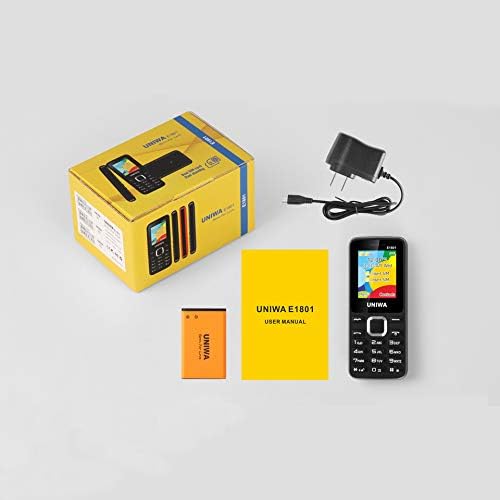
Image: Contents of the UNIWA E1801 package, including the phone, battery, charger, and user manual.
3. Dispositivo acabadoview
The UNIWA E1801 features a user-friendly design with large, easy-to-press buttons and a non-slip frame for comfortable handling. It includes an ergonomic keypad with plating navigation keys for intuitive operation.
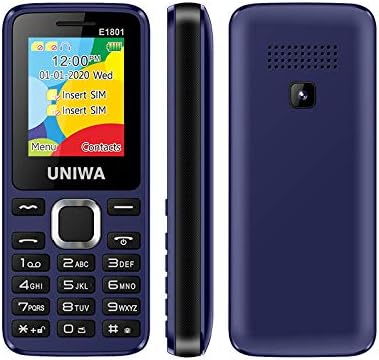
Imagem: Frente, lateral e traseira views of the UNIWA E1801 phone, highlighting its compact design.

Image: Detail showing the non-slip frame of the UNIWA E1801, designed for secure grip.

Image: Close-up of the ergonomic keypad and plating navigation keys on the UNIWA E1801.
4. Configuração
4.1. Instalação da bateria
- Remova a tampa traseira do telefone, abrindo-a cuidadosamente pela abertura.
- Align the gold contacts of the BL-5C 800 mAh battery with the contacts in the battery compartment.
- Pressione a bateria suavemente até ouvir um clique e ela se encaixar no lugar.
- Recoloque a tampa traseira, certificando-se de que esteja bem encaixada.
4.2. Instalação do cartão SIM
The UNIWA E1801 supports Dual SIM cards, allowing for two active phone numbers simultaneously.
- With the back cover removed and battery out (if necessary), locate the SIM card slots.
- Insert your SIM card(s) into the designated slot(s) with the gold contacts facing down and the cut corner aligned correctly.
- Empurre o cartão SIM com cuidado até que esteja totalmente encaixado.
- Reinstale a bateria e a tampa traseira.

Image: The dual SIM card slots of the UNIWA E1801, illustrating how SIM cards are inserted.
4.3. Carregando o dispositivo
Antes da primeira utilização, carregue totalmente a bateria do telefone.
- Connect the charger cable to the charging port on the phone.
- Conecte o carregador a uma tomada de parede padrão.
- O indicador de bateria na tela mostrará o status do carregamento.
- Depois de totalmente carregado, desconecte o carregador.
5. Instruções de operação
5.1. Ligar/desligar
- Para ligar: Mantenha pressionado o botão Liga/Desliga/Encerrar chamada até que a tela acenda.
- Para desligar: Press and hold the Power/End Call button until the power-off options appear, then confirm.
5.2. Fazendo chamadas
- Na tela inicial, digite o número de telefone usando o teclado.
- Press the Call button (usually green) to initiate the call.
- To end a call, press the End Call button (usually red).
5.3. Envio de mensagens
- Acesse o menu 'Mensagens' na tela principal.
- Select 'Write Message' or 'New SMS'.
- Digite sua mensagem usando o teclado.
- Digite o número do destinatário ou selecione-o em seus contatos.
- Envie a mensagem.
5.4. Contatos
A agenda telefônica pode armazenar até 300 contatos.
- Adicionar um contato: Go to 'Contacts' > 'Add New Contact', then enter the name and number.
- Procurando um contato: From the 'Contacts' menu, use the navigation keys to scroll or search by name.
5.5. Rádio FM
The UNIWA E1801 features a wireless FM radio, allowing you to listen to your favorite stations without needing headphones as an antenna.
- Acesse o aplicativo 'Rádio FM' no menu principal.
- Use the navigation keys to scan for available stations or manually tune to a frequency.
- Adjust the volume using the side keys (if available) or navigation keys.

Image: The UNIWA E1801 showcasing its wireless FM radio feature.
5.6. Multimedia (MP3/MP4)
The phone supports MP3 audio and MP4 video playback.
- Ensure you have a TF card (up to 16GB) inserted with your media files.
- Navigate to the 'Multimedia' or 'File Manager' menu.
- Select 'MP3 Player' or 'Video Player' to browse and play your files.

Image: Illustration of the 2030 Box Speaker on the UNIWA E1801, indicating its audio capabilities.
5.7. Câmera
The phone is equipped with a 0.08 MP rear camera.
- No menu principal, selecione 'Câmera'.
- Enquadre sua foto usando a tela como um... viewlocalizador.
- Press the designated button (usually the center navigation key) to take a photo.
5.8. Lanterna
The built-in flashlight can be useful in low-light conditions.
- Refer to your phone's specific shortcut key or menu option to activate/deactivate the flashlight. This is often a long press on a specific number key or a dedicated button.

Image: The UNIWA E1801 demonstrating its integrated flashlight function.
5.9. Outras funções
The UNIWA E1801 includes several utility functions:
- Jogos: Simple pre-installed games.
- Calendário: Para manter o controle de datas e eventos.
- Despertador: Configure vários alarmes.
- Calculadora: Funções aritméticas básicas.
- Relógio mundial: View Horário em diferentes fusos horários.
- E-book: Basic text file leitor.
- WAP: Basic internet browsing (requires GPRS data plan).
- Gravador: Função de gravação de voz.
6. Manutenção
- Limpeza: Use um pano macio e seco para limpar a superfície do telefone. Evite produtos de limpeza líquidos ou materiais abrasivos.
- Cuidados com a bateria: Para prolongar a vida útil da bateria, evite temperaturas extremas. Não deixe o telefone carregando por períodos excessivamente longos após a bateria estar totalmente carregada.
- Armazenar: If storing the phone for an extended period, ensure the battery is partially charged (around 50%) and store it in a cool, dry place.
7. Solução De Problemas
| Problema | Possível causa/solução |
|---|---|
| O telefone não liga. | Battery is depleted. Charge the phone for at least 30 minutes. Ensure battery is correctly installed. |
| Não consigo fazer nem receber chamadas. | No network signal. Move to an area with better reception. SIM card not properly inserted. Reinsert SIM card. |
| A bateria descarrega rapidamente. | Background applications running. Close unused applications. Battery may be old and require replacement. |
| Não consigo ouvir quem está ligando / Quem está ligando não consegue me ouvir. | Volume too low. Adjust call volume. Microphone/speaker blocked. Ensure no obstructions. |
Se o problema persistir após tentar essas soluções, entre em contato com o suporte ao cliente.
8. Especificações
| Recurso | Detalhe |
|---|---|
| Número do modelo | ECON E1801 |
| Dimensões | 108 x 45 x 14 mm |
| Peso | 68 g |
| CPU | SC6531E |
| Banda de rede | 2G: GSM850/900/1800/1900 MHz, GPRS |
| Cartão SIM | Dual-SIM, Dual-Standby |
| Capacidade da agenda telefônica | 300 números |
| toque | 64 chords, supports MP3, Midi ringtones |
| Palestrante | 2030 Orador |
| Rádio FM | Rádio FM sem fio |
| Tela | 1.77 inch QQVGA Display, 160 x 128 pixels |
| Câmera | 0.08 MP Rear Camera, 640 x 480 pixels |
| Multimídia | MP3, MP4 |
| Memória | Supports TF cards up to 16 GB max |
| Bluetooth | V2.1 |
| Vibrador | Sim |
| Tempo de conversação | Até 240 minutos |
| Tempo de espera | Até 200 horas |
| Idiomas | English, Russian, Hebrew, Arabic, French, Spanish, Polish, German, Italian, Portuguese, Chinese |
9. Garantia e Suporte
For warranty information and technical support, please refer to the warranty card included with your product or contact the retailer where you purchased the UNIWA E1801. You may also visit the official UNIWA webPara obter mais assistência e informações de suporte atualizadas, visite o site.


