Introdução
The Amazon Echo Show 5 (2nd Gen, 2021 release) is a smart display designed to simplify your daily routines and enhance your connected home experience. This certified refurbished device has been tested and certified to function like new, offering all the features of a new unit.
With Alexa built-in, you can manage your day, stay entertained, and connect with others using just your voice. The compact 5.5-inch screen provides visual feedback for alarms, timers, news, video calls, and more.

Image: The Echo Show 5 on a nightstand, illustrating its use as a smart display for time and daily information.
Configurar
Setting up your Echo Show 5 is a straightforward process. The device is designed for simple setup, allowing you to connect to your Wi-Fi network with ease.
O que está na caixa:
- Dispositivo Echo Show 5
- Glacier White power adapter (15W) with cable (4.9 ft.)
- Guia de início rápido
Etapas de configuração inicial:
- Conecte: Connect the power adapter to your Echo Show 5 and plug it into a wall outlet.
- Siga as instruções na tela: The device will power on and guide you through the initial setup process on its touch screen.
- Conectar ao Wi-Fi: Select your Wi-Fi network from the list and enter the password. The Echo Show 5 supports dual-band 802.11a/b/g/n/ac Wi-Fi networks.
- Sign In to Amazon Account: Log in with your Amazon account credentials.
- Personalizar configurações: Customize settings such as time zone, device name, and privacy preferences.
- Baixe o aplicativo Alexa: For full functionality and advanced controls, download the Alexa app on your Fire OS, Android, or iOS device. The app is also accessible via a web navegador.
Amazon's Wi-Fi simple setup technology helps streamline the connection process, making it easier to get your device up and running quickly.
Operando seu Echo Show 5
The Echo Show 5 offers a wide range of functionalities, primarily controlled by voice commands to Alexa and through its interactive touch screen.
Assistência diária:
- Alarmes e temporizadores: Set alarms and timers with voice commands.
- Calendar & News: Check your calendar, get news updates, and view previsões do tempo.
- Rotinas: Create routines to automate actions, such as gradually turning on compatible lights in the morning.
Controle residencial inteligente:
Manage compatible smart home devices using the interactive display, your voice, or motion detection.
- Câmera embutida: Use the 2 MP camera to look in on your home when you're away.
- Controle do dispositivo: Control lights, cameras, and other smart devices.

Image: A man carrying a laundry basket, with an Echo Show 5 in the foreground, demonstrating how the device can be used to control smart home devices, possibly through motion detection.
Comunicação:
- Chamada de vídeo: Make video calls to friends and family who have the Alexa app or an Echo device with a screen using the 2 MP camera.
- Anúncios: Send announcements to other compatible devices in your home.

Image: The Echo Show 5 displaying an active video call, highlighting its communication capabilities.
Entretenimento:
- Transmissão: Play TV shows and movies from services like Prime Video and Netflix on the 5.5-inch screen.
- Música e áudio: Stream music from Amazon Music, Apple Music, Spotify, and others.
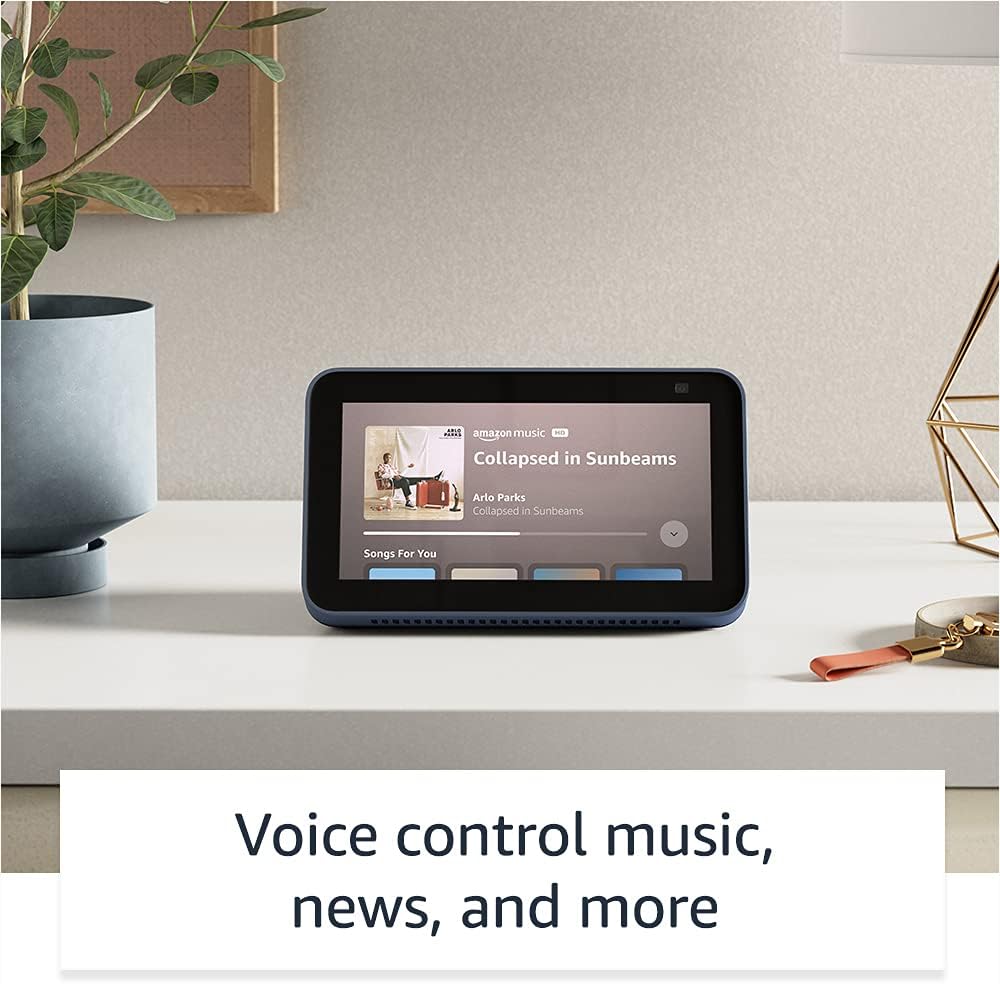
Image: The Echo Show 5 displaying a music playback screen, demonstrating its entertainment features.
Personalização:
- Porta-retratos digital: Use Amazon Photos to turn your home screen into a digital photo frame.

Image: The Echo Show 5 displaying a personal photo, illustrating its use as a digital photo frame.
Recursos de privacidade:
O Echo Show 5 foi projetado com múltiplas camadas de controle de privacidade:
- Mic/Camera Off Button: A physical button to electronically disconnect the microphones and camera.
- Obturador de câmera integrado: A physical shutter to cover the camera lens.
- Voice Recording Controls: Capacidade de view e apague suas gravações de voz.
- Tecnologia de palavra de ativação: The device only begins listening after detecting your chosen wake word.
- Indicadores de streaming: Visual indicators show when audio or video is being streamed to the cloud.

Imagem: Um close-up view of the Echo Show 5's top, highlighting the physical camera shutter button for privacy control.
Recursos de acessibilidade:
O Echo Show 5 inclui diversos recursos de acessibilidade para personalizar a Alexa de acordo com suas habilidades. Esses recursos podem ser acessados através de Configurações → Acessibilidade no seu dispositivo.
- Toque para Alexa: Interact with Alexa via touch through on-screen tiles or a keyboard.
- Escuta adaptativa: Dá mais tempo para terminar de falar antes que a Alexa responda.
- Tarifa preferencial para palestras: Controle a velocidade da fala da Alexa.
- Legendas: Alexa Captioning, Call Captioning e Closed Captioning fornecem texto para conteúdo compatível.
- Mostrar e contar: Ajuda a identificar produtos para usuários cegos ou com deficiência visual.
- VozView Leitor de tela: Permite o acesso a usuários cegos ou com deficiência visual.
- Ampliador de tela: Aproximar/afastar o zoom e percorrer a tela.
- Avisar quando estiver por perto: Plays notification sounds when detected near the device.
- Leitura em voz alta no Kindle: Alexa pode ler seus livros do Kindle em voz alta.
- Texto em tempo real: Digite texto ao vivo durante uma chamada de vídeo.
- Configurações adicionais para inversão de cores, correção de cores, solicitação de som e muito mais.
Manutenção
The Certified Refurbished Echo Show 5 has undergone rigorous testing and certification to ensure it looks and works like new. Regular maintenance is minimal.
- Limpeza: Limpe delicadamente a tela e a parte externa do dispositivo com um pano macio e sem fiapos. Evite produtos de limpeza ou sprays abrasivos.
- Atualizações de software: Ensure your device is connected to Wi-Fi to receive automatic software security updates, which are guaranteed for at least four years after the device is last available for purchase as a new unit.
Solução de problemas
If you encounter issues with your Echo Show 5, consider the following general troubleshooting steps:
- Ciclo de energia: Unplug the device from the power outlet, wait for 30 seconds, and then plug it back in.
- Verifique a conexão Wi-Fi: Ensure your Wi-Fi network is active and the device is connected. You can check network status in the device settings.
- Verify Internet Connectivity: Confirm your internet service is working by testing other devices on the same network.
- Check Microphone/Camera: Ensure the mic/camera off button is not activated and the camera shutter is open if you are trying to use these features.
- Aplicativo Alexa: Use the Alexa app on your smartphone or tablet to manage device settings, check for updates, and access further support resources.
- Comandos de voz: Speak clearly and ensure you are within range of the device's microphones.
For more detailed troubleshooting or specific issues, refer to the help section within the Alexa app or visit the official Amazon support website.
Especificações
| Recurso | Detalhe |
|---|---|
| Tamanho | 5.8” x 3.4” x 2.9” (148 mm x 86 mm x 73 mm) |
| Peso | 14.5 oz (410 gramas) |
| Mostrar | Tela de toque de 5.5 " |
| Câmera | Câmera de 2 MP com obturador integrado |
| Conectividade WiFi | Dual-band wifi (802.11a/b/g/n/ac). Does not support ad-hoc networks. |
| Conectividade Bluetooth | A2DP support for audio streaming; AVRCP for voice control of connected mobile devices. PIN-code speakers not supported. |
| Áudio | Alto-falante embutido de 1.65” de alcance total |
| Processador | MediaTek MT 8163 |
| Geração | Echo Show 5 (2nd Gen) - 2021 release |
| Linguagem | Alexa fala inglês e espanhol. |
Garantia e Suporte
Your Certified Refurbished Echo Show 5 comes with the same limited warranty as a new device. For specific details regarding your warranty, please refer to the documentation included with your device or visit the official Amazon website for Certified Refurbished Amazon devices.
For customer support, troubleshooting, and to manage your device settings, utilize the Alexa app on your compatible smartphone or tablet. You can also find extensive support resources and FAQs on the Amazon support website.
Atualizações de segurança de software: This device receives guaranteed software security updates until at least four years after the device is last available for purchase as a new unit on Amazon's websites.
Documentos relacionados - Echo Show 5 (2ª geração, versão 2021)
 |
Guia de Início Rápido do Amazon Echo Show 8 (2ª geração) Um guia para começar a usar o seu Amazon Echo Show 8 (2ª geração), abordando configuração, recursos e privacidade. |
 |
Guia do usuário do Amazon Echo Show 8 (2ª geração) Um guia completo do usuário para o Amazon Echo Show 8 (2ª geração), detalhando a configuração, os recursos de privacidade, os comandos de voz e dicas para usar a Alexa. |
 |
Diretrizes de uso da marca Amazon Echo e Alexa para parceiros externos Diretrizes oficiais para parceiros externos sobre o uso adequado dos ativos da marca Amazon Echo e Alexa, incluindo logotipos, tipografia, cores e representação em materiais de marketing. Garanta a consistência e a integridade da marca. |
 |
Guia de Início Rápido do Amazon Echo Show 8 (2ª geração): Configuração e Recursos Aprenda a configurar e usar seu Amazon Echo Show 8 (2ª geração). Este guia aborda os recursos do dispositivo, os controles de privacidade e os comandos essenciais da Alexa para tarefas diárias. |
 |
Guia de Início Rápido do Amazon Echo Show 5 (2ª geração) Um guia rápido para o Amazon Echo Show 5 (2ª geração), abordando configuração, recursos de privacidade e uso básico com a Alexa. |
 |
Guia de Início Rápido do Amazon Echo Show 5 (2ª geração) Comece a usar seu Amazon Echo Show 5 (2ª geração). Este guia aborda a configuração, os recursos do dispositivo, os controles de privacidade e como usar a Alexa para entretenimento, casa inteligente e comunicação. |