1. Introdução
Obrigado pela compra.asing the Fenton LIVE102 Karaoke Speaker System. This professional-grade speaker system features an integrated media player, Bluetooth connectivity, and vibrant LED lighting, making it ideal for home entertainment and small events. This manual provides essential information for safe and effective use, including setup, operation, and maintenance.

Figure 1: Fenton LIVE102 Speaker System with included KMD55 LED Microphones.
The Fenton LIVE102 is a versatile karaoke speaker system designed for ease of use and powerful audio output. It includes a 10-inch woofer and a 3.5-inch tweeter for clear sound reproduction across all frequencies. The system comes with two KMD55 LED microphones, featuring color-changing lights for an enhanced party atmosphere.
2. Instruções de segurança
Leia atentamente estas instruções de segurança antes de usar o dispositivo e guarde-as para futuras consultas.
- Fonte de energia: Connect the unit only to a grounded mains outlet with the correct voltage (220-240V AC, 50Hz).
- Água e Umidade: Não exponha o aparelho à chuva ou umidade. Não coloque objetos contendo líquidos, como vasos, sobre o aparelho.
- Ventilação: Ensure adequate ventilation. Do not cover ventilation openings.
- Aquecer: Não coloque a unidade perto de fontes de calor, como radiadores, aquecedores, fogões ou outros aparelhos (incluindo amplificadores) que produzem calor.
- Limpeza: Limpe a unidade apenas com um pano seco.
- Manutenção: Não tente consertar a unidade por conta própria. Encaminhe todos os serviços de manutenção para pessoal qualificado.
- Microfones: Manuseie os microfones com cuidado. Evite deixá-los cair ou submetê-los a força excessiva.
- Crianças: Mantenha o dispositivo fora do alcance de crianças.
3. Configuração
3.1 Desembalagem
Carefully remove the speaker system and all accessories from the packaging. Ensure all components are present:
- Fenton LIVE102 Speaker Unit
- 2 x KMD55 LED Microphones
- Cabo de energia
- Manual do usuário (este documento)
3.2 Conexão de energia
Connect the supplied power cable to the AC IN socket on the rear panel of the speaker and then plug it into a suitable mains power outlet.
3.3 Conectando microfones
The LIVE102 system includes two wired KMD55 LED microphones. Plug each microphone's cable into the MIC 1 or MIC 2 input jacks located on the top control panel.

Figure 2: KMD55 LED Microphone.
The KMD55 microphones feature integrated color-changing LEDs. These dynamic microphones are designed for clear vocal pickup and are robust for regular use.
3.4 Connecting External Audio Sources (RCA)
To connect external audio devices such as a CD player, DVD player, or television, use an RCA cable (not included). Connect one end of the RCA cable to the LINE IN (RCA) ports on the rear panel of the LIVE102 and the other end to the audio output of your external device.
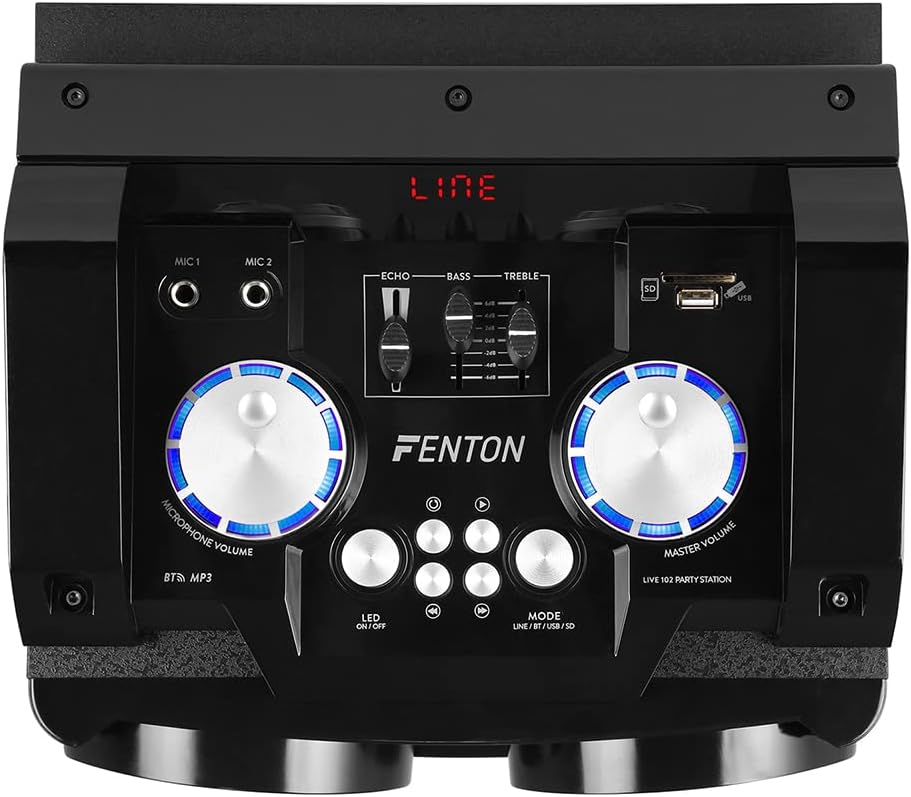
Figure 3: Rear panel connections of the LIVE102 speaker.
The rear panel provides the main power switch, AC power input, RCA line input for external audio sources, and an antenna for FM radio reception (if applicable, though not explicitly mentioned in features, it's visible).
4. Instruções de operação
4.1 Ligar/Desligar
Locate the main power switch on the rear panel of the speaker. Flip the switch to the "ON" position to power on the unit. The display on the top panel will illuminate. To power off, flip the switch to the "OFF" position.
4.2 Top Control Panel Overview

Figure 4: Top control panel of the LIVE102 speaker.
The top panel features controls for microphone volume, master volume, echo, bass, treble, media playback (USB/SD), Bluetooth pairing, and LED light control.
4.3 Emparelhamento Bluetooth
- Power on the LIVE102 speaker.
- Press the "MODE" button on the top panel until "BT" (Bluetooth) is displayed. The unit will enter pairing mode, indicated by a flashing Bluetooth icon or similar on the display.
- No seu smartphone, tablet ou outro dispositivo com Bluetooth, ative o Bluetooth e procure por dispositivos disponíveis.
- Select "Fenton LIVE102" from the list of devices.
- Once paired, the unit will emit a confirmation sound, and the "BT" indicator will stop flashing. You can now stream audio wirelessly from your device.
4.4 Using USB/SD Media Player
- Insert a USB flash drive into the USB port or an SD card into the SD card slot on the top panel.
- Press the "MODE" button until "USB" or "SD" is displayed. The unit will automatically begin playing audio files da mídia inserida.
- Utilize os botões de controle de reprodução (Reproduzir/Pausar, Anterior, Próximo) para gerenciar sua música.

Figure 5: USB port in use on the control panel.
The USB and SD card slots allow for direct playback of digital audio files. Ensure your media is formatted correctly and contains compatible audio files (ex.: MP3).
4.5 Microphone Usage and Effects
- Volume do microfone: Adjust the "MICROPHONE VOLUME" knob on the top panel to control the loudness of the connected microphones.
- Efeito de eco: Use the "ECHO" slider to add a reverberation effect to your vocals. Slide it up to increase the echo intensity.
4.6 Controles de áudio
- Volume principal: The "MASTER VOLUME" knob controls the overall output volume of the speaker system.
- Graves e agudos: Use the "BASS" and "TREBLE" sliders to adjust the low and high frequencies of the audio output, respectively, to suit your preference.
4.7 Controle de luz LED
The LIVE102 speaker features integrated LED lights in the woofer cone. Press the "LED ON/OFF" button on the top panel to toggle the lights on or off.

Figure 6: LIVE102 speaker with illuminated red LED lighting.
The speaker's woofer cone features dynamic LED lighting that changes color, adding a visual element to your audio experience.
5. Manutenção
5.1 Limpeza
- Sempre desconecte a unidade da tomada antes de limpá-la.
- Use a soft, dry cloth to wipe the exterior surfaces of the speaker and microphones.
- Não utilize produtos de limpeza abrasivos, ceras ou solventes, pois podem danificar o acabamento.
- Evite pulverizar líquidos diretamente sobre o aparelho.
5.2 Armazenamento
When not in use for extended periods, store the speaker system in a cool, dry place, away from direct sunlight and extreme temperatures. It is recommended to keep the original packaging for storage and transport.
6. Solução De Problemas
If you encounter any issues with your Fenton LIVE102 system, please consult the table below before contacting support.
| Problema | Possível causa | Solução |
|---|---|---|
| Sem energia | Power cable not connected; Power switch off; No power from outlet. | Ensure power cable is securely connected. Turn the power switch to "ON". Check the power outlet with another device. |
| Nenhuma saída de som | Master volume too low; Incorrect input mode selected; External device not playing or connected incorrectly. | Increase "MASTER VOLUME". Press "MODE" to select the correct input (BT, USB, SD, LINE). Check connections and playback on the external device. |
| Microfone não funciona | Microphone not plugged in; Microphone volume too low; Microphone damaged. | Ensure microphone is fully plugged into MIC 1 or MIC 2. Increase "MICROPHONE VOLUME". Test with another microphone if available. |
| Falha no pareamento Bluetooth | Device too far; Bluetooth not enabled on source device; Incorrect device selected. | Ensure source device is within range. Enable Bluetooth on your device. Select "Fenton LIVE102" from the list. Try restarting both devices. |
| Problemas de reprodução via USB/SD | Incorrect mode; Incompatible file format; Corrupted media. | Ensure "USB" or "SD" mode is selected. Check if files are in a compatible format (e.g., MP3). Try another USB drive or SD card. |
7. Especificações
| Recurso | Detalhe |
|---|---|
| Marca | Fenton |
| Modelo | AO VIVO102 |
| Tecnologia de Conectividade | Bluetooth, RCA |
| Fonte de energia | Electric Cable (AC 220-240V, 50Hz) |
| Configuração do alto-falante | 2-way (10" Woofer, 3.5" Tweeter) |
| Número de canais | 2 |
| Tipo de microfone | Wired Dynamic (KMD55 LED Microphones included) |
| Características adicionais | Integrated LED lighting, USB/SD media player, Microphone Echo effect, Bass/Treble control. |
8. Garantia e Suporte
For detailed warranty information, please refer to the warranty card included with your product or contact your retailer.
If you require technical support or have questions not covered in this manual, please contact Fenton customer service or your local dealer. Please have your product model number (LIVE102) and purchase details ready.


