Produto acimaview
The Weiser Smartcode 10 Commercial Grade Lever is designed for applications requiring code or key access, suitable for various commercial and multi-family housing environments. This electronic deadbolt offers keyless entry, an auto-lock function, and supports up to 30 customizable user access codes. It operates on a 9V battery and includes SmartKey re-key technology for enhanced security and convenience. The matte black finish provides a modern aesthetic.

Figure 1: The Smartcode 10 Commercial Grade Lever is ideal for various commercial and multi-family housing applications, providing secure and convenient access.
Instalação e configuração
The Smartcode 10 is designed for straightforward installation. Ensure you have all included components before beginning: interior and exterior assembly units, spindle, latch, strike, fasteners, Allen wrench, manual, 2 keys, SmartKey tool, and levers. A 9V battery is required for operation.

Figure 2: Front and back components of the Smartcode 10 lever, illustrating the keypad and keyway on the exterior unit and the lever and turn button on the interior unit.

Figure 3: The Smartcode 10 lever installed on a door, demonstrating its appearance and fit.
For detailed step-by-step installation instructions, refer to the comprehensive manual included with your product. Proper installation ensures optimal performance and security.
Operação
Entrada sem chave
The primary method of entry is via the keypad. To unlock the door, simply enter your programmed user code. The lock will provide an audible and visual confirmation upon successful entry. The keypad is backlit for visibility in low-light conditions.
Auto-Lock and Passage Mode
The Smartcode 10 features an auto-lock function, which automatically re-locks the door after a set period (configurable from 1 to 99 seconds) once it has been unlocked. This provides added security without manual intervention. Alternatively, the lock can be set to 'Passage Mode', which keeps the door unlocked, allowing entry without a code or key. This mode is useful for periods of high traffic.
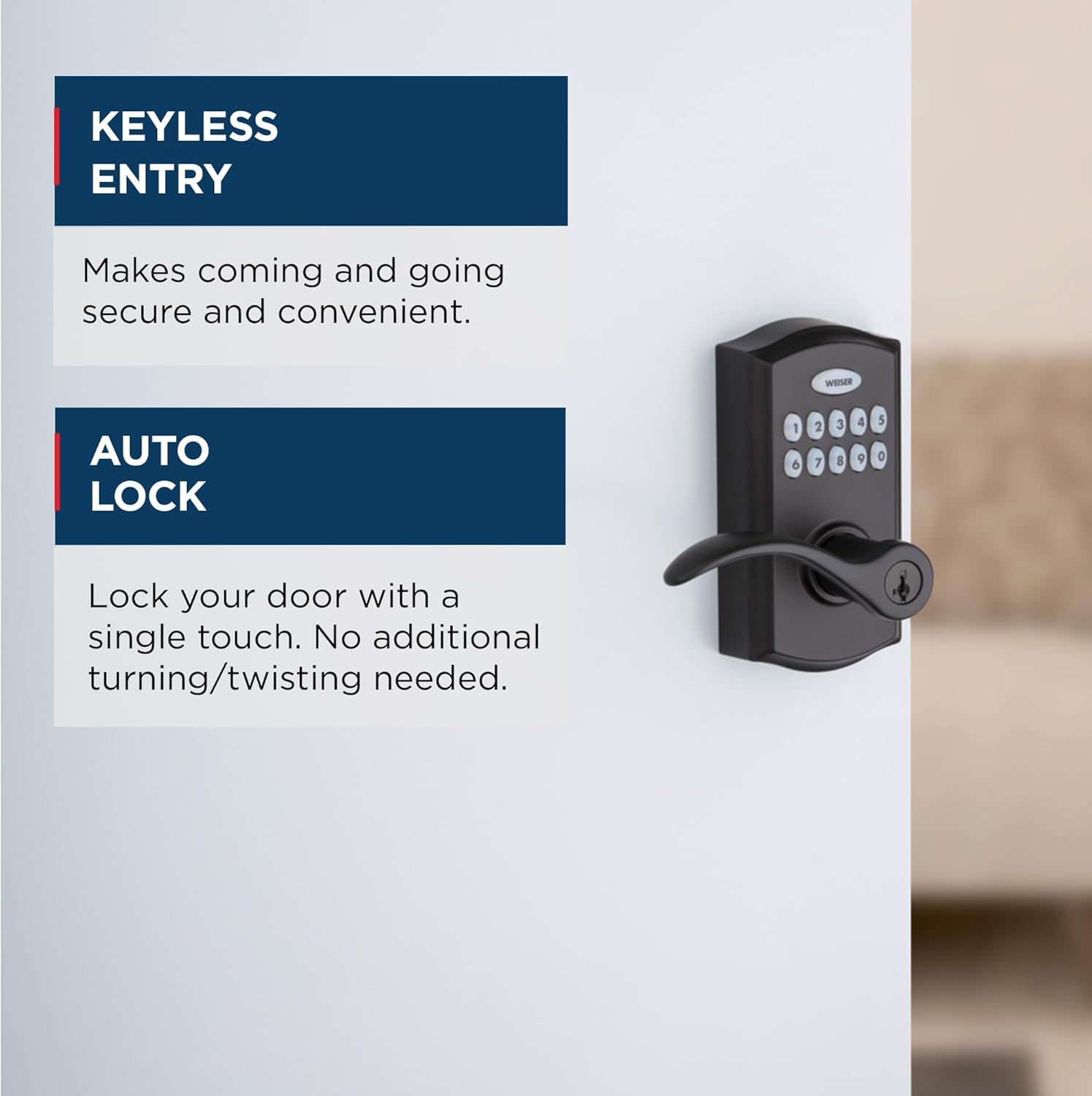
Figure 4: Keyless Entry and Auto Lock features enhance convenience and security.

Figure 5: Understanding the difference between Auto-Lock Mode and Passage Mode for flexible access control.
User Access Codes
The Smartcode 10 supports up to 30 unique user access codes. These codes can be easily programmed, enabled, or disabled as needed, providing flexibility for managing access for employees, maintenance personnel, or other authorized individuals. Individual codes can also be deleted.

Figure 6: The lock supports multiple user access codes for customized sharing.
Manutenção
Substituição da bateria
The Smartcode 10 operates on a 9V battery. When the battery level is low, the lock will provide an indicator (e.g., a series of beeps or a flashing light) to alert you. Replace the battery promptly to ensure continuous operation. Access the battery compartment from the interior side of the lock.
SmartKey Re-key Technology
This lock features Weiser's SmartKey re-key technology, allowing you to re-key the lock yourself in seconds. This is particularly useful if you lose a key or need to change the key for security reasons, making lost or unreturned keys obsolete. Use the included SmartKey tool and follow the instructions in the full manual for the re-keying process.

Figure 7: SmartKey Security provides advanced protection and convenient re-keying.
Solução de problemas
If you encounter issues with your Smartcode 10, consider the following common solutions:
- A fechadura não responde: Check the 9V battery. Replace if necessary.
- Código não funciona: Ensure you are entering the correct code and pressing the lock button after the code. Try re-programming the code.
- Lever feels loose: Refer to the installation manual to ensure all fasteners are properly tightened.
- O travamento automático não está sendo acionado: Verify the auto-lock duration setting in the programming mode.
- Restauração de fábrica: If persistent issues occur, a factory reset can restore the lock to its original settings. Refer to your manual for specific instructions, as this will delete all programmed user codes.
For more detailed troubleshooting steps or complex issues, please consult the full product manual or contact Weiser customer support.
Especificações do produto
| Recurso |
Detalhe |
| Marca |
Salgueiro |
| Nome do modelo |
9GED26000-002 |
| Tipo de bloqueio |
Keypad Electronic Deadbolt with Lever |
| Recurso especial |
Keyless Entry, Auto-Lock, SmartKey Re-key Technology |
| Material |
Metal |
| Tipo de acabamento |
Preto fosco |
| Fonte de energia |
Bateria de 9V (Incluída) |
| Dimensões do produto |
5.3 x 7.7 x 9.1 polegadas |
| Peso do item |
4.66 libras |
| Códigos de Usuário |
Up to 30 customizable codes |
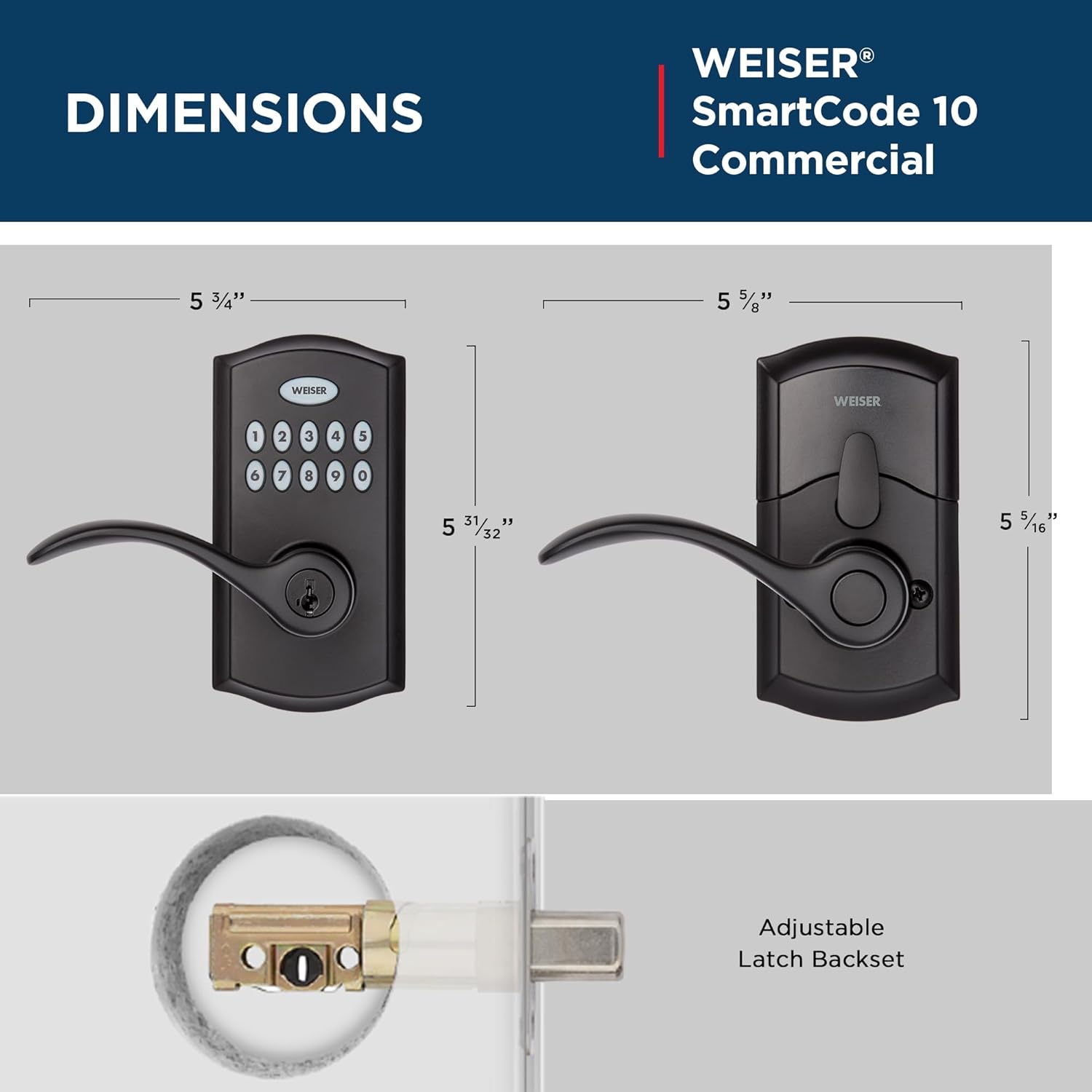
Figure 8: Detailed dimensions of the Smartcode 10 lever for installation planning.
Garantia e Suporte
For information regarding product warranty, technical support, or service, please visit the official Weiser website or contact their customer service department directly. Keep your purchase receipt and model number (9GED26000-002) readily available when seeking support.
Você pode encontrar mais informações e detalhes de contato no site. Weiser Official Website.
Produto acimaview
The Weiser Smartcode 10 Commercial Grade Lever is designed for applications requiring code or key access, suitable for various commercial and multi-family housing environments. This electronic deadbolt offers keyless entry, an auto-lock function, and supports up to 30 customizable user access codes. It operates on a 9V battery and includes SmartKey re-key technology for enhanced security and convenience. The matte black finish provides a modern aesthetic.
Figure 1: The Smartcode 10 Commercial Grade Lever is ideal for various commercial and multi-family housing applications, providing secure and convenient access.
Instalação e configuração
The Smartcode 10 is designed for straightforward installation. Ensure you have all included components before beginning: interior and exterior assembly units, spindle, latch, strike, fasteners, Allen wrench, manual, 2 keys, SmartKey tool, and levers. A 9V battery is required for operation.
Figure 2: Front and back components of the Smartcode 10 lever, illustrating the keypad and keyway on the exterior unit and the lever and turn button on the interior unit.
Figure 3: The Smartcode 10 lever installed on a door, demonstrating its appearance and fit.
For detailed step-by-step installation instructions, refer to the comprehensive manual included with your product. Proper installation ensures optimal performance and security.
Operação
Entrada sem chave
The primary method of entry is via the keypad. To unlock the door, simply enter your programmed user code. The lock will provide an audible and visual confirmation upon successful entry. The keypad is backlit for visibility in low-light conditions.
Auto-Lock and Passage Mode
The Smartcode 10 features an auto-lock function, which automatically re-locks the door after a set period (configurable from 1 to 99 seconds) once it has been unlocked. This provides added security without manual intervention. Alternatively, the lock can be set to 'Passage Mode', which keeps the door unlocked, allowing entry without a code or key. This mode is useful for periods of high traffic.
Figure 4: Keyless Entry and Auto Lock features enhance convenience and security.
Figure 5: Understanding the difference between Auto-Lock Mode and Passage Mode for flexible access control.
User Access Codes
The Smartcode 10 supports up to 30 unique user access codes. These codes can be easily programmed, enabled, or disabled as needed, providing flexibility for managing access for employees, maintenance personnel, or other authorized individuals. Individual codes can also be deleted.
Figure 6: The lock supports multiple user access codes for customized sharing.
Manutenção
Substituição da bateria
The Smartcode 10 operates on a 9V battery. When the battery level is low, the lock will provide an indicator (e.g., a series of beeps or a flashing light) to alert you. Replace the battery promptly to ensure continuous operation. Access the battery compartment from the interior side of the lock.
SmartKey Re-key Technology
This lock features Weiser's SmartKey re-key technology, allowing you to re-key the lock yourself in seconds. This is particularly useful if you lose a key or need to change the key for security reasons, making lost or unreturned keys obsolete. Use the included SmartKey tool and follow the instructions in the full manual for the re-keying process.
Figure 7: SmartKey Security provides advanced protection and convenient re-keying.
Solução de problemas
If you encounter issues with your Smartcode 10, consider the following common solutions:
- A fechadura não responde: Check the 9V battery. Replace if necessary.
- Código não funciona: Ensure you are entering the correct code and pressing the lock button after the code. Try re-programming the code.
- Lever feels loose: Refer to the installation manual to ensure all fasteners are properly tightened.
- O travamento automático não está sendo acionado: Verify the auto-lock duration setting in the programming mode.
- Restauração de fábrica: If persistent issues occur, a factory reset can restore the lock to its original settings. Refer to your manual for specific instructions, as this will delete all programmed user codes.
For more detailed troubleshooting steps or complex issues, please consult the full product manual or contact Weiser customer support.
Especificações do produto
| Recurso |
Detalhe |
| Marca |
Salgueiro |
| Nome do modelo |
9GED26000-002 |
| Tipo de bloqueio |
Keypad Electronic Deadbolt with Lever |
| Recurso especial |
Keyless Entry, Auto-Lock, SmartKey Re-key Technology |
| Material |
Metal |
| Tipo de acabamento |
Preto fosco |
| Fonte de energia |
Bateria de 9V (Incluída) |
| Dimensões do produto |
5.3 x 7.7 x 9.1 polegadas |
| Peso do item |
4.66 libras |
| Códigos de Usuário |
Up to 30 customizable codes |
Figure 8: Detailed dimensions of the Smartcode 10 lever for installation planning.
Garantia e Suporte
For information regarding product warranty, technical support, or service, please visit the official Weiser website or contact their customer service department directly. Keep your purchase receipt and model number (9GED26000-002) readily available when seeking support.
Você pode encontrar mais informações e detalhes de contato no site. Weiser Official Website.
Produto acimaview
The Weiser Smartcode 10 Commercial Grade Lever is designed for applications requiring code or key access, suitable for various commercial and multi-family housing environments. This electronic deadbolt offers keyless entry, an auto-lock function, and supports up to 30 customizable user access codes. It operates on a 9V battery and includes SmartKey re-key technology for enhanced security and convenience. The matte black finish provides a modern aesthetic.
Figure 1: The Smartcode 10 Commercial Grade Lever is ideal for various commercial and multi-family housing applications, providing secure and convenient access.
Instalação e configuração
The Smartcode 10 is designed for straightforward installation. Ensure you have all included components before beginning: interior and exterior assembly units, spindle, latch, strike, fasteners, Allen wrench, manual, 2 keys, SmartKey tool, and levers. A 9V battery is required for operation.
Figure 2: Front and back components of the Smartcode 10 lever, illustrating the keypad and keyway on the exterior unit and the lever and turn button on the interior unit.
Figure 3: The Smartcode 10 lever installed on a door, demonstrating its appearance and fit.
For detailed step-by-step installation instructions, refer to the comprehensive manual included with your product. Proper installation ensures optimal performance and security.
Operação
Entrada sem chave
The primary method of entry is via the keypad. To unlock the door, simply enter your programmed user code. The lock will provide an audible and visual confirmation upon successful entry. The keypad is backlit for visibility in low-light conditions.
Auto-Lock and Passage Mode
The Smartcode 10 features an auto-lock function, which automatically re-locks the door after a set period (configurable from 1 to 99 seconds) once it has been unlocked. This provides added security without manual intervention. Alternatively, the lock can be set to 'Passage Mode', which keeps the door unlocked, allowing entry without a code or key. This mode is useful for periods of high traffic.
Figure 4: Keyless Entry and Auto Lock features enhance convenience and security.
Figure 5: Understanding the difference between Auto-Lock Mode and Passage Mode for flexible access control.
User Access Codes
The Smartcode 10 supports up to 30 unique user access codes. These codes can be easily programmed, enabled, or disabled as needed, providing flexibility for managing access for employees, maintenance personnel, or other authorized individuals. Individual codes can also be deleted.
Figure 6: The lock supports multiple user access codes for customized sharing.
Manutenção
Substituição da bateria
The Smartcode 10 operates on a 9V battery. When the battery level is low, the lock will provide an indicator (e.g., a series of beeps or a flashing light) to alert you. Replace the battery promptly to ensure continuous operation. Access the battery compartment from the interior side of the lock.
SmartKey Re-key Technology
This lock features Weiser's SmartKey re-key technology, allowing you to re-key the lock yourself in seconds. This is particularly useful if you lose a key or need to change the key for security reasons, making lost or unreturned keys obsolete. Use the included SmartKey tool and follow the instructions in the full manual for the re-keying process.
Figure 7: SmartKey Security provides advanced protection and convenient re-keying.
Solução de problemas
If you encounter issues with your Smartcode 10, consider the following common solutions:
- A fechadura não responde: Check the 9V battery. Replace if necessary.
- Código não funciona: Ensure you are entering the correct code and pressing the lock button after the code. Try re-programming the code.
- Lever feels loose: Refer to the installation manual to ensure all fasteners are properly tightened.
- O travamento automático não está sendo acionado: Verify the auto-lock duration setting in the programming mode.
- Restauração de fábrica: If persistent issues occur, a factory reset can restore the lock to its original settings. Refer to your manual for specific instructions, as this will delete all programmed user codes.
For more detailed troubleshooting steps or complex issues, please consult the full product manual or contact Weiser customer support.
Especificações do produto
| Recurso |
Detalhe |
| Marca |
Salgueiro |
| Nome do modelo |
9GED26000-002 |
| Tipo de bloqueio |
Keypad Electronic Deadbolt with Lever |
| Recurso especial |
Keyless Entry, Auto-Lock, SmartKey Re-key Technology |
| Material |
Metal |
| Tipo de acabamento |
Preto fosco |
| Fonte de energia |
Bateria de 9V (Incluída) |
| Dimensões do produto |
5.3 x 7.7 x 9.1 polegadas |
| Peso do item |
4.66 libras |
| Códigos de Usuário |
Up to 30 customizable codes |
Figure 8: Detailed dimensions of the Smartcode 10 lever for installation planning.
Garantia e Suporte
For information regarding product warranty, technical support, or service, please visit the official Weiser website or contact their customer service department directly. Keep your purchase receipt and model number (9GED26000-002) readily available when seeking support.
Você pode encontrar mais informações e detalhes de contato no site. Weiser Official Website.
Produto acimaview
The Weiser Smartcode 10 Commercial Grade Lever is designed for applications requiring code or key access, suitable for various commercial and multi-family housing environments. This electronic deadbolt offers keyless entry, an auto-lock function, and supports up to 30 customizable user access codes. It operates on a 9V battery and includes SmartKey re-key technology for enhanced security and convenience. The matte black finish provides a modern aesthetic.
Figure 1: The Smartcode 10 Commercial Grade Lever is ideal for various commercial and multi-family housing applications, providing secure and convenient access.
Instalação e configuração
The Smartcode 10 is designed for straightforward installation. Ensure you have all included components before beginning: interior and exterior assembly units, spindle, latch, strike, fasteners, Allen wrench, manual, 2 keys, SmartKey tool, and levers. A 9V battery is required for operation.
Figure 2: Front and back components of the Smartcode 10 lever, illustrating the keypad and keyway on the exterior unit and the lever and turn button on the interior unit.
Figure 3: The Smartcode 10 lever installed on a door, demonstrating its appearance and fit.
For detailed step-by-step installation instructions, refer to the comprehensive manual included with your product. Proper installation ensures optimal performance and security.
Operação
Entrada sem chave
The primary method of entry is via the keypad. To unlock the door, simply enter your programmed user code. The lock will provide an audible and visual confirmation upon successful entry. The keypad is backlit for visibility in low-light conditions.
Auto-Lock and Passage Mode
The Smartcode 10 features an auto-lock function, which automatically re-locks the door after a set period (configurable from 1 to 99 seconds) once it has been unlocked. This provides added security without manual intervention. Alternatively, the lock can be set to 'Passage Mode', which keeps the door unlocked, allowing entry without a code or key. This mode is useful for periods of high traffic.
Figure 4: Keyless Entry and Auto Lock features enhance convenience and security.
Figure 5: Understanding the difference between Auto-Lock Mode and Passage Mode for flexible access control.
User Access Codes
The Smartcode 10 supports up to 30 unique user access codes. These codes can be easily programmed, enabled, or disabled as needed, providing flexibility for managing access for employees, maintenance personnel, or other authorized individuals. Individual codes can also be deleted.
Figure 6: The lock supports multiple user access codes for customized sharing.
Manutenção
Substituição da bateria
The Smartcode 10 operates on a 9V battery. When the battery level is low, the lock will provide an indicator (e.g., a series of beeps or a flashing light) to alert you. Replace the battery promptly to ensure continuous operation. Access the battery compartment from the interior side of the lock.
SmartKey Re-key Technology
This lock features Weiser's SmartKey re-key technology, allowing you to re-key the lock yourself in seconds. This is particularly useful if you lose a key or need to change the key for security reasons, making lost or unreturned keys obsolete. Use the included SmartKey tool and follow the instructions in the full manual for the re-keying process.
Figure 7: SmartKey Security provides advanced protection and convenient re-keying.
Solução de problemas
If you encounter issues with your Smartcode 10, consider the following common solutions:
- A fechadura não responde: Check the 9V battery. Replace if necessary.
- Código não funciona: Ensure you are entering the correct code and pressing the lock button after the code. Try re-programming the code.
- Lever feels loose: Refer to the installation manual to ensure all fasteners are properly tightened.
- O travamento automático não está sendo acionado: Verify the auto-lock duration setting in the programming mode.
- Restauração de fábrica: If persistent issues occur, a factory reset can restore the lock to its original settings. Refer to your manual for specific instructions, as this will delete all programmed user codes.
For more detailed troubleshooting steps or complex issues, please consult the full product manual or contact Weiser customer support.
Especificações do produto
| Recurso |
Detalhe |
| Marca |
Salgueiro |
| Nome do modelo |
9GED26000-002 |
| Tipo de bloqueio |
Keypad Electronic Deadbolt with Lever |
| Recurso especial |
Keyless Entry, Auto-Lock, SmartKey Re-key Technology |
| Material |
Metal |
| Tipo de acabamento |
Preto fosco |
| Fonte de energia |
Bateria de 9V (Incluída) |
| Dimensões do produto |
5.3 x 7.7 x 9.1 polegadas |
| Peso do item |
4.66 libras |
| Códigos de Usuário |
Up to 30 customizable codes |
Figure 8: Detailed dimensions of the Smartcode 10 lever for installation planning.
Garantia e Suporte
For information regarding product warranty, technical support, or service, please visit the official Weiser website or contact their customer service department directly. Keep your purchase receipt and model number (9GED26000-002) readily available when seeking support.
Você pode encontrar mais informações e detalhes de contato no site. Weiser Official Website.


