1. Introdução
The Tycon TPSC2440NMPPT is an advanced Maximum Power Point Tracking (MPPT) solar charge controller designed for efficient battery charging from solar panels. It automatically adjusts to 12V or 24V battery systems and supports various battery types including Flooded, AGM, GEL, and Lithium, with a customizable USER setting. This controller features an integral LCD display for monitoring key system parameters.
2. Instruções de segurança
Please read and understand all instructions before installation and operation. Failure to follow these instructions may result in electric shock, fire, or severe injury.
- Certifique-se de que toda a fiação esteja corretamente polarizada e firmemente conectada.
- Do not disassemble or attempt to repair the controller. Refer to qualified service personnel.
- Instale o controlador em uma área bem ventilada, longe de materiais inflamáveis e gases corrosivos.
- Always disconnect the battery and solar panel before installing or moving the controller.
- Utilize equipamento de proteção individual (EPI) adequado durante a instalação.
- The controller is designed for indoor use or protected outdoor environments (IP32 rating). Avoid direct exposure to water.
3. Produto acabadoview
The TPSC2440NMPPT controller is equipped with several features to optimize solar charging and battery management:
- Tecnologia MPPT: Maximizes power harvest from solar panels.
- Auto-Ranging Voltage: Compatible with 12V or 24V battery arrays.
- Multimode Load Operation: Offers 5 selectable modes for load control.
- Soft Start Load Output: Powers high capacitive loads safely.
- Automatic Battery Equalization: Performs 30-day equalization for optimal battery health.
- Conformal Coated Electronics: Provides environmental protection.
- TVS Lightning Protection: Enhances durability against electrical surges.
- Integral LCD Display: Mostra o volume da bateriatage, Capacity, Charging Capacity, Temperature, Load Current, and Solar Current.
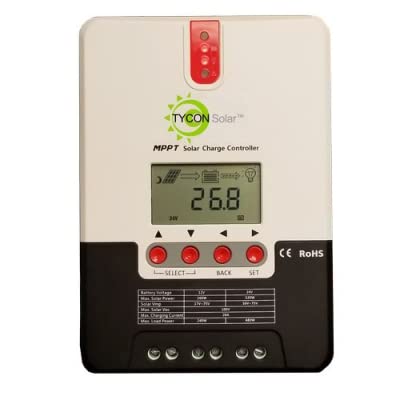
Figura 1: Frente view of the Tycon TPSC2440NMPPT Solar MPPT Battery Charging Controller, showing the LCD display and connection terminals.
4. Configuração e instalação
Siga estas etapas para uma instalação correta:
- Montagem: Choose a suitable location for mounting the controller. Ensure good ventilation and protection from direct sunlight and moisture.
- Conexão da bateria: Primeiro, conecte a bateria aos terminais da bateria do controlador. Certifique-se da polaridade correta (+ com + e - com -). O controlador detectará automaticamente a voltagem da bateria.tage (12V ou 24V).
- Conexão do painel solar: Connect the solar panel array to the controller's solar input terminals. Observe correct polarity. Ensure the open-circuit voltage of the solar array does not exceed the controller's maximum input voltage (110V at 25°C).
- Conexão de carga (opcional): If using the load output, connect your DC loads to the controller's load terminals. Do not exceed the rated load current (20A Max).
- Sensor de temperatura: Connect the included battery temperature probe cable to the designated port on the controller. Place the sensor near the battery for accurate temperature compensation.
- Ligar: Once all connections are secure, the controller will power on and begin operation.
5. Instruções de operação
The integral LCD display provides real-time information about your solar charging system. Use the buttons (if present, assuming standard UP/DOWN/SET) to navigate through the display menus and adjust settings.
5.1 Informações do visor LCD
- Bateria Voltage: Vol atualtage da bateria conectada.
- Capacidade da bateria: Estimated state of charge.
- Capacidade de carga: Current power being delivered to the battery.
- Temperatura da bateria: Temperature measured by the external probe.
- Carregar corrente: Current being drawn by connected DC loads.
- Solar Current: Current being generated by the solar panels.
5.2 Battery Type Settings
The controller supports Flooded, AGM, GEL, and Lithium battery types. A USER setting allows for custom charge parameters. Refer to the on-screen menu for selecting and configuring the battery type.
5.3 Load Operation Modes
The controller offers 5 selectable load operation modes. Consult the device's menu for details on each mode and how to select them, typically involving timed operation or dusk-to-dawn control.
6. Manutenção
A manutenção regular garante o desempenho ideal e a longevidade do seu controlador de carga solar.
- Inspecionar conexões: Verifique periodicamente se todas as conexões da fiação estão bem apertadas e se há corrosão.
- Controlador limpo: Keep the controller clean and free of dust. Use a dry cloth for cleaning. Do not use liquids.
- Saúde da bateria: Monitorar vol da bateriatage and capacity on the LCD. Ensure batteries are properly maintained according to their manufacturer's guidelines.
- Ventilação: Certifique-se de que a área de instalação permaneça bem ventilada para evitar o superaquecimento.
7. Solução De Problemas
| Problema | Possível causa | Solução |
|---|---|---|
| Sem imagem/Sem energia | Conexão da bateria solta; Volume da bateriatage too low; Blown fuse (external, if applicable). | Check battery connections and polarity. Charge battery if voltage is below operating threshold. Check and replace any external fuses. |
| Sem carregamento solar | Solar panel not connected; Incorrect polarity; Insufficient sunlight; Damaged solar panel/wiring. | Verify solar panel connections and polarity. Ensure panels are receiving adequate sunlight. Inspect panels and wiring for damage. |
| Carregar não está funcionando | Load disconnected; Overload; Short circuit; Battery voltage muito baixo. | Check load connections. Reduce load if exceeding 20A. Check for short circuits. Ensure battery is sufficiently charged. |
| Leituras imprecisas | Loose connections; Faulty sensor. | Check all wiring connections. Ensure temperature sensor is properly connected and placed. |
8. Especificações
- Modelo: TPSC2440NMPPT
- Volume Automáticotage: 12V/24V (System)
- Ampantes: 40A
- Corrente de carga nominal: 20 A máx.
- Carga capacitiva máxima: 10,000uF
- Vol. Máx. De Entrada Solartage: 110V (25°C), 90V (25°C)
- Max Power Point Range: 2VDC to 75VDC (Battery Volts)
- Eficiência de conversão: 96% Típico.
- MPPT Tracking Efficiency: 99%
- Autoconsumo: 1W
- Compensação de temperatura: -3.0mV/°C/Célula
- Tamanho máximo do fio: 8 AWG
- Volumetage and Current Accuracy: +/-2%
- Aterramento: Terreno negativo
- Proteção Ambiental: IP32
- Dimensões do produto: 12 x 9 x 6 polegadas
- Peso do item: 5.16 libras
- Tipo de exibição: LCD


