Introdução
This manual provides comprehensive instructions for the operation and maintenance of your SF Quartz Analog Digital Watch, model NR77027PP05. Please read this manual thoroughly to ensure proper use and to maximize the lifespan of your timepiece. This watch features both analog and digital displays, offering versatile timekeeping functions.

Imagem: Frente view of the SF Quartz Analog Digital Watch NR77027PP05, showcasing its black dial, green accents, and both analog hands and digital display. The watch features multiple buttons on its sides for various functions.
Configuração inicial
Definir hora analógica
- Pull the crown (located on the right side of the watch) out to the first position.
- Gire a coroa para ajustar os ponteiros das horas e dos minutos para a hora correta.
- Empurre a coroa de volta para a posição normal para iniciar o movimento analógico.
Configuração de data e hora digital
The digital display typically has buttons labeled 'MODE', 'SET', 'ADJ', and 'LIGHT'. Refer to the image below for button identification.
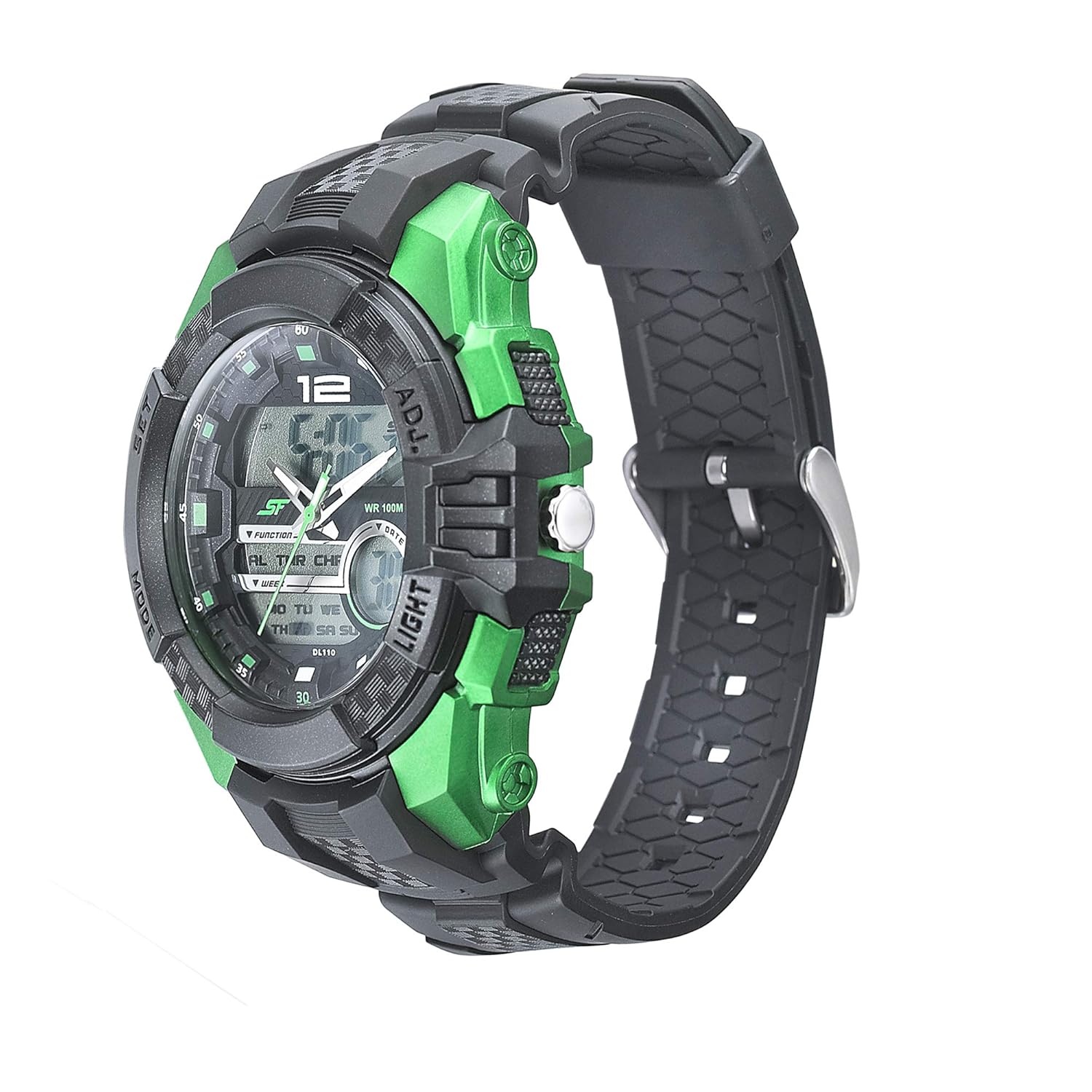
Imagem: Lado view of the SF Quartz Analog Digital Watch NR77027PP05, highlighting the 'SET' and 'ADJ' buttons on the right side, and 'MODE' and 'LIGHT' buttons on the left side.
- Pressione o MODO Pressione o botão repetidamente até chegar ao modo de ajuste de hora (geralmente indicado por dígitos piscando).
- Pressione o DEFINIR or AJUSTADO button to select the digit you wish to change (e.g., hours, minutes, year, month, day).
- Use o LUZ button (or another designated button) to increase the value of the flashing digit.
- Repeat steps 2 and 3 until all desired settings (time, date, day of week) are correct.
- Pressione o MODO botão para sair do modo de configuração.
Instruções de operação
Modos de exibição digital
Pressione o MODO botão para alternar entre as seguintes funções:
- Exibição de tempo: Shows current digital time (hours, minutes, seconds) and day of the week.
- Modo de alarme: Permite configurar e ativar um alarme.
- Modo cronômetro: Para medir o tempo decorrido.
- Modo Temporizador: Para contagem regressiva.
- Modo de hora dupla: Exibe um segundo fuso horário.
Usando a luz de fundo
Pressione o LUZ button (typically on the upper left or lower left side) to illuminate the digital display for a few seconds in low-light conditions.

Image: Another side view of the SF Quartz Analog Digital Watch NR77027PP05, emphasizing the 'LIGHT' button on the left side, used for illuminating the digital display.
Cuidados e Manutenção
- Limpeza: Limpe o relógio regularmente com um pano macio e seco. Para sujidade persistente, utilize um pano ligeiramente seco.amp Pode-se usar um pano e secá-lo imediatamente. Evite produtos químicos agressivos ou materiais abrasivos.
- Resistência à água: This watch is rated for 100 meters (10 ATM) water resistance. This means it is suitable for swimming and snorkeling, but not for scuba diving. Do not operate buttons or the crown while the watch is wet or submerged.
- Temperatura: Avoid exposing the watch to extreme temperatures (hot or cold) or sudden temperature changes, as this can affect its accuracy and seals.
- Impacto: Protect the watch from strong impacts or drops.
- Substituição da bateria: When the digital display dims or the analog movement stops, the battery may need replacement. It is recommended to have battery replacement performed by a qualified watch technician to ensure water resistance is maintained.

Imagem: Costas view of the SF Quartz Analog Digital Watch NR77027PP05, showing the stainless steel back case with "WR 100M" (Water Resistant 100 Meters) engraving, confirming its water resistance capabilities.
Solução de problemas
| Problema | Possível causa | Solução |
|---|---|---|
| Os ponteiros analógicos não se movem. | Bateria descarregada ou coroa puxada. | Push crown in. If still not moving, replace battery. |
| O visor digital está em branco ou com brilho reduzido. | Bateria descarregada. | Substitua a bateria. |
| O tempo é impreciso. | Incorrect setting or exposure to strong magnetic fields. | Reset time. Keep watch away from strong magnets. |
| Água dentro do relógio. | Crown or buttons operated underwater, or seals compromised. | Immediately take to a service center. Do not attempt to dry it yourself. |
Especificações
- Modelo: NR77027PP05
- Movimento: Quartzo (Analógico e Digital)
- Diâmetro da caixa: 53 milímetros
- Material da banda: Poliuretano
- Cor da faixa: Preto
- Peso do item: 180 gramas
- Resistência à água: 100 metros (10 ATM)
- Bateria: 1 bateria de polímero de lítio (incluída)
- Fabricante: Titan Company Ltd
- País de origem: Índia
Informações de garantia
This SF watch comes with a Garantia de 1 ano covering manufacturing defects. The warranty period begins from the date of purchase. Please retain your purchase receipt as proof of purchase for any warranty claims.
A garantia não cobre:
- Danos resultantes de manuseio impróprio, falta de cuidado, acidentes ou desgaste normal.
- Danos causados por reparos ou modificações não autorizadas.
- Substituição da bateria.
- Danos na pulseira ou no cristal.
For warranty service, please contact an authorized SF service center.
Apoiar
For further assistance, questions, or service inquiries regarding your SF watch, please refer to the official SF website or contact their customer support. Contact details can typically be found on the manufacturer's website ou no cartão de garantia que acompanha o produto.
Manufacturer: Titan Company Ltd
Address: 3 Sipcot Industrial Complex, Hosur - 635126, India
Telephone: +91-(0)4344-664199