Introdução
Obrigado pela compra.asing the Bytech True Wireless Bluetooth Boost Link True Speaker. This manual provides essential information for setting up, operating, and maintaining your new speakers. Please read this manual thoroughly before use to ensure proper operation and to maximize your listening experience. These speakers feature True Wireless Stereo (TWS) functionality, Bluetooth connectivity, FM Radio, and Bass Boost for rich audio.
Informações de segurança
- Do not expose the speakers to extreme temperatures, humidity, or direct sunlight.
- Evite deixar cair ou submeter as caixas de som a impactos fortes.
- Do not disassemble, repair, or modify the speakers yourself. Refer all servicing to qualified personnel.
- Mantenha as caixas de som longe de água e outros líquidos.
- Utilize apenas o cabo de carregamento e o adaptador de energia especificados.
- Clean the speakers with a soft, dry cloth. Do not use abrasive cleaners or solvents.
- Ouça em volume moderado para evitar danos à audição.
Conteúdo da embalagem

Image: The Bytech Boost Link True Wireless Speakers shown in their retail packaging, highlighting the two speakers and the Bluetooth connectivity feature.
Por favor, verifique se todos os itens estão presentes e em boas condições:
- 2 x Bytech Boost Link True Wireless Speakers
- 1 x Cabo de Carregamento (USB)
- 1 x Manual do Usuário (este documento)
Produto acimaview

Imagem: Um close-up frontal view of the two Bytech Boost Link True Wireless Speakers, showing the speaker grilles and control buttons at the bottom.
Familiarize-se com os componentes e controles da caixa de som:
- Grade do alto-falante: Protects the speaker driver.
- Botões de controle:
- Botão de energia: Power On/Off, Play/Pause.
- Botão de modo: Switch between Bluetooth, FM Radio, etc.
- Botão de diminuir volume/faixa anterior: Pressione rapidamente para a faixa anterior, pressione e segure para diminuir o volume.
- Botão Próxima Faixa/Aumentar Volume: Pressione rapidamente para a próxima faixa, pressione e segure para aumentar o volume.
- Porta de carregamento: Para conectar o cabo de carregamento USB.
- Indicador LED: Shows power status, charging status, and pairing status.
Configurar
Carregando os alto-falantes
Before first use, fully charge both speakers. Connect the supplied USB charging cable to the charging port on each speaker and plug the other end into a USB power adapter (not included) or a computer's USB port. The LED indicator will show charging status and turn off or change color when fully charged.
Ligar/desligar
- Para ligar: Press and hold the Power button on each speaker until the LED indicator lights up and you hear a power-on prompt.
- Para desligar: Press and hold the Power button on each speaker until the LED indicator turns off and you hear a power-off prompt.
Instruções de operação
Emparelhamento Bluetooth (Modo de alto-falante único)
- Certifique-se de que a caixa de som esteja ligada e no modo de emparelhamento Bluetooth (o indicador LED piscará).
- No seu dispositivo (smartphone, tablet, laptop), ative o Bluetooth e procure por dispositivos disponíveis.
- Select "BYTECH BOOST LINK" (or similar name) from the list.
- Once paired, the LED indicator will stop flashing and remain solid, and you will hear a confirmation sound.
Emparelhamento True Wireless Stereo (TWS) (dois alto-falantes)
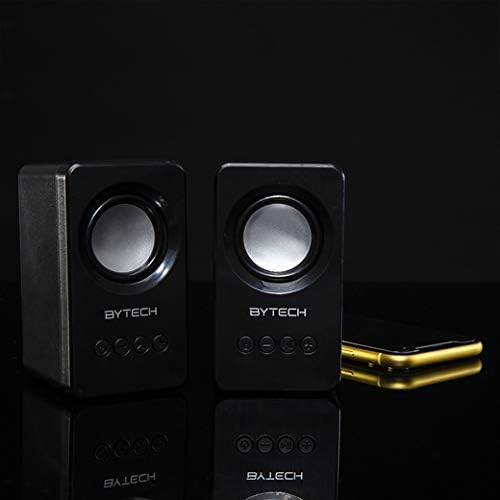
Image: The two Bytech Boost Link True Wireless Speakers positioned next to a smartphone, symbolizing their ability to connect wirelessly to each other and a device for stereo sound.
For a true stereo sound experience, you can pair both speakers together:
- Power on both Bytech Boost Link speakers. Do not connect them to your Bluetooth device yet.
- The speakers will automatically attempt to pair with each other. You will hear a confirmation sound when they are successfully linked for TWS. One speaker will become the master (left channel) and the other the slave (right channel).
- Once TWS paired, the master speaker will enter Bluetooth pairing mode (LED flashing).
- On your device, enable Bluetooth and search for "BYTECH BOOST LINK". Connect to this single entry.
- Both speakers will now play audio in stereo.
- Observação: If the speakers do not automatically pair, try double-pressing the Mode button on one of the speakers to initiate TWS pairing.
Operação de rádio FM
- Power on the speaker(s).
- Pressione o Modo button repeatedly until you hear the FM radio prompt.
- Para fazer uma busca automática e salvar estações, pressione e segure o botão. Reproduzir/Pausar button. The speaker will scan and store available FM stations.
- Use o Faixa anterior e Próxima faixa Botões para navegar entre as estações salvas.
Audio Playback and Volume Control
- Reproduzir/Pausar: Pressione rapidamente o botão Power.
- Próxima faixa: Short press the Next Track/Volume Up button.
- Faixa anterior: Short press the Previous Track/Volume Down button.
- Aumentar o volume: Long press the Next Track/Volume Up button.
- Volume baixo: Long press the Previous Track/Volume Down button.
Manutenção
- Limpeza: Use a soft, dry, lint-free cloth to clean the surface of the speakers. Do not use liquid cleaners, aerosols, or solvents.
- Armazenar: Quando não estiverem em uso por longos períodos, guarde as caixas de som em local fresco e seco, longe da luz solar direta e de temperaturas extremas.
- Cuidados com a bateria: To prolong battery life, avoid fully discharging the battery frequently. Charge the speakers regularly, even if not in use.
Solução de problemas
| Problema | Possível causa | Solução |
|---|---|---|
| A caixa de som não liga. | Bateria fraca. | Carregue totalmente a caixa de som. |
| Não foi possível emparelhar via Bluetooth. | O alto-falante não está em modo de emparelhamento; Bluetooth do dispositivo desligado; dispositivo muito distante. | Ensure speaker LED is flashing; Turn on Bluetooth on your device; Move speaker closer to device (within 10 meters). |
| Nenhum som. | Volume too low; Speaker not connected; Incorrect mode. | Increase volume on speaker and device; Re-pair Bluetooth; Ensure correct mode (Bluetooth/FM). |
| O emparelhamento TWS falha. | Alto-falantes já conectados a um dispositivo; Alto-falantes muito distantes uns dos outros. | Disconnect speakers from any device; Power off and on both speakers, then try TWS pairing again; Ensure speakers are close to each other. |
| Recepção de rádio FM ruim. | Sinal fraco; Interferência. | Relocate the speaker to an area with better reception; Extend the charging cable (can act as an antenna). |
Especificações
- Modelo: POR-AU-BS-152-BK
- Marca: Bytech
- Tecnologia de conectividade: Wireless (Bluetooth)
- Modo de saída de áudio: Cercar
- Tipo de alto-falante: Som Surround
- Características especiais: Wireless Bluetooth, Bass Boost, FM Radio, True Wireless Stereo (TWS)
- Usos recomendados: Para tocadores de música
- Dispositivos compatíveis: Notebook, Tablet, Smartphone
- Tipo de Controlador: Botões no dispositivo
- Dimensões da embalagem: 20.7 x 16 x 9 cm
- Peso: 560 g
Garantia e Suporte
Bytech products are designed and manufactured to the highest quality standards. For information regarding warranty coverage, technical support, or service inquiries, please refer to the warranty card included with your purchase or visit the official Bytech website. Guarde o comprovante de compra para solicitações de garantia.
For further assistance, please contact Bytech customer support.


