1. Introdução
This manual provides instructions for the Sharp Digital Alarm Clock, Model SPC547AJAMZ. This device features an easy-to-read LED display, a high-speed USB charging port, and essential alarm functions. Please read this manual thoroughly before use to ensure proper operation and to maximize the product's lifespan.

Figure 1: Sharp Digital Alarm Clock (Model SPC547AJAMZ) front view.
2. Recursos do Produto
The Sharp Digital Alarm Clock offers the following key features:
- Visor fácil de ler: Large, clear green LED digits for visibility from a distance.
- High-Speed USB Charging Port: Um 2 AMP USB port for rapid charging of compatible devices such as smartphones and tablets.
- Volume de alarme ajustável: Select between high and low alarm volume settings.
- Operação simples: Intuitive button controls for setting time and alarm.
- Bateria de reserva: Mantém as configurações de hora e alarme durante a falta de energia.tages (requires 2 AAA batteries, not included). The display will be blank during battery backup mode, but the internal clock will continue to run, and the alarm will sound at the set time.

Figure 2: Alarm clock with a smartphone connected to the USB charging port.
3. Conteúdo da embalagem
Verifique se todos os itens estão presentes na embalagem:
- Sharp Digital Alarm Clock (Model SPC547AJAMZ)
- Adaptador de energia CA
- Manual do usuário (este documento)
Note: 2 AAA batteries for backup are not included and must be purchased separately.
4. Informações de segurança
Observe as seguintes precauções de segurança:
- Não exponha o aparelho à água ou umidade excessiva.
- Evite colocar o aparelho perto de fontes de calor ou sob luz solar direta.
- Utilize apenas o adaptador de energia CA fornecido.
- Não tente desmontar ou modificar a unidade.
- Mantenha fora do alcance de crianças.
- Garanta ventilação adequada ao redor da unidade.
5. Configuração
5.1 Conexão de Energia
- Plug the AC power adapter into the DC IN jack located on the back of the alarm clock.
- Plug the other end of the AC power adapter into a standard wall outlet (120V AC, 60Hz).
- The display will illuminate, and the clock will be ready for time setting.
5.2 Instalação da bateria de reserva
Para garantir que as configurações de hora e alarme sejam mantidas durante uma queda de energia.tage:
- Localize o compartimento da bateria na parte inferior da unidade.
- Abra a tampa do compartimento da bateria.
- Insert two (2) new AAA batteries, observing the correct polarity (+ and -) as indicated inside the compartment.
- Feche bem a tampa do compartimento da bateria.
Note: Batteries are for backup only. The clock display will not be lit during a power outage when operating on battery backup, but the internal clock will continue to run, and the alarm will sound at the set time.
6. Instruções de operação
Familiarize yourself with the control buttons located on the top of the unit:
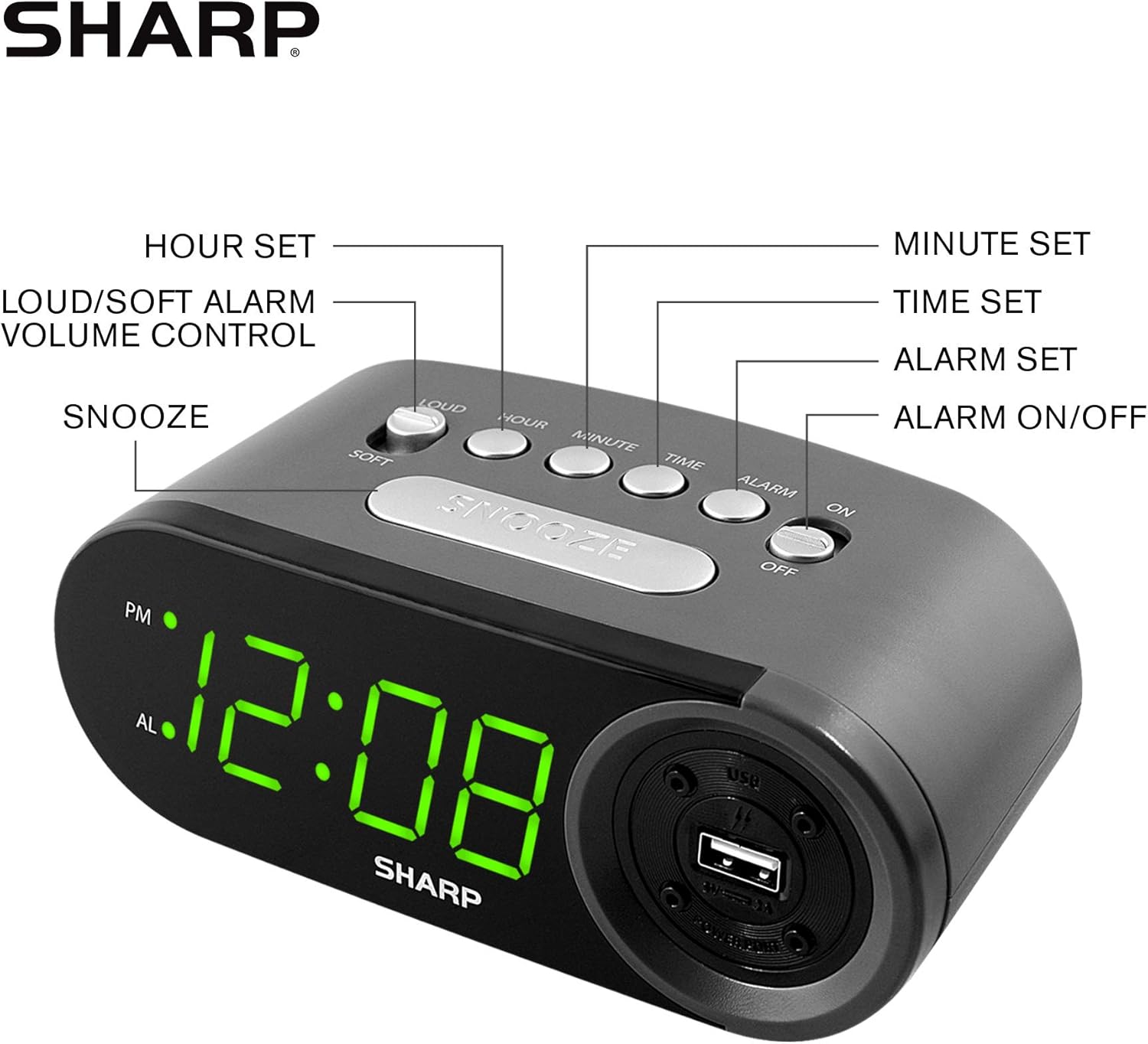
Figure 3: Top panel controls and their functions.
6.1 Ajustando a hora atual
- Pressione e segure o TEMPO button until the display begins to flash.
- Pressione o HORA button repeatedly to set the hour. Observe the PM indicator for afternoon hours.
- Pressione o MINUTO Pressione repetidamente o botão para definir os minutos.
- Após definir o tempo desejado, pressione o TEMPO Pressione novamente o botão para confirmar e sair do modo de configuração de hora.
6.2 Setting the Alarm Time
- Pressione e segure o ALARME button until the alarm time display begins to flash. The "AL" indicator will also flash.
- Pressione o HORA button repeatedly to set the alarm hour. Observe the PM indicator.
- Pressione o MINUTO button repeatedly to set the alarm minutes.
- Once the desired alarm time is set, press the ALARME button again to confirm and exit alarm setting mode.
6.3 Ativação/Desativação do Alarme
- Para ativar o alarme ON, deslize o ALARME LIGADO / DESLIGADO switch to the "ON" position. The "AL" indicator will appear on the display.
- Para ativar o alarme DESLIGADO, deslize o ALARME LIGADO / DESLIGADO switch to the "OFF" position. The "AL" indicator will disappear.
6.4 Função de soneca
Quando o alarme tocar, pressione o botão grande. SONECA botão. O alarme irá parar temporariamente e soar novamente após aproximadamente 9 minutos.
6.5 Desativando o alarme
To stop the alarm completely after it sounds (without using snooze), slide the ALARME LIGADO / DESLIGADO switch to the "OFF" position. The alarm will reset for the next day if the switch is moved back to "ON".
6.6 Ajustando o volume do alarme
Pressione o LOUD/SOFT button to toggle between high and low alarm volume settings.
6.7 Utilizando a porta de carregamento USB
Os 2 AMP USB charging port is located on the right side of the unit.
- Connect your device's USB charging cable (not included) to the USB port on the alarm clock.
- Conecte a outra extremidade do cabo ao seu smartphone, tablet ou outro dispositivo compatível com alimentação USB.
- Ensure the alarm clock is connected to AC power for the USB port to function.
Note: Charging speed may vary depending on your device and cable.
7. Manutenção
To keep your alarm clock in optimal condition:
- Limpeza: Limpe a unidade com um pano macio e seco. Não utilize produtos de limpeza abrasivos ou solventes.
- Substituição da bateria: Replace AAA backup batteries annually or when the battery low indicator (if present) appears, to ensure reliable backup functionality.
- Armazenar: Se for armazenar a unidade por um período prolongado, remova as baterias de reserva para evitar vazamentos.
8. Solução De Problemas
| Problema | Possível causa | Solução |
|---|---|---|
| O visor do relógio está em branco. | No AC power; power outage; unidade desligada. | Ensure AC adapter is securely plugged into the unit and a working wall outlet. Check for power outage. |
| O alarme não dispara. | Alarm is not activated; alarm time is incorrect; volume is too low. | Slide ALARM ON/OFF switch to "ON". Verify alarm time is set correctly. Adjust alarm volume using the LOUD/SOFT button. |
| A porta de carregamento USB não está funcionando. | Clock not connected to AC power; device not compatible; faulty cable. | Ensure the clock is plugged into AC power. Try a different USB cable or device to confirm compatibility. |
| As configurações de hora/alarme são perdidas após uma queda de energia.tage. | As baterias de reserva estão descarregadas ou não estão instaladas. | Install two fresh AAA batteries in the battery compartment, ensuring correct polarity. |
9. Especificações
- Marca: Afiado
- Modelo: SPC547AJAMZ
- Tipo de exibição: LED digital (verde)
- Fonte de energia: Corded Electric (AC 120V, 60Hz)
- Bateria de reserva: 2 pilhas AAA (não incluídas)
- Porta de carregamento USB: 2 AMP (5V)
- Dimensões do produto: Aproximadamente 6.2 cm de largura x 2.3 cm de altura x 3.25 cm de profundidade
- Peso do item: Aproximadamente 9.6 onças
- Material: Plástico
- Código UPC: 049353006000

Figura 4: Dimensões do produto.
10. Garantia e suporte
10.1 Informações de garantia
This Sharp product is covered by a limited manufacturer's warranty. For specific warranty terms and conditions, please refer to the warranty card included with your purchase or visit the official Sharp webGuarde o comprovante de compra como prova de aquisição.
10.2 Suporte ao cliente
If you have any questions, require assistance, or need to report an issue with your Sharp Digital Alarm Clock, please contact Sharp customer support. Contact details can typically be found on the official Sharp website ou na embalagem do produto.
Para mais informações, visite o Loja Sharp na Amazon.


