Introdução
This manual provides comprehensive instructions for the assembly, operation, and maintenance of your ODK 63-inch computer desk. Designed for versatility, this desk offers a spacious and sturdy workspace suitable for home office tasks, writing, or gaming setups. Please read these instructions carefully before beginning assembly or use to ensure proper setup and longevity of your product.

Image: The ODK 63-inch computer desk, showcasing its spacious surface and minimalist design in a home office environment.
Conteúdo da embalagem
Before assembly, verify that all components listed below are present and undamaged. If any parts are missing or damaged, contact customer support immediately.
- Computer Desk Top (1)
- Metal Frame Components (Legs, Crossbars, etc.)
- Assembly Tool Kit (Screws, Allen Key)
- Gancho para fone de ouvido (1)
- Storage Pouch (1)
- Manual de Instruções (1)

Image: An illustration detailing the various parts included in the package and a visual guide to the assembly steps.
Precauções de segurança
- Avoid long-term direct sunlight exposure to prevent material degradation.
- Keep the desk away from heat sources to prevent damage.
- Ensure the desk is placed away from sharp objects to avoid scratches or damage to the surface.
- Keep children away from small assembly parts to prevent choking hazards and other injuries.
- Avoid contact with corrosive substances, as they can damage the desk's finish.
- Do not overtighten fasteners during assembly, as this may lead to cracking or damage to the engineered wood board.
Instruções de montagem
The ODK 63-inch computer desk is designed for straightforward assembly. It is recommended to have two people for certain steps, though one person can typically complete it in approximately 30 minutes. All necessary tools and labeled parts are included.
- Descompacte os componentes: Carefully remove all parts from the packaging. Lay them out on a clean, soft surface to prevent scratches. Verify all items against the package contents list.
- Montar quadro: Connect the metal frame components (legs and crossbars) using the provided screws and Allen key. Ensure all connections are aligned correctly. Do not fully tighten screws at this stage.
- Conectar área de trabalho: Carefully place the desktop onto the assembled metal frame. Align the pre-drilled holes on the desktop with the holes on the frame. Secure the desktop to the frame using the appropriate screws.
- Instale o gancho para fones de ouvido: Attach the headphone hook to the desired side of the desk using the designated screws.
- Anexe a bolsa de armazenamento: Secure the fabric storage pouch to the side of the desk using its integrated fasteners or hooks.
- Aperto final: Once all parts are in place and the desk is upright, gently tighten all screws to ensure maximum stability. Avoid overtightening.
Instruções de operação
Your ODK 63-inch computer desk is ready for use after assembly. Follow these guidelines for optimal functionality:
- Colocação: Position the desk on a level and stable surface to prevent wobbling. Use the adjustable foot pads to compensate for uneven flooring.
- Utilização do espaço de trabalho: The spacious desktop can accommodate multiple monitors, a laptop, keyboard, mouse, and other office or gaming peripherals. Arrange your items to suit your workflow and comfort.
- Gancho para fone de ouvido: Utilize the integrated headphone hook to conveniently store your headphones, bags, or cables, keeping your desktop clear and organized.
- Bolsa de armazenamento: The side storage pouch is ideal for holding documents, magazines, or small office supplies, providing easy access and reducing clutter.
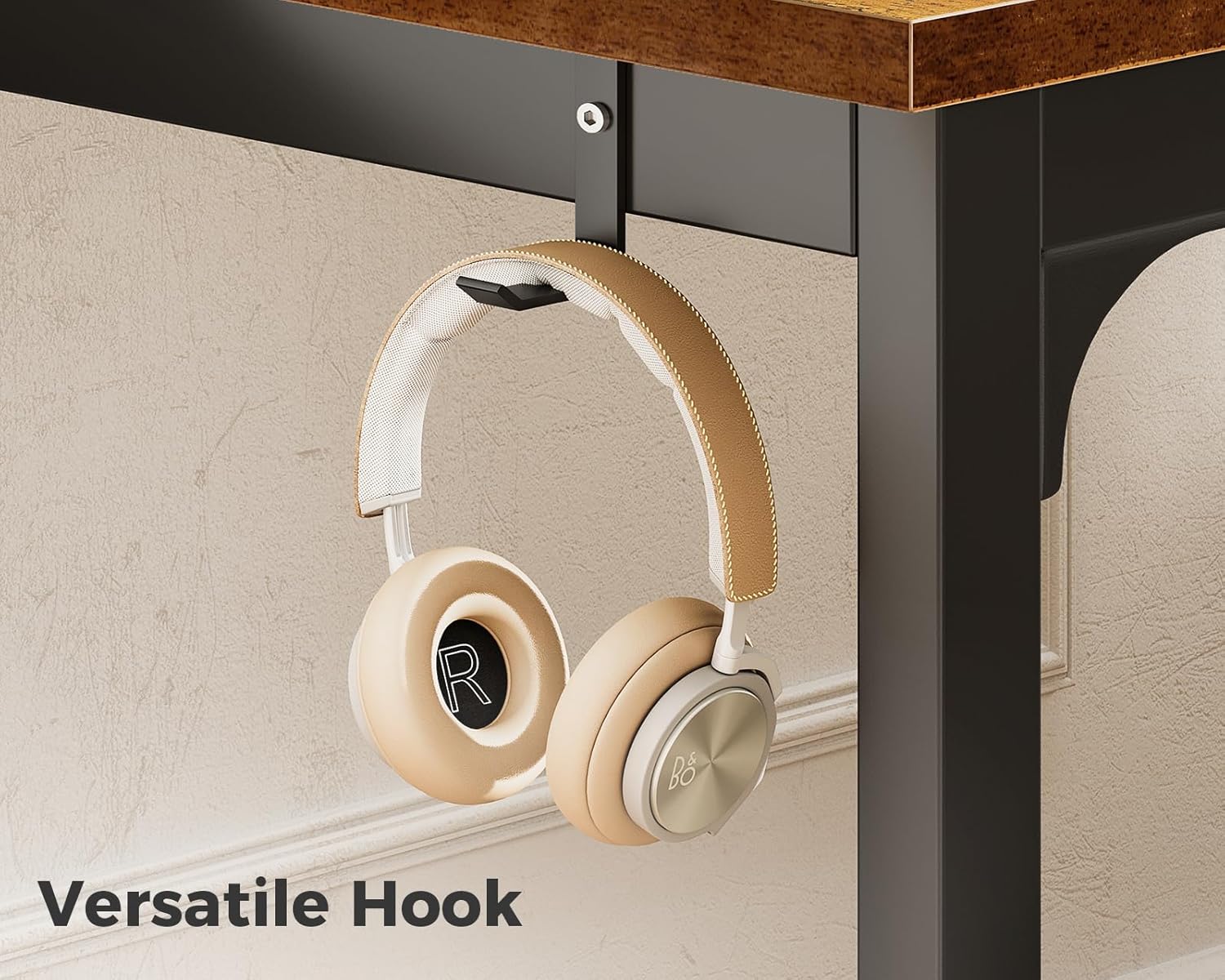
Imagem: Uma imagem detalhada view of the headphone hook, demonstrating its practical use for hanging headphones.
Manutenção
Proper care will extend the life and appearance of your ODK computer desk:
- Limpeza: The desk's engineered wood tabletop is waterproof and scratch-resistant. For general cleaning, wipe the surface with a soft, damp cloth. For tougher stains, use a mild soap solution and immediately dry with a clean cloth.
- Evite produtos químicos agressivos: Do not use abrasive cleaners, strong solvents, or harsh chemicals, as these can damage the desk's finish.
- Verificações regulares: Periodically inspect all screws and fasteners to ensure they remain tight. Retighten any loose connections to maintain the desk's stability.
- Proteger a superfície: While scratch-resistant, using coasters for drinks and mouse pads for computer mice can further protect the desktop surface.
Solução de problemas
If you encounter any issues with your ODK computer desk, refer to the following common solutions:
- Balança na mesa:
- Certifique-se de que todos os parafusos de montagem estejam totalmente apertados.
- Verify that the desk is placed on a flat, even surface.
- Adjust the foot pads at the bottom of the legs to stabilize the desk on uneven floors.
- Peças faltantes ou danificadas:
- Verifique novamente com atenção todos os materiais de embalagem.
- If parts are genuinely missing or arrived damaged, contact ODK customer support with your purchase information for assistance.
- Dificuldade de montagem:
- Review the assembly instructions carefully, paying close attention to diagrams and part labels.
- Certifique-se de usar os parafusos corretos em cada etapa.
- Do not force parts together; if they don't fit, re-check the orientation.
Especificações
| Recurso | Detalhe |
|---|---|
| Marca | OK |
| Número do modelo | B010111SPD69USDF-1 |
| Dimensões do produto (P x L x A) | 63" x 21.65" x 28.95" |
| Peso do item | 28 libras |
| Tipo de material superior | Madeira projetada |
| Tipo de material da estrutura | Metal |
| Cor | Vinhotage |
| Características especiais | Headphone Hook, Adjustable Foot Pads |
| Montagem necessária | Sim |
| Ferramentas de montagem incluídas | Sim |

Image: A visual representation of the desk's key dimensions and weight capacity.
Garantia e Suporte
For detailed warranty information, product support, or to inquire about replacement parts, please refer to the documentation included with your purchase or visit the official ODK webNossa equipe de atendimento ao cliente está disponível para ajudá-lo(a) com quaisquer dúvidas ou problemas.


