1. Informações importantes de segurança
Leia atentamente todas as instruções antes da montagem e utilização. Guarde este manual para futuras consultas.
- AVISO: Always assemble the desk according to the provided instructions to ensure stability.
- Não exceda a capacidade máxima de peso de 177 kg (80 lbs).
- Be cautious when using the height adjustment feature to avoid injury from moving parts.
- Keep hands and fingers away from the moving parts during operation.
- Ensure the power cord is not pinched or damaged during assembly or operation.
- Este produto é destinado somente para uso interno.
2. Produto acabadoview
The FLEXISPOT E1L is a dual-motor, L-shaped electric standing desk designed for home and office use. It features adjustable height, a quiet operation, and a customizable control panel.

Image 2.1: The FLEXISPOT E1L desk frame demonstrating its adjustable height capabilities.

Image 2.2: The FLEXISPOT E1L desk in a typical office setup, showcasing its L-shape and functionality.
3. Configuração e montagem
Assembly of the FLEXISPOT E1L desk is designed to be straightforward, typically taking less than 30 minutes. All necessary tools are included.
3.1 Desembalagem e verificação dos componentes
Carefully unpack all components and verify against the packing list. Ensure all parts are present and undamaged before proceeding.
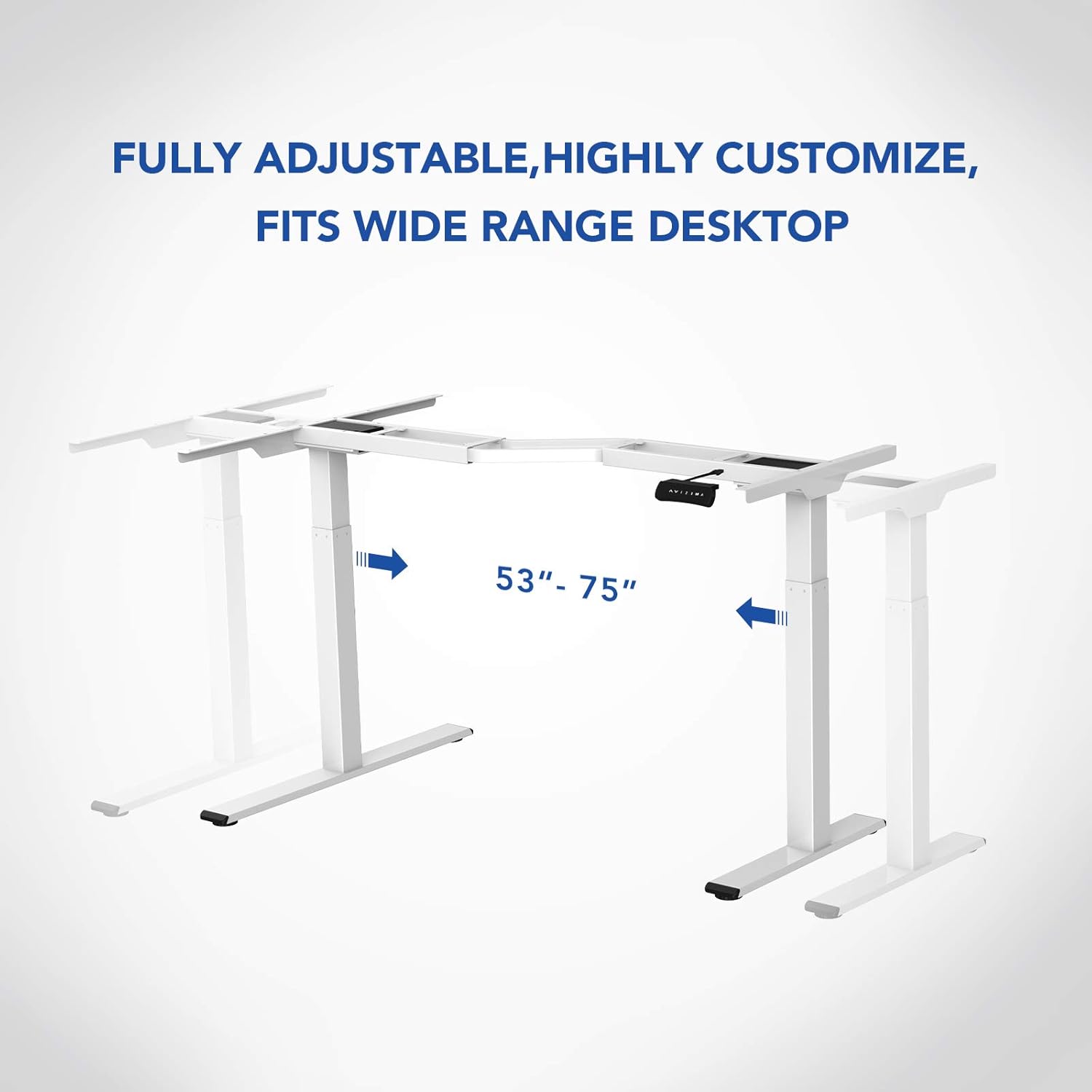
Imagem 3.1: Terminadoview of the FLEXISPOT E1L desk frame components prior to assembly.
3.2 Passos de Montagem
- Attach the lifting columns to the desktop frame.
- Secure the feet to the bottom of the lifting columns.
- Connect the control box and motor cables as per the detailed diagram in the included assembly guide.
- Mount the control panel to the desired location on the desk.
- Place the desktop surface onto the assembled frame and secure it.
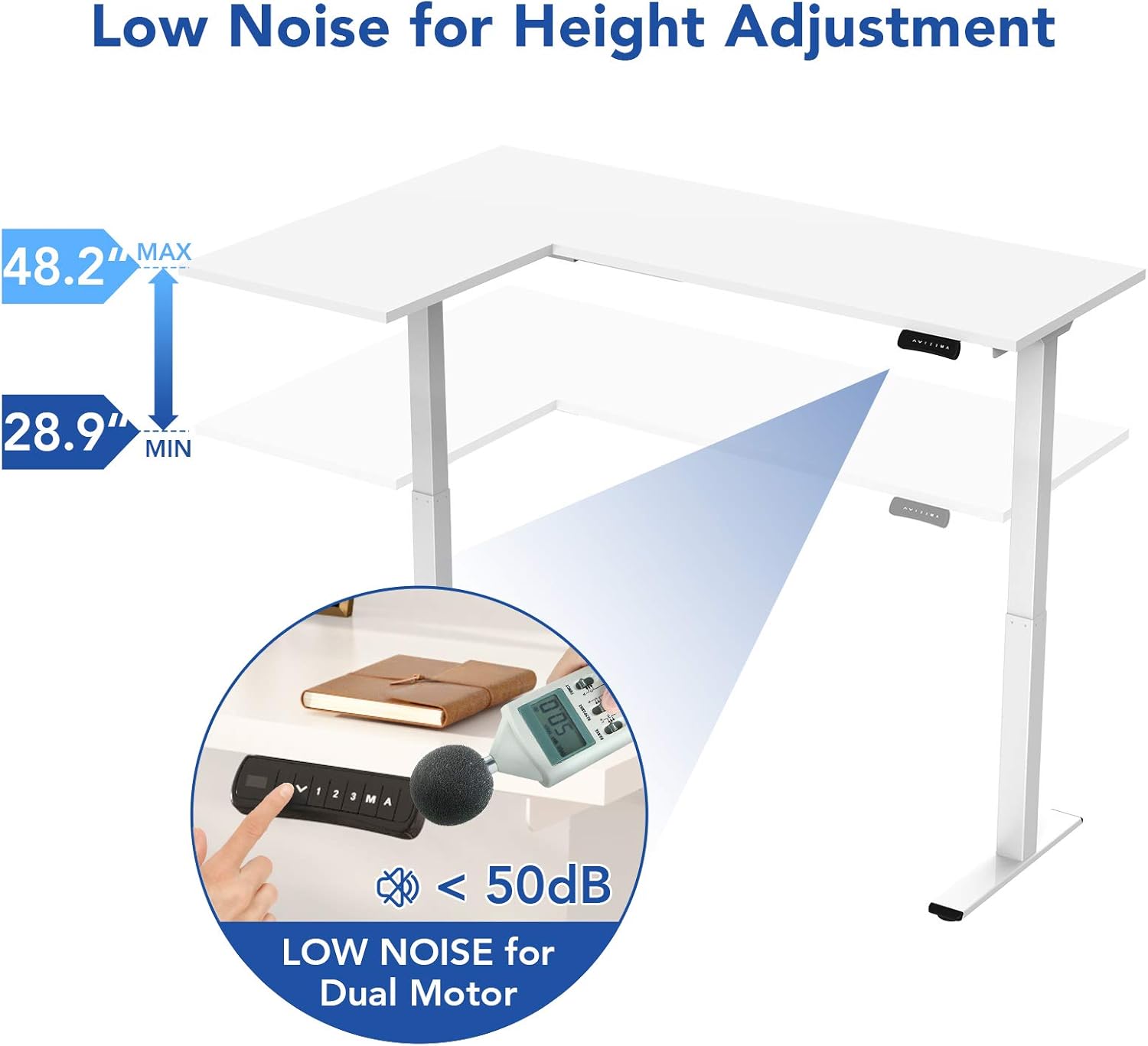
Image 3.2: An assembly step illustrating the connection of the L-shaped desk frame components.

Image 3.3: The desk frame nearing completion, with the control panel attached.
3.3 Reversible L-Shape Configuration
The L-shaped configuration of the desk is reversible, allowing you to set up the longer side on either the left or right, depending on your preference and workspace layout. This flexibility is determined during the assembly process.

Image 3.4: Visual representation of the desk's reversible L-shape, allowing for left or right-hand configurations.
4. Instruções de operação
4.1 Ajuste de Altura
The desk features a dual-motor lift mechanism for smooth and quiet height adjustments. The height can be adjusted from 27.9 inches (70.9 cm) to 47.2 inches (120 cm).
- Use o Up (▲) e Abaixo (▼) buttons on the control panel to manually adjust the desk height.
- The desk operates at a speed of 1 inch per second and maintains a noise level under 50 dB during movement.

Image 4.1: Illustration highlighting the low noise operation (under 50 dB) of the desk's dual motor system.
4.2 Funções do Painel de Controle
The built-in LED control panel allows for easy customization and programming of desk height settings.

Image 4.2: Close-up of the control panel, detailing its buttons and functions.
- Up/Down Buttons (▲, ▼): Manually adjust the desk height.
- Predefinições de memória (1, 2, 3): Store and recall up to three preferred height settings. To save a height, adjust the desk to the desired position, then press the 'M' button followed by the desired number (1, 2, or 3).
- Botão de memória (M): Used to save height presets.
- Sit-Stand Reminder (A): Activate a programmable timer to remind you to switch between sitting and standing postures. Refer to the full assembly guide for detailed programming instructions.
4.3 Sistema Anticolisão
The desk is equipped with a built-in anti-collision system. If the desk encounters an obstruction during height adjustment, it will automatically stop and reverse slightly to prevent damage or injury.

Image 4.3: Visual explanation of the anti-collision system, showing the desk reversing upon contact with an obstacle.
5. Manutenção
Regular maintenance ensures the longevity and optimal performance of your FLEXISPOT E1L desk.
- Limpeza: Limpe a superfície e a estrutura da mesa com um pano macio e seco.amp pano. Evite produtos de limpeza abrasivos ou solventes que possam danificar o acabamento.
- Gerenciamento de cabos: Periodically check all cables to ensure they are securely connected and not pinched or frayed. Use the included cable management tray to keep wires organized.
- Fixadores: Verifique periodicamente todos os parafusos e porcas para garantir que estejam bem apertados. Reaperte-os, se necessário.
- Inspeção do motor: Listen for any unusual noises during operation. If you notice any, discontinue use and consult the troubleshooting section or contact customer support.
6. Solução De Problemas
Se você tiver problemas com sua mesa, consulte as etapas comuns de solução de problemas a seguir:
| Problema | Possível causa | Solução |
|---|---|---|
| A mesa não se move. | Power cable disconnected; control box error; overload. | Check power connections. Unplug and replug the power cord. Reduce weight on the desk. |
| A mesa se move de forma irregular. | Uneven load; motor synchronization issue. | Distribute weight evenly. Perform a reset (refer to the full manual for specific reset procedures). |
| Código de erro exibido. | Falha específica do sistema. | Refer to the detailed error code list in the complete user manual or contact customer support. Often, a power cycle (unplugging for 10 seconds and replugging) can resolve temporary errors. |
| O sistema anticolisão é acionado com muita facilidade. | A sensibilidade está muito alta. | Adjust the anti-collision sensitivity setting via the control panel (refer to the full manual for instructions). |
Se essas etapas não resolverem o problema, entre em contato com o suporte ao cliente da FLEXISPOT.
7. Especificações
| Recurso | Especificação |
|---|---|
| Marca | PONTO FLEXI |
| Número do modelo | E1L |
| Design de mesa | Mesa de computador em formato de L |
| Material da estrutura | Industrial-grade Steel |
| Mecanismo de elevação | Dual Electric Motor |
| Faixa de ajuste de altura | 27.9" a 47.2" (70.9 cm a 120 cm) |
| Velocidade de elevação | 1"/second |
| Nível de ruído | Menos de 50 dB |
| Capacidade máxima de peso | 177 libras (80 kg) |
| Painel de controle | LED with 3 Memory Presets & Sit-Stand Reminder |
| Características especiais | Anti-Collision System, Corded Operation, Reversible L-Shape |
| Montagem necessária | Sim (Inclui todas as ferramentas de montagem) |
| Pessoas recomendadas para a assembleia | 1 |
8. Garantia e Suporte
8.1 Informações de garantia
The FLEXISPOT E1L desk comes with a Limited Warranty. Please refer to the warranty card included with your product or visit the official FLEXISPOT website for detailed terms and conditions regarding parts and labor coverage.
8.2 Suporte ao cliente
For technical assistance, warranty claims, or any questions regarding your FLEXISPOT E1L desk, please contact FLEXISPOT customer support through their official website ou as informações de contato fornecidas na embalagem do seu produto.
Você também pode visitar o Loja FLEXISPOT na Amazon Para obter informações adicionais sobre o produto e recursos de suporte.


