1. Introdução
Thank you for choosing the Hoco W27 Cat Ear Bluetooth Headphones. These headphones combine advanced Bluetooth 5.0 technology with a unique glowing cat ear design, offering a versatile audio experience. They support Bluetooth, TF card, and AUX playback modes, making them compatible with a wide range of mobile phones and tablets. This manual provides detailed instructions for setup, operation, maintenance, and troubleshooting to ensure you get the most out of your device.
2. Produto acabadoview
Familiarize yourself with the components of your Hoco W27 headphones.
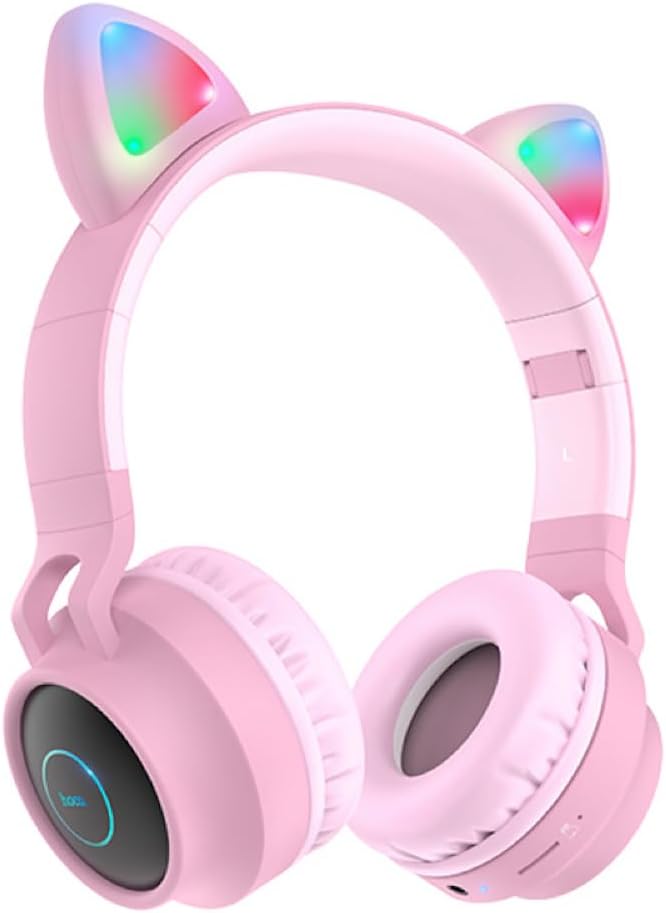
Figura 2.1: Frente view of the Hoco W27 Cat Ear Bluetooth Headphones in pink, showcasing the glowing cat ears and over-ear design.

Figura 2.2: Lado view of the Hoco W27 headphones, highlighting the control buttons on the left earcup, including volume, track control, and mode switch.

Figura 2.3: Careca view of the Hoco W27 headphones, showing the adjustable headband and the placement of the control panel on the earcup.
3. Configuração
3.1 Carregando os fones de ouvido
Before first use, fully charge the headphones. The built-in 300mAh battery requires approximately 2 hours for a full charge.
- Connect the charging cable (usually USB-C or Micro-USB, depending on model) to the charging port on the headphones.
- Conecte a outra extremidade do cabo a uma fonte de alimentação USB (por exemplo, porta USB do computador, adaptador de parede).
- The indicator light will show charging status (e.g., red light while charging, off or blue when fully charged).
3.2 Emparelhamento Bluetooth
The Hoco W27 headphones feature Bluetooth 5.0 for stable and efficient wireless connection.
- Certifique-se de que os fones de ouvido estejam desligados.
- Mantenha pressionado o botão Liga/Desliga até que a luz indicadora pisque em azul e vermelho alternadamente, indicando o modo de emparelhamento.
- No seu dispositivo (smartphone, tablet, computador), ative o Bluetooth e procure por dispositivos disponíveis.
- Select "Hoco W27" or a similar name from the list of found devices.
- Once connected, the indicator light will typically flash blue slowly or turn off, and you will hear a confirmation tone.
3.3 Modo de cartão TF
The headphones support TF (MicroSD) card playback.
- Insert a TF card with your desired audio files into the TF card slot on the headphones.
- The headphones should automatically switch to TF card playback mode. If not, press the Mode button to cycle through modes until TF card mode is active.
3.4 Modo AUX
For wired connection, use the AUX mode.
- Connect one end of a 3.5mm audio cable (not always included) to the AUX port on the headphones.
- Conecte a outra extremidade à entrada de saída de áudio do seu dispositivo.
- The headphones will automatically switch to AUX mode. Note that controls on the headphones may be limited in this mode, and playback is controlled by the connected device.
4. Instruções de operação
4.1 Ligar/Desligar
- Ligar: Press and hold the Power button for approximately 3 seconds until the indicator light turns on and you hear a power-on prompt.
- Desligar: Press and hold the Power button for approximately 3-5 seconds until the indicator light turns off and you hear a power-off prompt.
4.2 Reprodução de música
- Reproduzir/Pausar: Pressione o botão multifuncional (geralmente o botão Liga/Desliga ou um botão dedicado de Reproduzir/Pausar) uma vez.
- Próxima faixa: Pressione e mantenha pressionado o botão Aumentar Volume (+) ou um botão dedicado para Próxima Faixa.
- Faixa anterior: Pressione e mantenha pressionado o botão Diminuir Volume (-) ou um botão dedicado para a faixa anterior.
- Aumentar o volume: Pressione rapidamente o botão Aumentar Volume (+).
- Volume baixo: Pressione rapidamente o botão Diminuir Volume (-).
The headphones offer up to 5 hours of continuous music playback on a full charge.
4.3 Funções de Chamada
- Atender/encerrar chamada: Pressione o botão multifuncional uma vez durante uma chamada recebida.
- Rejeitar chamada: Durante uma chamada recebida, mantenha pressionado o botão multifuncional por aproximadamente 2 segundos.
- Rediscar último número: Pressione duas vezes o botão multifuncional quando não estiver em uma chamada.
4.4 Troca de modo
Press the 'M' (Mode) button to cycle between Bluetooth, TF Card, and AUX playback modes.
4.5 Cat Ear Lights
The glowing cat ear design adds a unique aesthetic. The lights typically activate automatically when the headphones are powered on. Refer to the product packaging or specific model features for details on controlling the lights, if a dedicated button exists.
4.6 Voice Prompt Switch
To switch the voice prompt language or disable prompts:
- When the headphones are não conectado to a device, double-click the 'M' (Mode) button. You will hear a beep, indicating a change in the voice prompt setting.
5. Manutenção
Os cuidados adequados garantem a longevidade dos seus fones de ouvido.
- Limpeza: Use um pano macio, seco e sem fiapos para limpar a superfície dos fones de ouvido. Não use produtos de limpeza abrasivos, solventes ou sprays diretamente nos fones de ouvido.
- Armazenar: Store the headphones in a cool, dry place away from direct sunlight and extreme temperatures. If storing for an extended period, ensure they are partially charged.
- Cuidados com a bateria: To preserve battery life, avoid fully discharging the headphones frequently. Charge them regularly, even if not in use for a long time.
- Evite umidade: Não exponha os fones de ouvido à água ou umidade excessiva.
6. Solução De Problemas
If you encounter issues with your Hoco W27 headphones, try the following solutions:
| Problema | Possível causa | Solução |
|---|---|---|
| Os fones de ouvido não ligam. | Bateria fraca. | Carregue os fones de ouvido por pelo menos 30 minutos. |
| Não foi possível emparelhar via Bluetooth. | Fones de ouvido não estão em modo de emparelhamento; Bluetooth do dispositivo desligado; dispositivo muito distante. | Ensure headphones are in pairing mode (flashing red/blue). Turn device Bluetooth off and on. Move headphones closer to device. |
| Nenhum som nos fones de ouvido. | Volume too low; incorrect mode; loose AUX cable; corrupted TF card files. | Increase volume on headphones and device. Ensure correct mode (Bluetooth, TF, AUX). Re-insert AUX cable. Check TF card files. |
| Má qualidade de som. | Interferência; bateria fraca; distância do dispositivo. | Move away from sources of interference. Charge headphones. Reduce distance between headphones and device. |
| Cat ear lights not working. | Headphones off; specific light control setting. | Ensure headphones are powered on. Check if there's a dedicated button for lights (refer to product specifics). |
7. Especificações
Key technical specifications for the Hoco W27 Cat Ear Bluetooth Headphones:
| Recurso | Especificação |
|---|---|
| Versão Bluetooth | 5.0 (JL AC6925F chip) |
| Capacidade da bateria | 300mAh |
| Tempo de carregamento | Aproximadamente 2 horas |
| Call / Music Time | Até 5 horas |
| Tempo de espera | Até 200 horas |
| Diâmetro do alto-falante | 40 mm |
| Dimensões (C*L*A) | 203 x 175 x 80 mm (8 x 6.9 x 3.1 polegadas) |
| Peso | 182g (6.4 oz) |
| Modos Suportados | Bluetooth, cartão TF, AUX |
| Característica de design | Glowing cat ear shape |
| Colocação da orelha | Sobre a orelha |
| Controle de Ruído | Nenhum |
8. Informações de segurança
Por favor, leia e siga estas diretrizes de segurança para uma operação segura:
- Não desmonte, repare ou modifique o produto. Isso pode causar incêndio, choque elétrico ou danos irreparáveis ao produto.
- Mantenha os fones de ouvido longe de temperaturas extremas, luz solar direta e alta umidade.
- Evite expor os fones de ouvido à água ou outros líquidos.
- Não utilize os fones de ouvido em volumes excessivamente altos por períodos prolongados, pois isso pode causar danos à audição.
- Mantenha fora do alcance de crianças.
9. Garantia e Suporte
For warranty information and customer support, please refer to the documentation provided with your purchase or contact the retailer where you purchased the Hoco W27 headphones. Keep your proof of purchase for any warranty claims.


