1. Introdução
This manual provides comprehensive instructions for the assembly, operation, and maintenance of your FLEXISPOT EN2 Electric Height Adjustable Standing Desk. Please read this manual thoroughly before assembly and use to ensure safe and efficient operation.
The FLEXISPOT EN2 desk features a spacious one-piece desktop, an electric height adjustment system with memory presets, and a removable clamp power strip for convenient device charging and cable management. It is designed to support a dynamic work environment, allowing seamless transitions between sitting and standing positions.
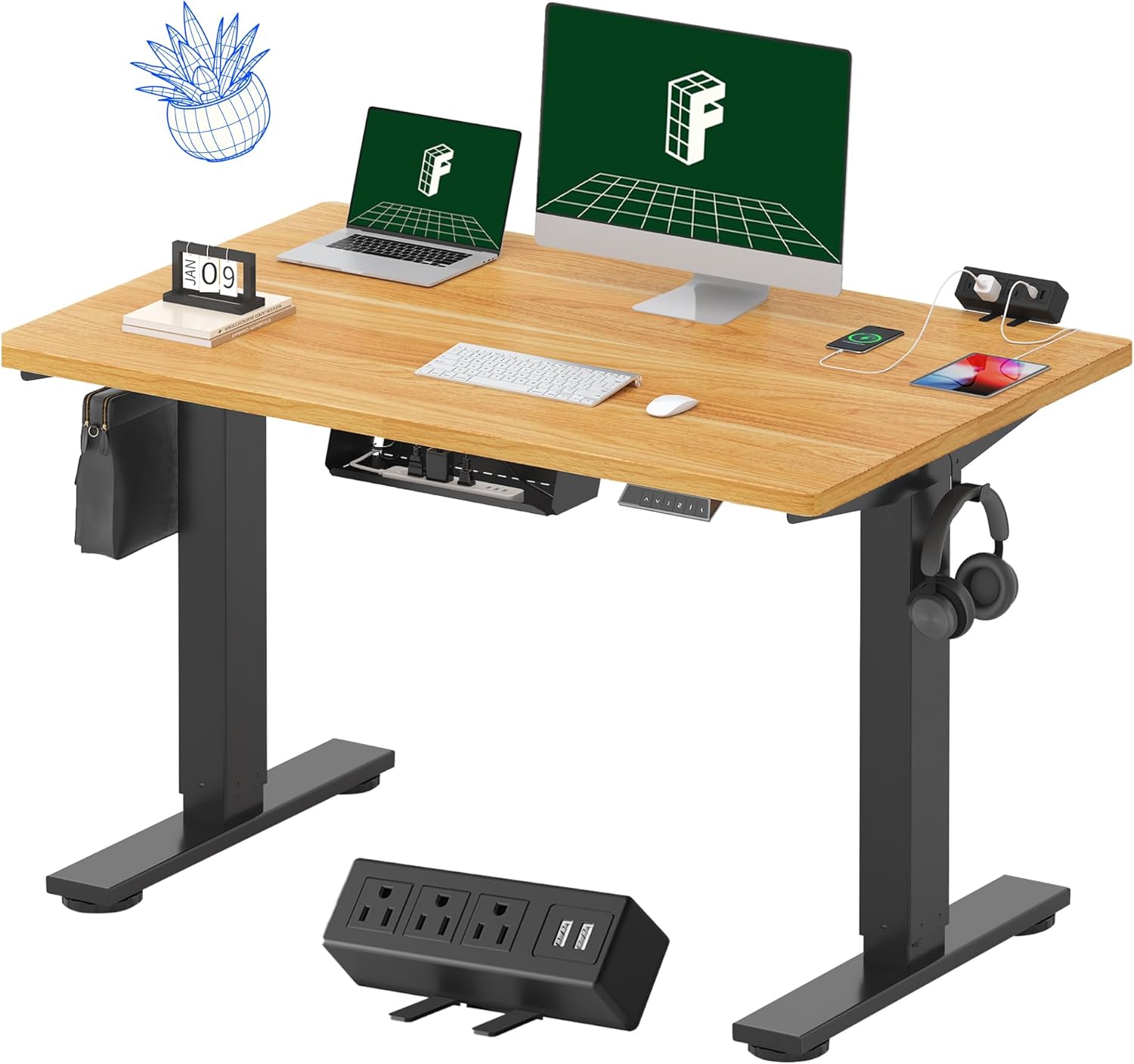
Image 1.1: FLEXISPOT EN2 Standing Desk with Maple Top and Black Frame, showcasing a typical setup with monitors, a laptop, and a clamp filtro de linha.
2. Informações de segurança
AVISO: O não cumprimento destas instruções de segurança pode resultar em ferimentos ou danos ao produto.
- Siga sempre atentamente as instruções de montagem.
- An electric drill (not included) may be required for assembly.
- Ensure the desk is properly anchored to prevent tipping.
- Não exceda a recomendação de peso máximo de 176 libras (80 kg).
- Keep the work surface clear of items that could fall and cause injury during height adjustments.
- Always unplug the desk before performing any maintenance or making adjustments to the frame or electrical components.
- Mantenha crianças e animais de estimação afastados da mesa durante o funcionamento.
3. Conteúdo da embalagem
Your FLEXISPOT EN2 Standing Desk will arrive in two separate packages, which may be shipped separately. Please ensure you have received both packages and all components before beginning assembly.

Image 3.1: Illustration showing the desk components arriving in two separate packages: one for the desktop and one for the desk frame.
Componentes incluídos:
- One-piece desktop (48" x 30" Maple Top)
- Electric height-adjustable frame (Black)
- 6-button digital controller with 4 memory presets
- Removable clamp power strip (3 AC outlets, 2 USB charging ports)
- Cable management device
- Assembly hardware and tools (excluding electric drill)
4. Configuração e montagem
Assembly typically requires two people and an electric drill (not included). Follow the detailed instructions provided in the separate assembly guide included with your product. The process involves attaching the legs to the desktop and connecting the control panel and motor.
Dicas de montagem:
- Disponha todos os componentes sobre uma superfície macia e limpa para evitar arranhões.
- Certifique-se de que todos os parafusos estejam bem apertados, mas não os aperte em excesso.
- Properly route all cables using the provided cable management solutions to avoid interference with desk movement.
Video 4.1: Official FLEXISPOT Standing Desk Frame Installation Guide. This video demonstrates the step-by-step process of assembling the desk frame and attaching it to the desktop.
5. Instruções de operação
5.1 Painel de controle digital
The desk is operated using a 6-button digital controller, typically mounted on the underside of the desktop. It features up/down arrows, an LED display for height, and four programmable memory presets.

Image 5.1: Digital control panel with LED display showing current height, up/down arrows, and four numbered memory preset buttons.
5.2 Ajuste de Altura
- Pressione e segure o Up Arrow (^) botão para levantar a mesa.
- Pressione e segure o Down Arrow (v) botão para baixar a mesa.
- The desk adjusts smoothly from 28.1 inches (71.4 cm) to 45.7 inches (116.1 cm).
- The motor operates quietly at less than 50 dB.
5.3 Configurando predefinições de memória
The controller allows you to save up to four preferred height settings for quick adjustments.
- Ajuste a mesa à altura desejada usando as setas para cima/para baixo.
- Pressione o Memória (M) button. The LED display will flash.
- Em até 3 segundos, pressione um dos botões predefinidos numerados (1, 2, 3 ou 4) para salvar a altura atual nessa predefinição.
- Para recuperar uma altura predefinida, basta pressionar o botão numerado correspondente. A mesa irá mover-se automaticamente para a posição guardada.
Video 5.2: FlexiSpot Brand Store video demonstrating the desk's height adjustment and memory preset functions.
6. Características
6.1 One-Piece Desktop
The desk features a spacious, single-piece desktop made of FSC-Certified wood. This design provides a smooth, seamless work surface, enhancing stability and aesthetics compared to multi-piece desktops.

Image 6.1: Visual comparison highlighting the smooth surface of a single-piece desktop against the visible seams of a two-piece desktop.
6.2 Removable Clamp Power Strip
A desktop-mounted power strip is included, featuring 3 AC outlets (125V/12A) and 2 USB charging ports (5V/2A). This allows for convenient charging of electronic devices directly from your desk. The power strip can be clipped to the back or side of your desk.

Image 6.2: Close-up of the removable clamp power strip, detailing its 3 AC outlets and 2 USB-A ports, and how it attaches to the desk edge.
6.3 Gerenciamento de cabos
The desk includes a cable management device to help organize and tidy up your workspace, preventing cables from dangling and interfering with desk movement.

Image 6.3: Illustration demonstrating effective cable management with an under-desk tray, showing a tidy setup compared to unmanaged cables.
7. Manutenção
- Inspecione regularmente todos os parafusos e conexões para garantir que estejam bem apertados.
- Limpe a superfície da mesa com um pano macio e seco.amp pano. Evite produtos de limpeza abrasivos que possam danificar o acabamento.
- Mantenha o motor e os componentes elétricos livres de poeira e umidade.
- Do not place hot items directly on the desktop without protective coasters.
8. Solução De Problemas
8.1 Desk Not Moving or Displaying Error Code (e.g., "r5t")
If your desk is not responding or the LED display shows an error code like "r5t", a system reset may be required.
- Unplug the desk from the power outlet.
- Aguarde pelo menos 10 a 15 segundos.
- Plug the desk back into the power outlet.
- Press and hold the "Down Arrow (v)" button until the desk reaches its lowest position and then slightly rises. This indicates a successful reset.
- Se o problema persistir, entre em contato com o suporte ao cliente.
8.2 Desk Wobbling at Higher Heights
While the desk is designed for stability, minor wobbling can occur at maximum heights. Ensure the adjustable feet on the leg bases are properly leveled to compensate for uneven flooring.
9. Especificações
| Recurso | Especificação |
|---|---|
| Marca | PONTO FLEXI |
| Modelo | EN2 |
| Material de mesa | FSC-Certified Maple Wood |
| Dimensões da área de trabalho | 48" (L) x 30" (P) |
| Espessura da área de trabalho | 1 polegadas |
| Material da estrutura | Industrial-grade Alloy Steel (Black) |
| Faixa de ajuste de altura | 28.1" a 45.7" (71.4 cm a 116.1 cm) |
| Nível de ruído do motor | < 50 dB |
| Capacidade de peso | 176 libras (80 kg) |
| Painel de controle | 6-button digital controller with 4 memory presets |
| Tomada | 3 AC outlets (125V/12A), 2 USB charging ports (5V/2A) |
| Montagem necessária | Yes (electric drill recommended) |
10. Garantia e Suporte
10.1 Informações de garantia
- Garantia de 5 anos: Covers frames, motors, and other mechanical devices.
- Garantia de 2 anos: Covers controllers, switches, and electronics.
Guarde o comprovante de compra para eventuais solicitações de garantia. A garantia cobre defeitos de materiais e de fabricação em condições normais de uso.
10.2 Suporte ao cliente
For any questions, troubleshooting assistance, or warranty claims, please contact FLEXISPOT customer support through their official website ou o revendedor onde você comprou o produto.


