1. Introdução
This manual provides instructions for the installation, operation, and troubleshooting of your ARRIS Touchstone TM804G DOCSIS 3.0 Telephone Modem. The TM804G is designed to provide high-speed data access and up to four lines of Voice over IP (VoIP) telephone service over your cable network. It features DOCSIS 3.0 technology for enhanced internet speeds and reliability.
2. Principais características
- DOCSIS 3.0 compliant for high-speed internet.
- Four (4) dedicated VoIP telephone ports.
- Supports download speeds up to 343 Mbps.
- Two independent 96MHz RF tuners.
- Ethernet connectivity for network devices.
3. Conteúdo da embalagem
Verifique se seu pacote contém os seguintes itens:
- ARRIS Touchstone TM804G Telephone Modem
- Adaptador de energia
- Cabo Ethernet
- Documentação (Guia de Início Rápido, Informações de Segurança)
Note: A backup battery is sold separately and is not included in the standard package.
4. Características Físicas
4.1 Indicadores do Painel Frontal
The front panel of the TM804G modem features several LED indicators that provide status information.

Figura 1: Frente view of the ARRIS Touchstone TM804G Telephone Modem. This image shows the modem's black casing with ventilation holes on top and a row of green LED indicator lights on the right side of the front panel.
| Indicador | Status | Descrição |
|---|---|---|
| PODER | Verde Sólido | O modem está ligado. |
| DS (downstream) | Verde Sólido | O canal a jusante está conectado. |
| EUA (upstream) | Verde Sólido | O canal a montante está conectado. |
| ON-LINE | Verde Sólido | The modem is registered and online. |
| LINK | Verde Sólido | An Ethernet device is connected. |
| TEL1-4 | Verde Sólido | Telephone line is active. |
4.2 Portas do painel traseiro
The rear panel provides all necessary connection ports for the modem.
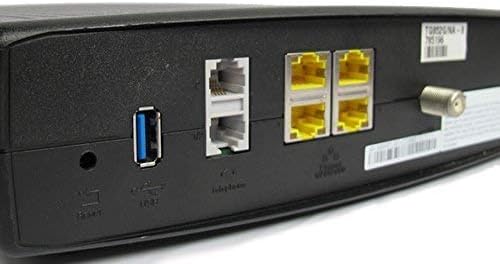
Figura 2: Traseira view of the ARRIS Touchstone TM804G Telephone Modem. This image displays the back of the modem, featuring a coaxial cable connector, four yellow Ethernet ports, two grey telephone ports (RJ-11), a USB port, a reset button, and the power input.
- COAXIAL: Connects to the cable wall outlet.
- ETHERNET (LAN): Four (4) RJ-45 ports for connecting to a computer or router.
- TEL1-4 (RJ-11): Four (4) telephone ports for connecting to telephones or a home telephone wiring system.
- USB: (Functionality may vary or be disabled by your service provider).
- REDEFINIR: Recessed button to reset the modem to factory defaults (use with caution).
- PODER: Conecta-se ao adaptador de energia.
5. Configuração e instalação
Follow these steps to install your ARRIS Touchstone TM804G modem.
- Conecte o cabo coaxial: Connect one end of a coaxial cable to the COAXIAL port on the modem and the other end to a cable wall outlet. Ensure the connection is finger-tight.
- Conecte o cabo Ethernet: Connect one end of the Ethernet cable to one of the ETHERNET ports on the modem and the other end to your computer's network port or your wireless router's WAN/Internet port.
- Conectar linhas telefônicas: If using telephone service, connect your telephone(s) or home telephone wiring to the TEL1, TEL2, TEL3, or TEL4 ports on the modem using standard RJ-11 telephone cables.
- Conecte o adaptador de energia: Connect the power adapter to the POWER port on the modem and then plug the adapter into an electrical outlet.
- Ligar: The modem will automatically power on. Observe the front panel indicator lights. The POWER, DS, US, and ONLINE lights should eventually turn solid green, indicating a successful connection to the cable network and internet. The TEL lights will illuminate when telephone lines are active.
- Ativar serviço: Contact your Internet Service Provider (ISP) to activate the modem. You will need to provide them with the MAC address and serial number, typically found on a label on the bottom or back of the modem.
Important: Do not connect the modem to a power outlet until all other connections are made.
6. Instruções de operação
Once the modem is successfully installed and activated, it operates automatically.
- Acesso à internet: Any device connected via Ethernet to the modem (or through a connected router) should have internet access once the ONLINE light is solid green.
- Serviço telefônico: If your service plan includes VoIP, connected telephones will have dial tone and function once the corresponding TEL lights are solid green.
- Status de monitoramento: Refer to the front panel LED indicators (Section 4.1) to monitor the modem's operational status.
7. Manutenção
- Limpeza: Keep the modem clean and free of dust. Use a soft, dry cloth to wipe the exterior. Do not use liquid cleaners or aerosols.
- Ventilação: Certifique-se de que o modem esteja em uma área bem ventilada para evitar superaquecimento. Não obstrua as aberturas de ventilação.
- Atualizações de firmware: As atualizações de firmware geralmente são gerenciadas automaticamente pelo seu provedor de serviços de internet. Não tente atualizar o firmware manualmente, a menos que seja instruído pelo seu provedor de internet.
- Restarting the Modem: If you experience connectivity issues, try restarting the modem by unplugging the power adapter for 10-15 seconds and then plugging it back in.
- Restauração de fábrica: The recessed RESET button on the rear panel can be used to restore factory default settings. This should only be done if instructed by your ISP, as it will erase all custom configurations. To perform a factory reset, use a paperclip to press and hold the RESET button for at least 10 seconds.
8. Solução De Problemas
If you encounter problems with your modem, refer to the following common issues and solutions.
| Problema | Possível causa | Solução |
|---|---|---|
| Sem energia | Adaptador de energia não conectado ou tomada com defeito. | Ensure power adapter is securely connected to the modem and a working electrical outlet. Check the POWER LED. |
| Sem acesso à Internet | Coaxial cable loose, modem not activated, or ISP outage. |
|
| Sem sinal de linha no telefone | Telephone cable loose, TEL light off, or service issue. |
|
| Velocidade lenta da Internet | Network congestion, old router, or ISP issue. |
|
For further assistance, contact your Internet Service Provider's technical support.
9. Especificações
| Número do modelo | TM804G |
| Padrão DOCSIS | DOCSIS 3.0 |
| Internet Download Speed | Até 343 Mbps (dependendo do provedor de internet) |
| Portas VoIP | 4 (RJ-11) |
| Portas Ethernet | 4 (RJ-45) |
| Tecnologia de Conectividade | Ethernet |
| Dimensões (C x L x A) | Aproximadamente 11.81 x 9.13 x 2.56 polegadas |
| Peso | Aproximadamente 2.16 libras |
| Provedores de Internet compatíveis | Optimum, Mediacom (and others, check with your provider) |
10. Garantia e Suporte
Este produto é oferecido como um item Amazon Renewed. Os produtos Amazon Renewed são inspecionados e testados profissionalmente para funcionar e ter a aparência de novos. Eles são elegíveis para substituição ou reembolso, conforme a Garantia Amazon Renewed, caso você não esteja satisfeito com a sua compra.
For technical support, troubleshooting, or service-related inquiries, please contact your Internet Service Provider (ISP) directly. Your ISP is responsible for the activation, configuration, and ongoing support of the modem on their network.


