1. Instruções importantes de segurança
Please read these instructions carefully before using the device and retain them for future reference. Failure to follow these instructions may result in electric shock, fire, or other hazards.
- Não exponha este aparelho à chuva ou umidade.
- Não obstrua as aberturas de ventilação. Instale de acordo com as instruções do fabricante.
- Não instale perto de fontes de calor, como radiadores, registros de calor, fogões ou outros aparelhos (incluindo amplificadores) que produzem calor.
- Proteja o cabo de alimentação de pisadelas ou apertos, especialmente nos plugues, receptáculos de conveniência e no ponto de onde eles saem do aparelho.
- Utilize somente acessórios/anexos especificados pelo fabricante.
- Desligue este aparelho durante tempestades com raios ou quando não for utilizado por longos períodos de tempo.
- Entregue todos os serviços de manutenção a pessoal de serviço qualificado. O serviço é necessário quando o aparelho foi danificado de alguma forma, como cabo de alimentação ou plugue danificado, líquido foi derramado ou objetos caíram no aparelho, o aparelho foi exposto à chuva ou umidade, não opera normalmente ou foi derrubado.
- Não abra o aparelho. Não há peças que possam ser reparadas pelo usuário em seu interior.
2. Produto acabadoview
The LONPOO Portable CD Player Boombox (Model zxg-103) is a versatile audio device offering multiple playback options including CD, FM Radio, Bluetooth, USB, and AUX input. It features a built-in rechargeable battery for portability and dual stereo speakers for clear sound.
Principais características:
- Top-loading CD player compatible with CD, CD-R, and CD-RW discs.
- Sintonizador de rádio FM integrado.
- Conectividade Bluetooth para transmissão de áudio sem fio.
- USB port for MP3/WMA playback from flash drives.
- Entrada AUX para conectar dispositivos de áudio externos.
- 3.5mm headphone jack for private listening.
- 3.5mm microphone port for external microphone input.
- Integrated rechargeable battery and AC power option.
- LCD display and intuitive control panel.
- Portable handle for easy transport.
Conteúdo da embalagem:
- LONPOO Portable CD Player Boombox (zxg-103)
- Adaptador de energia CA
- Controle remoto
- Manual do usuário (este documento)
Controls and Ports Diagram:
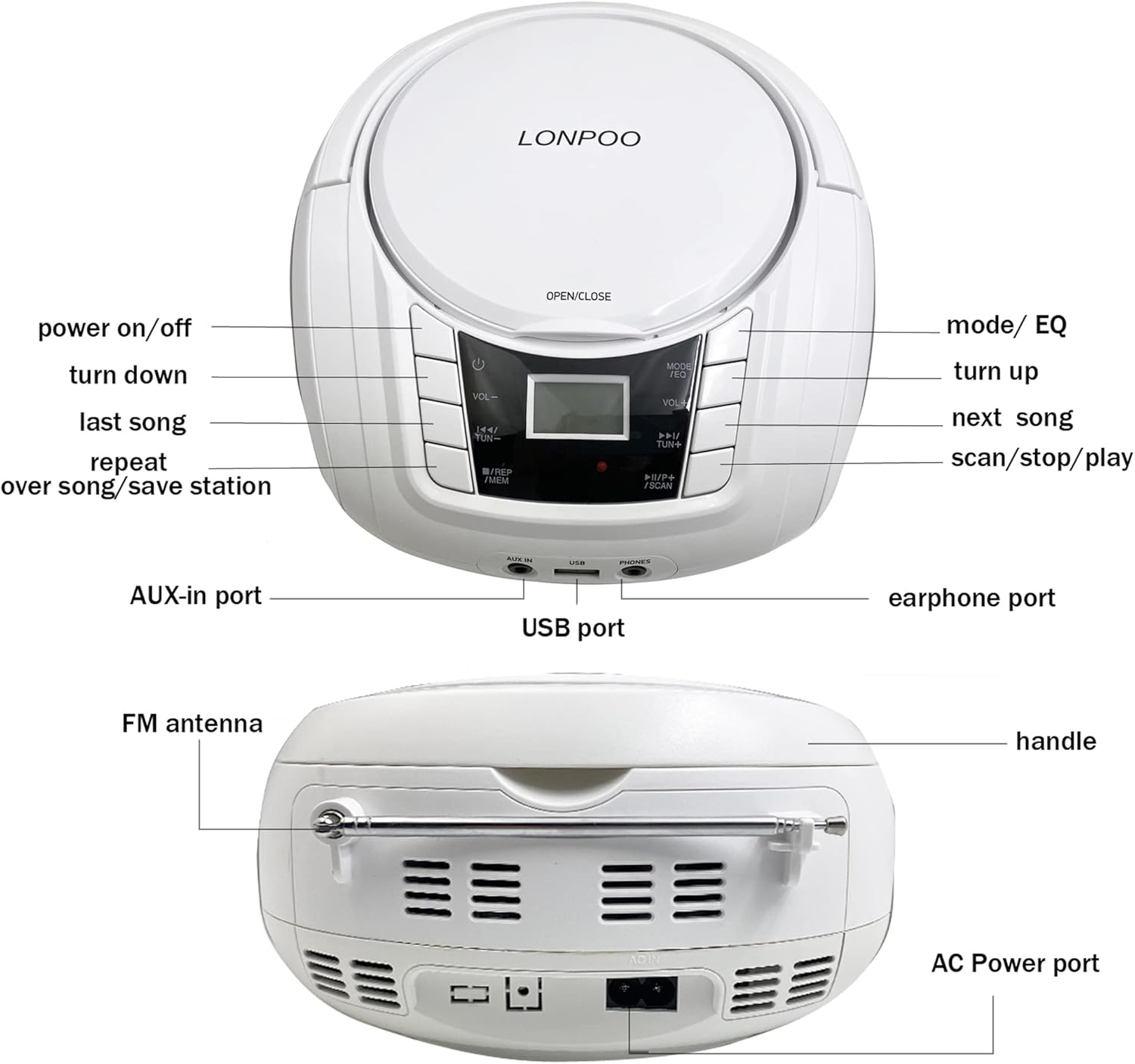
Imagem: Frente e traseira view of the LONPOO Portable CD Player Boombox, highlighting the power button, volume controls, mode/EQ button, track/tuning buttons, repeat/memory button, scan/stop/play button, AUX-in port, USB port, earphone port, FM antenna, handle, and AC power port.
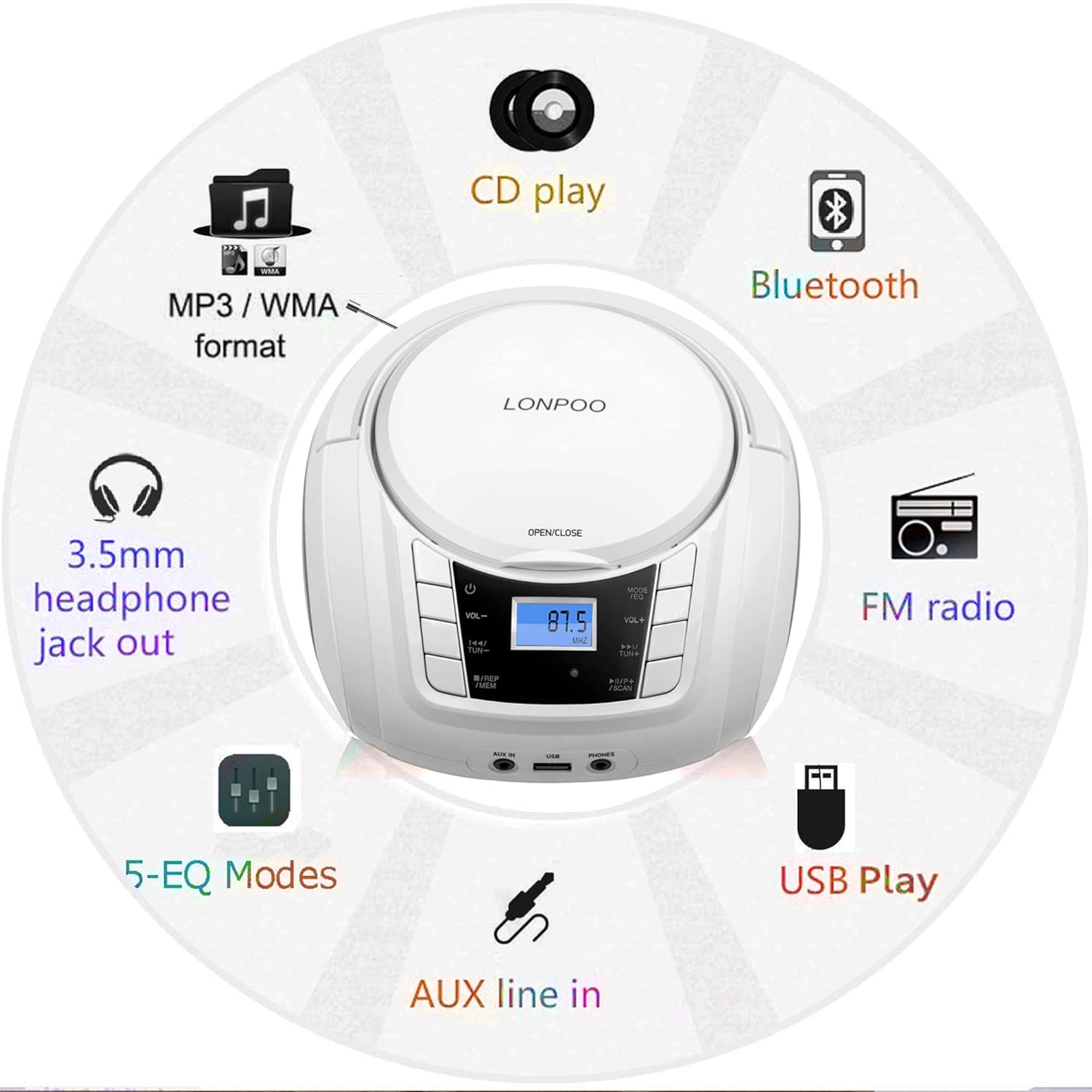
Image: A circular diagram illustrating the multiple functions of the boombox, including CD play, MP3/WMA format support, Bluetooth, FM radio, USB play, AUX line-in, 5-EQ modes, and 3.5mm headphone jack out.
3. Configuração
3.1 Ligando o dispositivo
The boombox can be powered by the included AC adapter or its internal rechargeable battery.
- Alimentação CA: Connect the AC power adapter to the AC IN port on the back of the unit and plug the other end into a standard wall outlet.
- Bateria recarregável: The internal battery charges automatically when the unit is connected to AC power. A full charge provides several hours of playback. The battery indicator on the LCD display will show charging status.
3.2 Inicialização Inicial
- Ensure the unit is connected to power or has sufficient battery charge.
- Pressione o PODER button (usually marked with a circle and a vertical line) on the front panel to turn on the device. The LCD display will illuminate.
4. Instruções de operação
4.1 Reprodução de CD
- Pressione o ABRIR/FECHAR button or lift the CD compartment lid.
- Place a CD, CD-R, or CD-RW disc onto the spindle with the label side facing up.
- Feche bem a tampa do compartimento de CDs.
- Pressione o MODE / EQ button repeatedly until 'CD' mode is selected on the LCD display.
- Pressione o REPRODUZIR/PAUSAR botão para iniciar a reprodução.
- Use o ANTERIOR PRÓXIMO botões para pular faixas.
- Pressione o REPITA Botão para repetir a faixa atual ou todas as faixas.
- Ajuste o volume usando o VOL+ e vol- botões.

Image: The LONPOO Portable CD Player Boombox with its top-loading CD compartment open, showing a CD being placed inside. This illustrates the CD loading process.
4.2 Operação de rádio FM
- Extend the FM antenna on the back of the unit for optimal reception.
- Pressione o MODE / EQ button repeatedly until 'FM' mode is selected.
- Pressione e segure o ESCANEAMENTO Botão para escanear e salvar automaticamente as estações de FM disponíveis.
- Use o ANTERIOR PRÓXIMO buttons to navigate through saved stations or manually tune.
- Ajuste o volume usando o VOL+ e vol- botões.
4.3 Conexão Bluetooth
- Pressione o MODE / EQ button repeatedly until 'BT' (Bluetooth) mode is selected. The LCD display will show 'BT' and flash, indicating it's in pairing mode.
- No seu dispositivo com Bluetooth (por exemplo, smartphone, tablet), ative o Bluetooth e procure por dispositivos disponíveis.
- Select 'LP-D03' (or similar model name) from the list of devices.
- Once paired, the 'BT' indicator on the boombox will stop flashing and remain solid. You can now stream audio from your device.
- Ajuste o volume usando o VOL+ e vol- buttons on the boombox or your connected device.

Image: The LONPOO Portable CD Player Boombox positioned next to a smartphone displaying its Bluetooth settings, showing a successful connection to 'LP-D03'. This illustrates the Bluetooth pairing process.
Reprodução USB 4.4
- Insert a USB flash drive (containing MP3/WMA audio files) na porta USB na parte frontal da unidade.
- Pressione o MODE / EQ button repeatedly until 'USB' mode is selected.
- The unit will automatically begin playing the audio files da unidade USB.
- Use o ANTERIOR PRÓXIMO botões para pular faixas.
- Ajuste o volume usando o VOL+ e vol- botões.
4.5 Entrada AUX
- Connect an external audio device (e.g., MP3 player, smartphone) to the AUX IN port on the front of the unit using a 3.5mm audio cable (not included).
- Pressione o MODE / EQ button repeatedly until 'AUX' mode is selected.
- Inicie a reprodução em seu dispositivo de áudio externo.
- Ajuste o volume usando o VOL+ e vol- botões no boombox e/ou no seu dispositivo externo.
4.6 Uso de fones de ouvido
- Conecte fones de ouvido de 3.5 mm na entrada. TELEFONES porta na parte frontal da unidade.
- O áudio será alternado automaticamente dos alto-falantes para os fones de ouvido.
- Ajuste o volume usando o VOL+ e vol- botões.

Image: A child and an adult are shown happily listening to the LONPOO Portable CD Player Boombox using wired headphones, demonstrating the private listening feature.
4.7 entrada de microfone
Connect a 3.5mm microphone (not included) to the Microfone port on the front of the unit. The microphone input will mix with the current audio source.
4.8 Modos do equalizador (EQ)
Pressione o MODE / EQ button briefly while in any playback mode to cycle through available equalizer presets (e.g., Pop, Rock, Jazz, Classic, Flat) to adjust the sound profile.
5. Manutenção
5.1 Limpeza
- Sempre desconecte a unidade da tomada antes de limpá-la.
- Use a soft, dry cloth to clean the exterior surfaces. Do not use abrasive cleaners or solvents.
- Para a lente do leitor de CD, utilize um kit de limpeza específico para lentes de CD. Não toque na lente diretamente.
5.2 Armazenamento
When not in use for extended periods, store the boombox in a cool, dry place away from direct sunlight and extreme temperatures. Ensure the unit is fully charged before storing to maintain battery health.
6. Solução De Problemas
If you encounter issues with your LONPOO Portable CD Player Boombox, please refer to the following common problems and solutions:
| Problema | Possível causa | Solução |
|---|---|---|
| Sem energia | AC adapter not connected; Battery depleted | Ensure AC adapter is securely plugged in; Charge the battery. |
| Sem som | Volume too low; Mute activated; Incorrect mode selected; Headphones connected | Increase volume; Check if muted; Select correct playback mode; Disconnect headphones if not desired. |
| O CD não está tocando/está pulando faixas | Disc dirty or scratched; Disc inserted incorrectly; Non-compatible disc format | Clean disc with a soft cloth; Reinsert disc correctly; Ensure disc is CD, CD-R, or CD-RW. |
| Estática de rádio FM | Poor reception; Antenna not extended | Extend and adjust FM antenna; Try moving the unit to a different location. |
| Bluetooth não conecta | Boombox not in pairing mode; Device Bluetooth off; Incorrect device selected | Ensure boombox is in 'BT' mode and flashing; Enable Bluetooth on your device; Select 'LP-D03' from device list. |
| USB não reproduz | Unidade USB não inserida corretamente; Incompatível file format; USB drive corrupted | Reinsira a unidade USB; Certifique-se de que... files are MP3/WMA; Try a different USB drive. |
7. Especificações
| Recurso | Especificação |
|---|---|
| Número do modelo | zxg-103 |
| Dimensões do produto (C x L x A) | 9.5 x 8.3 x 5.1 polegadas (24.1 x 21.1 x 13 cm) |
| Peso do item | 3.19 libras (1.45 kg) |
| Potência de saída | 10L x 2 (RMS) |
| Tipo de alto-falante | Estéreo |
| Tecnologia de Conectividade | Bluetooth, USB, AUX, 3.5mm MIC, 3.5mm Headphone |
| Compatibilidade de CD | CD, CD-R, CD-RW |
| USB Playback Formats | MP3, WMA |
| Fonte de energia | AC Power Adapter, Built-in Rechargeable Battery |

Image: The LONPOO Portable CD Player Boombox shown on a wooden surface with its approximate dimensions (9.3 inches length, 8.3 inches width, 4.5 inches height) clearly labeled.
8. Garantia e Suporte
This product is covered by a standard manufacturer's warranty. For specific warranty details, please refer to the documentation included with your purchase or contact LONPOO customer support.
For technical assistance, troubleshooting not covered in this manual, or warranty claims, please visit the official LONPOO webou entre em contato com o departamento de atendimento ao cliente. As informações de contato geralmente podem ser encontradas na embalagem do produto ou no site oficial da marca.


