1. Introdução
Thank you for choosing the BenQ DVD-2019 DVD Player. This manual provides essential information for the safe and efficient use of your new device. Please read it thoroughly before operating the player and retain it for future reference.
Informações importantes de segurança:
- Não exponha a unidade à chuva ou umidade.
- Não abra o casing; encaminhe todos os serviços de manutenção para pessoal qualificado.
- Garanta ventilação adequada ao redor da unidade.
- Utilize apenas a fonte de alimentação especificada para este dispositivo.
2. Conteúdo da embalagem
Por favor, verifique se todos os itens estão presentes na embalagem:
- BenQ DVD-2019 DVD Player
- Controle remoto
- Cabo AV (RCA)
- Cabo de energia
- Manual de Instruções (este documento)
3. Produto acabadoview
3.1 Painel Frontal

Figure 1: Front Panel of the DVD-2019 Player
The front panel features the disc tray, power button, play/pause, stop, and skip buttons. It also includes a USB port and an SD card slot for playing media from external storage devices.
3.2 Painel traseiro

Figure 2: Rear Panel of the DVD-2019 Player
The rear panel provides various connection ports for audio and video output, including HDMI, RCA (composite video and stereo audio), and component video outputs. The power input is also located here.
3.3 Controle Remoto
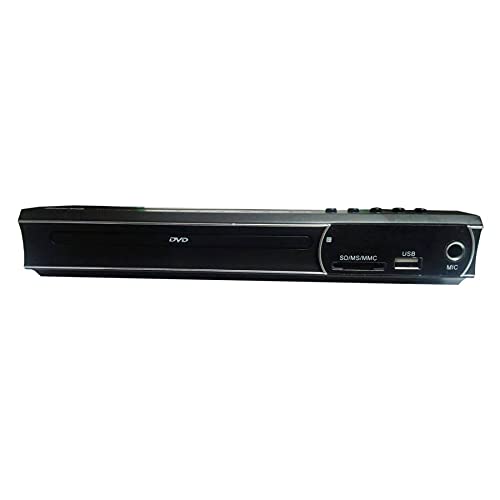
Figure 3: Remote Control for the DVD-2019 Player
The remote control allows you to operate all functions of the DVD player from a distance. It requires two AAA batteries (not included).
4. Configuração
4.1 Conectando a uma televisão
Escolha um dos seguintes métodos de conexão:
- Conexão HDMI (recomendada para melhor qualidade):
Connect one end of an HDMI cable (not included) to the HDMI OUT port on the DVD player and the other end to an HDMI IN port on your television. Select the corresponding HDMI input on your TV. - Conexão RCA:
Connect the yellow video cable to the VIDEO OUT port on the DVD player and the yellow video input on your TV. Connect the red and white audio cables to the AUDIO OUT (R/L) ports on the DVD player and the corresponding red and white audio input ports on your TV. Select the AV input on your TV.
4.2 Conexão de Energia
After connecting the video and audio cables, plug the power cable into the AC IN port on the rear of the DVD player and then into a wall outlet.
5. Instruções de operação
5.1 Reprodução básica de DVD
- Turn on your TV and the DVD player.
- Select the correct input source on your TV (e.g., HDMI 1, AV).
- Press the OPEN/CLOSE button on the front panel or remote to open the disc tray.
- Place a DVD disc gently into the tray with the label side facing up.
- Press the OPEN/CLOSE button again to close the tray. The disc will load automatically.
- Playback should begin automatically. If a menu appears, use the arrow keys and OK button on the remote to navigate.
5.2 Reprodução de cartão USB/SD
- Insert a USB flash drive into the USB port or an SD card into the SD card slot on the front panel.
- The player should automatically detect the device and display a media browser. If not, press the SOURCE or USB/CARD button on the remote.
- Use the arrow keys and OK button to navigate through your files (videos, music, photos).
- Selecione um file e pressione OK para iniciar a reprodução.
5.3 Configurações de áudio e vídeo
Access the player's setup menu by pressing the SETUP button on the remote control. Here you can adjust settings such as:
- Definições de Vídeo: Aspect ratio (4:3, 16:9), video output resolution.
- Configurações de áudio: Audio output mode (Stereo, Dolby Digital, DTS), dynamic range control.
- Configurações de idioma: Idioma do OSD, idioma do áudio, idioma da legenda.
6. Manutenção
6.1 Limpando a Unidade
- Limpe a parte externa do aparelho com um pano macio e seco.
- Não utilize produtos de limpeza líquidos ou sprays aerossóis.
- For the disc tray, use a soft, lint-free cloth to gently remove dust.
6.2 Manuseio de disco
- Always hold discs by their edges.
- Keep discs clean and free from scratches. Use a soft cloth to wipe from the center outwards.
- Armazene os discos em seus estojos quando não estiverem em uso.
7. Solução De Problemas
| Problema | Possível causa | Solução |
|---|---|---|
| Sem energia | Cabo de alimentação desconectado; tomada com defeito. | Ensure power cable is securely connected. Try a different outlet. |
| Sem imagem | Incorrect TV input selected; video cable loose or faulty. | Select the correct HDMI/AV input on your TV. Check video cable connections. |
| Sem som | Audio cables loose or faulty; TV volume muted. | Check audio cable connections. Increase TV volume and ensure it's not muted. |
| Disco não reproduz | O disco está sujo, riscado ou em formato incompatível. | Clean the disc. Try a different disc. Ensure the disc format is supported (DVD). |
| Controle remoto não funciona | As pilhas estão descarregadas ou inseridas incorretamente; existe alguma obstrução entre o controle remoto e o aparelho. | Substitua as pilhas. Verifique a polaridade correta. Remova quaisquer obstruções. |
8. Especificações
| Recurso | Detalhe |
|---|---|
| Número do modelo | DVD-2019 |
| Marca | BenQ |
| Tipo de mídia | DVD |
| Tipo de conector | HDMI, RCA |
| Tecnologia de Conectividade | HDMI, RCA, USB |
| Formatos de áudio suportados | Dolby Digital, DTS, PCM |
| Dispositivos compatíveis | Televisão |
9. Garantia e Suporte
This BenQ DVD-2019 DVD Player comes with a standard manufacturer's warranty. Please refer to the warranty card included in your package for specific terms and conditions, including the warranty period and coverage details.
For technical support, service inquiries, or to obtain replacement parts, please contact BenQ customer service through their official website or the contact information provided on your warranty documentation. Keep your purchase receipt as proof of purchase for warranty claims.


