1. Introdução
The Orbit 6-zone indoor sprinkler controller is designed to provide convenient and flexible control over your lawn or garden watering schedule. Its user-friendly interface simplifies setup and customization, offering features such as rain delay, water budgeting, and dual watering programs to meet specific irrigation needs.
This manual provides detailed instructions for the installation, operation, and maintenance of your Orbit Easy Dial Sprinkler Controller.
Principais características:
- Flexible Watering Options: Set water duration for each station between 1-240 minutes.
- Efficient Watering Schedule: Up to 8 start times per day to reduce water runoff.
- Rain Delay Feature: Pause watering for 24, 48, or 72 hours.
- Water Budgeting: Adjust run times based on seasonal changes.
- Dual Watering Programs: Independent programs for customized intervals, days of the week, or even/odd watering days.

Figura 1.1: Frente view of the Orbit Easy Dial 6-Station Indoor Sprinkler Controller, showing the LCD display, control buttons, and rotary dial.
2. Informações de segurança
Please read all safety information before installing or operating the controller. Failure to follow these instructions could result in injury or property damage.
- This controller is designed for somente para uso interno. Do not install outdoors or in areas exposed to water.
- Certifique-se de que a fonte de alimentação esteja desconectada antes de realizar qualquer fiação ou manutenção.
- All electrical connections should be made in accordance with local electrical codes.
- Não tente consertar a unidade por conta própria. Encaminhe todos os serviços de manutenção a pessoal qualificado.
3. Configuração e instalação
3.1 Montando o Controlador
Choose a suitable indoor location near a standard 120V AC electrical outlet. Avoid areas with extreme temperatures or direct sunlight.
- Marque na parede o local desejado para a montagem.
- Install two mounting screws (not included) into the wall, leaving approximately 1/8 inch (3 mm) of the screw head exposed. The screws should be spaced vertically to align with the keyhole slots on the back of the controller.
- Hang the controller on the screws.

Figura 3.1: Example of the controller mounted on a wall in an indoor setting.
3.2 Conexão do Controlador
Before wiring, ensure the power adapter is unplugged from the electrical outlet.
- Common Wire (COM): Connect the common wire from your sprinkler valves to the terminal labeled 'COM' on the controller. This is typically a white wire.
- Zone Wires (1-6): Connect each individual zone wire from your sprinkler valves to the corresponding numbered terminals (1 through 6) on the controller.
- Rain Sensor (Optional): If using a rain sensor (sold separately), connect its wires to the 'SENSOR' terminals. Ensure the rain sensor switch inside the controller is set to 'ON' if a sensor is connected. If no sensor is used, keep the switch 'OFF' and ensure the jumper wire is in place between the sensor terminals.
- Conexão de energia: Plug the included 24V AC transformer into the '24VAC' terminals on the controller. Then, plug the transformer into a standard 120V AC electrical outlet.
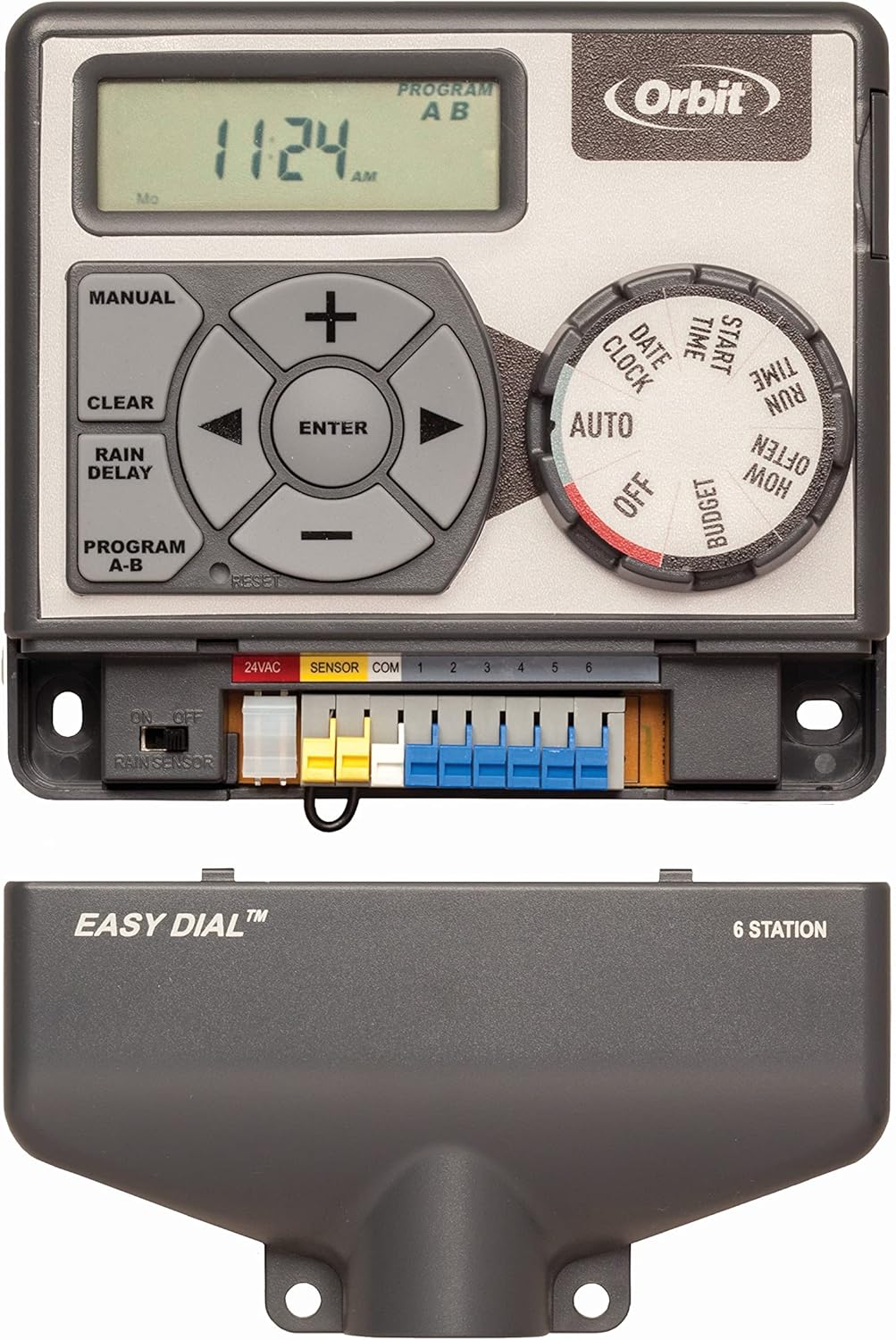
Figura 3.2: Detalhado view of the wiring terminals, showing connections for 24VAC, SENSOR, COM, and zones 1-6.
4. Instruções de operação
The Orbit Easy Dial controller features a rotary dial for selecting functions and a set of buttons for adjusting settings.

Figura 4.1: Painel de controle sobreview, highlighting the LCD display, directional buttons, and function dial.
4.1 Configurar a hora e a data atuais
- Gire o dial para DATA/RELÓGIO.
- Use o + e - buttons to set the current year, then press DIGITAR.
- Repeat for month, day, hour, and minute.
4.2 Programming Watering Schedules (Programs A & B)
The controller supports two independent programs (A and B) for different watering needs.
4.2.1 Setting Start Times
- Gire o dial para HORA DE INÍCIO.
- The display will show '1'. Use + e - to set the first start time, then press DIGITAR.
- Continue setting up to 8 start times for the current program. To skip a start time, press DIGITAR without setting a time.
- To switch between Program A and B, press the PROGRAMA AB botão.
4.2.2 Setting Run Times (How Long)
- Gire o dial para QUANTO TEMPO.
- The display will show 'STATION 1'. Use + e - to set the watering duration (1-240 minutes) for Station 1, then press DIGITAR.
- Repeat for each station (1-6).
- To switch between Program A and B, press the PROGRAMA AB botão.
4.2.3 Setting Watering Days (How Often)
- Gire o dial para COM QUE FREQUÊNCIA.
- Você pode escolher entre três opções:
- Days of the Week: Use o SETA PARA A DIREITA button to move to the desired day, then press DIGITAR to select/deselect.
- Intervalos: Usar + e - to set the interval (e.g., every 2 days).
- Even/Odd Days: Select 'EVEN' or 'ODD' for watering on even or odd calendar days.
- To switch between Program A and B, press the PROGRAMA AB botão.
4.3 Rain Delay Feature
The rain delay feature allows you to temporarily suspend your watering schedule for a set period.
- Gire o dial para AUTO.
- Pressione o ATRASO POR CHUVA botão.
- Use o + e - buttons to select a delay of 24, 48, or 72 hours.
- The controller will automatically resume the schedule after the delay period. To cancel, press CLARO.
4.4 Water Budgeting
The water budgeting feature allows you to adjust all programmed run times by a percentage, useful for seasonal adjustments without reprogramming each station.
- Gire o dial para ORÇAMENTO.
- Use o + e - buttons to adjust the percentage (e.g., 50% to reduce watering by half, 150% to increase by 50%).
- The change applies to all active programs and stations.
4.5 Operação Manual
To manually water a specific station or all stations:
- Gire o dial para AUTO.
- Pressione o MANUAL botão.
- Use o SETA PARA A DIREITA or SETA PARA A ESQUERDA buttons to select the desired station or 'ALL' for all stations.
- Imprensa DIGITAR.
- Usar + e - to set the manual run time.
- Imprensa DIGITAR para iniciar a rega manual.
- Para interromper a rega manual, pressione CLARO.
4.6 Turning Off the Controller
To stop all automatic watering, turn the dial to DESLIGADO. The controller will retain its programming.
5. Manutenção
- Mantenha o controlador limpo e livre de poeira e detritos. Use um pano macio e seco para a limpeza.
- Ensure the controller is not exposed to moisture or direct water spray.
- Verifique periodicamente as conexões da fiação para garantir que estejam seguras.
- During winter months in cold climates, it is recommended to disconnect the controller and store it indoors to prevent damage from freezing temperatures.
6. Solução De Problemas
| Problema | Possível causa | Solução |
|---|---|---|
| Display is blank or no power. | No power to the outlet; faulty transformer; loose wiring. | Check outlet with another device. Ensure transformer is securely plugged into controller and outlet. Verify 24VAC wiring. |
| Sprinklers do not turn on. | Controller is OFF; rain delay active; wiring issue; valve problem. | Turn dial to AUTO. Check if rain delay is active. Verify common and zone wiring. Manually test valves at the valve box. |
| Only some zones water. | Loose zone wire; faulty valve for specific zone. | Check wiring for the non-working zones. Test the specific valve manually. |
| Controller waters at wrong times. | Incorrect time/date; incorrect program settings. | Verify current time and date. Review start times, run times, and watering days for all programs (A and B). |
| Watering duration is too short/long. | Incorrect run times; water budgeting active. | Check run times for each station. Verify water budgeting percentage. |
7. Especificações
| Recurso | Detalhe |
|---|---|
| Número do modelo | 28966 |
| Número de Zonas | 6 |
| Entrada de energia | 120V AC, 60Hz |
| Potência de saída | 24 V CA |
| Temperatura de operação | 68 graus Fahrenheit (20 graus Celsius) |
| Dimensões do produto | 8 x 6.75 x 2 polegadas (20.3 x 17.1 x 5.1 cm) |
| Peso do item | 1.3 libras (0.59 kg) |
| Tipo de exibição | LCD |
| UPC | 046878289666 |
8. Garantia e Suporte
For specific warranty information and detailed support, please refer to the official Orbit webou entre em contato diretamente com o serviço de atendimento ao cliente da Orbit. Guarde o comprovante de compra como prova para eventuais solicitações de garantia.
Orbit is a leading provider of watering solutions, committed to delivering quality products and customer satisfaction.
You can visit the official Orbit store for more information and product support: Loja Orbit na Amazon


