1. Introdução
This manual provides essential instructions for setting up, operating, maintaining, and troubleshooting your realme DIZO Star 300 feature phone. Please read this manual carefully to ensure proper use and to maximize the lifespan of your device.
2. Produto acabadoview
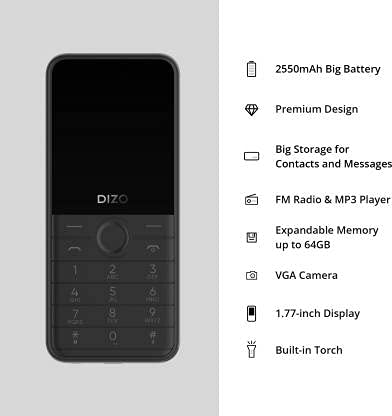
The DIZO Star 300 is a basic mobile phone designed for essential communication and entertainment. It features a compact design, a long-lasting battery, and several useful functions.
Principais características:
- Tela de 1.8 polegadas
- Bateria de 2550 mAh
- 32 MB de RAM
- Expandable Memory up to 64 GB
- Human Interface Input: Keypad
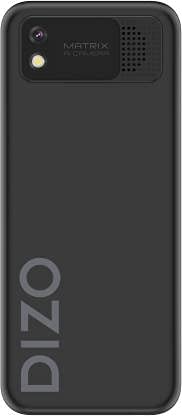
- VGA Rear Camera
- FM Radio & MP3 Player
- Tocha embutida
- Large Storage for Contacts and Messages
Produto Views:

Vídeos do produto:
DIZO Star 300 Overview
Este vídeo oferece uma visão geral.view of the DIZO Star 300 phone, highlighting its design and key features such as the 1.8-inch display, 2550 mAh battery, 32 MB RAM, and multimedia capabilities.
DIZO Star 300 User Interaction
This video demonstrates basic user interaction with the DIZO Star 300, including navigating menus and using the keypad.
3. Configuração
3.1 Installing the SIM Card and Memory Card
- Remova cuidadosamente a tampa traseira do telefone.
- If the battery is installed, remove it by gently lifting it from the designated slot.
- Insert your SIM card(s) into the SIM card slot(s) with the gold contacts facing down. Ensure they are securely seated.
- If using an external memory card (up to 64GB), insert it into the microSD card slot.
- Insert the battery, aligning the contacts correctly.
- Recoloque a tampa traseira até ouvir um clique.
3.2 Carregando a bateria
- Conecte o carregador à porta de carregamento do seu telefone.
- Conecte o carregador a uma tomada elétrica.
- O indicador de bateria na tela mostrará o status do carregamento.
- Once fully charged, disconnect the charger from the phone and the power outlet.
3.3 Ligar/Desligar
- Para ligar: Pressione e mantenha pressionado o botão Liga/Desliga/Encerrar chamada até que a tela acenda.
- To power off: Press and hold the Power/End Call button until the power-off options appear, then select 'Power off'.
4. Instruções de operação
4.1 Navegação básica
- Use the navigation keys (up, down, left, right) to move through menus.
- Press the center key (OK/Select) to confirm a selection.
- Press the 'Back' or 'Clear' key to return to the previous screen or delete characters.
4.2 Fazendo e recebendo chamadas
- To make a call: Enter the phone number using the keypad and press the Call button (green receiver icon).
- To answer a call: Press the Call button when the phone rings.
- To end a call: Press the End Call button (red receiver icon).
4.3 Mensagens
- Navigate to the 'Messaging' menu.
- Selecione 'Escrever mensagem' para compor um novo SMS.
- Digite o número do destinatário ou selecione-o em seus contatos.
- Digite sua mensagem usando o teclado.
- Pressione 'Enviar' para transmitir a mensagem.
4.4 FM Radio and MP3 Player
- To use FM Radio: Connect earphones (acting as an antenna) and navigate to the 'FM Radio' application.
- To use MP3 Player: Ensure you have MP3 files stored on your memory card. Navigate to the 'MP3 Player' application to browse and play your music.
4.5 Utilizando a câmera
- Acesse o aplicativo 'Câmera'.
- Enquadre sua foto usando a tela.
- Press the center key to capture a photo.
4.6 Built-in Torch
- The torch function can typically be activated or deactivated through the phone's menu or by a long press on a specific key (refer to on-screen prompts).
5. Manutenção
- Limpeza: Use um pano macio e seco para limpar a superfície do telefone. Evite usar produtos de limpeza líquidos ou materiais abrasivos.
- Cuidados com a bateria: Do not expose the battery to extreme temperatures. Avoid overcharging or completely draining the battery frequently to prolong its life.
- Armazenar: Guarde o telefone em local fresco e seco, longe da luz solar direta e da umidade, quando não estiver em uso por longos períodos.
- Atualizações de software: Periodically check for any available software updates to ensure optimal performance and security.
6. Solução De Problemas
If you encounter issues with your DIZO Star 300, refer to the following common solutions:
- O telefone não liga: Ensure the battery is charged and correctly inserted. Try connecting the charger to see if it powers on.
- Sem sinal de rede: Check if the SIM card is properly inserted. Ensure you are in an area with network coverage.
- A bateria não carrega: Verify the charger is working and properly connected to both the phone and the power outlet. Check for any damage to the charging cable or port.
- Teclado não responde: Reinicie o telefone. Se o problema persistir, entre em contato com o suporte ao cliente.
- Problemas de som: Check volume settings. Ensure the speaker is not obstructed.
For issues not covered here, please contact DIZO customer support.
7. Especificações
| Recurso | Detalhe |
|---|---|
| Nome do modelo | Estrela 300 |
| Marca | eu de verdade |
| Fabricante | DIZO |
| Cor | Preto |
| Tamanho da tela | 1.8 polegadas |
| Capacidade da bateria | 2550 mAh |
| BATER | 32 MB |
| Memória expansível | Até 64 GB |
| Entrada de Interface Humana | Teclado |
| Câmera | VGA Rear Camera |
| Características | FM Radio, MP3 Player, Built-in Torch |
| Peso do item | 220 g |
| ASIN | B099MXZ3MM |
| Data da primeira disponibilidade | 16 de julho de 2021 |
8. Garantia e Suporte
The realme DIZO Star 300 is manufactured by DIZO. For warranty information, service, or technical support, please refer to the warranty card included with your product or visit the official DIZO or realme support website. Guarde o recibo de compra como comprovante para solicitações de garantia.