1. Terminadoview
The MUSE M-109 DAB+ is a compact and portable digital radio alarm clock designed for versatile use. It offers both DAB+ and FM radio reception, ensuring access to a wide range of stations. Equipped with an intuitive LCD display and various functions like dual alarms, snooze, and sleep timer, it serves as an ideal companion for your home, office, or on the go.

Image: The MUSE M-109 DAB+ Portable Radio Alarm Clock, showcasingraças ao seu design compacto e controles.
2. Configuração
2.1 Ligando o dispositivo
The M-109 DAB+ can be powered in two ways:
- Alimentação CA: Connect the supplied AC adapter to the DC jack on the unit and plug it into a standard 100-240V ~ 50/60Hz wall outlet.
- Potência da bateria: For portable use, insert 4 x 1.5V AA/R6/LR6/UM3 batteries (not included) into the battery compartment located on the back of the unit. Ensure correct polarity.
2.2 Antena
For optimal radio reception, fully extend the telescopic antenna. Adjust its position to achieve the clearest signal for both DAB+ and FM broadcasts.
2.3 Initial Scan
Upon first power-on or after a factory reset, the unit may automatically perform a scan for available DAB+ and FM stations. Allow this process to complete. The radio will store found stations in its memory.

Image: The MUSE M-109 DB Portable Radio Alarm Clock, highlighting its model designation.
3. Instruções de operação
3.1 Operação básica
- Ligar/desligar: Pressione o PODER botão para ligar ou desligar a unidade.
- Seleção de fonte: Pressione o FONTE button to switch between DAB+ and FM radio modes.
- Controle de volume: Gire o VOLUME knob (or use dedicated volume buttons if present) to adjust the sound level.
3.2 Radio Functions
- Tuning: In FM or DAB+ mode, use the ESCANEAMENTO button for automatic station search. For manual tuning, use the SINTONIZAR +/- botões.
- Estações predefinidas: The unit supports 60 preset stations (30 FM + 30 DAB). To save a station, tune to the desired frequency, then press and hold the PREDEFINIDO botão. Use o SELECIONAR botão ou SINTONIZAR +/- buttons to choose a preset number, then press SELECIONAR Para confirmar. Para recuperar uma predefinição, pressione rapidamente. PREDEFINIDO e usar o SELECIONAR knob to choose.
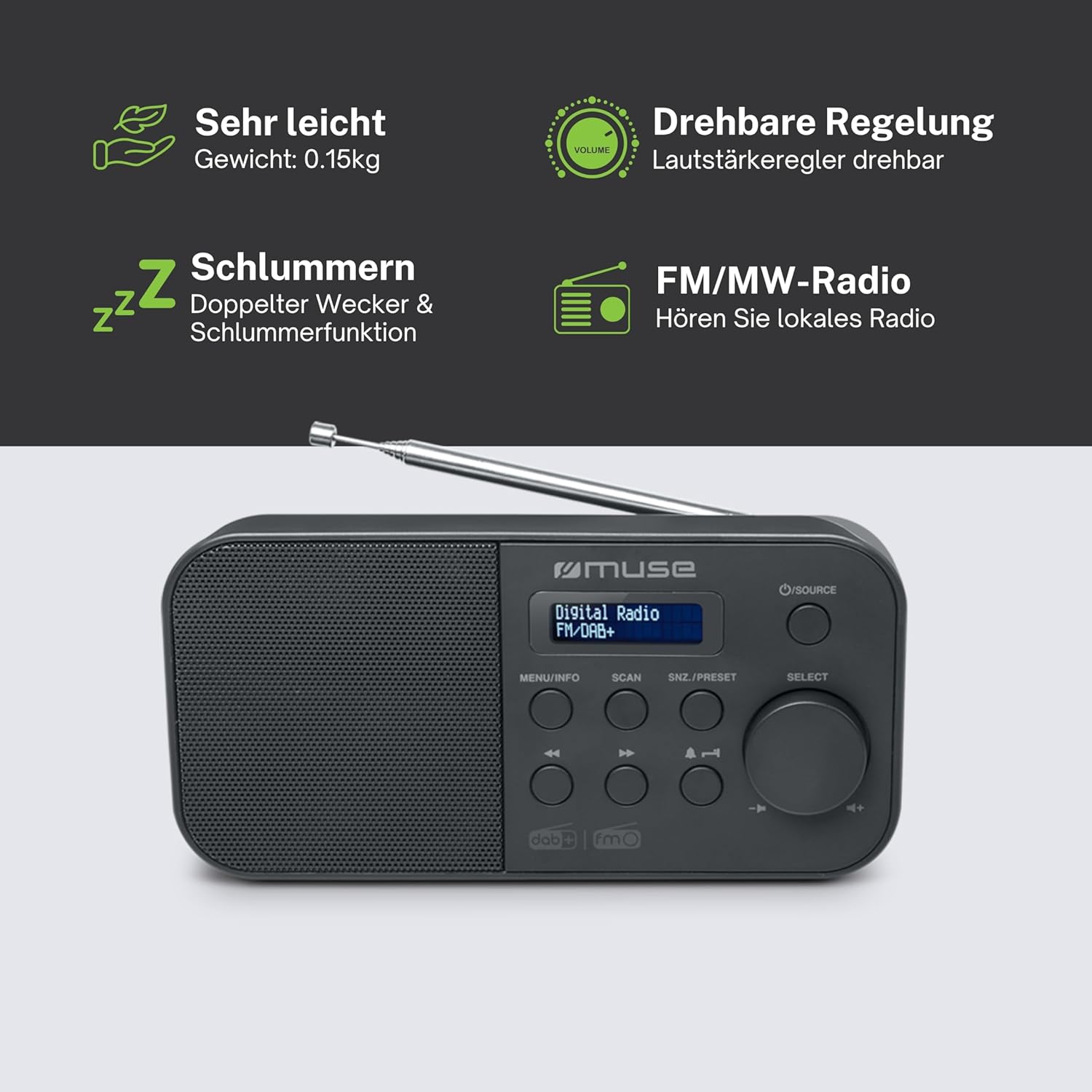
Image: Key features of the MUSE M-109 DAB+ radio, including lightweight design, rotary volume control, snooze, and FM/MW radio capabilities.
3.3 Funções do despertador
- Configurar alarmes duplos: Acesse as configurações do alarme através do MENU / INFO button. Follow the on-screen prompts to set Alarm 1 and Alarm 2, including wake time, alarm source (buzzer/radio), and volume.
- Função soneca: Quando o alarme tocar, pressione o SNZ/PRESET button to activate snooze. The alarm will temporarily stop and sound again after a set interval.
- Despertador: Para definir um temporizador, pressione o botão DORMIR button repeatedly to cycle through available sleep times (e.g., 15, 30, 60, 90 minutes). The radio will automatically turn off after the selected duration.
3.4 Conexões
- Phone Jack (AUX): Connect external audio devices like smartphones or MP3 players to the unit using a 3.5mm audio cable (not included) via the AUX input. Select the AUX source to play audio from the connected device.
- Conector CC: For connecting the provided AC power adapter.

Image: Detailed functions of the MUSE M-109 DAB+ radio, including 30 FM and 30 DAB+ presets, dot matrix LCD, PLL radio, sleep, alarm, wake to, snooze, DC jack, phones jack, AC/DC, and AC adaptor.
4. Manutenção
To ensure the longevity and optimal performance of your MUSE M-109 DAB+ radio, follow these maintenance guidelines:
- Limpeza: Limpe a unidade com um pano macio e seco. Não utilize produtos de limpeza abrasivos, ceras ou solventes, pois podem danificar o acabamento.
- Substituição da bateria: If using battery power, replace all four AA batteries when the low battery indicator appears or when the unit's performance degrades. Do not mix old and new batteries or different types of batteries. Remove batteries if the unit will not be used for an extended period.
- Armazenar: Guarde o aparelho em local fresco e seco, longe da luz solar direta e de temperaturas extremas.
5. Solução De Problemas
| Problema | Possível causa | Solução |
|---|---|---|
| A unidade não liga. | Sem fonte de alimentação; pilhas descarregadas ou inseridas incorretamente. | Check AC adapter connection. If using batteries, replace them and ensure correct polarity. |
| Poor radio reception (static, no stations). | Antena não estendida; área de sinal fraco; interferência. | Fully extend and adjust the telescopic antenna. Try moving the unit to a different location. Avoid placing near other electronic devices that may cause interference. Perform a new auto-scan. |
| O alarme não dispara. | Alarm not set or deactivated; alarm volume too low. | Verify alarm settings (time, activation, source). Increase alarm volume. |
| A tela está escura ou ilegível. | Dimmer setting; low battery. | Check if there is a dimmer function and adjust it. Replace batteries if running on battery power. |
6. Especificações
| Recurso | Detalhe |
|---|---|
| Número do modelo | M-109 DAB+ portable Radiowecker |
| Sintonizador | DAB+, FM PLL Radio |
| Mostrar | Full Dot Matrix LCD with Backlight |
| Estações predefinidas | 60 (30 FM + 30 DAB) |
| Funções | Dual Alarm, Snooze, Sleep Timer, Auto Scan, Manual Scan |
| Conectividade | Phone Jack (AUX), DC Jack |
| Fonte de energia | AC: 100-240V ~ 50/60Hz; DC: 4 x 1.5V AA/R6/LR6/UM3 batteries (not included) |
| Dimensões (C x L x A) | 18 cm x 5.3 cm x 9 cm (aproximadamente 7.09 x 2.09 x 3.54 polegadas) |
| Peso líquido | 0.282 kg (aprox. 0.62 lbs) |
| Componentes incluídos | AC Adapter, User Manual |
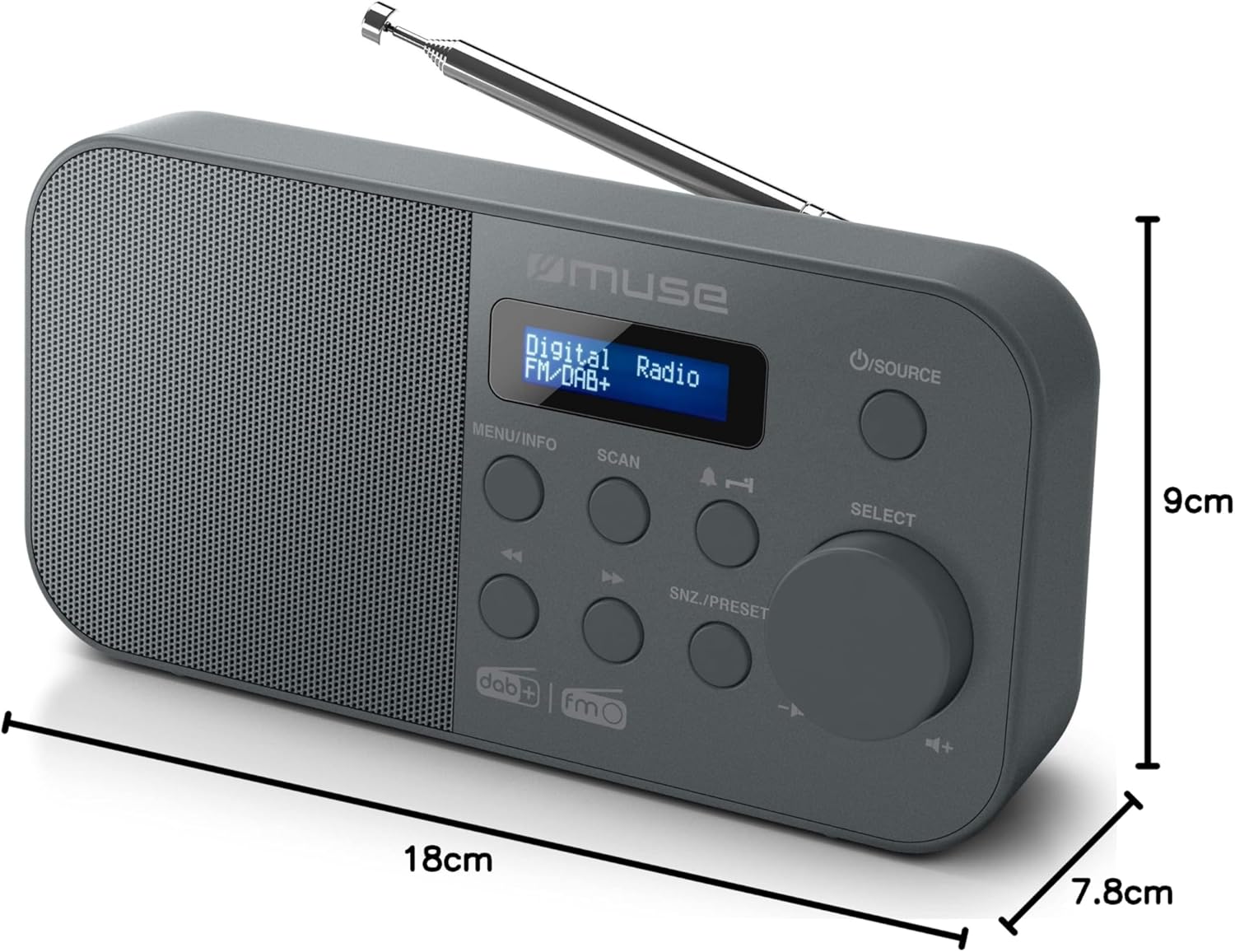
Image: Dimensions of the MUSE M-109 DAB+ Portable Radio Alarm Clock, showing its compact size.
7. Garantia e Suporte
This product is covered by a manufacturer's warranty. Please refer to the warranty information provided in the packaging or contact your retailer for details regarding warranty terms and conditions.
For technical support or inquiries, please visit the official MUSE webou entre em contato com o departamento de atendimento ao cliente. Guarde o comprovante de compra como prova para eventuais solicitações de garantia.


