1. Introdução
The Sonoro Easy is a compact and portable digital radio designed to provide powerful sound for various occasions. It features FM, DAB+, and Bluetooth connectivity, along with an AUX input for external devices. Its small footprint allows for easy placement in any room, and the intuitive controls ensure straightforward operation. The integrated LED night light and USB charging port add to its versatility, making it an ideal companion for your bedroom, kitchen, or on the go.
2. Configuração
2.1 Desembalagem
Carefully remove the Sonoro Easy radio from its packaging. Ensure all components are present:
- Sonoro Easy Digital Radio
- Adaptador de energia
- Manual do usuário (este documento)
2.2 Ligando
The Sonoro Easy can be powered via the included mains adapter or by batteries for portable use.
Principal fonte de energia:
- Connect the power adapter to the "12V - 2.5A" DC input port on the rear of the radio.
- Ligue o adaptador de energia a uma tomada elétrica adequada.
- Pressione o Poder button on the front panel to turn on the device.
Potência da bateria:
The radio supports alkaline or NiMH rechargeable batteries (not included). The battery compartment is located on the bottom of the unit.
- Abra a tampa do compartimento da bateria.
- Insira as baterias necessárias, garantindo a polaridade correta.
- Feche bem a tampa do compartimento da bateria.
- Pressione o Poder botão para ligar o dispositivo.

Figure 1: Rear panel connections including power input and antenna.
2.3 Initial Setup and Antenna
Upon first power-on, the radio may perform an initial scan for DAB+ stations. Extend the telescopic antenna for optimal reception for both FM and DAB+ radio.

Figure 2: Front display and controls of the Sonoro Easy radio.
3. Instruções de operação
3.1 Controles Básicos
The Sonoro Easy features intuitive controls located on the top and front panels.
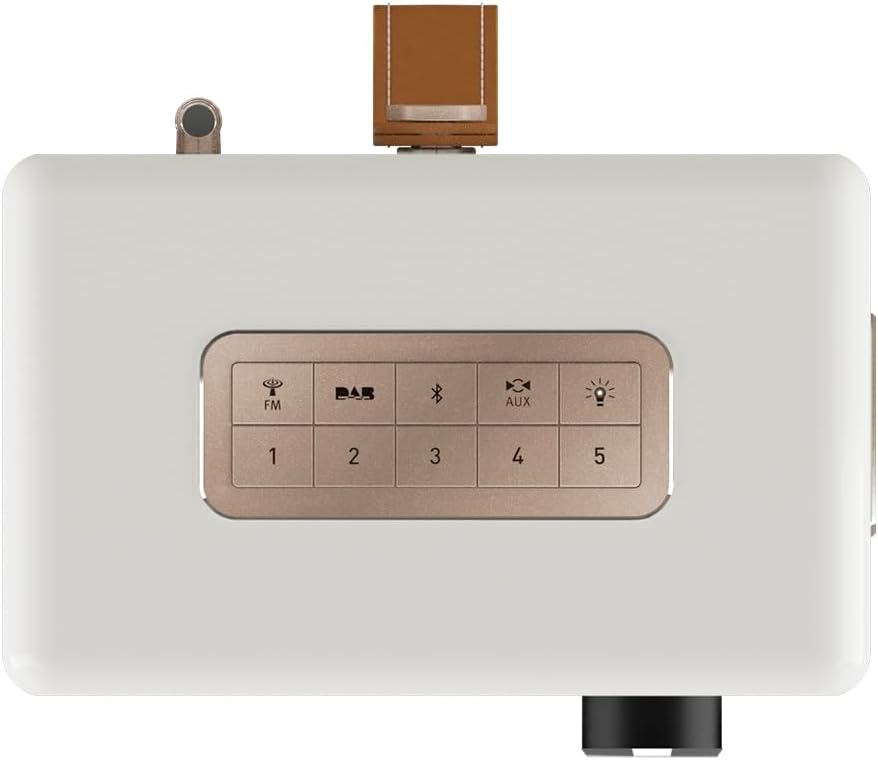
Figure 3: Top panel controls including preset and function buttons.
- Botão de energia: Liga ou desliga o rádio.
- Botão rotativo: Utilizado para controle de volume, navegação em menus e seleção.
- Botões predefinidos (1-5): Store and recall your favorite radio stations.
- Function Buttons (FM, DAB, Bluetooth, AUX, Night Light): Selecione o modo de operação desejado.
3.2 Radio Modes (DAB+ / FM)
Rádio DAB+:
- Pressione o DAB button to enter DAB+ mode.
- The radio will automatically scan for available stations.
- Use the rotary knob to scroll through the station list and press to select.
- Para salvar uma estação como predefinida, pressione e segure um dos botões. Botões predefinidos (1-5) until the display confirms.
Rádio FM:
- Pressione o FM botão para entrar no modo FM.
- Use the rotary knob to manually tune to a frequency or press and hold to auto-scan for the next available station.
- Para salvar uma estação como predefinida, pressione e segure um dos botões. Botões predefinidos (1-5) until the display confirms.
3.3 Conectividade Bluetooth
- Pressione o Bluetooth button to activate Bluetooth pairing mode. The display will show "Pairing".
- On your mobile device, enable Bluetooth and search for "Sonoro Easy".
- Select "Sonoro Easy" from the list of available devices to connect.
- Uma vez conectado, você pode transmitir áudio do seu dispositivo para o rádio.
3.4 Entrada AUX
- Connect an external audio device (e.g., MP3 player) to the "AUX IN" port on the rear of the radio using a 3.5mm audio cable (not included).
- Pressione o AUX button to select AUX input mode.
- Controle a reprodução do seu dispositivo externo.
3.5 Despertador e Temporizador de Sono
The Sonoro Easy features a dual alarm function and a sleep timer.
- Configuração de alarmes: Access the alarm settings through the menu (usually by pressing the rotary knob and navigating). Follow on-screen prompts to set alarm time, source (buzzer, FM, DAB+), and volume.
- Despertador: The sleep timer allows the radio to turn off automatically after a set period. This function is typically accessed via the menu.
- Função soneca: When an alarm sounds, pressing the rotary knob or a designated snooze button will temporarily pause the alarm.
3.6 Night Light and USB Charging
- Luz noturna: Pressione o Luz noturna button (often represented by a light bulb icon) to activate the integrated LED night light on the rear of the unit. This provides subtle background illumination.
- Carregamento USB: The USB port (5V - 2.1A) on the side of the radio can be used to charge compatible smartphones or other small devices. Connect your device using its charging cable.
4. Manutenção
4.1 Limpeza
To maintain the appearance of your Sonoro Easy radio:
- Certifique-se de que o dispositivo esteja desligado e desconectado antes de limpar.
- Use um pano macio, seco e sem fiapos para limpar as superfícies.
- Para manchas persistentes, ligeiramente dampUmedeça o pano com água. Evite produtos de limpeza abrasivos, solventes ou sprays químicos.
4.2 Armazenamento
When not in use for extended periods, store the radio in a cool, dry place away from direct sunlight and extreme temperatures. If using batteries, remove them to prevent leakage.
5. Solução De Problemas
| Problema | Possível causa | Solução |
|---|---|---|
| Sem energia / O rádio não liga. | Power adapter not connected or faulty. Batteries depleted or incorrectly inserted. | Check power adapter connection and wall outlet. Replace or recharge batteries, ensuring correct polarity. |
| Poor radio reception (DAB+ / FM). | Antenna not extended. Weak signal in the area. Interference from other electronics. | Estenda completamente a antena telescópica. Tente reposicionar o rádio. Afaste-se de outros aparelhos eletrônicos. |
| O dispositivo Bluetooth não consegue conectar. | Radio not in pairing mode. Device too far away. Bluetooth disabled on source device. | Ensure radio is in Bluetooth pairing mode. Move device closer to the radio. Enable Bluetooth on your source device. |
| Sem som na entrada AUX. | AUX cable not connected properly. Radio not in AUX mode. Volume too low on radio or source device. | Check AUX cable connection. Select AUX mode on the radio. Increase volume on both the radio and the external device. |
| A tela está muito brilhante ou muito escura. | Display brightness setting needs adjustment. | Adjust display brightness through the radio's menu settings. |
6. Especificações
| Recurso | Detalhe |
|---|---|
| Marca | Sonoro |
| Número do modelo | 88f59bc4-6f28-4e95-95de-ba49a597f237 |
| Cor | Fosco Branco |
| Tecnologia de ajuste | DAB+,FM |
| Conectividade | Bluetooth, AUX In, USB (charging) |
| Características especiais | Portable, Dual Alarm, Sleep Timer, Snooze, Dimmable Display, LED Night Light, USB Charging Port |
| Fonte de energia | Mains (12V - 2.5A), Battery (Alkaline or NiMH, not included) |
| Saída USB | 5V - 2.1A (for charging external devices) |
| Dimensões (C x L x A) | 18.6 cm x 15.6 cm x 11.8 cm |
| Palestrante | 3" Full-range speaker with Bass Reflex tube |
| Material | Hand-polished wooden cabinet |
7. Garantia e suporte
7.1 Garantia do Produto
The Sonoro Easy Digital Radio comes with a Garantia do fabricante de 2 anos A garantia é válida a partir da data da compra e cobre defeitos de materiais e de fabricação sob uso normal. Guarde o comprovante de compra para eventuais solicitações de garantia.
A garantia não cobre:
- Danos causados por acidente, abuso, uso indevido, inundação, incêndio, terremoto ou outras causas externas.
- Danos causados pela utilização do produto fora das finalidades permitidas ou previstas neste manual.
- Damage caused by service performed by anyone who is not an authorized representative of Sonoro.
- Products or parts that have been modified to alter functionality or capability without the written permission of Sonoro.
7.2 Suporte ao cliente
For technical assistance, warranty claims, or further information, please contact Sonoro customer support. Contact details can typically be found on the official Sonoro website ou na embalagem do produto.
Please visit the official Sonoro webAcesse o site para obter as informações de suporte mais atualizadas e as opções de contato.


