Introdução
This manual provides detailed instructions for the installation, operation, and maintenance of your Thermalright AXP-90 X53 Low Profile CPU Air Cooler. Please read this manual thoroughly before installation and use to ensure proper functionality and longevity of the product. The AXP-90 X53 is designed for compact systems requiring efficient cooling within a limited space.
Principais características
- Design compacto: Premium-quality low-profile CPU cooler with a total height of 53mm, ideal for small form factor builds.
- Compatibilidade ampla: Supports Intel sockets 115X/1200 and AMD AM4 platforms.
- Dissipação de calor aprimorada: Features 4x6mm heat pipes for efficient thermal transfer.
- Operação silenciosa: Equipped with a 90mm TL-9015 PWM fan, designed for low noise levels (≤22.4dBA).
- Construção robusta: All-metal platform with a backplate fastener and secondary reflow soldering process for durability and reliable contact.
Configuração e instalação
A instalação correta é crucial para um desempenho de resfriamento ideal. Siga estas etapas cuidadosamente.
Vídeo: AXP90 X53 Air Cooler Series Installation Tutorial. This video demonstrates the complete installation process for Intel 115X/1200 and AMD AM4 sockets.
- Prepare the Cooler:
Remove the protective plastic sticker from the cooler's base before applying thermal compound. Ensure the heat pipes are clean and free of debris.
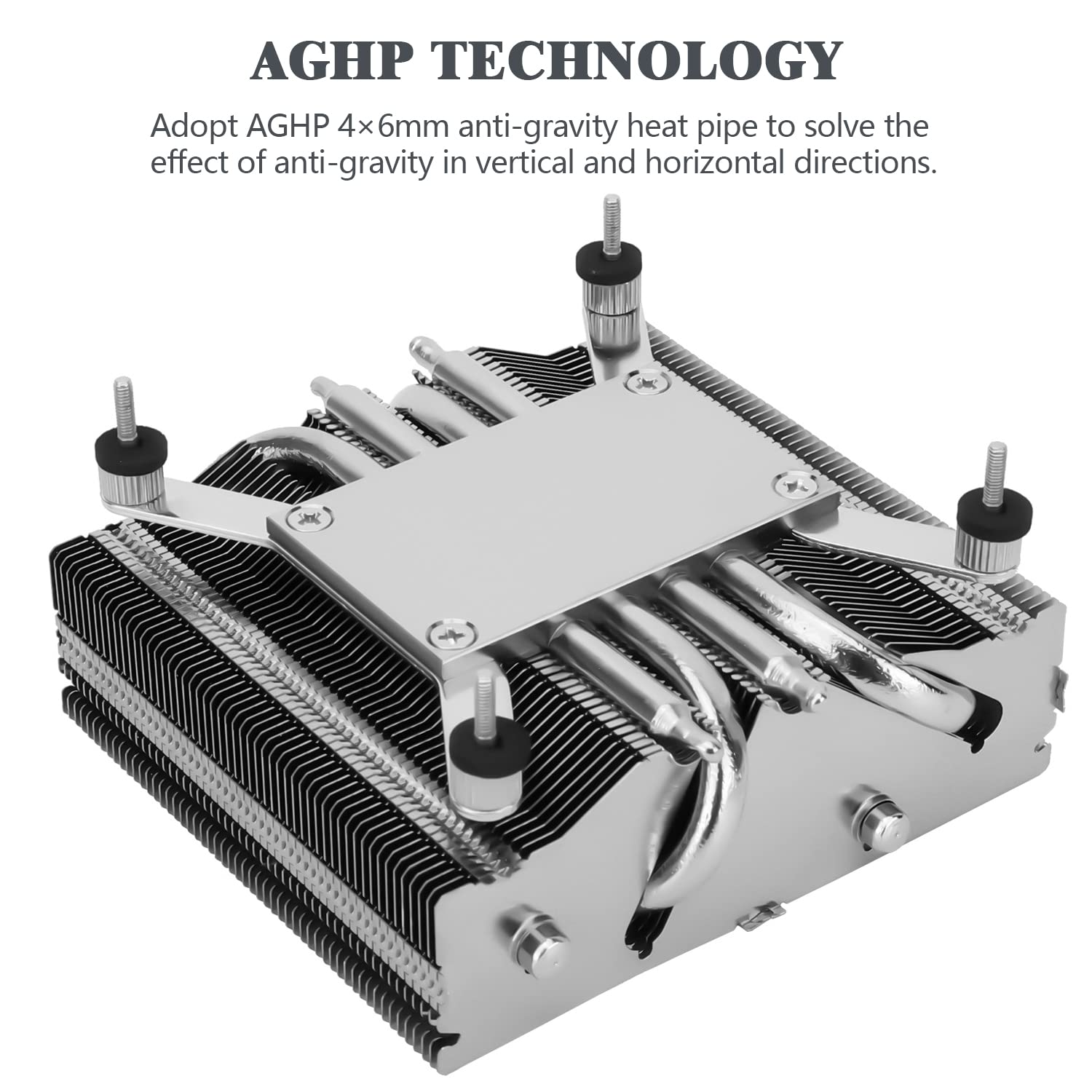
Imagem: The base of the AXP-90 X53 cooler, highlighting the AGHP (Anti-Gravity Heat Pipe) technology for efficient heat transfer in various orientations.
- Aplicar pasta térmica:
Apply a small, pea-sized amount of thermal compound to the center of your CPU's integrated heat spreader (IHS). Do not spread it manually; the pressure from the cooler will distribute it evenly.
- Instalar a placa traseira:
For Intel sockets, ensure the backplate is oriented correctly (LGA115X/1200 side facing the motherboard). For AMD AM4, use the AM4 side. Place the backplate on the backside of the motherboard, aligning the mounting holes.

Imagem: Components of the AXP-90 X53 cooler, including the down-flow CPU cooler, AMD/Intel platform backplate, and TF7 thermal paste.
- Monte o cooler:
Carefully place the heatsink onto the CPU, ensuring the mounting screws pass through the motherboard holes and align with the backplate. Be mindful of the heatsink's airflow direction relative to your case's airflow.

Imagem: Lado view of the AXP-90 X53 cooler, illustrating its compact 53mm total height, designed for ITX motherboard compatibility.
- Prenda bem o cooler:
From the backside of the motherboard, secure the backplate and heatsink using the four hex nuts. Tighten them in a diagonal pattern until snug, but do not overtighten to avoid damaging the motherboard or CPU socket.
- Conectar ventilador:
Connect the 4-pin PWM fan header to the CPU_FAN socket on your motherboard. Ensure the connection is secure.

Imagem: The TL-9015 92mm slim profile fan, which pairs with the AXP-90 X53 cooler for efficient and quiet operation.
Instruções de operação
Once installed, the Thermalright AXP-90 X53 operates automatically, controlled by your motherboard's PWM fan settings. Ensure your system's BIOS/UEFI settings are configured to manage the CPU fan speed based on temperature for optimal cooling and noise balance.
- Inicialização do sistema: Monitor CPU temperatures during the first boot and under load to confirm proper installation and thermal compound application.
- Configurações da BIOS/UEFI: Access your motherboard's BIOS/UEFI to adjust fan curves if you desire a different balance between cooling performance and noise levels.
- Fluxo de ar do sistema: Ensure adequate case airflow to support the cooler's performance. Proper intake and exhaust fans in your PC case will significantly impact overall system temperatures.
Manutenção
Regular maintenance helps maintain optimal performance and extends the lifespan of your CPU cooler.
- Remoção de poeira: Periodically clean dust from the heatsink fins and fan blades using compressed air or a soft brush. Accumulation of dust can impede airflow and reduce cooling efficiency.
- Inspeção do ventilador: Check the fan for any signs of wear, damage, or unusual noise. Ensure the fan spins freely without obstruction.
- Composto térmico: While not frequently required, consider reapplying thermal compound every few years or if you notice a significant increase in CPU temperatures.
Solução de problemas
If you encounter issues with your Thermalright AXP-90 X53 cooler, refer to the following common problems and solutions:
- Altas temperaturas da CPU:
- Certifique-se de que o cooler esteja firmemente montado e em contato total com a CPU.
- Verify that thermal compound was applied correctly and evenly.
- Check for dust buildup on the heatsink fins and fan.
- Confirm that the fan is spinning and connected to the CPU_FAN header.
- Review BIOS/UEFI fan settings to ensure the fan curve is appropriate for your CPU's thermal load.
- A ventoinha não está girando:
- Check the fan cable connection to the motherboard's CPU_FAN header.
- Ensure the fan is not obstructed by cables or other components.
- Test the fan on a different fan header if available, or try a different fan to isolate the issue.
- Ruído excessivo da ventoinha:
- Verifique se há parafusos soltos na ventoinha ou vibrações.
- Clean any dust or debris from the fan blades.
- Adjust fan speed settings in BIOS/UEFI to a quieter profile if temperatures allow.
Especificações

Imagem: Detailed dimensions of the AXP-90 X53 cooler, showing its 94.5mm width, 95mm length, and 53mm total height (38mm heatsink + 15mm fan).
| Recurso | Especificação |
|---|---|
| Dimensões do produto | 94.5 mm (C) x 95 mm (L) x 53 mm (A) |
| Heatsink Dimensions | 94.5 mm (C) x 95 mm (L) x 38 mm (A) |
| Heatsink Weight | 300g |
| Tubos de calor | 4 x 6mm units |
| Modelo do ventilador | TL-9015 PWM Fan |
| Dimensões do Ventilador | 92 mm (C) x 92 mm (L) x 15 mm (A) |
| Peso do Ventilador | 55g |
| Fan Rated Speed | 2700 RPM ± 10% |
| Rated Noise | ≤22.4 dBA |
| Capacidade de fluxo de ar | 42.58 CFM (MÁX.) |
| Pressão estática | 1.33 mm/H₂O (MAX) |
| Corrente nominal | 0.18 UMA |
| Vol avaliadotage | 12 V CC |
| Tipo de conector de alimentação | PWM de pinos 4 |
| Rolamento do ventilador | Rolamento Hidráulico |
| Thermal Power Capability | 150 W |
| Soquetes compatíveis | Intel: LGA 1150/1151/1155/1851/1200; AMD: AM4 |
Garantia e Suporte
Thermalright products are manufactured to high-quality standards. For specific warranty information, please refer to the warranty card included with your product or visit the official Thermalright website. For technical support or inquiries, please contact Thermalright customer service through their official channels.