Introdução
This manual provides essential instructions for the proper use, setup, and maintenance of your Kamon KE Wired Earbuds. Please read this manual thoroughly before using the product to ensure optimal performance and longevity.
Conteúdo da embalagem
Verifique se todos os itens estão presentes no seu pacote:
- 5 x Kamon KE Wired Earbuds (various colors)

A visual representation of the Kamon KE wired earbuds, showcasing the different color options available in the 5-pack. Each earbud features a 3.5mm jack and an integrated remote with microphone.
Produto acimaview
The Kamon KE Wired Earbuds are designed for clear audio and convenient communication. They feature an ergonomic in-ear design, a built-in microphone, and an in-line remote control for managing calls and music playback.
Principais características:
- High Fidelity Sound: Provides clear audio with balanced bass, mid, and treble response.
- In-line Remote & Microphone: Multi-functional button for call and music control, with an integrated microphone for hands-free communication.
- Design ergonômico: Secure and comfortable fit for extended wear.
- Ampla compatibilidade: 3.5mm jack compatible with most audio devices.
- Cabo sem emaranhamento: Durable cable designed to resist tangling.
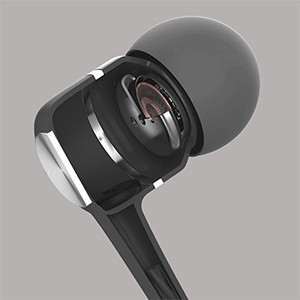
A cutaway diagram revealing the high-powered dynamic speaker system inside the earbud, designed to deliver outstanding audio performance with clear bass, mid, and treble.
Configurar
Conectando ao seu dispositivo:
- Localize a entrada de áudio de 3.5 mm no seu smartphone, tablet, computador ou outro dispositivo de áudio compatível.
- Insert the 3.5mm plug of the Kamon KE earbuds firmly into the device's audio jack.
- Ensure the plug is fully inserted for proper audio transmission. If experiencing issues, gently rotate the plug a few times while inserted.

An illustration demonstrating the wide compatibility of the 3.5mm audio jack with various devices, including PCs, Macbooks, iPads, iPhones, Android smartphones, and iPods.
Instruções de operação
Usando os fones de ouvido:
- Insira cuidadosamente cada fone de ouvido no canal auditivo correspondente.
- Adjust the earbuds until they feel secure and comfortable. The ergonomic design is intended to provide a stable fit.

Esta imagem fornece uma visão lateral view of the earbud in use, illustrating its ergonomic shape designed for a stable and comfortable fit during various activities.
Using the In-line Remote and Microphone:
The multi-functional button on the in-line remote allows for easy control of calls and music playback.
- Atender / encerrar chamadas: Press the button once to answer an incoming call. Press the button once again to end an active call.
- Rejeitando chamadas: Press the button two times to reject an incoming call.
- Reproduzir/Pausar Música: Pressione o botão uma vez para reproduzir ou pausar a reprodução de música.
- Próxima faixa: Press the button two times to skip to the next music track.
- Faixa anterior: Press the button three times to go back to the previous music track.

A detailed diagram highlighting the multi-functional button on the in-line remote, explaining how to answer/end calls, play/pause music, and skip tracks. The integrated HD microphone is also indicated.
Manutenção
Proper care will extend the life of your earbuds:
- Avoid pulling the earbud cord directly. Always hold the plug part and the earbud part when disconnecting from devices or removing from ears.
- Keep the earbuds clean and dry. Wipe with a soft, dry cloth as needed.
- Store the earbuds in a safe place to prevent tangling and damage to the cable.
Solução de problemas
If you encounter issues with your Kamon KE Earbuds, refer to the following common solutions:
- Sem som ou áudio intermitente:
- Certifique-se de que o plugue de 3.5 mm esteja totalmente inserido na entrada de áudio do seu dispositivo.
- Gently rotate the earbud plug a few cycles while it is connected to your phone or device. This can often resolve connection issues.
- Verifique as configurações de volume do seu dispositivo.
- Test the earbuds with another device to determine if the issue is with the earbuds or the original device.
- Microfone não funciona:
- Certifique-se de que o plugue de 3.5 mm esteja totalmente inserido.
- Verifique as configurações de entrada do microfone do seu dispositivo.
- Certifique-se de que o microfone não esteja obstruído.
- O controle remoto não responde:
- Certifique-se de que o plugue de 3.5 mm esteja totalmente inserido.
- Some older devices or specific operating systems may have limited compatibility with in-line remote functions.
Especificações
Technical specifications for the Kamon KE Wired Earbuds:
| Recurso | Especificação |
|---|---|
| Nome do modelo | KE |
| Tecnologia de Conectividade | Com fio |
| Entrada para fones de ouvido | 3.5 mm Jack |
| Controle de Ruído | Isolamento Acústico |
| Impedância | 32 Ohm ±15% a 1KHz |
| Faixa de frequência | 20 Hz - 20 kHz |
| Classificação de potência | 3mW |
| Potência máxima de entrada | 5mW |
| Comprimento do cabo | 120cm |
| Peso do item | 0.07 quilogramas (2.39 onças) |
| Dispositivos compatíveis | iPhone devices, Android smartphones, iPod, iPad, MP3 players, music speakers |
| Recurso especial | Noise Isolation, Remote & Microphone, Tangle Free Cord |
Garantia e Suporte
Kamon products are manufactured with quality and performance in mind. For any product-related inquiries, technical support, or warranty information, please contact Kamon customer service through the retailer where the product was purchased.
Guarde o comprovante de compra para reclamações de garantia.


