Introdução
The Muse M-195 BT is a 1-DIN car radio featuring a front USB port and a multi-function MCD display. This car radio includes integrated Bluetooth and an SD/MMC card reader, allowing for audio streaming from compatible devices such as laptops, tablets, or smartphones. The integrated hands-free system enables easy call management. The output power is 4 x 40 W.
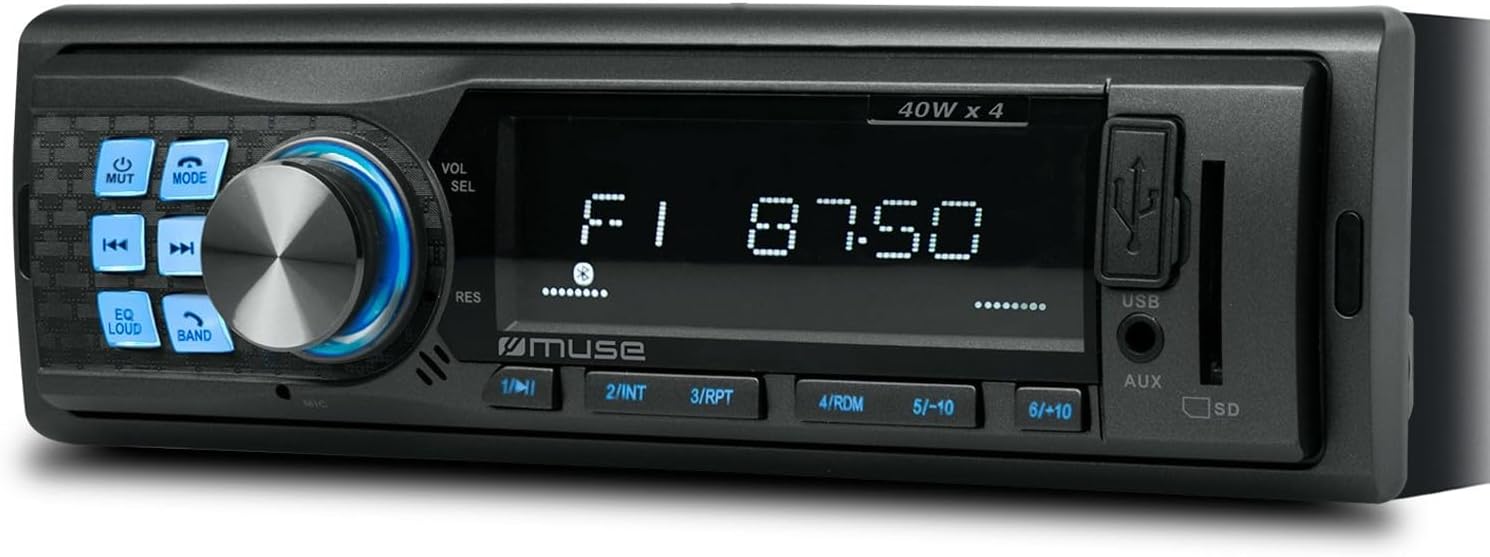
Figura 1: Frente view of the Muse M-195 BT car radio. This image displays the main unit with its central display, a large rotary knob for volume and selection, various function buttons (Mute, Mode, EQ, Loud, Band, Skip), and front-facing USB and AUX inputs, along with an SD card slot.
Informações de segurança
- Leia todas as instruções cuidadosamente antes da instalação e operação.
- Ensure proper wiring to prevent short circuits or damage. Consult a professional if unsure.
- Não utilize o dispositivo de forma que o distraia da condução.
- Evite expor o aparelho a temperaturas extremas, luz solar direta ou umidade.
- Não tente desmontar ou modificar a unidade. Isso pode anular a garantia e causar danos.
- Mantenha o volume em um nível que permita ouvir sons externos, como veículos de emergência.
Conteúdo da embalagem
Por favor, verifique se todos os itens estão presentes na embalagem:
- Muse M-195 BT Car Radio Unit
- Manga de Montagem
- Chicote de fios (conector ISO)
- Removal Keys (2x)
- Manual do usuário (este documento)
Configuração e instalação
1. Instalação
The M-195 BT is designed for a standard 1-DIN dashboard opening (180x50mm). Ensure sufficient space behind the dashboard for wiring and ventilation.

Figure 2: Dimensions of the Muse M-195 BT car radio. The diagram illustrates the standard 1-DIN size, with a width of 185mm and a height of 58mm, crucial for proper fitment in a vehicle's dashboard.
- Preparar a abertura do painel de controle: Remova o rádio automotivo existente ou a placa de cobertura do slot 1-DIN.
- Install the Mounting Sleeve: Insert the supplied metal mounting sleeve into the dashboard opening. Bend the tabs on the sleeve outwards with a screwdriver to secure it firmly.
- Conectar a fiação: Connect the car's wiring harness to the supplied ISO connector. Ensure correct connections for power (constant 12V, ignition 12V, ground), speaker outputs, and antenna.
- Fio Amarelo: 12V constantes (bateria)
- Fio vermelho: Ignition 12V (ACC)
- Fio preto: Chão
- Fio Azul: Antena de alimentação / Amplifier Remote (Output)
- Fios de alto-falante: Conecte aos alto-falantes correspondentes do veículo (por exemplo, branco/branco-preto para dianteiro esquerdo, cinza/cinza-preto para dianteiro direito, verde/verde-preto para traseiro esquerdo, roxo/roxo-preto para traseiro direito).
- Slide na unidade: Carefully slide the M-195 BT unit into the mounting sleeve until it clicks into place.
- Funcionalidade de teste: Turn on the car ignition and test all functions of the radio (power, radio, USB, Bluetooth, sound output).
2. Inicialização da alimentação
After successful installation, press the POWER / MODE button to turn on the unit. The display will illuminate. The unit will typically start in the last used mode (e.g., FM radio).
Instruções de operação
1. Controles Básicos
- POWER/MODE Button: Press to turn the unit ON/OFF. Short press to cycle through modes (FM, USB, SD, AUX, Bluetooth).
- Volume Knob (VOL/SEL): Rotate to adjust volume. Press to enter menu settings (e.g., Bass, Treble, Balance, Fader, EQ).
- Botão MUTE: Mutes/unmutes audio output.
- Botão EQ: Cycles through preset equalizer settings (e.g., Pop, Rock, Classic, Flat).
- LOUD Button: Activates/deactivates loudness compensation for enhanced bass and treble at low volumes.
- Botão BAND: No modo FM, alterna entre as bandas de FM (FM1, FM2, FM3).
- SKIP Buttons (◀◀ / ►►): In radio mode, short press to seek previous/next station. Long press for manual tuning. In USB/SD/BT mode, short press for previous/next track.
- Botões Numéricos (1-6): In radio mode, short press to recall preset stations. Long press to save current station to a preset.
2. Radio Operation (FM)
- Imprensa MODO until "FM" is displayed.
- Imprensa BANDA to select FM1, FM2, or FM3.
- Pressão curta ◀◀ or ►► para buscar automaticamente a próxima estação com sinal forte.
- Pressão longa ◀◀ or ►► to manually tune the frequency.
- To save a station: Tune to the desired station, then long press one of the numeric buttons (1-6) until the display confirms saving.
3. Reprodução via USB/Cartão SD
- Insert a USB flash drive into the front USB port or an SD/MMC card into the SD card slot.
- The unit will automatically switch to USB/SD mode and begin playing compatible audio files (MP3). If not, press MODO para selecionar.
- Usar ◀◀ or ►► para pular faixas.
- Use numeric buttons for specific functions like 1/►►I (Play/Pause), 2/INT (Intro scan), 3/RPT (Repeat), 4/RDM (Random).
4. Operação Bluetooth
The M-195 BT supports Bluetooth for audio streaming and hands-free calling.
- Emparelhamento:
- Certifique-se de que o Bluetooth esteja ativado em seu dispositivo móvel.
- Imprensa MODO on the car radio until "BT" or "Bluetooth" is displayed. The unit will enter pairing mode.
- On your mobile device, search for available Bluetooth devices. Select "M-195 BT" from the list.
- If prompted for a PIN, enter "0000" (default).
- Once paired, the display will show "CONNECTED" or similar confirmation.
- Transmissão de áudio (A2DP):
- After pairing, play music on your mobile device. Audio will stream through the car speakers.
- Usar ◀◀ or ►► on the car radio to skip tracks.
- Chamadas em modo mãos-livres (HFP):
- When a call comes in, the radio display will show "CALL" or the caller ID.
- Pressione o Responder button (often the Play/Pause button or a dedicated call button if available) to answer.
- Pressione o Encerrar chamada botão para desligar.
- The built-in microphone will be used for conversations.
5. Entrada AUX
Connect an external audio device (e.g., MP3 player, smartphone) to the front 3.5mm AUX input using an audio cable.
- Connect the audio cable from your device to the AUX port on the car radio.
- Imprensa MODO until "AUX" is displayed.
- Controle a reprodução do seu dispositivo externo.
Manutenção
- Limpeza: Use um pano macio e seco para limpar a superfície da unidade. Para sujeira persistente, dampUmedeça levemente o pano com água. Não utilize produtos de limpeza abrasivos ou solventes.
- Evite líquidos: Do not allow liquids to enter the unit, as this can cause damage.
- Temperatura: Evite expor o aparelho a temperaturas extremas, luz solar direta ou alta umidade.
- USB/SD Slot Care: Mantenha as entradas USB e para cartão SD livres de poeira e detritos.
Solução de problemas
| Problema | Possível causa | Solução |
|---|---|---|
| Sem energia | Fiação incorreta; Fusível queimado; Conexão solta. | Check power (yellow, red) and ground (black) wire connections. Check vehicle's fuse box and the unit's fuse. Ensure connections are secure. |
| Sem som | Volume muito baixo; Modo mudo ativado; Fiação das caixas de som incorreta; Caixas de som danificadas. | Increase volume. Press MUTE button. Check speaker wire connections. Test with different speakers if possible. |
| Má recepção de rádio | Antenna not connected; Weak signal; Damaged antenna. | Ensure antenna is properly connected. Try tuning to a stronger station. Check antenna for damage. |
| USB/SD não reproduz | Incompatível file Formatação incorreta; cartão USB/SD corrompido; modo selecionado incorretamente. | Garantir files are MP3 format. Try a different USB/SD card. Press MODE to select USB/SD. |
| Falha no pareamento Bluetooth | Bluetooth not enabled on device; Device too far; Incorrect PIN; Previous connection interference. | Ensure Bluetooth is ON on your device. Bring device closer. Re-enter PIN "0000". Delete previous pairings on your device and try again. |
Especificações
- Modelo: M-195BT
- Potência de saída: 4 x 40 W
- Mostrar: MCD Multi-function
- Conectividade: Bluetooth, USB, SD/MMC, AUX (3.5mm Jack)
- Formatos de áudio suportados: MP3
- Sintonizador de rádio: FM (18 presets)
- Chamadas com viva-voz: Microfone Integrado
- Dimensões (C x L x A): 14 x 18.5 x 5.8 cm (approx. 1-DIN standard)
- Peso: 550 g
- Pré-ampSaídas lificadas: 1 pair (RCA audio rear or sub)
Garantia e Suporte
This product comes with a standard manufacturer's warranty. For detailed warranty terms and conditions, please refer to the warranty card included with your purchase or visit the official Muse website. For technical support, troubleshooting assistance beyond this manual, or service inquiries, please contact your retailer or the Muse customer service department.
Guarde o comprovante de compra para reclamações de garantia.


