Manual do Usuário do Aparelho de Som Automotivo Double Din PLZ MP-902
Model: MP-902 | Brand: PLZ
Introdução
This user manual provides comprehensive instructions for the installation, operation, and maintenance of your PLZ MP-902 Double Din Car Stereo. Please read this manual thoroughly before using the product to ensure proper functionality and safety. The MP-902 is designed to enhance your in-car audio and entertainment experience with its advanced features and user-friendly interface.
Características do produto
Bluetooth 5.1 & Dual Mic: Enjoy hands-free calling and audio streaming with advanced Bluetooth 5.1. Features a built-in microphone and external microphone interface for clear communication.
Funcionalidade de espelhamento de links: Supports screen mirroring for both ISO (iPhone) and Android phones via USB, allowing you to display navigation, videos, and other apps on the 7-inch touchscreen.
Traseira/Frente View Suporte para câmera: Designed for safety, the MP-902 automatically displays the rear camera image when reversing. An HD rear camera with night vision and a 170° ultra-wide viewing angle is included.
7 Inch Full HD Capacitive Touchscreen: Features a highly sensitive and accurate 7-inch capacitive touch screen supporting 1080P video playback for an immersive viewexperiência.
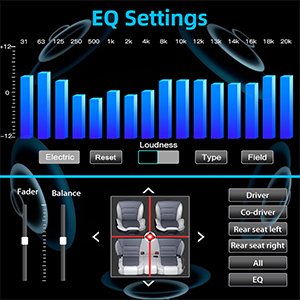
16-Band EQ DSP: Customize your audio experience with the built-in 16-band equalizer and Digital Signal Processor (DSP) to match various music styles.
USB Fast Charging & Data Read: Conveniently charge your devices and read data via the USB port.
Rádio FM/AM: Access your favorite radio stations with FM/AM tuner.
Controle do volante: Compatible with steering wheel controls for safe and convenient operation while driving.
Conteúdo da embalagem
Certifique-se de que todos os itens listados abaixo estejam presentes em sua embalagem:
PLZ MP-902 Double Din Car Stereo Unit
Controle remoto
Traseira View Câmera
Cabo da câmera de backup
Quadro
Brackets (Mounting Hardware)
Parafusos
Chicote de Fiação
Manual do usuário
Image: Complete package contents for the PLZ MP-902 car stereo.
Configuração e instalação
Before beginning installation, ensure your vehicle's dashboard opening is compatible with the standard double din size (173mm x 98mm). If not, a suitable dash kit or modification may be required. Professional installation is recommended.
1. Conexões de fiação
Connect the included wiring harness to your vehicle's existing wiring. Refer to the detailed wiring diagram provided in the user manual and on the product image for correct connections. Additional wire harness adapters or antenna adapters may be needed for specific car models.
Image: Standard size and wiring diagram for the MP-902 car stereo.
2. Instalação da câmera
The MP-902 supports both front and rear view cameras. The included HD rear camera should be mounted at the rear of your vehicle. Connect the camera's video output to the 'R-CAM' input on the stereo and its power to your vehicle's reverse light circuit for automatic activation when shifting into reverse.
Image: Front and rear camera input setup, highlighting the included rear camera with night vision and wide viewângulo de engate.
3. Instalação Física
Secure the stereo unit into the dashboard opening using the provided brackets and screws. Attach the frame for a clean, integrated look. Ensure all cables are properly routed and secured to prevent interference or damage.
Video: A demonstration of the PLZ MP-902 car stereo's functions, including a brief overview of its physical features and connections.
Instruções de operação
The PLZ MP-902 features an intuitive touchscreen interface for easy navigation and control. Below are instructions for key functions.
1. Navegação Básica
From the main menu, tap on the desired icon to access functions such as Radio, Bluetooth, Phone Link, USB, Card, AV In, F-CAM (Front Camera), and Setup.
Image: Main menu interface of the MP-902.
2. Conectividade Bluetooth
To connect your phone via Bluetooth 5.1, go to the 'BT' menu. Enable Bluetooth on your phone and search for 'MP-902'. Pair the devices. Once connected, you can make hands-free calls, access your phonebook, and stream audio. The dual microphone system ensures clear call quality.
Image: Bluetooth 5.1 interface for hands-free calling and music streaming.
3. Mirror Link (Phone Connectivity)
Select 'Phone Link' from the main menu. Connect your ISO or Android smartphone via a USB cable. Follow the on-screen prompts to enable screen mirroring. This allows you to display your phone's screen, including navigation apps and video content, directly on the stereo's display.
Image: Phone Mirror Link feature displaying a mirrored smartphone screen.
4. Audio Settings (16-Band EQ)
Access the 16-Band EQ settings from the 'EQ' icon. Adjust individual frequency bands to customize your audio output. You can also control fader and balance settings to optimize sound distribution within your vehicle.
Image: Detailed 16-Band EQ settings for audio customization.
5. Operação de rádio
Select 'Radio' from the main menu. You can manually tune to stations or use the auto-scan feature to find available FM/AM frequencies. Save your favorite stations as presets for quick access.
Image: FM/AM Radio interface.
6. Controle do Volante (SWC)
If your vehicle supports steering wheel controls, you can configure them in the 'Setup' menu under 'Steering Wheel Setup'. This allows you to control volume, track changes, and other functions directly from your steering wheel.
Imagem: Interface de configuração dos controles do volante.
Manutenção
To ensure the longevity and optimal performance of your PLZ MP-902 car stereo, follow these maintenance guidelines:
Limpando a tela: Use um pano macio e sem fiapos para limpar suavemente a tela sensível ao toque. Para manchas persistentes, pressione levemente o pano.ampLimpe o pano com água ou um produto de limpeza seguro para telas. Evite materiais abrasivos ou produtos químicos agressivos.
Limpeza geral: Mantenha o aparelho livre de poeira e detritos. Use uma escova macia ou ar comprimido para limpar ao redor dos botões e das aberturas de ventilação.
Atualizações de software: Verifique periodicamente as instruções do fabricante. website or contact customer support for any available software updates. Updates can improve performance, add features, or fix bugs. Follow update instructions carefully.
Evite temperaturas extremas: Não exponha o aparelho a temperaturas extremas (calor ou frio) por períodos prolongados, pois isso pode afetar os componentes eletrônicos.
Solução de problemas
If you encounter issues with your PLZ MP-902, refer to the following common troubleshooting steps:
Problema
Possível causa
Solução
Sem energia
Loose wiring, blown fuse, vehicle power issue.
Check power and ground connections. Inspect vehicle's fuse box and the stereo's inline fuse. Ensure ignition is on.
Verify speaker connections. Increase volume. Check if mute is active. Select the correct audio source (e.g., Radio, BT, USB).
Bluetooth não conecta
Bluetooth not enabled on phone/stereo, device not in pairing mode, interference.
Ensure Bluetooth is on for both devices. Put stereo in pairing mode. Delete previous pairings on phone and retry. Move closer to the unit.
O link alternativo não está funcionando.
Incorrect USB cable, phone settings, app compatibility.
Use a high-quality USB cable. Ensure phone's USB debugging or mirroring settings are enabled. Some apps may restrict mirroring due to copyright.
A imagem da câmera traseira não está sendo exibida.
Incorrect camera wiring, reverse trigger wire not connected, faulty camera.
Check camera video input and power connections. Ensure the reverse trigger wire is correctly connected to the vehicle's reverse light.
If these steps do not resolve the issue, please contact PLZ customer support for further assistance.
Especificações
Recurso
Detalhe
Número do modelo
MP-902
Tamanho da tela
7 polegadas
Tipo de tela
Full HD Capacitive Touchscreen
Versão Bluetooth
5.1
Equalizador de áudio
16-Band EQ DSP
Conectividade
Bluetooth, Auxiliar, USB
Supported Video Playback
1080P
Dimensões do produto
3.26"D x 7"L x 3.93"A (8.28 x 17.78 x 9.98 cm)
Peso do item
2.51 libras (1.14 kg)
Câmera incluída
HD Rear Camera with Night Vision (170° ultra-wide viewângulo de ing)
Garantia e Suporte
PLZ is committed to providing high-quality products and excellent customer service. For any warranty claims, technical support, or inquiries regarding your MP-902 car stereo, please contact PLZ customer support directly. Refer to the contact information provided with your product packaging or visit the official PLZ website para obter assistência.
Many common issues can be resolved by referring to the troubleshooting section of this manual or by checking for the latest software updates from PLZ.
Manual de operação do cartucho estéreo NAGAOKA série MP Manual de operação abrangente para cápsulas estéreo NAGAOKA da série MP, detalhando instalação, substituição de agulha, especificações, precauções de uso e informações de garantia para os modelos MP-500, MP-300, MP-200, MP-150 e MP-110.
Manual de Instruções do Mirror-Link PLZ MP-900 Manual de instruções do sistema PLZ MP-900 Mirror-Link, detalhando a configuração do Phonelink para Android e iPhone, o emparelhamento Bluetooth, a instalação do aplicativo e as etapas de solução de problemas.