1. Informações de segurança
Leia atentamente todas as instruções antes de usar este aparelho e guarde-as para futuras consultas. O não cumprimento destas instruções pode resultar em choque elétrico, incêndio ou ferimentos graves.
- Desligue sempre o ventilador da tomada antes de o limpar, realizar manutenção ou mover.
- Do not operate the fan with a damaged cord or plug. If the cord or plug is damaged, contact customer service for repair or replacement.
- Este ventilador destina-se apenas ao uso interno. Não o utilize ao ar livre ou em locais úmidos.
- Mantenha o ventilador longe de água e outros líquidos. Não mergulhe o ventilador em água.
- Certifique-se de que o ventilador esteja colocado em uma superfície estável e plana para evitar que ele tombe.
- Mantenha crianças e animais de estimação afastados do ventilador durante o funcionamento.
- Do not insert fingers or any objects into the grille when the fan is operating.
- Do not block air openings or operate near curtains, drapes, or other objects that could block airflow.
- Não utilize o ventilador em áreas onde líquidos ou gases inflamáveis são armazenados.
2. Produto acabadoview
The Amazon Basics 40" 70-Degree Oscillating Digital Tower Fan is designed to provide efficient and customizable cooling for various indoor spaces. It features a sleek, compact design and user-friendly controls.
Componentes
- Unidade de ventilador de torre
- Base (requires assembly)
- Controle remoto
Principais características
- Arrefecimento Eficiente: Delivers powerful airflow for effective cooling in enclosed spaces.
- Velocidades personalizáveis: Four intuitive speed settings to adjust airflow.
- Vários modos: Includes Standard, Breeze, and Nature modes for varied airflow patterns.
- Oscilação: 70-degree oscillation for wide-range air flow coverage.
- Função do temporizador: Programmable timer up to 15 hours for energy saving and convenience.
- Controle remoto: Convenient remote for adjusting settings from a distance.
- Controles digitais: Easy-to-use digital control panel located on the top of the fan.
- Design compacto: Slim tower design (11.4"D x 11.4"W x 39.3"H) fits easily into any room.

Figura 2.1: The Amazon Basics 40-inch Digital Tower Fan shown with its remote control. The fan is black with a sleek, tall design, and the remote is compact with clearly labeled buttons for power, speed, mode, oscillation, and timer.

Figura 2.2: A diagram illustrating the key features of the tower fan, including its 40-inch height, 4 customizable airflow speed settings, timer with auto shutoff (1h, 2h, 4h, 8h options), and convenient remote control for adjusting speed, oscillation, and timer. The diagram highlights the digital display and control panel on top of the fan.
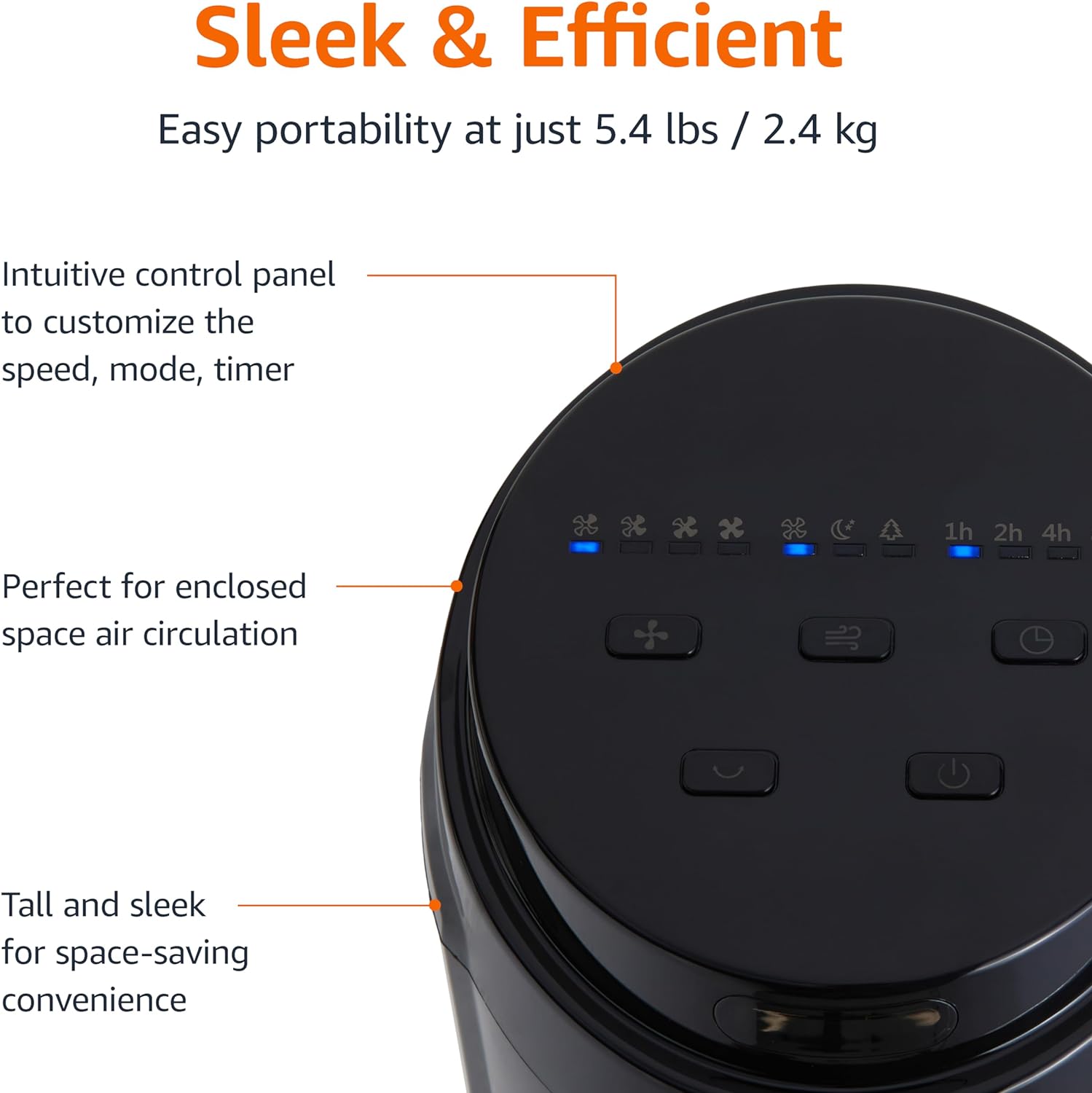
Figura 2.3: Um close-up view of the intuitive control panel located on the top of the Amazon Basics Tower Fan. The panel features buttons for speed, mode, power, oscillation, and timer, along with LED indicators for selected settings. This design allows for easy customization of fan operation.
3. Configuração
3.1 Montagem
- Remova cuidadosamente todos os componentes da embalagem.
- Attach the fan base to the main tower unit. Align the slots on the base with the corresponding tabs on the bottom of the fan.
- Secure the base using the provided screws, if any, ensuring it is firmly attached.
3.2 Posicionamento
- Coloque o ventilador sobre uma superfície firme e nivelada.
- Ensure there is adequate space around the fan for proper air circulation, especially for the oscillation feature.
- Keep the fan at least 1 foot (30 cm) away from walls, furniture, and other objects.
- Plug the power cord into a standard NEMA 5-15 (US Standard Wall Outlet) electrical outlet.
4. Instruções de operação
The fan can be operated using either the control panel on top of the unit or the included remote control.
4.1 Control Panel & Remote Control Functions
| Botão / Função | Descrição |
|---|---|
| Energia (liga / desliga) | Liga ou desliga o ventilador. |
| Velocidade | Cycles through 4 fan speed settings (Low, Medium, High, Max). |
| Modo | Selects between 3 operating modes:
|
| Oscilação | Activates or deactivates the 70-degree oscillation feature, allowing the fan to sweep air across a wider area. |
| Temporizador | Sets the fan to automatically turn off after a specified period (up to 15 hours in 1-hour increments). |
4.2 Uso do controle remoto
The remote control allows for convenient operation of all fan functions from a distance. Ensure the remote is pointed towards the fan's control panel for optimal response.
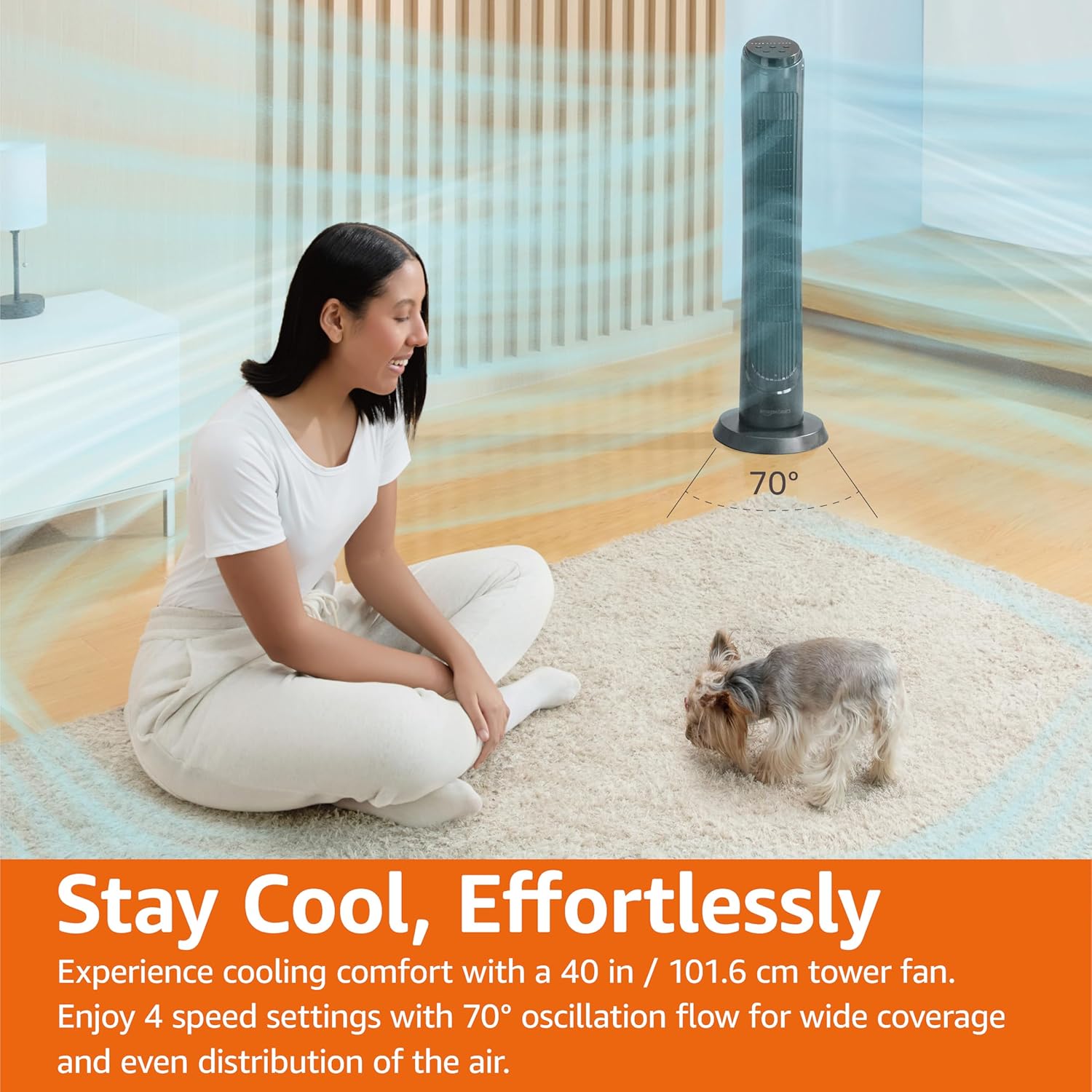
Figura 4.1: The Amazon Basics Tower Fan oscillating 70 degrees, providing wide coverage and even air distribution in a room. A person and a small dog are comfortably seated on a rug, benefiting from the airflow.

Figura 4.2: The Amazon Basics Tower Fan positioned in a modern living space, demonstrating its effective airflow. The image visually represents the air movement from the fan, highlighting its ability to circulate air throughout the room.
5. Manutenção
5.1 Limpeza
- Sempre desligue o ventilador antes de limpá-lo.
- Use um pano macio e macioamp pano para limpar as superfícies externas do ventilador.
- Não utilize produtos de limpeza abrasivos ou químicos agressivos, pois estes podem danificar o acabamento do ventilador.
- For dust accumulation on the air intake or output grilles, use a vacuum cleaner with a brush attachment to gently remove dust.
- Certifique-se de que o ventilador esteja completamente seco antes de ligá-lo novamente na tomada.
5.2 Armazenamento
- If storing the fan for an extended period, clean it thoroughly as described above.
- Store the fan in its original packaging or a suitable box to protect it from dust and damage.
- Armazene em local fresco e seco.
6. Solução De Problemas
Se você estiver enfrentando problemas com o seu ventilador, consulte os problemas e soluções comuns a seguir:
| Problema | Possível causa | Solução |
|---|---|---|
| O ventilador não liga. | Sem alimentação elétrica; botão liga/desliga não pressionado. | Ensure the power cord is securely plugged into a working outlet. Press the Power button on the control panel or remote. |
| Fluxo de ar fraco ou inexistente. | Air intake/output blocked; Fan speed too low. | Check for any obstructions around the fan grilles. Increase the fan speed setting. |
| A oscilação não está funcionando. | Oscillation feature not activated. | Press the Oscillation button on the control panel or remote. Ensure the fan is on a flat surface. |
| O controle remoto não funciona. | Batteries are dead; Remote not pointed correctly. | Replace the remote control batteries. Ensure the remote is pointed directly at the fan's control panel. |
| Ruído incomum. | Ventilador em superfície desnivelada; Obstrução interna. | Place the fan on a stable, level surface. Unplug the fan and check for any foreign objects inside the grilles (do not attempt to disassemble). |
Se o problema persistir após tentar essas soluções, entre em contato com o suporte ao cliente.
7. Especificações
| Atributo | Detalhe |
|---|---|
| Marca | Noções básicas sobre a Amazon |
| Nome do modelo | DC2021 |
| Cor | Preto |
| Projeto de ventilador elétrico | ventilador de pé |
| Fonte de energia | Energia CA |
| Estilo | 40" - Digital |
| Dimensões do produto | 11.4"P x 11.4"L x 39.3"A |
| Tipo de quarto | Quarto, Sala de estar, Escritório |
| Recurso especial | Oscillating, 4 Speeds, 3 Modes, Timer, Remote Control |
| Usos recomendados | Cooling and Air Circulation for Indoor Spaces |
| Nível de ruído | 60 dB |
| O quetage | 50 watts |
| Peso do item | 7.5 libras (aproximadamente 3.4 kg) |
| Componentes incluídos | Remoto |
| Uso interno/externo | Interior |
| Método de controle | Remoto |
| Material da lâmina | Plástico |
| Número de níveis de potência | 4 |
| Tipo de conector de alimentação principal | NEMA 5-15 (US Standard Wall Outlet) |
| Fabricante | Amazon |
| UPC | 840095880428 |
| País de origem | China |
8. Garantia e Suporte
For detailed warranty information, please refer to the official Warranty PDF document provided by Amazon Basics. This document outlines the terms and conditions of your product's warranty.
For further assistance, troubleshooting not covered in this manual, or to inquire about replacement parts, please contact Amazon Basics customer support.
- Manual do Usuário Oficial (PDF): Baixar PDF
- Official Warranty (PDF): Baixar PDF
- Amazon Basics Store: Visite a loja


