1. Produto acabadoview
The Anderic OEM NSRCFNA21 Smart Remote is an original equipment manufacturer (OEM) replacement remote control specifically designed for various Insignia TV models. This remote provides seamless functionality and user-friendly operation, ensuring reliable control over your television.
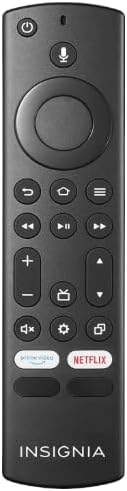
Imagem 1.1: The Anderic OEM NSRCFNA21 Smart Remote. This image displays the front view of the black remote control, featuring various buttons for power, voice control, navigation, volume, channel, and dedicated streaming service buttons.
Os principais recursos incluem:
- Original Quality: An authentic OEM product, ensuring performance and reliability comparable to the remote originally supplied with your TV.
- Design amigável: Intuitive buttons and controls for easy navigation, volume adjustment, channel changes, and access to various TV functions.
- Desempenho confiável: Provides a stable and responsive connection for accurate command execution.
2. Instruções de configuração e emparelhamento
To ensure proper functionality, the remote control must be paired with your Insignia TV. Follow these steps carefully:
- Redefinir TV: Unplug your Insignia TV from its power source. Wait for approximately 30 seconds.
- Power On TV: Plug the TV back into the power source and turn it on. Allow the TV to fully boot up.
- Iniciar pareamento: Once the TV has completely booted up and is displaying content, press and hold the Lar button on the Anderic NSRCFNA21 remote control for up to 30 seconds.
- Remote Update (if prompted): Your TV may display a message indicating that the remote needs an update. If prompted, allow the TV to proceed with the update. This process may take 1 to 3 minutes to complete.
- Verificação: After the update (if any) and pairing process, test the remote's functions (e.g., volume, channel, navigation) to confirm successful pairing.
If the remote does not pair after following these steps, repeat the process or refer to the troubleshooting section.
3. Operando o controle remoto
The Anderic NSRCFNA21 remote control features an intuitive layout for easy operation of your Insignia TV. Below are the general functions of the primary buttons:
- Botão de energia: Liga ou desliga a TV.
- Botão de controle de voz: Ativa comandos de voz para pesquisar conteúdo ou controlar a TV.
- Navigation Pad (Directional Buttons and Select): Utilizado para navegar pelos menus e selecionar itens.
- Botão Home: Returns to the TV's main home screen.
- Botão Voltar: Volta para a tela ou menu anterior.
- Menu/Options Button: Accesses additional menu options or settings.
- Aumentar/diminuir volume: Adjusts the TV's audio volume.
- Canal para cima/para baixo: Muda de canal na TV.
- Botão Mudo: Silencia ou ativa o som da TV.
- Botão de configurações: Abre o menu de configurações da TV.
- Botão de entrada/fonte: Changes the TV's input source (e.g., HDMI 1, HDMI 2).
- Dedicated Streaming Service Buttons: Provides quick access to popular streaming applications (e.g., Amazon Prime Video, Netflix).
4. Compatibilidade
The Anderic OEM NSRCFNA21 Smart Remote is compatible with the following Insignia TV models:
- NS24DF310NA21
- NS39DF310NA21
- NS50DF710NA21
- NS55DF710NA21
This remote also replaces the following models:
- NSRCFNA19 Rev B Fire
- NSRCFNA19revB
- NSRCFNA21 Fire
- NSRCFNA21 Rev E
- NSRCFNA21-Rev-E
Ensure your TV model is listed above for optimal performance.
5. Manutenção
Proper maintenance can extend the life and functionality of your remote control.
- Substituição da bateria: The remote requires two AAA batteries. Replace batteries when the remote's responsiveness decreases or it stops functioning. Ensure correct polarity when inserting new batteries.
- Limpeza: Use a soft, dry cloth to clean the remote's surface. Avoid using liquid cleaners or abrasive materials, as these can damage the remote.
- Armazenar: Guarde o controle remoto em local seco, longe de temperaturas extremas e da luz solar direta.
6. Solução De Problemas
If you encounter issues with your Anderic NSRCFNA21 Smart Remote, try the following troubleshooting steps:
- O controle remoto não está respondendo:
- Check the batteries. Replace them with fresh AAA batteries, ensuring correct polarity.
- Certifique-se de que não haja obstruções entre o controle remoto e o sensor da TV.
- Tente novamente o processo de emparelhamento conforme descrito na Seção 2.
- Funcionalidade intermitente:
- Isso pode indicar bateria fraca. Troque as baterias.
- Ensure you are within the effective range of the TV's sensor.
- Pairing Fails:
- Confirm your TV model is listed in the compatibility section (Section 4).
- Ensure the TV is fully booted up before attempting to hold the Home button.
- Try unplugging the TV for a longer period (e.g., 1-2 minutes) before plugging it back in and re-attempting pairing.
Se os problemas persistirem após tentar essas etapas, entre em contato com o suporte ao cliente para obter mais assistência.
7. Especificações
| Marca | Andérico |
| Número do modelo | NSRCFNA21 Rev B |
| Dispositivos compatíveis | Insignia Televisions |
| Fonte de energia | 2 pilhas AAA (necessárias) |
| Peso do item | 1.76 onças |
| Dimensões da embalagem | 6.3 x 2.95 x 0.67 polegadas |
| Cor | Preto |
| Fabricante | Dan's Electronics Etc., Inc. |
8. Garantia e Suporte
For warranty information or technical support, please contact the manufacturer, Anderic (Dan's Electronics Etc., Inc.). Refer to the product packaging or the official Anderic webPara obter detalhes de contato específicos e termos de garantia, consulte o site.
Você pode visitar o Anderic Store on Amazon para maiores informações.


