Introdução
Thank you for choosing the Mistral MSF1650R 16-inch Stand Fan. This manual provides important information regarding the assembly, operation, maintenance, and troubleshooting of your new fan. Please read it thoroughly before use and retain it for future reference.
Instruções importantes de segurança
- Always ensure the fan is placed on a stable, level surface to prevent it from tipping over.
- Não utilize o ventilador com um cabo ou ficha danificados. Se o cabo estiver danificado, deve ser substituído pelo fabricante, pelo seu agente de assistência técnica ou por pessoal qualificado para evitar riscos.
- Unplug the fan from the power outlet before cleaning, assembling, or disassembling parts.
- Keep fingers, pencils, or any other objects out of the fan guard when it is operating.
- Não utilize o ventilador perto de água ou em ambientes excessivamente úmidos.
- Este aparelho não se destina ao uso por pessoas (incluindo crianças) com capacidades físicas, sensoriais ou mentais reduzidas, ou com falta de experiência e conhecimento, a menos que tenham recebido supervisão ou instruções sobre o uso do aparelho de uma pessoa responsável pela sua segurança.
- As crianças devem ser supervisionadas para garantir que não brinquem com o aparelho.
Componentes do produto
Familiarize yourself with the main parts of your Mistral MSF1650R stand fan.
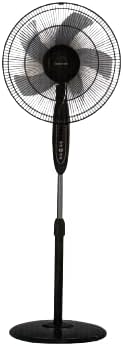
Figura 1: Frente view of the Mistral MSF1650R 16-inch Stand Fan, showing the fan head, control panel, adjustable stand, and round base.

Figure 2: The Mistral MSF1650R stand fan accompanied by its remote control, illustrating the convenience of remote operation.
- Guarda Frontal
- Fan Blade (5 ABS blades)
- Guarda Traseira
- Carcaça do motor
- Painel de controle
- Haste de suporte ajustável
- Base
- Controle remoto
Instruções de montagem
Siga estes passos para montar seu ventilador de pedestal:
- Fixe a Base: Place the stand pole onto the base and secure it using the provided screw and washer from underneath the base.
- Install the Rear Guard: Position the rear guard onto the motor housing, ensuring it aligns with the locating pins. Secure it with the guard nut.
- Mount the Fan Blade: Slide the fan blade onto the motor shaft, aligning the notch on the blade with the pin on the shaft. Secure it with the blade cap, turning it counter-clockwise.
- Attach the Front Guard: Place the front guard onto the rear guard, aligning the clips. Secure the guards together using the guard ring and clip, ensuring it is tightly fastened around the perimeter.
- Ajustar altura: Loosen the height adjustment knob on the stand pole, extend or retract the pole to the desired height, and then tighten the knob securely.
Instruções de operação
Your Mistral MSF1650R fan can be operated via the control panel on the fan body or the remote control.
Funções do painel de controle:
- Botão ON/OFF: Pressione para ligar ou desligar o ventilador.
- Botão VELOCIDADE: Pressione repetidamente para alternar entre as velocidades do ventilador: Baixa, Média, Alta.
- Botão MODE: Press to select between Normal, Natural, and Sleep modes.
- Botão TEMPORIZADOR: Press to set the operating timer (up to 7.5 hours). Each press adds 0.5 hours.
- Botão OSC (Oscilação): Press to start or stop the fan head oscillating horizontally.
Funções do controle remoto:
The remote control duplicates all functions available on the fan's control panel for convenient operation from a distance.
- Certifique-se de que as pilhas estejam inseridas corretamente no controle remoto.
- Point the remote control towards the fan's receiver when operating.
- Buttons on the remote correspond to the functions described above (ON/OFF, SPEED, MODE, TIMER, OSC).
Manutenção e Limpeza
A limpeza regular ajudará a manter o desempenho do ventilador e prolongar sua vida útil.
- Desligue antes de limpar: Always disconnect the fan from the power supply before attempting any cleaning or maintenance.
- Limpe as superfícies externas: Wipe the fan's exterior surfaces with a soft, damp pano. Não use produtos de limpeza abrasivos ou solventes.
- Clean Fan Blades and Guards: To clean the fan blades and inside the guards, you may need to carefully remove the front guard. Use a soft cloth or a vacuum cleaner with a brush attachment to remove dust. Ensure all parts are dry before reassembling.
- Armazenar: If storing the fan for an extended period, cover it to protect it from dust and store it in a dry, cool place.
Solução de problemas
Consulte a tabela abaixo para obter informações sobre problemas comuns e suas soluções.
| Problema | Possível causa | Solução |
|---|---|---|
| O ventilador não liga. | Sem fonte de alimentação. O ventilador não está conectado à tomada. Botão liga/desliga não pressionado. | Verifique a tomada elétrica. Certifique-se de que o plugue esteja totalmente inserido. Pressione o botão ON/OFF. |
| Fluxo de ar fraco. | A velocidade da ventoinha está muito baixa. Dust accumulation on blades/guards. | Aumente a velocidade do ventilador. Clean fan blades and guards as per maintenance instructions. |
| O ventilador está fazendo um barulho incomum. | Peças soltas. Obstrução nas pás do ventilador. | Ensure all assembly screws and nuts are tight. Desligue da tomada e verifique se há objetos estranhos. |
| O controle remoto não funciona. | Baterias descarregadas. Obstrução entre o controle remoto e o ventilador. | Substitua as pilhas. Assegure-se de que haja linha de visão desobstruída para o receptor do ventilador. |
Especificações
Technical details for the Mistral MSF1650R 16-inch Stand Fan.

Figure 3: Detailed specifications of the Mistral MSF1650R stand fan, including dimensions, power, and features.
| Modelo | MSF1650R |
| Lâmina da ventoínha | 5 ABS Fan Blade |
| Volumetage | 220-240 V ~ 50 Hz |
| Poder | 55 W |
| Volume de ar | 66.49 m³/minuto |
| Fluxo de ar máximo | 3.45 m/s |
| Dimensões do produto | 45 x 15 x 57 cm (Profundidade x Largura x Altura) |
| Altura máxima | 1.3m (Adjustable) |
| Peso líquido | 5.85 kg |
| Características especiais | Adjustable Height, Remote Controlled, 7.5 Hours Timer, 3 Speed Selection, Normal/Natural/Sleep Modes |
Garantia e Suporte
For warranty information or technical support, please refer to the warranty card included with your purchase or contact Mistral customer service. Keep your proof of purchase for warranty claims.
For further assistance, please visit the official Mistral webou entre em contato com os centros de serviço autorizados.


