1. Introdução
Thank you for choosing the Dalton 2000VA Uninterruptible Power Supply (UPS). This device is designed to provide reliable power backup and protection for your electronic equipment against power outages, surges, and fluctuations. Please read this manual thoroughly before installation and operation to ensure optimal performance and safety.
2. Instruções importantes de segurança
Siga sempre estas precauções básicas de segurança para reduzir o risco de incêndio, choque elétrico e ferimentos:
- Não abra a caixa da UPS.asing. Não existem peças que possam ser reparadas pelo usuário no interior. Encaminhe a manutenção para pessoal de serviço qualificado.
- Do not use the UPS in environments with excessive dust, humidity, or extreme temperatures.
- Certifique-se de que o UPS esteja conectado a uma tomada elétrica aterrada.
- Do not connect non-computer related items like medical equipment, life support equipment, or household appliances to the UPS.
- Posicione o UPS em uma área bem ventilada, longe da luz solar direta ou de fontes de calor.
- In case of emergency, press the power button to turn off the UPS and disconnect it from the AC power source.
3. Conteúdo da embalagem
Verifique se todos os itens estão presentes no seu pacote:
- Dalton 2000VA UPS Unit
- Cabo de alimentação
- Cabo de comunicação USB (se aplicável)
- Manual do usuário (este documento)

Figura 3.1: Frente view of the Dalton 2000VA UPS unit, showing the display screen and power button.
4. Configuração e instalação
Follow these steps to set up your UPS:
- Desembalagem: Retire cuidadosamente o UPS da embalagem. Inspecione-o para verificar se há danos causados pelo transporte.
- Colocação: Place the UPS on a flat, stable surface in a cool, dry, and well-ventilated area. Ensure there is adequate space around the unit for airflow.
- Carga inicial: Before connecting any devices, plug the UPS power cord into a grounded wall outlet. Allow the unit to charge for at least 8 hours to ensure the battery is fully charged. The display will indicate charging status.
- Dispositivos de conexão:
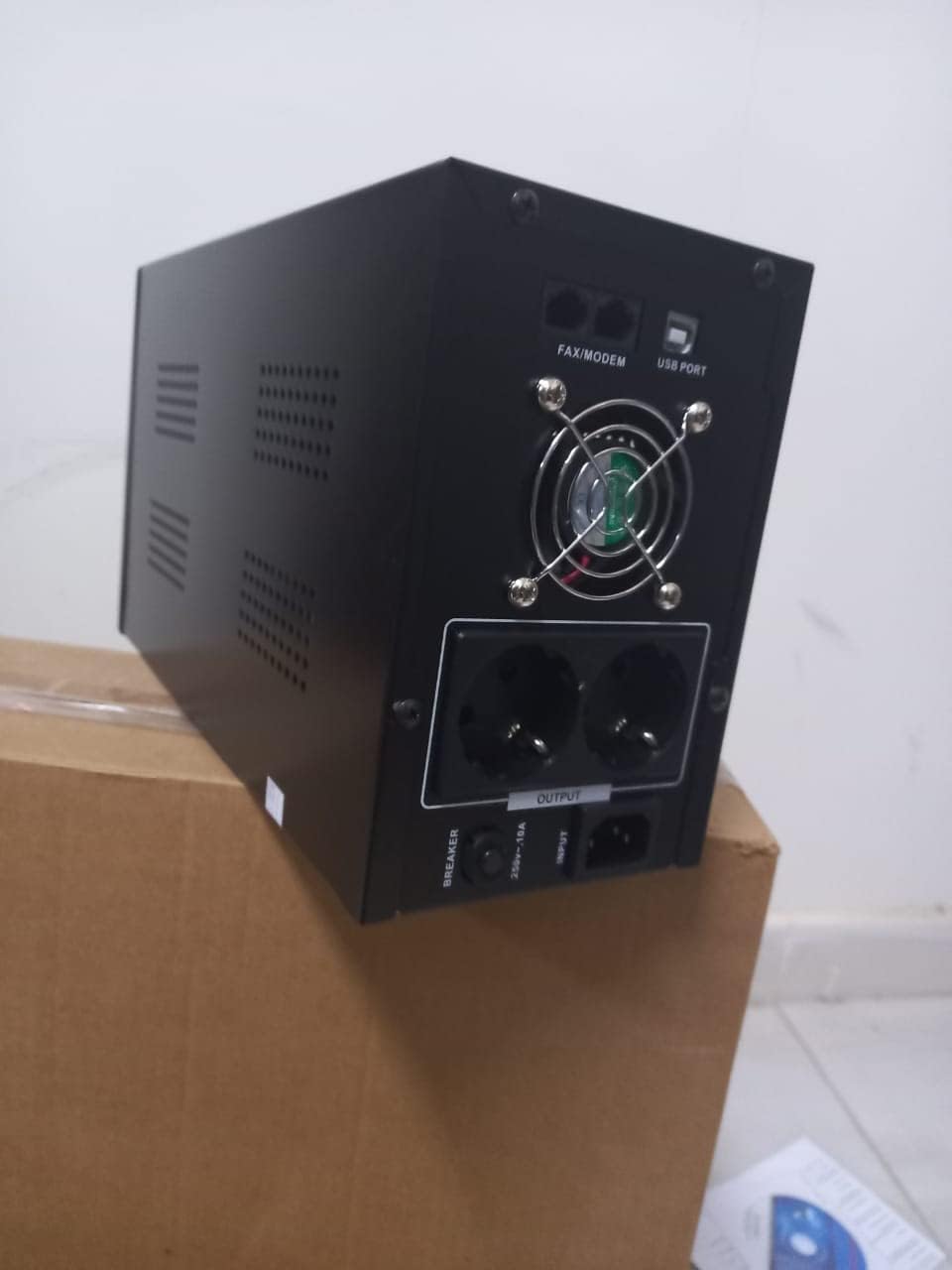
Figura 4.1: Traseira view of the Dalton 2000VA UPS, highlighting the input power port, output sockets, and USB/Modem ports.
- Once the battery is charged, connect your computer, monitor, and other critical electronic devices to the UPS output sockets.
- Do not overload the UPS. Refer to the specifications section for maximum load capacity.
- If applicable, connect the USB communication cable from the UPS to your computer for monitoring software (software not included, check manufacturer's weblocal).
5. Operando o UPS
5.1 Ligar/Desligar
- Para ligar: After connecting to AC power and charging, press and hold the power button on the front panel for approximately 3 seconds until you hear a beep and the display illuminates.
- Para desligar: Press and hold the power button for approximately 3 seconds until you hear a beep and the display turns off. If the UPS is running on battery, it will shut down immediately. If connected to AC, it will switch to bypass mode before shutting down.
5.2 Compreendendo o visor
The front panel LCD display provides real-time status information:
- EM: Exibe o volume de entradatage from the utility power.
- FORA: Exibe o volume de saídatage provided by the UPS to connected devices.
- NORMAL: Indicates the UPS is operating on utility power.
- Bastão: Mostra o nível atual de carga da bateria.
- Carregar: Indica a porcentagemtage da capacidade do UPS sendo utilizada pelos dispositivos conectados.
- Battery Mode Icon: Appears when the UPS is running on battery power during an outage.

Figura 5.1: Lateral view of the UPS, showing the illuminated display with power status indicators.
5.3 Função de bateria de reserva
Em caso de falta de energiatage, the UPS will automatically switch to battery power, providing continuous power to your connected devices. The duration of backup power depends on the load connected and the battery's charge level. The UPS will emit an audible alarm during battery operation.
When utility power returns, the UPS will automatically switch back to AC power and begin recharging its battery.
6. Manutenção
- Cuidados com a bateria: To maximize battery life, ensure the UPS is always connected to an AC outlet to keep the battery charged. If the UPS is stored for an extended period, recharge it every three months for at least 8 hours.
- Limpeza: Disconnect the UPS from all power sources before cleaning. Use a soft, dry cloth to wipe the exterior. Do not use liquid or aerosol cleaners.
- Ventilação: Regularly check that the ventilation openings are not blocked by dust or debris to prevent overheating.
7. Solução De Problemas
Consulte a tabela abaixo para problemas comuns e suas soluções:
| Problema | Possível causa | Solução |
|---|---|---|
| O nobreak não liga. | Battery not charged or power cord disconnected. | Ensure power cord is securely plugged in and allow battery to charge for 8 hours. |
| O UPS emite bipes contínuos no modo normal. | Condição de sobrecarga. | Disconnect non-essential equipment until the alarm stops. Check total load. |
| Tempo de backup curto. | Bateria não totalmente carregada ou bateria próxima do fim de sua vida útil. | Allow UPS to charge for 8 hours. If issue persists, battery may need replacement (contact service center). |
| O UPS não fornece energia durante o funcionamento.tage. | Battery discharged or internal fault. | Ensure UPS was fully charged. If problem persists, contact authorized service center. |
8. Especificações técnicas
| Recurso | Detalhe |
|---|---|
| Dimensões do produto | 12.5 x 22.5 x 38 cm |
| Fabricante | Dalton |
| Marca | Genérico |
| Cor | Preto |
| Material | Metal |
| Atual | 5 Ampantes |
| Fator de forma | Prateleira |
| Faixa de frequência | 50-60 Hz |
| Volume de saídatage | 220 Volts |
| Tipo de conector | AC |
9. Garantia e Suporte
Dalton provides an authorized maintenance center for all Uninterruptible Power Supply units. For warranty claims, technical support, or service inquiries, please contact your local Dalton authorized distributor or service center. Keep your purchase receipt as proof of purchase for warranty validation.
For further assistance, please visit the official Dalton website ou entre em contato com o suporte ao cliente.


