1. Introdução
Thank you for choosing the Baseus Orange Dot Wireless Presenter. This device is designed to enhance your presentations with its RF2.4GHz wireless technology, integrated laser pointer, and versatile USB/Type-C receiver. This manual provides detailed instructions for setup, operation, maintenance, and troubleshooting to ensure optimal performance.
2. Conteúdo da embalagem
Antes de prosseguir, verifique se todos os itens estão presentes em sua embalagem:
- Baseus Orange Dot Wireless Presenter
- USB/Type-C Dual Receiver
- AAA Battery (for battery version)
- Manual do usuário (este documento)

Imagem: Contents of the package include the wireless presenter, a USB/Type-C receiver, and an AAA battery.
3. Instruções de configuração
3.1 Instalação da bateria
If your presenter is the battery-powered version, follow these steps:
- Open the battery compartment cover located at the rear of the presenter.
- Insira uma pilha AAA, certificando-se de que os terminais positivo (+) e negativo (-) estejam alinhados corretamente com as marcações dentro do compartimento.
- Feche bem a tampa do compartimento da bateria.
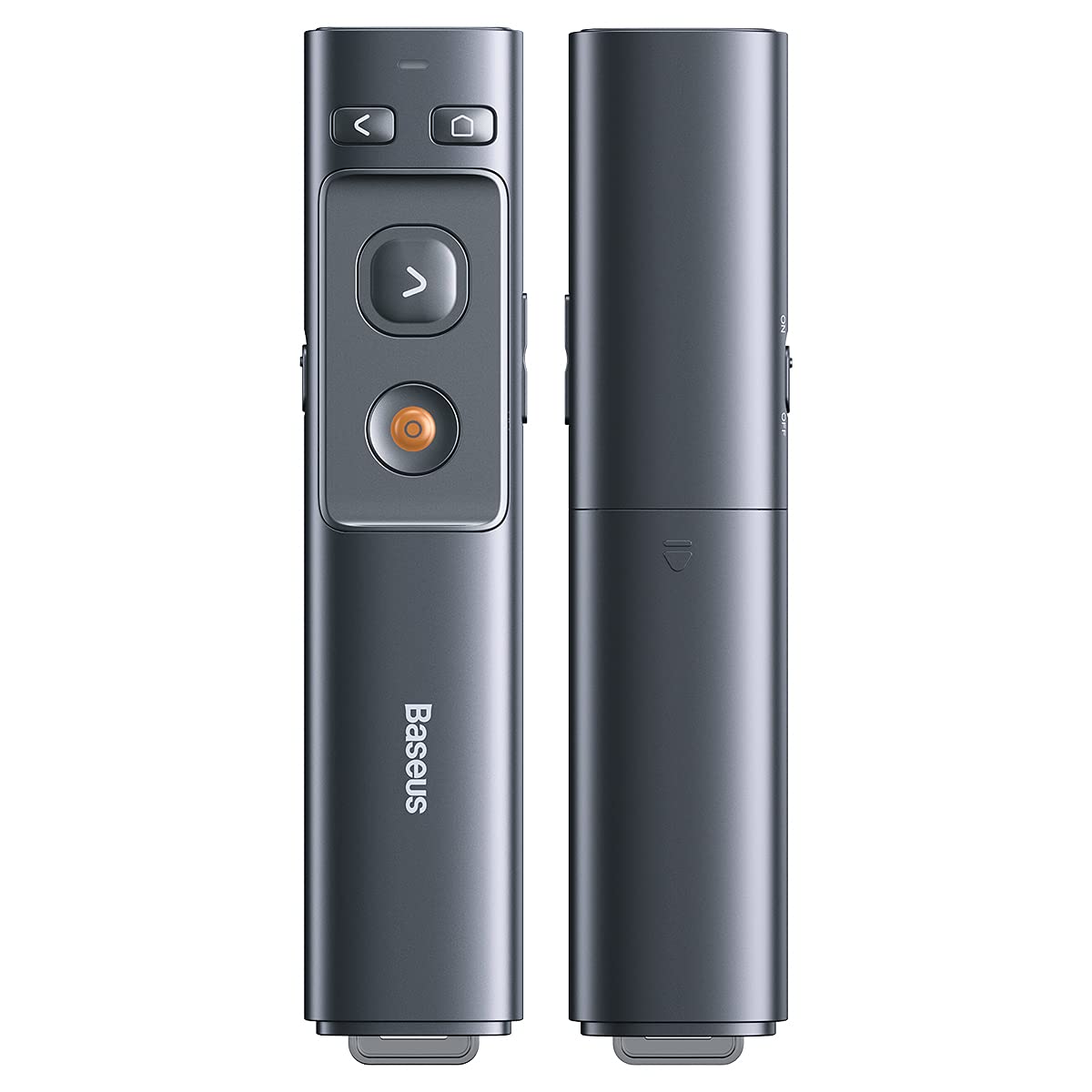
Imagem: Insert one AAA battery into the designated compartment. Ensure correct polarity.
3.2 Conexão do Receptor
The presenter features a dual USB/Type-C receiver for broad compatibility.
- Locate the receiver stored magnetically within the presenter's body. Gently pull it out.
- Plug the receiver into an available USB-A or Type-C port on your computer or laptop. The system will automatically detect and install the necessary drivers. No additional software installation is required.

Imagem: The dual USB/Type-C receiver connects to your computer for wireless operation.

Imagem: The receiver can be stored magnetically within the presenter body when not in use.
4. Instruções de operação
Familiarize yourself with the presenter's buttons for effective control during your presentation.

Imagem: Control buttons for page navigation, laser activation, and volume adjustment.
4.1 Ligar/Desligar
The presenter typically powers on automatically when the receiver is connected and a button is pressed. To conserve battery, ensure the receiver is disconnected when not in use.
4.2 Presentation Control
- Page Up Button (<): Press to move to the previous slide or page.
- Page Down Button (>): Press to move to the next slide or page.
- Full Screen/Black Screen Button: Press to toggle between full-screen mode and black screen mode in presentation software.
4.3 Laser Pointer Function
Press and hold the dedicated laser button (usually a red dot icon) to activate the red laser pointer. Release the button to turn off the laser.

Imagem: The laser pointer function highlights content on a display.
4.4 Controle de volume
Use the designated volume buttons (if present) to adjust the audio output of your computer during a presentation.
5. Manutenção
Proper care ensures the longevity of your Baseus Orange Dot Wireless Presenter.
- Limpeza: Use a soft, dry cloth to clean the surface of the presenter. Avoid using harsh chemicals or abrasive materials.
- Armazenar: When not in use, store the presenter and its receiver in a dry, cool place. Always store the receiver inside the presenter's magnetic compartment to prevent loss.
- Cuidados com a bateria: For battery-powered versions, remove the AAA battery if the presenter will not be used for an extended period to prevent leakage.
6. Solução De Problemas
If you encounter issues with your presenter, refer to the following common problems and solutions:
- Presenter is unresponsive:
- Ensure the receiver is securely plugged into a USB-A or Type-C port on your computer.
- For battery versions, check if the AAA battery is inserted correctly and has sufficient charge. Replace if necessary.
- Tente conectar o receptor a uma porta USB diferente do seu computador.
- Reinicie o seu computador.
- Laser pointer is not working:
- Ensure the presenter has power (battery charged/inserted).
- Confirm you are pressing and holding the correct laser activation button.
- Slides are not advancing/going back:
- Verify that your presentation software (e.g., PowerPoint, Keynote) is active and in presentation mode.
- Ensure the receiver is properly connected and recognized by your computer.
7. Especificações
| Recurso | Detalhe |
|---|---|
| Marca | Baseus |
| Nome do modelo | Apresentador Wireless Dot Laranja |
| Número do modelo | LFZ_OrangeDotPresenter |
| Conectividade | RF 2.4 GHz sem fio |
| Tipo de receptor | USB-A / Type-C Dual Interface |
| Tipo de laser | Laser vermelho |
| Distância do laser | Até 100 metros |
| Distância do controle remoto | Até 100 metros |
| Fonte de energia | 1 x AAA Battery (for battery version) |
| Peso do item | 60 g |
| Dimensões da embalagem | 19.5 x 7 x 1.9 cm |
| País de origem | China |
8. Garantia e Suporte
Os produtos Baseus são projetados para oferecer confiabilidade e desempenho. Para informações sobre a garantia, consulte o cartão de garantia incluído na sua compra ou visite o site oficial da Baseus. website. For technical support or further assistance, please contact Baseus customer service through their official channels.


