1. Introdução
The iOptron CEM26 Mount Head with AccuAlign Polar Scope is an advanced equatorial mount designed for astronomical observation and astrophotography. This mount is engineered for portability, weighing approximately 10 lbs while supporting a payload of up to 26 lbs, achieving an impressive 2.6 mount weight to payload ratio. Its Center-Balanced Equatorial (CEM) design ensures natural stability by focusing the mount and payload weight directly over the center of the tripod.
Key features of the CEM26 include a positive lock gear engagement system for ease of use, even with gloves, built-in Wi-Fi for enhanced connectivity, and recordable Permanent Periodic Error Correction (PPEC) for optimized tracking performance. The mount delivers precise pointing and accurate tracking, setting a new standard for compact equatorial mounts.
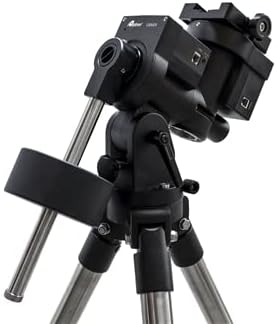
Figure 1: The iOptron CEM26 equatorial mount head. This image displays the black mount head with its counterweight shaft, designed for stable support of telescopes and cameras for astronomical purposes.
Características:
- Mount head only, designed for integration with existing tripods.
- Equipped with an AccuAlign optical polar scope for quick and precise polar alignment.
- Integrated Wi-Fi for seamless wireless control and connectivity.
- Supports a payload of up to 26 lbs with a mount weight of approximately 10 lbs.
- Features GOTONOVA GOTO technology with a database of over 212,000 objects.
- Go2Nova Hand Controller with a large 4-line LCD screen for intuitive operation.
- Recordable Permanent Periodic Error Correction (PPEC) for enhanced tracking accuracy.
- Adjustable counterweight bar to prevent obstruction.
2. Configuração
2.1 Desembalagem e Inspeção Inicial
Carefully unpack all components from the packaging. Verify that all parts are present and undamaged. Retain the original packaging for future transport or storage.
2.2 Mounting the CEM26 Head
Attach the CEM26 mount head securely to a compatible tripod. Ensure the mounting screws are tightened appropriately to prevent any movement during operation. The center-balanced design allows for optimal stability when properly mounted.
2.3 Attaching Counterweights and Payload
Slide the counterweights onto the counterweight shaft. Adjust their position to achieve proper balance with your telescope or camera setup. The adjustable counterweight bar helps prevent obstruction with the tripod. Secure your optical tube assembly (OTA) or camera to the mount's dovetail saddle.
2.4 Polar Alignment with AccuAlign Polar Scope
The CEM26 includes an AccuAlign optical polar scope for precise polar alignment. This scope is designed to be accessible at all times, not being blocked by the declination shaft. Follow the instructions provided with the AccuAlign scope for detailed alignment procedures. Accurate polar alignment is crucial for precise tracking and GoTo performance.
2.5 Power and Connectivity
Connect the mount to a suitable power source. Utilize the built-in Wi-Fi for wireless control and connectivity with your devices. Refer to the Go2Nova Hand Controller manual for initial setup and connection details.
3. Operating the CEM26 Mount
3.1 Go2Nova Hand Controller
The Go2Nova Hand Controller is the primary interface for operating your CEM26 mount. Its intuitive design and large 4-line LCD screen simplify navigation and object selection. Power on the mount and wait for the controller to initialize.
3.2 GoTo Technology and Object Database
The CEM26 is equipped with advanced GOTONOVA GOTO technology. Its extensive database contains over 212,000 celestial objects. Use the hand controller to select desired objects from categories such as stars, constellations, deep-sky objects, and solar system bodies. The mount will automatically slew to the selected target.
3.3 Tracking and Periodic Error Correction (PEC)
Once an object is acquired, the CEM26 will begin tracking it across the night sky to compensate for Earth's rotation. For enhanced tracking accuracy, especially critical for long-exposure astrophotography, the mount supports recordable Permanent Periodic Error Correction (PPEC). This feature allows you to train the mount to minimize inherent gear errors, improving tracking performance over time.
3.4 Controle por Wi-Fi
The built-in Wi-Fi enables remote control of the mount via compatible applications on your smartphone, tablet, or computer. This provides an alternative and often more convenient method for controlling GoTo functions and monitoring mount status.
4. Manutenção
4.1 Limpeza
Keep the mount head clean from dust and debris. Use a soft, dry cloth to wipe down surfaces. Avoid using abrasive cleaners or solvents that could damage the finish or internal components. For the AccuAlign polar scope optics, use a lens brush or air blower to remove dust, followed by a clean microfiber cloth specifically designed for optics, if necessary.
4.2 Armazenamento
When not in use, store the CEM26 mount head in a dry, dust-free environment. If possible, use the original packaging or a padded carrying case to protect it from impacts and environmental factors. Avoid extreme temperatures and high humidity.
4.3 Verificações periódicas
Periodically check all screws and fasteners to ensure they are tight. Do not overtighten. Inspect cables for any signs of wear or damage. If any issues are observed, contact iOptron support.
5. Solução De Problemas
This section provides general guidance for common issues. For detailed troubleshooting or issues not listed here, please refer to the full iOptron CEM26 manual or contact iOptron customer support.
5.1 Mount Not Powering On
- Ensure the power cable is securely connected to both the mount and the power source.
- Verifique se a fonte de alimentação está fornecendo a tensão correta.tage and current as specified for the CEM26.
- Check for any blown fuses in the power supply or mount (if applicable).
5.2 Inaccurate GoTo or Tracking
- Confirm that polar alignment was performed accurately using the AccuAlign polar scope.
- Ensure the mount is properly balanced with your payload.
- Verify that the correct time, date, and location (latitude/longitude) are entered into the Go2Nova Hand Controller.
- Perform a star alignment procedure as outlined in the Go2Nova Hand Controller manual.
- Consider performing or re-training the Permanent Periodic Error Correction (PPEC).
5.3 Hand Controller Not Responding
- Check the cable connection between the hand controller and the mount.
- Restart the mount and hand controller.
- Ensure the mount is receiving adequate power.
6. Especificações
| Nome do modelo | CEM26 |
| Número do modelo do item | CEM26 |
| Marca | iOptron |
| Fabricante | iOptron |
| Peso do item | 29 pounds (shipping weight, mount head is approx. 10 lbs) |
| Material | Liga de aço |
| Cor | Preto |
| Dispositivos compatíveis | Camera (and telescopes) |
| Recurso especial | Ajustável |
| Tipo de cabeça de tripé | Montagem Equatorial |
| UPC | 761062356831 |
| ASIN | B09NFGYG94 |
| Data da primeira disponibilidade | 11 de dezembro de 2021 |
7. Garantia e Suporte
7.1 Informações de garantia
The iOptron CEM26 Mount Head comes with a one-year standard warranty. This warranty covers defects in materials and workmanship under normal use. Please retain your proof of purchase for warranty claims. The warranty does not cover damage caused by misuse, accidents, unauthorized modifications, or improper maintenance.
7.2 Suporte ao cliente
For technical assistance, troubleshooting, or warranty service, please contact iOptron customer support. Visit the official iOptron webAcesse o site para obter as informações de contato mais atualizadas, perguntas frequentes e recursos adicionais.
Note: iOptron tuned units are brought back to factory condition, except for cosmetic appearance.


