1. Introdução
Thank you for choosing the Omega OM0520WB 1600 dpi Wireless Optical Mouse. This manual provides detailed instructions for setting up, operating, maintaining, and troubleshooting your new device. Please read this manual carefully before use to ensure optimal performance and longevity of your mouse.
2. Conteúdo da embalagem
Por favor, verifique se a embalagem contém os seguintes itens:
- Omega OM0520WB Wireless Optical Mouse
- Manual do usuário
- 1 x AA Battery (may be pre-installed or included separately)
3. Produto acabadoview
Familiarize yourself with the components of your Omega OM0520WB mouse:
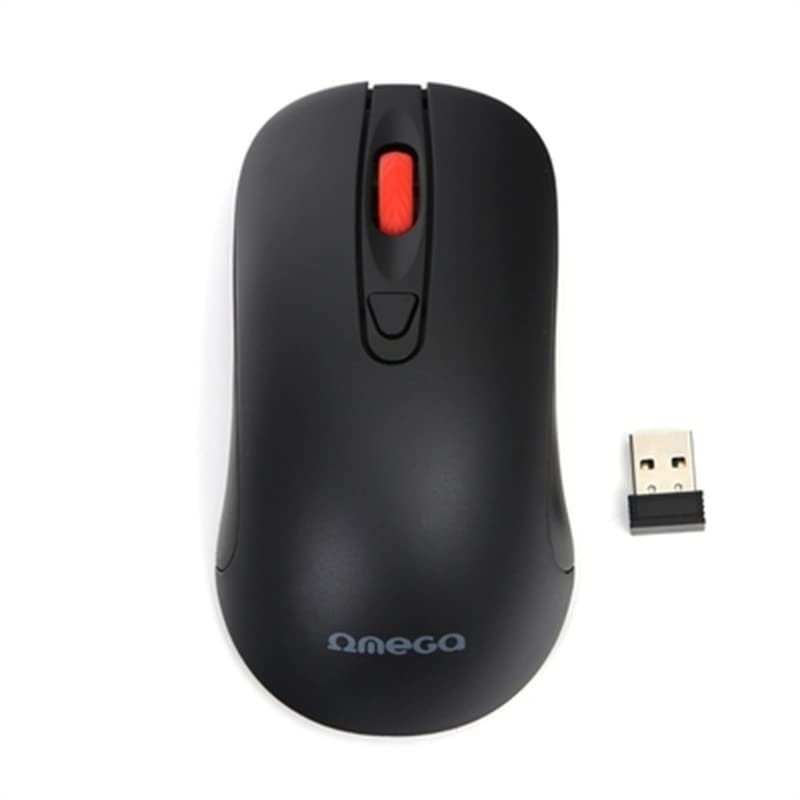
Image: The Omega OM0520WB Wireless Optical Mouse, shown in black. It features a sleek, ergonomic design with standard left and right click buttons, a scroll wheel, and a smooth finish.
- Botão esquerdo do mouse: Função padrão de clique primário.
- Botão direito do mouse: Função padrão de clique secundário.
- Rodinha do mouse: Para rolagem vertical e função de clique do meio.
- Sensor óptico: Located on the underside, for precise tracking.
- Compartimento da bateria: Localizado na parte inferior, para inserir a pilha AA.
- Interruptor de alimentação: On/Off switch, usually on the underside of the mouse.
4. Instruções de configuração
Follow these steps to set up your Omega OM0520WB mouse:
- Instale a bateria: Open the battery compartment cover on the underside of the mouse. Insert one AA battery, ensuring the polarity (+/-) matches the diagram inside the compartment. Close the cover securely.
- Ligar o mouse: Locate the power switch on the underside of the mouse and slide it to the 'ON' position.
- Conecte-se por Bluetooth:
- No seu computador ou notebook, acesse as configurações de Bluetooth.
- Certifique-se de que o Bluetooth esteja ativado.
- Procurar new devices. The mouse should appear as 'Omega OM0520WB' or similar.
- Select the mouse to pair. Once paired, your mouse is ready for use.
5. Instruções de operação
Your Omega OM0520WB mouse is designed for intuitive use:
- Navegação básica: Mova o mouse sobre uma superfície plana para controlar o cursor na tela.
- Clicando: Use the left button for primary clicks (e.g., selecting items) and the right button for secondary clicks (e.g., opening context menus).
- Rolagem: Role a roda de rolagem para cima ou para baixo para navegar pelos documentos e web pages. Press the scroll wheel for a middle-click function, if supported by your application.
- Configuração de DPI: The mouse operates at a fixed 1600 dpi, providing a balance of speed and precision for most tasks.
- Design Ambidestro: The symmetrical design allows comfortable use for both left-handed and right-handed users.
6. Manutenção
Para garantir a longevidade e o desempenho ideal do seu mouse, siga estas orientações de manutenção:
- Limpeza: Use um pano macio e seco para limpar a superfície do mouse. Para sujeira mais resistente, umedeça levemente o mouse.ampUmedeça o pano com água. Evite usar produtos químicos agressivos ou abrasivos.
- Sensor óptico: Keep the optical sensor on the underside clean and free from dust or debris.
- Substituição da bateria: When the mouse performance degrades or it stops responding, replace the AA battery. Always use a fresh, high-quality battery.
- Armazenar: When not in use for extended periods, turn off the mouse using the power switch to conserve battery life. Store it in a cool, dry place.
7. Solução De Problemas
If you encounter issues with your Omega OM0520WB mouse, refer to the following solutions:
- O mouse não responde:
- Certifique-se de que o mouse esteja ligado.
- Verifique a bateria. Substitua-a se necessário.
- Verify that Bluetooth is enabled on your computer and the mouse is paired. Try re-pairing the mouse.
- Move the mouse closer to your computer to ensure a strong Bluetooth signal.
- Movimento errático do cursor:
- Limpe o sensor óptico na parte inferior do mouse.
- Use the mouse on a clean, non-reflective, and uniform surface. Mouse pads are recommended.
- Problemas de conexão:
- Reinicie o seu computador e tente conectar novamente.
- Remove the mouse from your computer's Bluetooth device list and then re-pair it.
- Ensure there are no other devices interfering with the Bluetooth signal.
8. Especificações
| Nome do modelo | OM0520WB |
| Tecnologia de Conectividade | Wireless (Bluetooth) |
| Tecnologia de detecção de movimento | Óptico |
| DPI | 1600 dpi |
| Número de botões | 3 (Esquerda, Direita, Roda de rolagem) |
| Orientação das mãos | Ambidestro |
| Fonte de energia | 1 x AA Lithium-ion battery (required) |
| Dispositivos compatíveis | Computador pessoal, laptop |
| Peso | Aproximadamente 73 g |
| Cor | Preto |
9. Garantia e Suporte
Omega products are designed for reliability and performance. For information regarding warranty coverage, technical support, or service, please refer to the warranty card included with your product or visit the official Omega webGuarde o comprovante de compra como prova de aquisição.


