Introdução
Thank you for choosing the Inateck KB02017 AZERTY Keyboard. This manual provides detailed instructions for setting up, operating, and maintaining your keyboard to ensure optimal performance and longevity. Please read this manual thoroughly before use.
Compatibilidade
The Inateck KB02017 keyboard is compatible with the following iPad models:
- iPad 10.2-inch (9th Generation, 2021)
- iPad 10.2-inch (8th Generation, 2020)
- iPad 10.2-inch (7th Generation, 2019)
- iPad Air 3 (10.5-inch, 2019)
- iPad Pro 10.5 polegadas

This image illustrates the compatible iPad models and how to locate your iPad's model number for verification.
Conteúdo da embalagem
Por favor, verifique se a embalagem contém os seguintes itens:
- Inateck KB02017 Magnetic Detachable Keyboard
- Estojo protetor
- Cabo de carregamento USB
- Manual do usuário
Características do produto
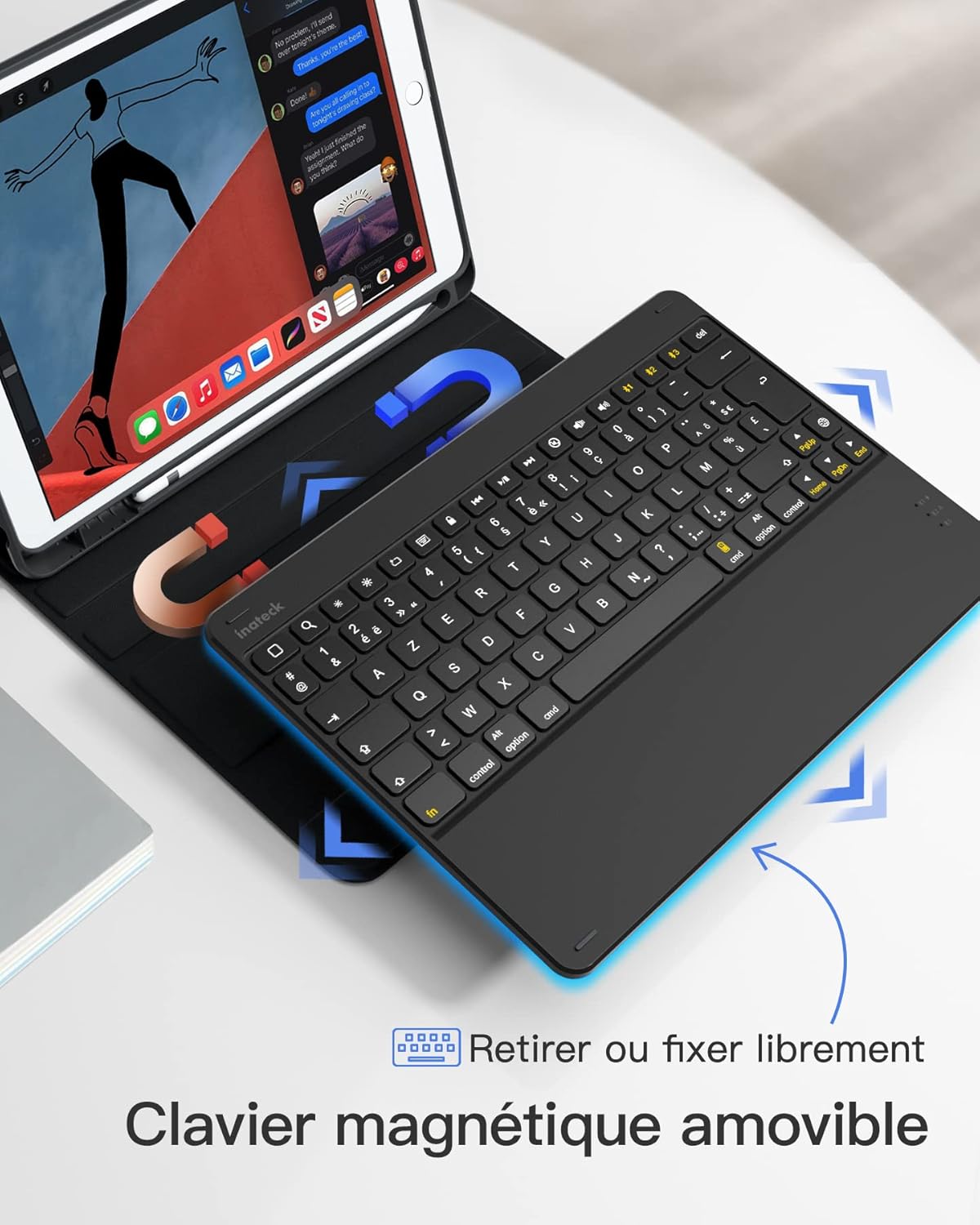
- Magnetic Detachable Design: The keyboard can be easily detached from the protective case, offering flexibility and portability. This allows you to use the iPad with or without the keyboard.
- True French AZERTY Layout: Designed with a genuine French AZERTY keyboard layout for comfortable and familiar typing.
- Múltiplo ViewÂngulos de engate: The case supports three adjustable viewing angles, allowing you to find the most comfortable position for typing, viewing, or drawing.
- Independent iOS Shortcut Keys: A dedicated row of shortcut keys provides quick access to various iOS functions, enhancing productivity.
- Proteção total: The flexible and shock-resistant protective case safeguards your iPad from daily bumps and scratches.
- Bateria de longa duração: Enjoy up to 100 hours of continuous operation or 50 days of standby time on a single charge.

The keyboard features a magnetic detachable design for versatile use.

The keyboard features a true French AZERTY layout.

Ajustável viewing angles provide ergonomic comfort.
Configurar
1. Carregando o teclado
Before first use, fully charge the keyboard. Connect the provided USB charging cable to the keyboard's charging port and a USB power source. The charging indicator light will show the charging status.
2. Emparelhamento Bluetooth
- Certifique-se de que o teclado esteja carregado e ligado.
- No seu iPad, acesse Configurações > Bluetooth e ligue o Bluetooth.
- Pressione e segure o Fn + C keys simultaneously on the keyboard for 3 seconds. The Bluetooth indicator light will start flashing, indicating the keyboard is in pairing mode.
- On your iPad, look for "Inateck KB02017" (or similar name) in the list of available devices and tap to connect.
- Once connected, the Bluetooth indicator light on the keyboard will stop flashing and remain solid for a few seconds, then turn off.
The keyboard connects to your iPad via Bluetooth.
Instruções de operação
Using Shortcut Keys
The top row of the keyboard features dedicated iOS shortcut keys for quick access to various functions. These keys allow you to control your iPad efficiently without touching the screen.
| Ícone de Chave | Função |
|---|---|
| Lar | Retornar à tela inicial |
| Pesquisar | Activate Spotlight Search |
| Diminuição do brilho | Diminuir o brilho da tela |
| Aumentar o brilho | Aumentar o brilho da tela |
| Keyboard Hide/Show | Hide or show the on-screen keyboard |
| Faixa anterior | Ir para a faixa de mídia anterior |
| Reproduzir/Pausar | Play or pause media playback |
| Próxima faixa | Ir para a próxima faixa de mídia |
| Mudo | Silenciar ou ativar o áudio |
| Diminuir volume | Diminuir volume |
| Aumentar o volume | Aumentar o volume |
| Tela de bloqueio | Lock the iPad screen |

Dedicated shortcut keys for iOS functions.
Manutenção
Limpeza
Para limpar o teclado, limpe suavemente a superfície com um pano macio e seco.amp cloth. Avoid using harsh chemicals or abrasive materials. Ensure no liquid enters the keyboard's internal components.
Cuidados com a bateria
The keyboard is powered by a rechargeable battery. To prolong battery life:
- Charge the keyboard regularly, even if not in frequent use.
- Evite expor o teclado a temperaturas extremas.
- Se for guardar o aparelho por um período prolongado, carregue a bateria até cerca de 50% antes de o guardar.

The keyboard offers long battery life for extended use.
Solução de problemas
Keyboard Fails to Connect via Bluetooth
- Clear the paired device history for "Inateck KB02017" on your iPad.
- Deactivate and then reactivate the keyboard's Bluetooth.
- Pressione e segure o Fn + C keys for 3 seconds to enter Bluetooth pairing mode.
- Tap on "Inateck KB02017" in your iPad's Bluetooth device list to pair.
Some Keys Transmit Incorrect Values
If keys are not producing the expected characters (e.g., 'A' instead of 'Q' for AZERTY layout), ensure the correct keyboard layout is selected on your iPad:
- Vá para Configurações > Em geral > Teclado.
- Toque em Teclados, então Add New Keyboard... if 'French (AZERTY)' is not listed.
- Sob Teclado de Hardware, ensure the correct 'French (AZERTY)' layout is selected for your Inateck KB02017.

Common troubleshooting steps for connectivity and key input issues.
Especificações
| Recurso | Detalhe |
|---|---|
| Marca | Inateck |
| Número do modelo | KB02017 |
| Cor | Cinza escuro |
| Tecnologia de Conectividade | Bluetooth |
| Tipo de energia | Alimentado por bateria |
| Descrição do teclado | Autônomo |
| Dispositivos compatíveis | iPad 2021/2020/2019 (9th/8th/7th Generation), iPad Air 3, iPad Pro 10.5 |
| Dimensões do item (C x L x A) | 25.5 x 19.8 x 1.8 cm |
| Peso do produto | 0.65 kg (1.43 libras) |
| Recurso especial | Leve |
| Material | Aluminum, Polycarbonate, PBT |
Garantia e Suporte
For warranty information or technical support, please refer to the documentation included with your purchase or visit the official Inateck website. Contact details for customer service can typically be found on the product packaging or the brand's support page.


