Informações importantes de segurança
Please read this manual carefully before assembly and use to ensure safe operation and to prevent damage to the product or injury to yourself.
- Não exceda a capacidade máxima de carga de 100 kgA sobrecarga pode causar instabilidade e danos.
- Certifique-se de que todos os cabos estejam devidamente organizados e fixados para evitar tropeços ou danos durante ajustes de altura.
- Mantenha crianças e animais de estimação afastados da mesa durante o funcionamento.
- Do not place hands or other body parts near moving parts of the desk frame during height adjustment.
- Utilize a mesa apenas para a finalidade a que se destina, como estação de trabalho.
- Verifique regularmente todos os parafusos e porcas para garantir que estejam bem apertados.
Produto acimaview
The FLEXISPOT E1B Electric Standing Desk is designed to provide a versatile and ergonomic workspace. It features a robust dual-motor system for smooth height adjustments and a durable tabletop.
Principais características:
- Sistema de motor duplo: Ensures stable and efficient height adjustment at 25 mm/s.
- Faixa de altura: Adjustable from 70 cm to 119 cm to suit various user heights and work preferences.
- Capacidade de carga: Supports up to 100 kg, accommodating multiple monitors and office equipment.
- Predefinições de memória: Control panel with memory functions for saving preferred height settings.
- High-Quality Tabletop: 160x80cm black tabletop, made in the EU from FSC-certified MDF with scratch-resistant high-pressure laminate.
Conteúdo da embalagem
Before starting assembly, verify that all components listed below are present and undamaged. If any parts are missing or damaged, please contact customer support.
- Desk Frame (E1B) components (legs, feet, crossbar, motor, control box)
- Tabletop (DT1608-BLACK-EU18)
- Control Panel with Memory Functions
- Adaptador de energia e cabo
- Assembly Hardware (screws, bolts, Allen keys)
- Acessórios para gerenciamento de cabos
- Manual do usuário
Instruções de Instalação e Montagem
Assembly is designed to be straightforward. It is recommended to assemble the desk on a soft, clean surface to prevent scratches. Two people are recommended for easier assembly.
Etapa 1: descompactar componentes
Retire cuidadosamente todas as peças da embalagem e disponha-as à mesa. Confira o conteúdo da embalagem.
Step 2: Assemble the Desk Frame
- Attach the lifting columns to the crossbar using the provided screws.
- Fixe os pés da mesa na parte inferior das colunas de elevação.
- Mount the control box to the designated area on the frame.
- Conecte os cabos do motor das colunas de elevação à caixa de controle.
- Conecte o cabo do painel de controle à caixa de controle.

Image: The FLEXISPOT E1B desk frame in black and white, illustrating the height adjustment range from 70cm to 119cm, highlighting the dual motor system, 25mm/s adjustment speed, and low noise operation (less than 50dB).
Passo 3: Fixe o tampo da mesa
Carefully place the tabletop upside down on a soft surface. Position the assembled desk frame onto the tabletop, aligning the pre-drilled holes. Secure the tabletop to the frame using the provided screws.

Image: A FLEXISPOT desk with a black tabletop, featuring a laptop, books, and a pen holder, demonstrating a functional and organized workspace.
Etapa 4: Conecte a energia e organize os cabos.
Connect the power adapter to the control box and then to a power outlet. Use the included cable management accessories to organize and secure all cables, preventing them from interfering with the desk's movement.
Instruções de operação
Painel de controle encerradoview:
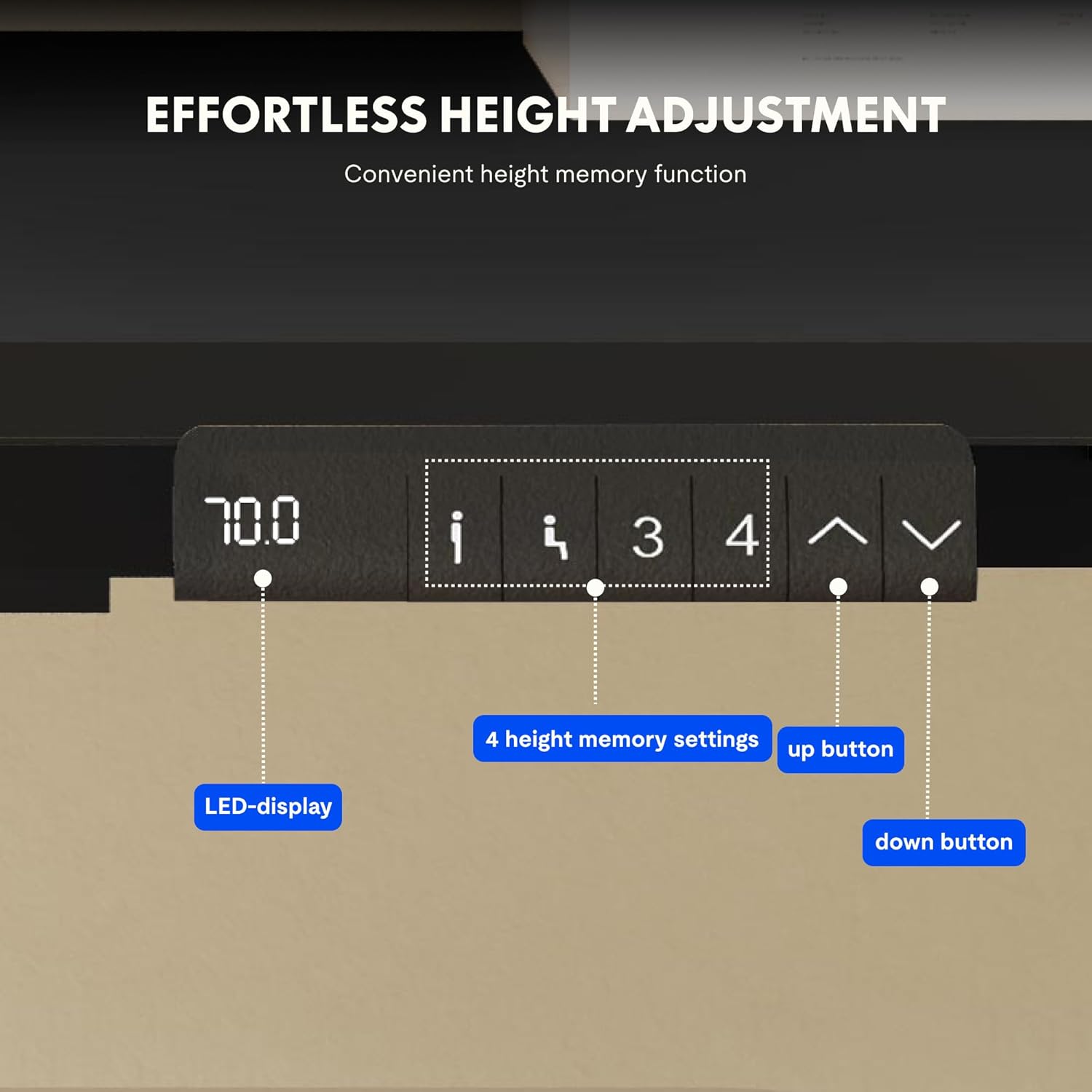
Image: Close-up of the FLEXISPOT desk control panel, showing the LED display for current height, up and down arrow buttons for manual adjustment, and four numbered buttons for saving and recalling height memory presets.
Manual Height Adjustment:
- Pressione e segure o Seta para cima (^) botão para levantar a mesa.
- Pressione e segure o Seta para baixo (v) botão para baixar a mesa.
- Release the button at your desired height. The LED display will show the current height.
Definindo predefinições de memória:
- Ajuste a mesa à altura desejada usando as setas para cima/para baixo.
- Pressione o "M" or "DEFINIR" button (if available, otherwise proceed to step 3).
- Press one of the numbered memory buttons (1, 2, 3 ou 4) within 3 seconds. The display will show "S-" followed by the number, indicating the height is saved.
Recuperando configurações de memória predefinidas:
Simply press the desired numbered memory button (1, 2, 3 ou 4A mesa se ajustará automaticamente à altura salva.
Função de reinicialização:
If the desk encounters an error or does not move smoothly, a reset may be required. Press and hold the "Abaixo" button until the desk reaches its lowest position, then release and press it again for 5-10 seconds until the display shows "RST" or "E-1" and then returns to the lowest height. The desk will then reset to its factory lowest position.
Manutenção
- Limpeza: Limpe a superfície e a estrutura da mesa com um pano macio e seco.amp pano. Evite produtos de limpeza abrasivos ou químicos agressivos.
- Inspeção: Verifique periodicamente todos os parafusos e conexões para garantir que estejam bem apertados. Reaperte-os, se necessário.
- Gerenciamento de cabos: Ensure cables remain tidy and do not obstruct the desk's movement.
- Distribuição de peso: Distribute weight evenly on the tabletop to prevent strain on the motors and frame.
Solução de problemas
| Problema | Possível causa | Solução |
|---|---|---|
| A mesa não se move. | Power cable disconnected; control box error; overloaded desk. | Check power connections. Perform a reset (see Operating Instructions). Reduce weight on the desk. |
| A mesa se move de forma irregular ou faz ruídos estranhos. | Loose connections; obstruction; uneven weight distribution. | Check all screws and connections. Remove any obstructions. Redistribute weight evenly. Perform a reset. |
| O visor mostra um código de erro (por exemplo, E01, E02). | Erro interno do sistema. | Perform a reset. If the error persists, contact customer support. |
| As configurações de memória não estão funcionando. | As predefinições não foram salvas corretamente. | Re-save the memory presets following the instructions. |
Especificações
| Recurso | Detalhe |
|---|---|
| Marca | PONTO FLEXI |
| Número do modelo | E1B+DT1608-BLACK-EU18 |
| Tabletop Dimensions (L x W) | 160 cm x 80 cm |
| Faixa de ajuste de altura | 70 cm - 119 cm |
| Capacidade de carga | 100 kg |
| Velocidade de ajuste | 25 mm/s |
| Tipo de motor | Motores duplos |
| Material de mesa | FSC-certified MDF with high-pressure laminate |
| Material da estrutura | Liga de aço |
| Cor | Black Tabletop + Black Frame |
Garantia e Suporte
FLEXISPOT products are manufactured to high-quality standards. For warranty information and customer support, please refer to the official FLEXISPOT website ou entre em contato com seu revendedor.
- Garantia: Specific warranty terms may vary by region and product. Please check your purchase documentation or the manufacturer's website para obter detalhes.
- Suporte ao cliente: For technical assistance, missing parts, or operational questions, please visit the Loja da marca FLEXISPOT ou entre em contato com os canais de suporte oficiais.


