1. Introdução
Obrigado pela compra.asing the Muse MT-106 BT Stereo Turntable. This manual provides essential information for the safe and efficient operation of your new device. Please read it thoroughly before use and retain it for future reference.
The Muse MT-106 BT is a versatile 3-speed (33/45/78 RPM) stereo turntable featuring a Bluetooth receiver, a USB port for playback and encoding, and two integrated speakers. It is designed to play vinyl records and can also stream music from any Bluetooth-compatible device such as a tablet, smartphone, or laptop.
2. Instruções de segurança
- Fonte de energia: Certifique-se de que a fonte de alimentação voltage matches the rating indicated on the unit.
- Água e Umidade: Do not expose the unit to rain, moisture, or dripping water. Do not place objects filled with liquids, such as vases, on the unit.
- Ventilação: Garanta ventilação adequada. Não obstrua as aberturas de ventilação.
- Aquecer: Mantenha o aparelho afastado de fontes de calor, como radiadores, aquecedores, fogões ou outros aparelhos que produzam calor.
- Limpeza: Desligue o aparelho da tomada antes de limpá-lo. Use um pano macio e seco. Não use produtos de limpeza líquidos ou em aerossol.
- Manutenção: Não tente consertar este produto sozinho. Encaminhe todos os serviços de manutenção para pessoal de serviço qualificado.
- Colocação: Coloque a unidade em uma superfície estável e plana para evitar danos causados por quedas.
3. Conteúdo da embalagem
Por favor, verifique se os seguintes itens estão incluídos em seu pacote:
- Muse MT-106 BT Stereo Turntable
- Manual do usuário
- Adaptador de energia
- Adaptador 45 RPM
4. Produto acabadoview
Familiarize yourself with the components and controls of your Muse MT-106 BT Turntable.

Figura 4.1: geral view of the Muse MT-106 BT Stereo Turntable. This image displays the turntable from an angled perspective, with its transparent dust cover lifted. The wooden base and integrated speakers are visible, along with the black platter, tonearm, and control knobs on the right side.
4.1 Front and Top Components
- Capa de proteção contra poeira: Protects the platter and tonearm from dust.
- Prato: A plataforma giratória onde os discos são colocados.
- Fuso: Holds the record in place on the platter.
- Adaptador de 45 RPM: Utilizado para reproduzir discos de 7 polegadas com furos centrais grandes.
- Braço: Segura a agulha e percorre os sulcos do disco.
- Ponta de prova (agulha): The part that reads the record grooves.
- Alavanca de sinalização: Levanta e abaixa o braço do leitor de discos.
- Seletor de velocidade: Switch to select 33, 45, or 78 RPM.
- Alto-falantes integrados: Alto-falantes integrados para saída de áudio.

Figura 4.2: Painel de Controle. Esta imagem fornece uma visão detalhada. view of the control panel located on the right side of the turntable. It shows three rotary knobs for volume and function selection, along with several buttons for playback control and mode switching.
4.2 Painel de controle
- Botão de potência/volume: Liga/desliga o aparelho e ajusta o volume.
- Botão seletor de função: Switches between Phono, Bluetooth, USB, and Aux-in modes.
- Botões de controle de reprodução: Play/Pause, Skip Forward, Skip Backward (for USB mode).
- Interruptor de parada automática: Enables or disables the automatic stop function for vinyl playback.
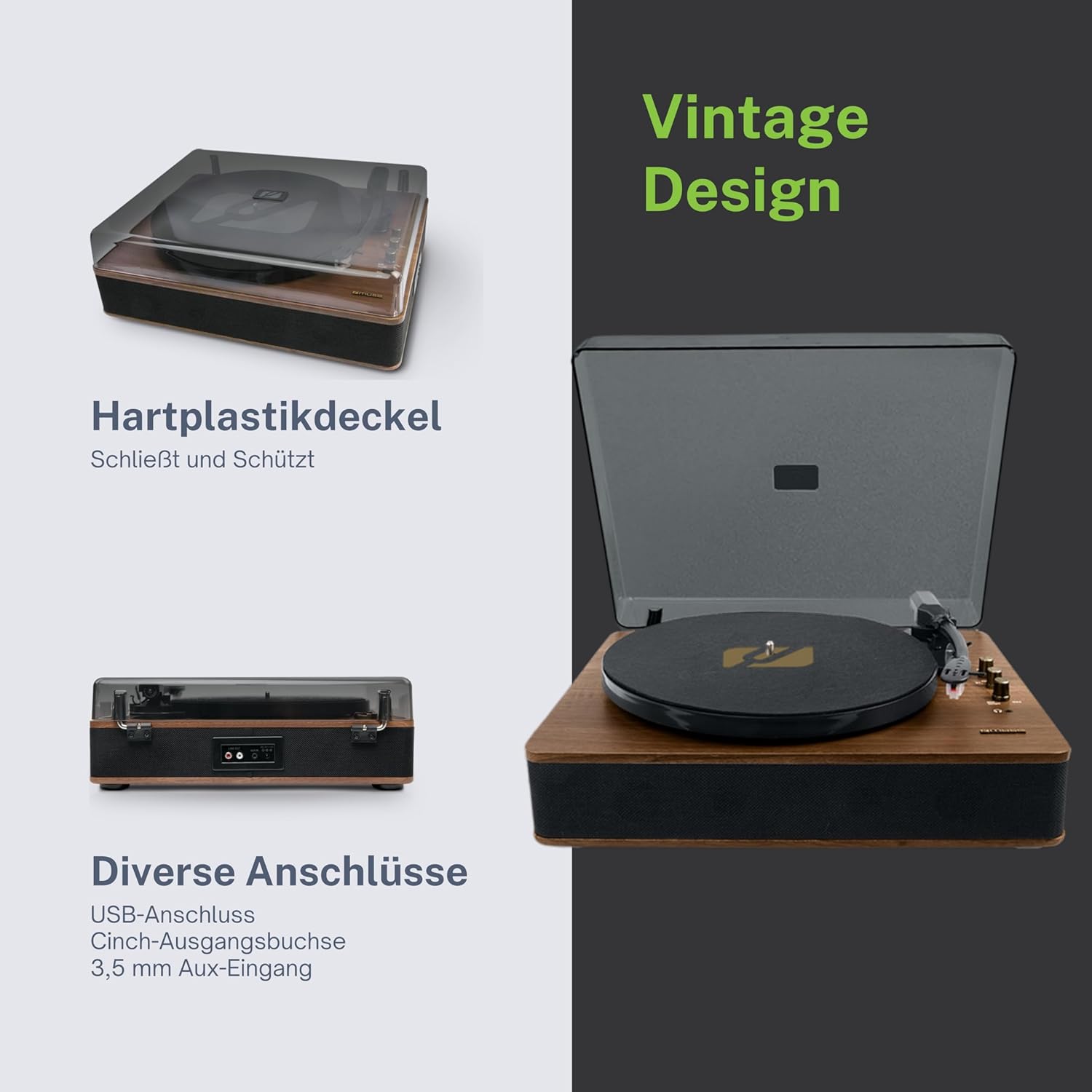
Figure 4.3: Rear Connections. The rear panel of the turntable is shown, featuring various connection ports including RCA audio outputs, a USB port, and an auxiliary input jack, allowing connection to external audio systems or devices.
4.3 Conexões traseiras e laterais
- Conectores de saída RCA (E/D): Conecte-se a um externo ampamplificador ou alto-falantes amplificados.
- Porta USB: Para reproduzir MP3 files from a USB drive or encoding vinyl to USB.
- Entrada AUX (3.5 mm): Conecte dispositivos de áudio externos.
- Conector DC IN: Conecte o adaptador de energia.
- Entrada para fone de ouvido (3.5mm): Para audição privada.

Figure 4.4: Key Functions Overview. An illustrative graphic highlighting the key functions and connectivity options of the turntable. Icons represent features such as USB encoding, MP3 playback via USB, RCA output, auto-stop, integrated speakers, headphone jack, auxiliary input, and AC power input.
5. Configuração
5.1 Desembalagem
- Remova cuidadosamente a unidade da embalagem.
- Remova todos os materiais de embalagem e películas protetoras.
- Keep the packaging for future transport or storage.
5.2 Posicionamento
- Coloque o prato giratório em uma superfície plana, estável e nivelada.
- Avoid placing it near strong magnetic fields, direct sunlight, or heat sources.
- Certifique-se de que haja espaço suficiente ao redor da unidade para ventilação adequada.
5.3 Conexão de Energia
- Connect the supplied power adapter to the DC IN jack on the rear of the turntable.
- Ligue o adaptador de energia a uma tomada elétrica adequada.
5.4 Instalação da tampa de proteção contra poeira
- Carefully attach the dust cover to the hinges on the back of the turntable.
- The dust cover protects the unit when not in use. Remove it or lift it fully when playing records.
6. Instruções de operação
6.1 Tocando discos de vinil
- Levante a tampa contra poeira.
- Rotate the Power/Volume knob clockwise to turn on the unit.
- Set the Function Selector knob to 'Phono'.
- Place a record on the platter. If playing a 45 RPM single, place the 45 RPM adapter on the spindle first.
- Select the correct speed (33, 45, or 78 RPM) using the Speed Selector switch.
- Remova o protetor da caneta da caneta.
- Lift the tonearm using the cue lever.
- Mova o braço do toca-discos sobre o ponto inicial desejado do disco.
- Gently lower the tonearm onto the record using the cue lever. The music will begin to play.
- Ajuste o volume usando o botão liga/desliga/volume.
- At the end of the record, if the Auto Stop switch is ON, the platter will stop rotating. If OFF, the platter will continue to rotate. Manually lift the tonearm and return it to its rest.
6.2 Modo Bluetooth
- Rotate the Power/Volume knob clockwise to turn on the unit.
- Set the Function Selector knob to 'BT' (Bluetooth). The Bluetooth indicator will flash, indicating pairing mode.
- Ative o Bluetooth no seu dispositivo externo (smartphone, tablet, etc.) e procure por dispositivos disponíveis.
- Select 'MUSE MT-106 BT' from the list of devices. Once connected, the Bluetooth indicator will stop flashing and remain solid.
- You can now play music from your external device through the turntable's speakers. Adjust volume using both the turntable's knob and your external device.
6.3 Reprodução e codificação USB
Reprodução USB 6.3.1
- Rotate the Power/Volume knob clockwise to turn on the unit.
- Set the Function Selector knob to 'USB'.
- Insert a USB flash drive into the USB port. The unit will automatically detect and begin playing MP3 files.
- Use the Playback Control Buttons (Play/Pause, Skip Forward, Skip Backward) to navigate tracks.
6.3.2 Codificação USB (Gravação de Vinil para USB)
The MT-106 BT allows you to convert your vinyl records into digital MP3 files on a USB drive.
- Ensure a USB flash drive is inserted into the USB port.
- Set the Function Selector knob to 'Phono'.
- Start playing your vinyl record as described in section 6.1.
- Press the 'Record' button (refer to Figure 4.2 for button location, typically indicated by a circle or 'REC' label). The recording indicator will illuminate.
- To stop recording, press the 'Record' button again. The recording indicator will turn off.
- The recorded audio will be saved as an MP3 file no seu pen drive.
6.4 Entrada auxiliar (AUX IN)
- Rotate the Power/Volume knob clockwise to turn on the unit.
- Set the Function Selector knob to 'AUX'.
- Connect an external audio device (e.g., MP3 player, CD player) to the AUX IN jack (3.5mm) on the rear of the turntable using an audio cable (not supplied).
- Play audio from your external device. The sound will be output through the turntable's speakers.
6.5 saída RCA
Para conectar seu toca-discos a uma fonte externa ampAmplificador ou caixas de som amplificadas:
- Ensure the turntable and the external audio system are turned off.
- Connect an RCA audio cable (not supplied) from the RCA Output Jacks (L/R) on the rear of the turntable to the corresponding audio input jacks on your ampamplificador ou alto-falantes amplificados.
- Turn on both the turntable and your external audio system.
- Selecione a entrada apropriada no seu sistema de áudio externo.
7. Manutenção
7.1 Limpeza da agulha
- Use uma escova macia, especialmente concebida para a limpeza de canetas stylus, para escovar suavemente a caneta de trás para a frente.
- Do not use excessive force or brush from side to side, as this can damage the stylus.
- Substitua a agulha aproximadamente a cada 300-500 horas de reprodução, ou se notar uma degradação na qualidade do som.
7.2 Limpando a Unidade
- Wipe the exterior of the turntable with a soft, dry, lint-free cloth.
- Não utilize produtos de limpeza abrasivos, ceras ou solventes, pois podem danificar o acabamento.
- Para a capa protetora contra poeira, use um pano macio e, se necessário, um produto de limpeza suave e não abrasivo.
8. Solução De Problemas
If you experience issues with your turntable, please consult the following table before contacting support.
| Problema | Possível causa | Solução |
|---|---|---|
| Sem energia | Adaptador de energia não conectado ou tomada com defeito. | Certifique-se de que o adaptador de energia esteja conectado firmemente e que a tomada esteja funcionando. |
| Sem som | Volume too low; incorrect function mode; external speakers not connected/powered. | Increase volume; select correct function (Phono, BT, USB, AUX); check external speaker connections and power. |
| Poor sound quality (vinyl) | Dirty or worn stylus; dirty record; incorrect speed selected. | Clean or replace stylus; clean record; select correct RPM. |
| Bluetooth não conecta | Turntable not in pairing mode; device too far; already connected to another device. | Ensure turntable is in BT mode and flashing; move device closer; disconnect from other devices. |
| A reprodução USB não está funcionando | Unidade USB inserida incorretamente; não suportada. file Formatar; unidade USB com defeito. | Reinsert USB drive; ensure files are MP3 format; try a different USB drive. |
9. Especificações
| Marca | MUSA |
| Nome do modelo | MT-106BT |
| Cor | Madeira |
| Material | Madeira |
| Peso do item | 4.3 quilos |
| Velocidades de rotação | 33, 45, 78 RPM |
| Conectividade | Bluetooth, USB, RCA Output, 3.5mm AUX Input, 3.5mm Headphone Jack |
| Características especiais | Integrated Speaker, Dust Protection, Adjustable Speed, USB Encoding |
| Dispositivos compatíveis | Smartphone, Tablet |
| Fonte de energia | AC Adapter (1 AAAA battery required for unspecified function, likely remote or internal clock) |
| País de origem | China |
10. Garantia e Suporte
This product is covered by a manufacturer's warranty. Please refer to the warranty card included with your purchase or visit the official MUSE website para obter termos e condições detalhados da garantia.
For technical support, troubleshooting assistance, or inquiries regarding spare parts, please contact MUSE customer service through their official channels. Information regarding spare parts availability is currently not available.


