Introdução
Obrigado pela compra.asing the UBeesize 170cm Tripod. This versatile tripod is designed to provide stable support for various devices, including cameras, smartphones, tablets, and video cameras. Its lightweight aluminum construction, 3-way pan head, and adjustable height make it suitable for a wide range of photography and videography needs, from family trips to live streaming. Please read this manual carefully to ensure proper setup and operation.
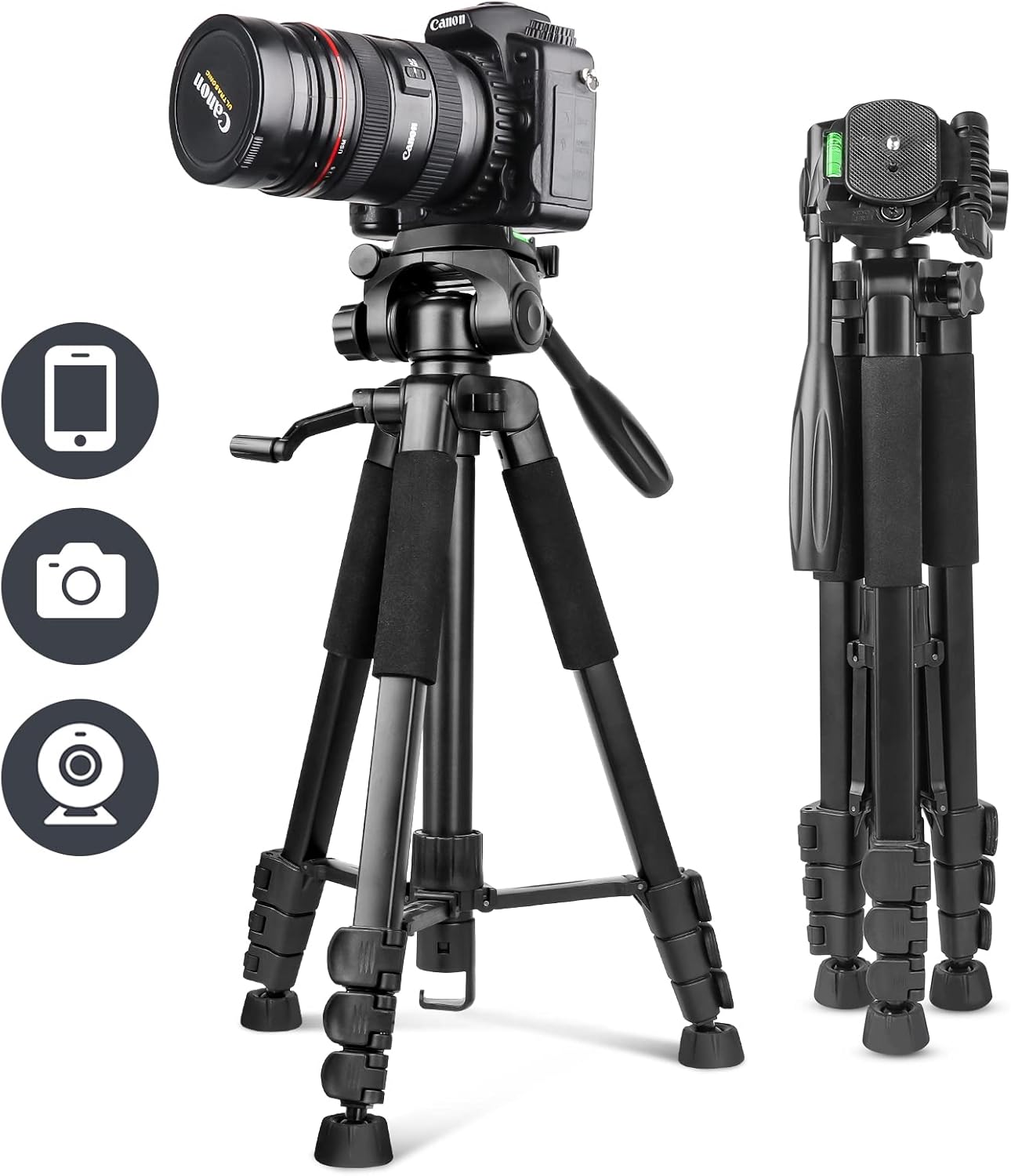
Image: The UBeesize 170cm Tripod shown fully extended with a camera attached, illustrating its primary use.
Conteúdo da embalagem
Verifique se todos os itens listados abaixo estão incluídos no seu pacote:
- UBeesize Camera Tripod x 1
- Smartphone Clip x 1
- Controle remoto sem fio x 1
- Bolsa de transporte x 1
- Manual de instruções x 1

Image: Visual representation of the tripod and its accompanying accessories, including the smartphone clip, wireless remote, and carrying bag.
Product Diagram and Parts Identification
Familiarize yourself with the different components of your UBeesize tripod:

Imagem: Uma explosão view diagram highlighting key parts such as the pan handle head, quick release plate, spirit level, center column, leg locks, anti-slip feet, and the hook for added stability.
- Pan Handle Head: Allows for smooth horizontal and vertical adjustments.
- Placa de Liberação Rápida: For quick attachment and detachment of your device.
- Spirit Level: Helps ensure your setup is perfectly horizontal.
- Coluna central: Extends for additional height adjustment.
- Leg Locks: Secure the tripod legs at desired lengths.
- Pés antiderrapantes: Provide stability on various surfaces.
- Gancho para acessórios: Located at the bottom of the center column, can be used to hang a weight (e.g., backpack) for increased stability.
Instruções de configuração
1. Desdobrando o tripé
- Coloque o tripé em uma superfície plana e estável.
- Release the leg locks on each leg.
- Extend the legs to the desired length and angle.
- Securely fasten all leg locks to prevent accidental collapse.
2. Ajustando a Altura
The tripod offers 4-stage height adjustment, from a minimum of 51cm to a maximum of 170cm.
- To adjust the leg height, open the leg locks, extend the leg sections, and then close the locks firmly.
- To adjust the center column height, loosen the center column lock knob, raise or lower the column, and then tighten the knob securely.

Image: A visual guide demonstrating the tripod's adjustable height settings, ranging from its folded state to its maximum extension of 170cm.
3. Attaching Devices (Camera, Smartphone)
- Para câmeras: Unscrew the quick release plate from the tripod head. Attach the quick release plate to the bottom of your camera by screwing it into the camera's tripod mount. Then, slide the quick release plate with the camera back onto the tripod head until it clicks into place. Ensure it is securely locked.
- Para smartphones: Attach the smartphone clip to the quick release plate. Insert your smartphone into the clip, ensuring it is held firmly. Then, attach the quick release plate with the smartphone clip to the tripod head.
- Importante: Always ensure the device is securely mounted and all screws are tightened to prevent accidental drops and maintain the maximum load capacity of 5.5kg.
4. Utilizando o controle remoto sem fio
The included wireless remote control is compatible with both iOS and Android smartphones, offering a maximum effective range of 10 meters.
- Ligue o controle remoto usando o interruptor ON/OFF.
- Habilite o Bluetooth no seu smartphone e pesquise os dispositivos disponíveis.
- Select the remote control (usually named 'AB Shutter3' or similar) from the list to pair.
- Once paired, open your smartphone's camera app. Use the corresponding button on the remote (iOS or Android) to trigger the shutter.
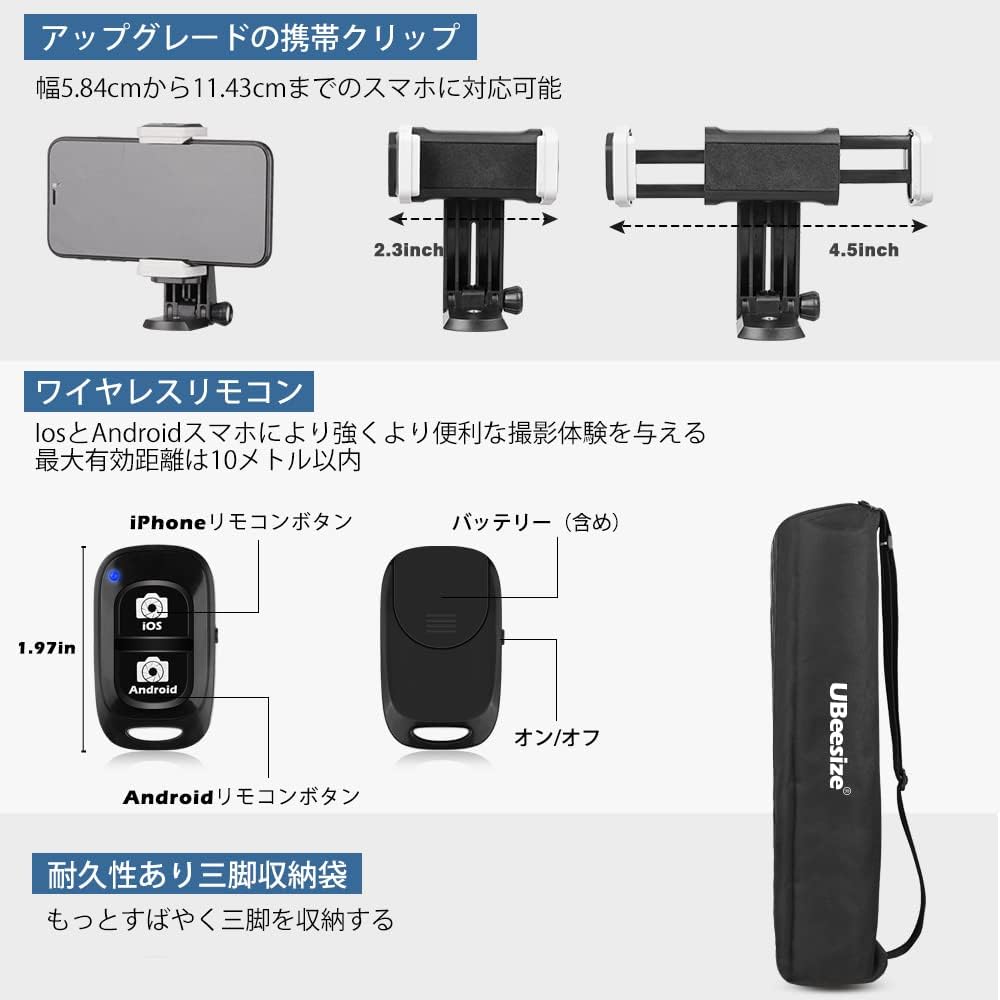
Imagem: Close-up view of the adjustable smartphone clip, the wireless Bluetooth remote control with iOS and Android buttons, and the compact carrying bag.
Instruções de operação
1. Adjusting Shooting Angles with the 3-Way Pan Head
The 3-way pan head allows for flexible positioning of your device:
- Horizontal Panning: Loosen the horizontal lock knob on the pan head to rotate the device 360 degrees horizontally for panoramic shots. Tighten to secure.
- Vertical Tilting: Loosen the vertical tilt handle to adjust the device's angle up or down. Tighten the handle to secure the position.
- Orientação retrato/paisagem: The quick release plate mount can be tilted 90 degrees to switch between landscape and portrait orientations. Loosen the side knob, adjust, and tighten.

Imagem: Examples of various shooting modes achievable with the 3-way pan head, including landscape, portrait, upward-angle, and downward-angle shots, along with an indicator for 360-degree rotation.
2. Enhancing Stability
For maximum stability, especially with heavier devices or in windy conditions:
- Ensure all leg locks and head adjustment knobs are firmly tightened.
- Hang a weight (e.g., your camera bag or backpack) from the accessory hook located at the bottom of the center column.
- Use the spirit level on the tripod head to ensure your setup is perfectly balanced.

Image: The tripod set up outdoors with a camera, showing a backpack attached to the center column hook to provide additional stability.
Manutenção
To ensure the longevity and optimal performance of your tripod:
- Clean the tripod regularly with a soft, dry cloth. Avoid abrasive cleaners or solvents.
- If used in dusty or sandy environments, carefully clean the leg sections and locks to prevent grit from affecting their operation.
- Guarde o tripé na bolsa de transporte em local seco e fresco quando não estiver em uso.
- Periodically check all screws and connections for tightness.
Solução de problemas
1. Tripod is unstable:
- Certifique-se de que todas as travas das pernas estejam totalmente apertadas.
- Verify that the quick release plate and your device are securely attached to the tripod head.
- Extend the legs evenly and ensure they are spread wide enough.
- Consider hanging a weight from the accessory hook for added stability.
2. Device is slipping or tilting:
- Tighten the pan handle and tilt adjustment knobs firmly.
- Ensure your device's weight does not exceed the maximum load capacity of 5.5kg.
3. Wireless remote control not pairing:
- Ensure the remote control is turned on and within 10 meters of your smartphone.
- Verifique se o Bluetooth está ativado no seu smartphone.
- If previously paired, try unpairing and re-pairing the remote control in your smartphone's Bluetooth settings.
- Replace the remote control battery if necessary.
Especificações
| Número do modelo | UB-TR670BK01 |
| Material | Alumínio |
| Cor | Preto |
| Altura Máxima | 170 centímetros |
| Altura mínima | 51 centímetros |
| Comprimento dobrado | 51 centímetros |
| Peso do item | 1.39 kg (body weight), 1.64 kg (package weight) |
| Capacidade Máxima de Carga | 5.5 kg |
| Tipo de cabeça de tripé | 3-Way Pan Handle Head |
| Dispositivos compatíveis | Cameras, Smartphones, Tablets, Video Cameras |
| Classificação à prova d'água | IP54 |
| Características especiais | Portable, 360° Rotation, Accessory Hook |
Garantia e Suporte
Your UBeesize 170cm Tripod comes with a Garantia de 12 meses from the date of purchase. If you encounter any issues or have questions regarding your product during this period, please do not hesitate to contact our customer support team. We are committed to providing reliable service and assistance.
For support, please refer to the contact information provided on the UBeesize official website ou sua plataforma de compra.


