Introdução
This manual provides comprehensive instructions for the assembly, operation, maintenance, and troubleshooting of your FLEXISPOT EC5 Standing Desk. Please read this manual thoroughly before use to ensure proper setup and safe operation.

Figure 1: FLEXISPOT EC5 Standing Desk with a black tabletop and black frame, set up in an office environment.
The FLEXISPOT EC5 is an electric height-adjustable desk designed to promote a healthier work environment by allowing seamless transitions between sitting and standing positions. It features a robust dual-motor system, a smart control panel with memory presets, and a durable construction.
Principais características:
- Three-tier frame for height adjustment from 60.5cm to 125cm.
- Supports heavy loads up to 125kg (or 160kg with upgraded design).
- Smooth and quiet lifting speed of 38mm/second.
- Programmable digital memory with 3 preset options for customized heights.
- Collision protection system for enhanced safety.
- Durable MDF tabletop with scratch-resistant laminate.
Configuração e montagem
The FLEXISPOT EC5 Standing Desk is designed for straightforward assembly. All necessary tools are included, and detailed instructions are provided to guide you through the process, typically taking 20-25 minutes.
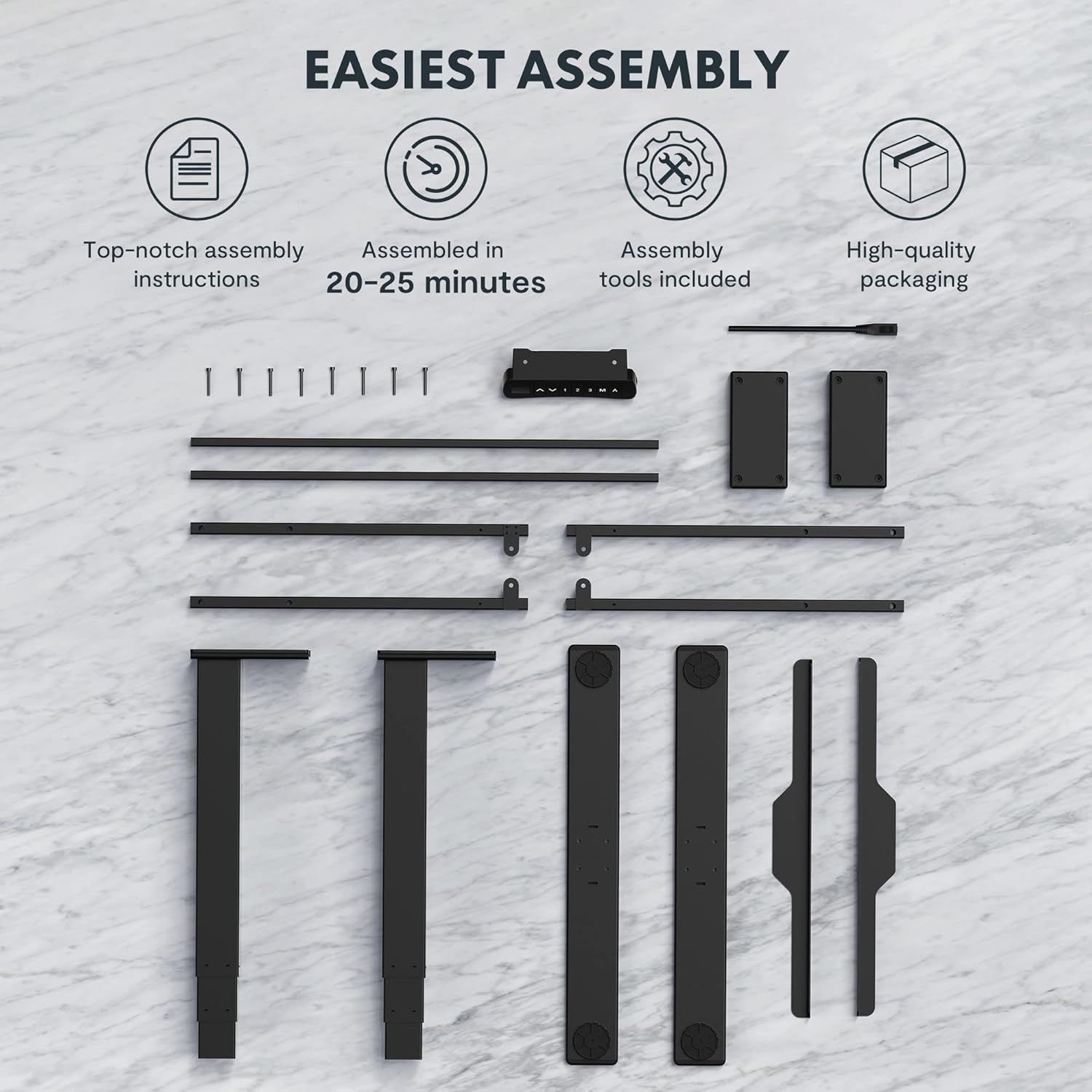
Figure 2: All components and tools required for assembling the FLEXISPOT EC5 Standing Desk.
Conteúdo da embalagem:
- Desk Frame (legs, crossbars)
- Tabletop (if included in package)
- Control Panel with Cable
- Adaptador de energia e cabo
- Ferragens de montagem (parafusos, porcas)
- Ferramentas de montagem (ex: chave Allen)
- Manual de instruções
Etapas de montagem (geral)view):
- Desembale todos os componentes e confira com a lista de peças.
- Assemble the desk legs to the crossbars, ensuring all connections are secure.
- Attach the assembled frame to the tabletop using the provided screws.
- Mount the control panel to the underside of the tabletop in an accessible location.
- Connect all cables (motor cables to control box, control panel cable to control box, power cable to control box).
- Ensure all cables are neatly managed and secured to prevent snagging.
- Place the desk in its desired location, ensuring it is on a level surface.
For detailed, step-by-step assembly instructions, please refer to the separate assembly guide included in your product packaging.
Instruções de operação
The FLEXISPOT EC5 Standing Desk features an intuitive control panel for easy height adjustment and memory functions.

Figure 3: The EC5 control panel, featuring height display, up/down buttons, and memory presets.
Operação básica:
- Ajustando a altura: Use o ▲ e ▼ arrows on the control panel to raise or lower the desk to your desired height. The current height will be displayed on the digital screen.
- Faixa de altura: The desk can be adjusted from a minimum height of 60.5 cm (23.8 inches) to a maximum height of 125 cm (49.2 inches).
Predefinições de memória:
The EC5 desk allows you to save up to three preferred height settings for quick adjustments.
- Salvando uma predefinição:
- Ajuste a mesa à altura desejada.
- Pressione o "M" botão. O visor mostrará "S-".
- Within 3 seconds, press the desired number button ("1", "2", ou "3") to save the current height to that preset. The display will show "S-1", "S-2", or "S-3" to confirm.
- Recuperando uma predefinição:
- Basta pressionar o botão numérico correspondente ("1", "2", ou "3"A mesa se ajustará automaticamente à altura salva.
Recurso anticolisão:
The desk is equipped with an anti-collision system. If the desk encounters an obstacle while moving up or down, it will automatically stop and reverse slightly to prevent damage. Ensure the area around the desk is clear during operation.
Manutenção
Regular maintenance ensures the longevity and optimal performance of your FLEXISPOT EC5 Standing Desk.
- Limpeza: Limpe a superfície e a estrutura da mesa com um pano macio e seco.amp pano. Evite produtos de limpeza abrasivos ou químicos agressivos que possam danificar o acabamento.
- Gerenciamento de cabos: Periodically check that all cables are securely connected and neatly organized to prevent tangling or damage.
- Fixadores: Occasionally check all screws and bolts to ensure they are tight. Retighten if necessary, but do not overtighten.
- Capacidade de peso: Do not exceed the maximum weight capacity of 125kg (or 160kg for upgraded models) to prevent damage to the motors and frame.
- Ambiente: Use the desk in a dry indoor environment. Avoid exposure to extreme temperatures or high humidity.
Solução de problemas
If you encounter issues with your FLEXISPOT EC5 Standing Desk, refer to the following common problems and solutions:
| Problema | Possível causa | Solução |
|---|---|---|
| A mesa não se move. | Power cable disconnected, motor cable loose, overload. | Check all cable connections. Ensure power is supplied. Reduce weight on desk if overloaded. |
| A mesa se move de forma irregular ou faz barulhos estranhos. | Uneven load, loose fasteners, obstruction. | Distribute weight evenly. Check and tighten all fasteners. Clear any obstructions. |
| O visor digital exibe um código de erro. | Mau funcionamento do sistema, problema no sensor. | Refer to the full troubleshooting guide in your product manual for specific error codes. Try unplugging the desk for 10 seconds and plugging it back in to reset. |
| O recurso anticolisão é muito sensível ou não está funcionando. | Sensor calibration needed, obstruction. | Ensure no constant obstructions. Consult the full manual for anti-collision sensitivity adjustment or reset procedures. |
Se o problema persistir após tentar essas soluções, entre em contato com o suporte ao cliente da FLEXISPOT.
Especificações do produto
Detailed technical specifications for the FLEXISPOT EC5 Standing Desk:
| Recurso | Especificação |
|---|---|
| Marca | PONTO FLEXI |
| Número do modelo | EC5B-EU3+PR1206-Black |
| UPC | 810072812643 |
| Faixa de ajuste de altura | 60.5 cm - 125 cm (23.8" - 49.2") |
| Velocidade de elevação | 38 mm/segundo |
| Capacidade máxima de peso | 125 kg (275 libras) - Upgraded models may support up to 160 kg |
| Número de motores | 2 |
| Quadro Stages | 3 |
| Painel de controle | Digital display with 3 memory presets |
| Tabletop Dimensions (H x W x D) | 2.5 x 140 x 70 cm (0.98"D x 55.12"L x 27.56"A) |
| Material de mesa | MDF with high pressure scratch resistant laminate |
| Material base | Engineered Wood (for tabletop), Metal (for frame) |
| Cor | Preto |
| Montagem necessária | Sim |
| Tipo de garantia | Limitado |

Figure 4: The EC5 desk frame is designed for stability and can support significant weight, with some models supporting up to 160KG.
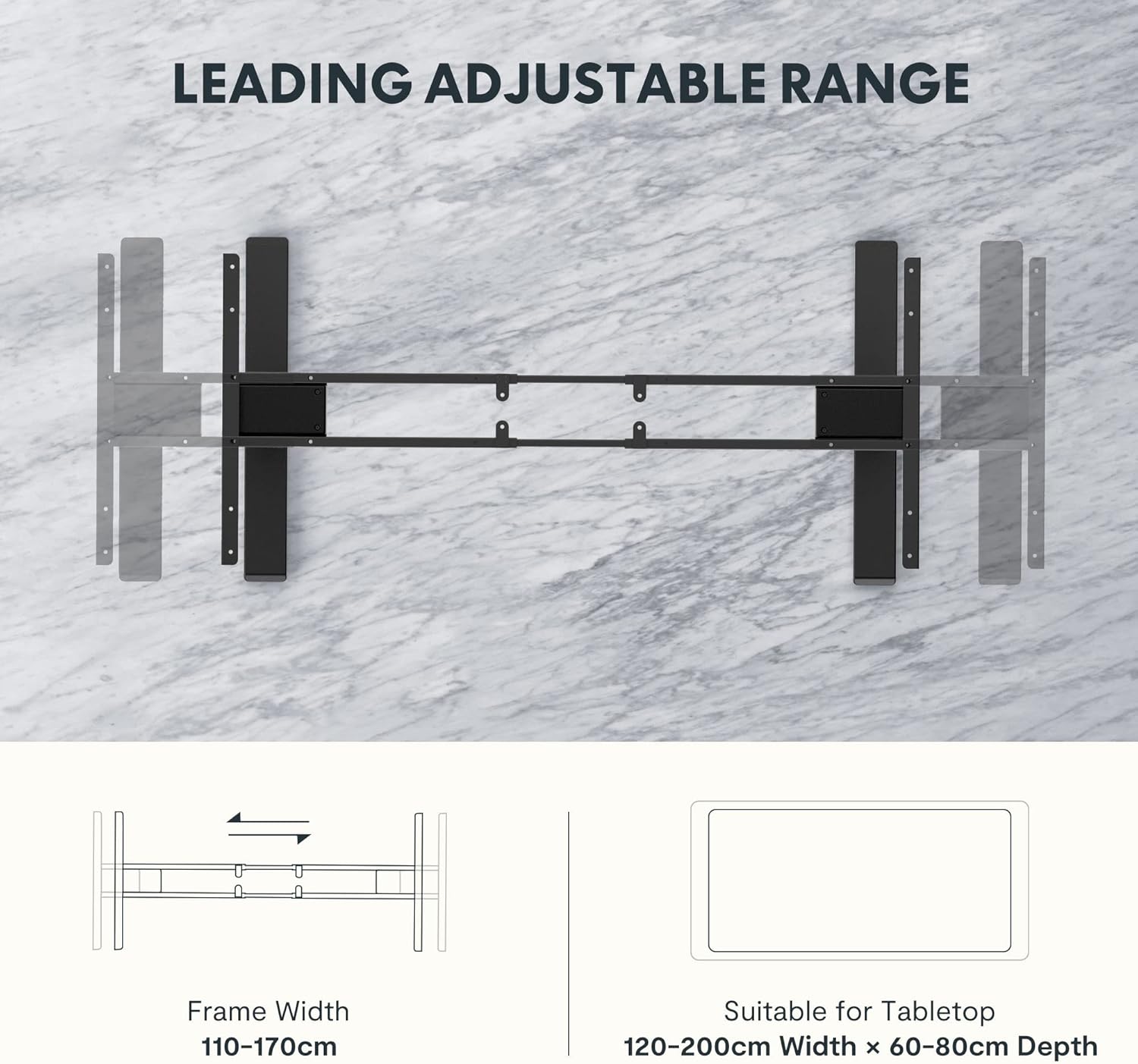
Figure 5: The adjustable frame accommodates various tabletop sizes, offering flexibility for different workspace needs.
Garantia e Suporte
Informações sobre garantia:
The FLEXISPOT EC5 Standing Desk comes with a Garantia limitada. Please refer to the warranty card included with your product for specific terms, conditions, and duration of coverage. This warranty typically covers manufacturing defects in materials and workmanship under normal use.
Suporte ao cliente:
For technical assistance, warranty claims, or any questions regarding your FLEXISPOT EC5 Standing Desk, please contact FLEXISPOT customer support. You can typically find contact information on the FLEXISPOT official website ou na embalagem do seu produto.
When contacting support, please have your model number (EC5B-EU3+PR1206-Black) and proof of purchase readily available.


