1. Produto acabadoview
The IRONZON Fingerprint Smart Door Lock offers a secure and convenient 4-in-1 keyless entry solution for residential homes, hotels, offices, apartments, and bedrooms. This advanced door lock integrates multiple unlocking methods including fingerprint recognition, password entry, mobile application control, and traditional backup keys.
Designed for ease of use and robust security, the lock features a high fingerprint recognition rate, allowing access in approximately 1 second. It supports up to 50 unique fingerprints and offers flexible password management, including temporary password generation for guests or service providers. The smart app functionality provides remote control and monitoring capabilities, enhancing overall security and convenience.

Image: The IRONZON Fingerprint Smart Door Lock, showcasing its sleek black design with integrated keypad and fingerprint sensor, alongside a mobile phone displaying the companion app interface.
2. Conteúdo da embalagem
Verifique se todos os componentes estão presentes antes de iniciar a instalação.
- 1 x IRONZON Fingerprint Smart Door Lock (Front and Rear Handles)
- 2 chaves de backup
- 1 x Latch/Deadbolt Mechanism
- 1 x Installation Hardware Kit (Screws, Spindle, etc.)
- 1 x Manual do Usuário (Este documento)
3. Guia de instalação
The IRONZON Fingerprint Smart Door Lock is designed for easy installation, typically within 10 minutes, requiring no additional drilling for standard US doors. It is compatible with door thicknesses from 1-3/8'' to 2-1/8'' (35 mm - 55 mm) and backsets of 2-3/8'' (60mm) and 2-1/8'' (70 mm). The lock is suitable for both left-handed and right-handed doors.
3.1 Preparação
- Ensure your door meets the specified dimensions.
- Reúna as ferramentas necessárias: chave de fenda Phillips.
- Remova todas as ferragens existentes da porta.
3.2 Etapas de instalação
- Install the latch/deadbolt mechanism into the door edge. Ensure the latch bolt is facing the correct direction for your door swing.
- Insira o eixo através do mecanismo de trava.
- Attach the exterior handle assembly, ensuring the spindle aligns correctly.
- Connect the interior handle assembly, carefully routing any wires to avoid pinching.
- Secure both handle assemblies with the provided screws.
- Install 4 AAA batteries into the battery compartment of the interior handle.
- Test the lock's basic functionality before closing the door.
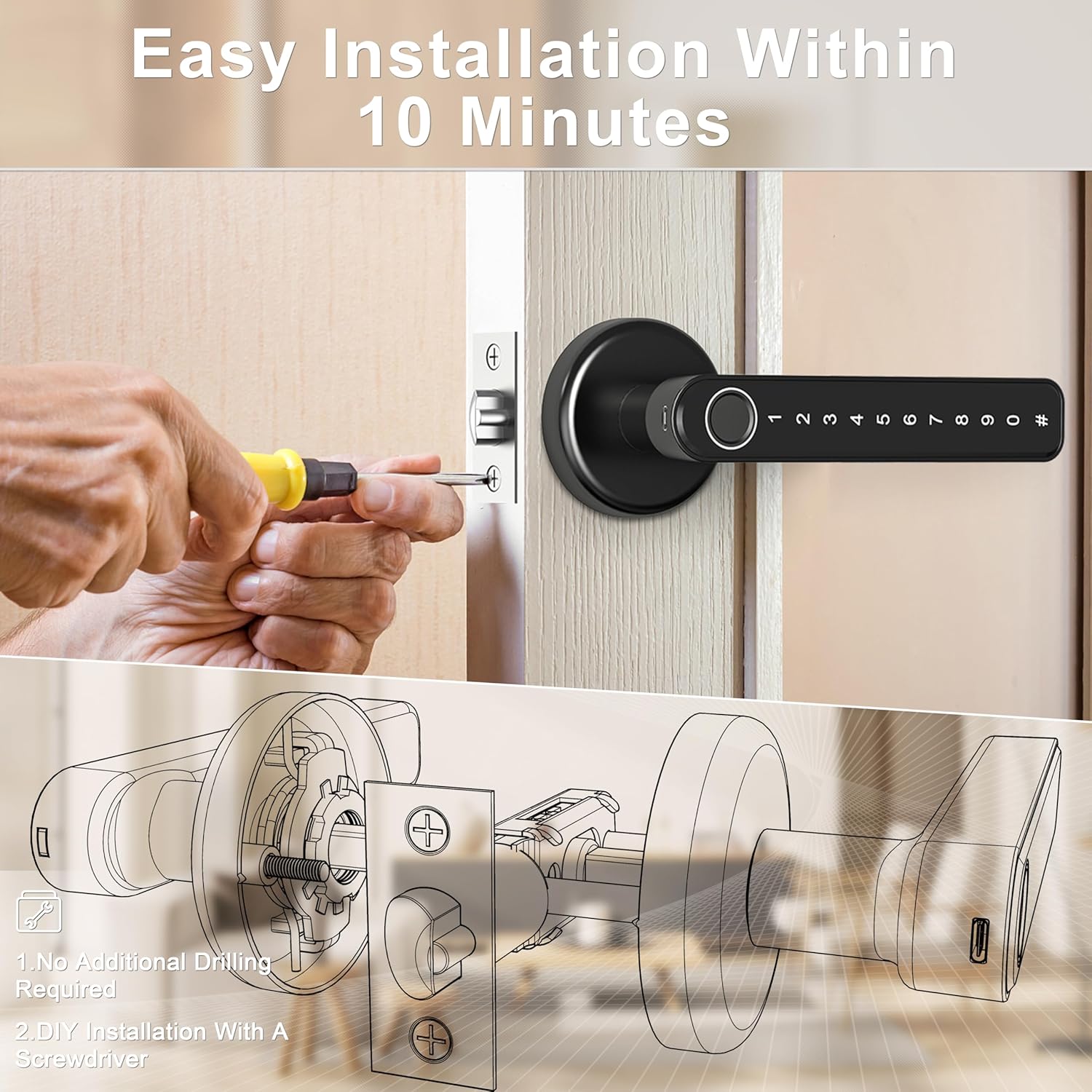
Image: Diagram illustrating the simple installation process of the IRONZON Smart Door Lock, highlighting that no additional drilling is required and installation can be completed with a screwdriver.
4. Configuração e Programação
After installation, configure your lock for secure access using the mobile app, fingerprints, and passcodes.
4.1 Configuração do aplicativo móvel
The lock supports both iOS and Android devices for smart control. Download the dedicated app (refer to the packaging or quick start guide for app name/QR code) to unlock, manage users, and set temporary passwords.
- Download and install the smart lock application from your device's app store.
- Crie uma conta e faça login.
- Follow the in-app instructions to add your IRONZON Smart Door Lock. This typically involves pairing via Bluetooth or Wi-Fi.
- Once paired, you can use the app to unlock the door, add/delete users, and manage settings.
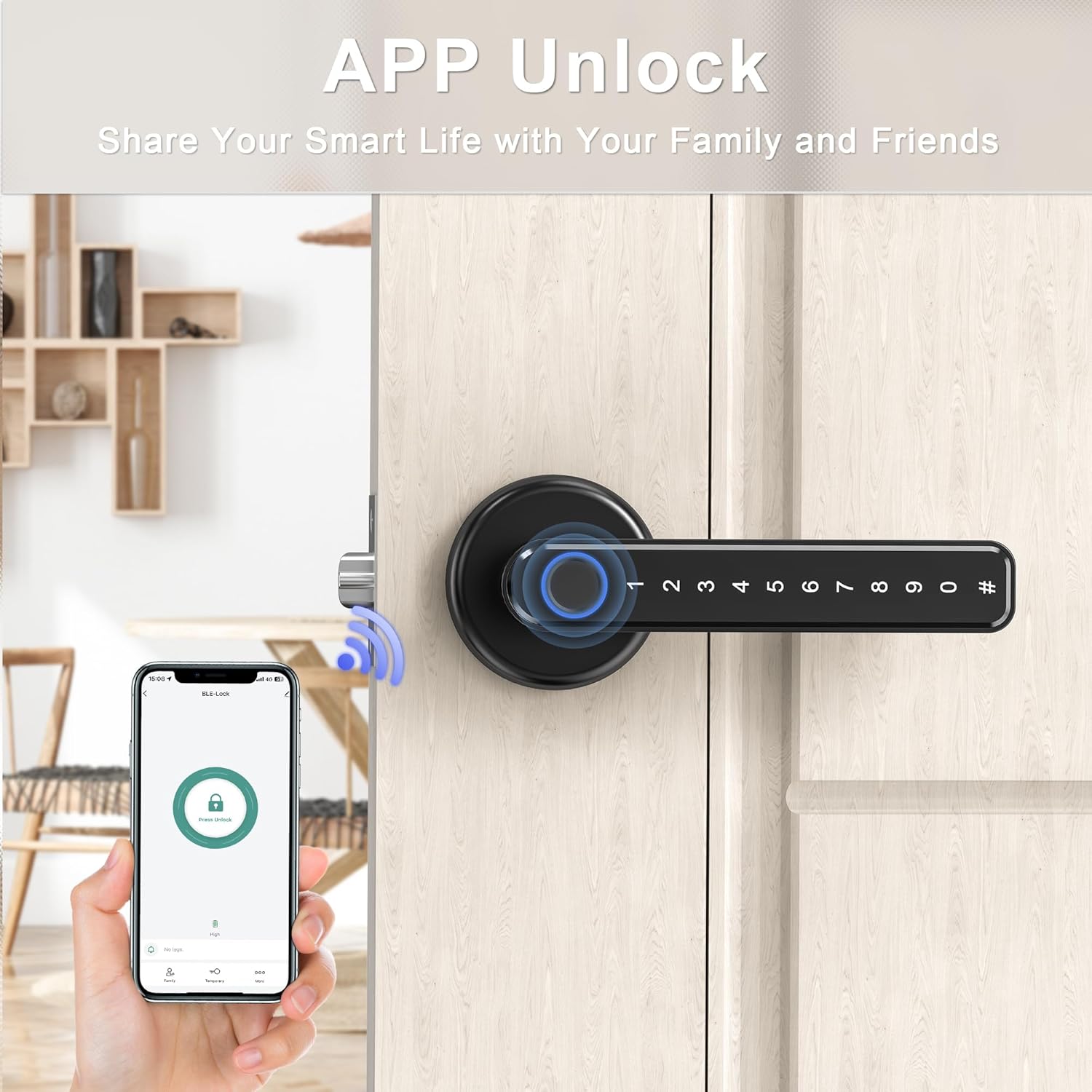
Image: A smartphone screen displaying the IRONZON smart lock app interface, showing a locked padlock icon, indicating the ability to unlock the door via the application.
4.2 Fingerprint Enrollment
The lock can store up to 50 unique fingerprints. Ensure your finger is clean and dry during enrollment for optimal recognition.
- Access the fingerprint management section within the mobile app or follow the lock's direct programming instructions (usually involving pressing a button on the interior handle).
- Place your finger on the fingerprint sensor multiple times as prompted, adjusting the angle slightly each time to capture a comprehensive scan.
- A confirmation sound or light will indicate successful enrollment.

Image: A close-up of the IRONZON Smart Door Lock's handle, highlighting the fingerprint sensor with a blue glowing ring, indicating its 360-degree recognition support and fast 0.1-second unlocking speed.
4.3 Passcode Setup
You can set permanent or temporary passcodes for access. The lock supports an anti-peeping feature, allowing you to enter random numbers before or after your actual code to prevent others from guessing it.
- Navigate to the password management section in the mobile app or use the lock's keypad programming mode.
- Enter your desired passcode, ensuring it meets any length requirements (e.g., minimum 6 digits).
- Confirme a senha.
- For temporary passcodes, specify the duration or number of uses as prompted by the app.

Image: A hand entering a password on the keypad of the IRONZON Smart Door Lock, with an overlay demonstrating the anti-peeping password feature where random numbers can be entered before or after the real password.
5. Operação
Operating your IRONZON Smart Door Lock is straightforward with its multiple access methods.
5.1 Desbloqueio com impressão digital
- Place your enrolled finger firmly on the fingerprint sensor.
- The lock will verify your fingerprint (indicated by a light or sound).
- Once verified, the lock will unlock, allowing you to turn the handle and open the door.
5.2 Desbloqueio com código de acesso
- Toque no teclado para ativá-lo.
- Enter your registered passcode (optionally, include random digits before or after for anti-peeping).
- Press the '#' key or wait for automatic confirmation.
- The lock will unlock upon successful code entry.
5.3 Unlocking with Mobile App
- Open the IRONZON smart lock application on your smartphone.
- Ensure your phone is within Bluetooth range of the lock or connected via Wi-Fi (if applicable).
- Tap the unlock icon within the app.
- The lock will receive the command and unlock.
5.4 Unlocking with Backup Key
- Insert one of the provided backup keys into the keyhole located on the exterior handle.
- Gire a chave para destravar o mecanismo.
- This method is useful for emergencies or when batteries are depleted.

Image: The IRONZON Smart Door Lock with a physical key inserted into its keyhole, demonstrating the traditional backup unlocking method.
6. Manutenção
Proper maintenance ensures the longevity and optimal performance of your IRONZON Smart Door Lock.
- Substituição da bateria: The lock requires 4 AAA batteries. It features a low battery reminder function. When the battery alert is active, replace all four batteries promptly to avoid loss of functionality.
- Carregamento de emergência: In case of complete battery depletion, the lock is equipped with a Type-C interface for emergency charging. Connect a portable power bank via a Type-C cable to temporarily power the lock and gain access.
- Limpeza: Limpe a superfície da fechadura com um pano macio e seco. Evite usar produtos de limpeza abrasivos ou solventes que possam danificar o acabamento ou os componentes eletrônicos.
- Sensor de impressão digital: Para obter leituras precisas, mantenha o sensor de impressões digitais limpo e livre de sujeira e umidade.
7. Solução De Problemas
This section addresses common issues you might encounter with your IRONZON Smart Door Lock.
| Problema | Possível causa | Solução |
|---|---|---|
| A fechadura não responde nem liga. | Baterias descarregadas; instalação incorreta das baterias. | Replace all 4 AAA batteries. Ensure batteries are inserted with correct polarity. Use emergency Type-C power if needed. |
| Impressão digital não reconhecida. | Finger is wet, dirty, or improperly placed; fingerprint not enrolled. | Ensure finger is clean and dry. Place finger firmly and completely on the sensor. Try different angles. Re-enroll fingerprint if issue persists. |
| Passcode not working. | Incorrect passcode entered; passcode expired (for temporary codes). | Verify the passcode. Ensure you are pressing '#' after the code. Check if it's a temporary code that has expired. Reset passcode via app if necessary. |
| O aplicativo não consegue se conectar à fechadura. | Bluetooth/Wi-Fi off; lock not paired; app issues. | Ensure Bluetooth is enabled on your phone. Re-pair the lock with the app. Restart the app or your phone. Check app permissions. |
| Bloqueio emite bipes continuamente. | Low battery; internal error. | Replace batteries immediately. If beeping continues after battery replacement, contact customer service. |
If you encounter issues not listed here or require further assistance, please refer to the customer service information in Section 9.
8. Especificações
| Recurso | Detalhe |
|---|---|
| Número do modelo | F190B |
| Marca | IRONZON |
| Tipo de bloqueio | Teclado, impressão digital |
| Material | Zinco |
| Cor | APP Black |
| Dimensões (C x L x A) | 6.3 x 2.3 x 2.3 polegadas |
| Peso do item | 1 libra |
| Fonte de energia | 4 pilhas AAA (incluídas) |
| Energia de emergência | Interface Tipo-C |
| Conectividade | Wi-Fi (para controle por aplicativo) |
| Tipo de controlador | Androide, iOS |
| Compatibilidade de espessura de porta | 1-3/8'' to 2-1/8'' (35 mm - 55 mm) |
| Compatibilidade de recuo | 2-3/8'' (60mm) and 2-1/8'' (70 mm) |
| Capacidade de impressão digital | Até 50 grupos |
| Primeira data disponível | 12 de abril de 2022 |
9. Garantia e Suporte ao Cliente
IRONZON is committed to providing high-quality products and customer satisfaction.
9.1 Política de Devolução
Este produto está sujeito a uma política de devolução de 30 dias para reembolso ou substituição, conforme os termos padrão de venda a retalho.
9.2 Atendimento ao cliente
For any product information, questions, or technical support, please contact IRONZON customer service. We aim to respond to inquiries within 24 hours.
Manufacturer: IRONZON
For support, please visit the official IRONZON store page or contact through the platform where the product was purchased. Visit IRONZON Store on Amazon


