Introdução
Thank you for choosing the iJoy Ultra Wireless Over-Ear Bluetooth Headphones. These headphones are designed to provide a versatile audio experience with multiple connectivity options and comfortable wear. This manual will guide you through the features, setup, and operation of your new headphones.

Image: iJoy Ultra Wireless Over-Ear Bluetooth Headphones, showcasing the sleek design and over-ear cushions.
O que está na caixa
Certifique-se de que todos os itens estejam presentes em sua embalagem:
- iJoy Ultra Wireless Over-Ear Bluetooth Headphones
- Cabo de carregamento USB tipo C
- Cabo AUX (3.5 mm)
Produto acimaview
Familiarize yourself with the headphone controls and ports:

Imagem: Lado view of the headphone ear cup, highlighting the control buttons for volume, track skipping, and power/play/pause/call management.
- Aumentar volume / Pular música: Hold for Volume Up, Press for Next Song.
- Power / Play / Pause / Answer/Reject Calls: Press to Play/Pause or Answer/Reject Calls. Hold to Power On/Off.
- Volume - / Música anterior: Hold for Volume Down, Press for Previous Song.
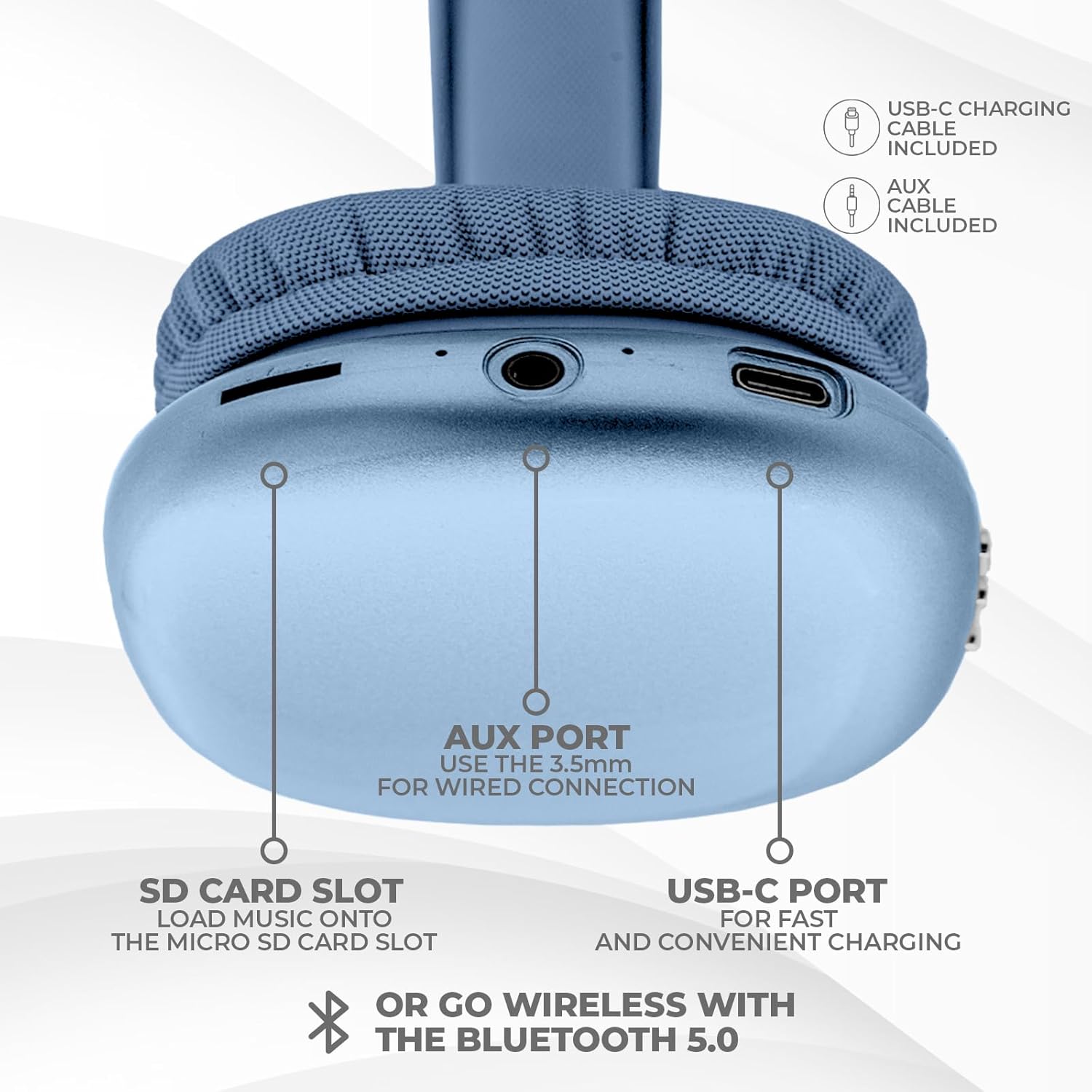
Imagem: Parte inferior view of the headphone ear cup, showing the USB-C charging port, AUX port, and SD card slot.
- Porta USB-C: Para carregar os fones de ouvido.
- Porta AUX (3.5 mm): Para conexão de áudio com fio.
- Slot para cartão SD: Para reprodução direta de áudio a partir de um cartão Micro SD.
Configurar
1. Carregando os fones de ouvido
Antes da primeira utilização, carregue totalmente os seus fones de ouvido. Uma carga completa leva aproximadamente 2 horas.
- Connect the provided USB Type C charging cable to the USB-C port on the headphone.
- Conecte a outra extremidade do cabo USB a uma fonte de alimentação USB compatível (por exemplo, adaptador de parede, porta USB do computador).
- O indicador LED mostrará o status do carregamento e se apagará ou mudará de cor quando a carga estiver completa.
2. Emparelhamento Bluetooth
Para conectar seus fones de ouvido sem fio:
- Certifique-se de que os fones de ouvido estejam carregados e desligados.
- Mantenha pressionado o botão Liga/Desliga até que o indicador LED pisque, indicando o modo de emparelhamento.
- No seu dispositivo (smartphone, tablet, laptop), ative o Bluetooth e procure por dispositivos disponíveis.
- Select "iJoy Ultra" from the list of devices.
- Once connected, the LED indicator will typically show a solid light or slow flash.
Note: The Bluetooth range is approximately 10 meters (33 feet).
3. Conexão com fio (AUX)
For a non-wireless connection or when the battery is low:
- Connect one end of the provided 3.5mm AUX cable to the AUX port on the headphone.
- Connect the other end of the AUX cable to the 3.5mm audio jack on your device.
- Os fones de ouvido mudarão automaticamente para o modo com fio.
4. Reprodução com cartão SD
To play music directly from a Micro SD card:
- Insert a Micro SD card (with music files) into the SD card slot on the headphone.
- Os fones de ouvido detectarão automaticamente o cartão e começarão a reproduzir música.
- Use the track control buttons to navigate your music.
Instruções de operação
Ligar/Desligar
- Ligar: Pressione e mantenha pressionado o botão Liga/Desliga por aproximadamente 3 segundos.
- Desligar: Pressione e mantenha pressionado o botão Liga/Desliga por aproximadamente 3 segundos.
Reprodução de música
- Reproduzir/Pausar: Pressione o botão Liga / Desliga uma vez.
- Próxima faixa: Pressione o botão Volume + uma vez.
- Faixa anterior: Pressione o botão de diminuir o volume uma vez.
- Aumentar o volume: Hold the Volume + button.
- Volume baixo: Hold the Volume - button.
Gestão de Chamadas
When connected via Bluetooth:
- Atender chamada: Pressione o botão Liga / Desliga uma vez.
- Encerrar chamada: Pressione o botão Liga/Desliga uma vez durante uma chamada.
- Rejeitar chamada: Pressione e mantenha pressionado o botão Liga/Desliga por aproximadamente 2 segundos.
Duração da bateria
The headphones offer up to 10 hours of wireless playtime on a single charge.

Image: Visual representation of the headphones' battery life, indicating up to 10 hours of wireless playtime.
Manutenção
To ensure the longevity and optimal performance of your iJoy Ultra headphones:
- Limpe os fones de ouvido regularmente com um pano macio e seco.
- Evite expor os fones de ouvido a temperaturas extremas, umidade ou luz solar direta.
- Não utilize produtos de limpeza abrasivos ou solventes.
- Guarde os fones de ouvido em local fresco e seco quando não estiverem em uso.
- Evite deixar os fones de ouvido caírem ou sofrerem impactos fortes.
Solução de problemas
Se você tiver problemas com seus fones de ouvido, consulte as seguintes soluções comuns:
| Problema | Solução |
|---|---|
| Os fones de ouvido não ligam. | Certifique-se de que os fones de ouvido estejam totalmente carregados. Conecte-os a uma fonte de energia usando o cabo USB-C. |
| Não foi possível emparelhar via Bluetooth. | Make sure the headphones are in pairing mode (flashing LED). Turn off and on Bluetooth on your device. Ensure no other devices are currently connected to the headphones. Try 'forgetting' the device on your phone and re-pairing. |
| No sound or choppy audio. | Check volume levels on both headphones and your device. Ensure Bluetooth connection is stable or try a wired AUX connection. If using an SD card, ensure it is properly inserted and the files são compatíveis. |
| Headphones are uncomfortable or too tight. | Adjust the headband for a better fit. The over-ear cushions are designed for comfort, but individual fit may vary. |
| Cannot connect to multiple devices simultaneously. | These headphones typically support connection to one device at a time. Disconnect from the current device before attempting to connect to another. |
Especificações
| Recurso | Detalhe |
|---|---|
| Nome do modelo | Ultra |
| Número do modelo do item | IJHP21 |
| Tecnologia de Conectividade | Sem fio (Bluetooth), com fio (AUX de 3.5 mm) |
| Tecnologia de comunicação sem fio | Bluetooth |
| Alcance Bluetooth | 10 Metros (33 Pés) |
| Entrada para fones de ouvido | 3.5 mm Jack |
| Características especiais | SD Card Slot, Soft Cushion Padding, USB Type C |
| Duração da bateria | Até 10 horas |
| Tempo de carregamento | 2 horas |
| Tipo de controle | Volume Control, Track Management, Call Management |
| Colocação da orelha | Sobre a orelha |
| Material | Plástico |
| Peso do item | 8 onças |
| Dimensões do produto | 7 x 3 x 8 polegadas |
| UPC | 842700193053 |
Vídeo oficial do produto
Vídeo: Um vídeo oficial do produto da iJoy Electronics.asing the features and design of the iJoy Ultra Bluetooth Over-Ear Headphones.
Garantia e Suporte
For warranty information or technical support, please refer to the documentation included with your product or contact iJoy customer service directly. Keep your proof of purchase for any warranty claims.


