1. Introdução
The Guardo Fit Coach Explore is an advanced activity tracker designed to monitor various aspects of your health and fitness. This manual provides essential information for setting up, operating, and maintaining your device to ensure optimal performance and longevity.
2. Conteúdo da embalagem
Por favor, verifique se todos os itens estão presentes em sua embalagem:
- Guardo Fit Coach Explore Activity Tracker
- Cabo de carregamento
- Manual do usuário (este documento)
3. Configuração
3.1 Carregando o dispositivo
Before first use, fully charge your Guardo Fit Coach Explore. Connect the charging cable to the charging port on the back of the device and plug the other end into a USB power source (e.g., computer, USB wall adapter). The device will display a charging indicator.

Imagem: Traseira view of the activity tracker highlighting the charging contacts and sensors, alongside a display showing blood pressure readings.
3.2 Instalação e emparelhamento do aplicativo
- Download the official Guardo Fit Coach app from your smartphone's app store (compatible with Android operating systems).
- Certifique-se de que o Bluetooth esteja ativado em seu smartphone.
- Abra o aplicativo e siga as instruções na tela para criar uma conta ou fazer login.
- Selecione 'Adicionar dispositivo' ou 'Emparelhar novo dispositivo' no aplicativo.
- The app will search for your Guardo Fit Coach Explore. Select your device from the list to initiate pairing.
- Confirm the pairing request on both your smartphone and the activity tracker if prompted.

Image: The activity tracker worn on a wrist, showing a watch face with icons for different applications, indicating smartphone connectivity.
4. Instruções de operação
4.1 Navegação básica
The Guardo Fit Coach Explore features a touchscreen display for interaction. Swipe left, right, up, or down to navigate through menus and features. Tap to select an option or confirm an action. The device may also have physical buttons for specific functions like power on/off or returning to the home screen.

Image: The activity tracker's display showing a customizable watch face with a unique spiral graphic.
4.2 Recebimento de notificações
Once paired with your smartphone, the activity tracker can display notifications for incoming calls, messages, and app alerts. Ensure notification permissions are granted in your smartphone's settings and within the Guardo Fit Coach app.

Image: The activity tracker's screen showing an incoming call notification with the caller's number and options to answer or reject the call.
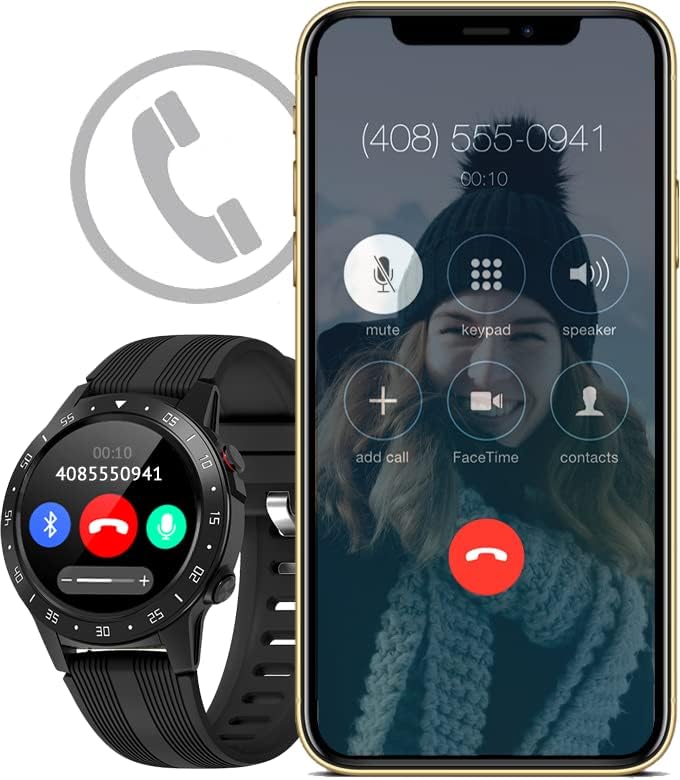
Image: The activity tracker and a smartphone side-by-side, both indicating an incoming call, demonstrating call notification synchronization.
4.3 Controle de música
Control music playback on your paired smartphone directly from your activity tracker. This feature allows you to play, pause, skip tracks, and adjust volume without needing to access your phone.

Image: The activity tracker and a smartphone displaying synchronized music playback interfaces, allowing remote control of audio.
5. Características
The Guardo Fit Coach Explore offers a range of features to support your active lifestyle:
- Rastreador multiesportivo: Track various activities such as indoor and outdoor sports, cycling, and climbing.
- Custom Activity Tracking: Monitor specific activities with tailored settings.
- GPS: Built-in GPS for accurate tracking of routes and distances during outdoor activities.
- Monitor de frequência cardíaca: Continuously monitor your heart rate.
- Monitor de pressão arterial: Measure your blood pressure directly from the device.
- Notificações: Receba alertas de chamadas, mensagens e notificações de aplicativos.
- Bússola: Integrated digital compass for navigation.
- Acelerômetro: Measures movement and activity.
- Altímetro: Measures altitude, useful for hiking and climbing.
- Barômetro: Measures atmospheric pressure, aiding in weather prediction and altitude accuracy.

Image: The activity tracker's display surrounded by icons symbolizing its diverse functionalities, including communication and utility features.

Image: The activity tracker's screen showing real-time GPS data, such as distance covered, pace, and heart rate, overlaid on a map.
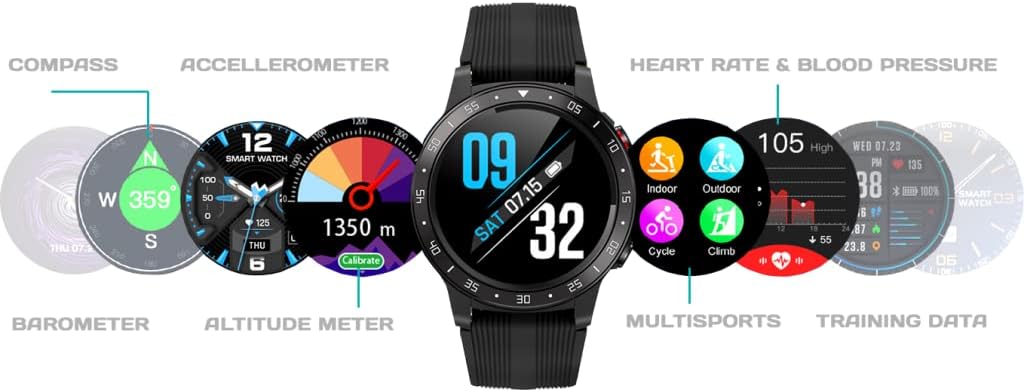
Imagem: Uma visão abrangente view of the activity tracker's display, showcasing various data points from its integrated sensors, including environmental and health metrics.
6. Manutenção
6.1 Limpeza
Regularly clean your activity tracker to prevent skin irritation and maintain device functionality. Use a soft, damp, lint-free cloth to wipe the screen and strap. Avoid harsh chemicals or abrasive materials.
6.2 Cuidados com a bateria
Para prolongar a vida útil da bateria, evite expor o dispositivo a temperaturas extremas. Carregue o dispositivo regularmente, mas evite deixá-lo totalmente carregado ou totalmente descarregado por longos períodos.
7. Solução De Problemas
7.1 Dispositivo não liga
- Certifique-se de que o dispositivo esteja totalmente carregado. Conecte-o ao carregador por pelo menos 30 minutos.
- Press and hold the power button (if applicable) for 10-15 seconds to attempt a forced restart.
7.2 Problemas de emparelhamento
- Certifique-se de que o Bluetooth esteja ativado no seu smartphone e que o dispositivo esteja dentro do alcance.
- Restart both your smartphone and the activity tracker.
- Forget the device in your smartphone's Bluetooth settings and attempt to pair again through the Guardo Fit Coach app.
- Verifique se o aplicativo está atualizado para a versão mais recente.
7.3 Leituras Incorretas
- Ensure the device is worn snugly on your wrist, about one finger's width above your wrist bone.
- Limpe os sensores na parte traseira do dispositivo.
- Para usar o GPS, certifique-se de estar em uma área aberta e com visibilidade desobstruída. view do céu.
8. Especificações
| Recurso | Especificação |
|---|---|
| Marca | Guardo |
| Modelo | Explorar |
| Dispositivos compatíveis | Smartphone (Android OS) |
| Tipo de exibição | LCD |
| Tamanho da tela | 40 Milímetro |
| Conectividade sem fio | Bluetooth |
| GPS | GPS integrado |
| Dispositivo de entrada | Microfone, tela sensível ao toque |
| Baterias recarregáveis incluídas | Sim |
| Características especiais | Custom activity tracking, Blood pressure monitor, GPS, Notifications, Multisport Tracker |
9. Informações de segurança
- Não tente abrir ou desmontar o dispositivo.
- Mantenha o dispositivo longe de temperaturas extremas, luz solar direta e umidade.
- This device is not a medical instrument. The data provided is for reference only and should not be used for medical diagnosis or treatment.
- Consult your doctor before starting any new exercise regimen or if you have any health concerns.
- Descarte o dispositivo e sua bateria de acordo com as normas locais.


