Introdução
The OWC Thunderbolt Dock is designed to expand the connectivity of your computer, providing a comprehensive solution for connecting multiple peripherals through a single Thunderbolt cable. This dock adds three Thunderbolt 4 ports, four USB ports, Gigabit Ethernet, audio, and an SD card reader, enhancing your workflow and device management.
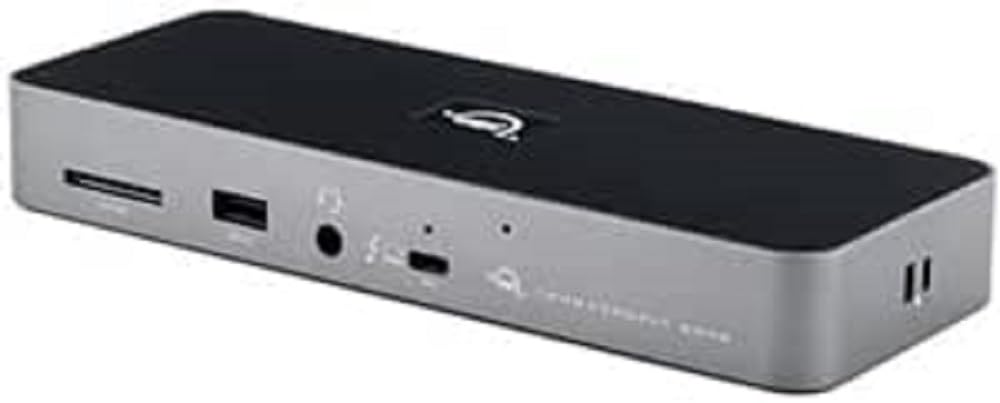
Figure 1: OWC Thunderbolt Dock, showing its compact design and front-facing ports.
O que está na caixa
Verifique se todos os itens estão presentes na embalagem:
- Dock Thunderbolt da OWC
- Cabo Thunderbolt
- Fonte de alimentação e cabo
- Guia de início rápido
Principais características
The OWC Thunderbolt Dock offers the following capabilities:
- Adds three full-speed and functional Thunderbolt 4 ports to your computer.
- Enables creation of multiple independent "tree branches" for device connectivity.
- Provides up to 96W of power delivery for laptop charging.
- Includes four USB ports for connecting and charging USB devices.
- Supports connection of various storage devices, up to two 4K displays, or one 5K/6K/8K display.
- Ensures device compatibility as if directly connected to your computer.
- Features Gigabit Ethernet for reliable network streaming and sharing.
- Integrated SD card reader for data transfer speeds up to 312MB/s.
- Audio combo jack for headphones and microphones.
- Adjustable LED for customizable illumination.
Configurar
Follow these steps to set up your OWC Thunderbolt Dock:
- Conecte a energia: Connect the included power supply to the DC In port on the rear of the OWC Thunderbolt Dock and then plug the power cable into a wall outlet.

Figure 2: Rear ports of the OWC Thunderbolt Dock, including the DC In port on the left.
- Conectar ao computador: Use the provided Thunderbolt cable to connect one of the Thunderbolt 4 ports on the dock (labeled with a computer icon) to a Thunderbolt 3 or Thunderbolt 4 port on your computer.
- Conecte periféricos: Connect your external devices such as monitors, external drives, USB devices, Ethernet cable, and audio devices to the corresponding ports on the OWC Thunderbolt Dock.

Figure 3: Front ports of the OWC Thunderbolt Dock, including the SD card slot, USB 2.0 port, and audio combo jack.
- Ligar: The dock will power on automatically once connected to power and your computer. The LED indicator will illuminate.
Operating the Dock
Once set up, the OWC Thunderbolt Dock operates as an extension of your computer's ports. Devices connected to the dock will function as if they were directly connected to your computer.
- Conectividade de exibição: Connect up to two 4K displays at 60Hz, or a single 5K, 6K, or 8K display at 60Hz (or 4K at 120Hz) to the Thunderbolt 4 downstream ports using appropriate cables and adapters.
- Dispositivos USB: Utilize the USB-A ports for connecting keyboards, mice, external hard drives, and other USB peripherals. The USB 2.0 port is suitable for low-bandwidth devices like keyboards or mice.
- Conexão de rede: Plug an Ethernet cable into the Gigabit Ethernet port for a stable wired network connection.
- Áudio: Use the 3.5mm audio combo jack for headphones, speakers, or microphones.
- Leitor de cartão SD: Insert an SD card into the front-facing slot to access photos, videos, and other data.
- Fornecimento de energia: The dock provides up to 96W of power to charge your connected laptop via the Thunderbolt cable.
Manutenção
To ensure optimal performance and longevity of your OWC Thunderbolt Dock:
- Keep the dock in a well-ventilated area to prevent overheating.
- Clean the exterior with a soft, dry, lint-free cloth. Avoid using liquid cleaners or aerosols.
- Certifique-se de que todos os cabos estejam conectados com segurança.
- Evite colocar objetos pesados em cima do cais.
Solução de problemas
If you encounter issues with your OWC Thunderbolt Dock, try the following solutions:
- No Power/Dock Not Responding:
- Verify that the power supply is securely connected to the dock and a working power outlet.
- Ensure the Thunderbolt cable is firmly connected to both the dock and your computer.
- Experimente uma tomada diferente.
- Dispositivos conectados não reconhecidos:
- Disconnect and reconnect the problematic device from the dock.
- Try connecting the device to a different port on the dock, if available.
- Ensure your computer's operating system and Thunderbolt drivers are up to date.
- Reinicie o seu computador.
- Display Issues (No Signal, Flickering):
- Check the display cable connection between the monitor and the dock.
- Ensure the display is set to the correct input source.
- Try a different display cable or adapter.
- Reduce the display resolution or refresh rate to see if the issue persists.
- Problemas de conectividade de rede:
- Verify the Ethernet cable is securely connected to the dock and your router/modem.
- Verifique as configurações de rede do seu computador.
- Reinicie o seu roteador/modem.
Especificações
| Recurso | Detalhe |
|---|---|
| Dimensões do produto | 8.66 x 3.15 x 1.18 polegadas |
| Peso | 14.11 onças |
| Número do modelo do item | OWCTB4DOCK |
| Fabricante | OWC |
| Tipo de conector | Ethernet, RJ45, USB Type A, USB Type C |
| Tipo de cabo | Raio |
| Dispositivos compatíveis | Computer, Docking Station, External Display |
| Recurso especial | Alta velocidade |
| Fornecimento de energia | Up to 96W to host computer |
| Suporte de exibição | Up to two 4K displays @ 60Hz, or one 5K/6K/8K display @ 60Hz (or 4K @ 120Hz) |
| SD Card Reader Speed | Até 312 MB/s |
Garantia e Suporte
OWC products are designed for reliability and performance. For information regarding warranty coverage, technical support, or service, please refer to the official OWC website or contact OWC customer support directly. Keep your proof of purchase for warranty claims.
Para obter os recursos de suporte mais recentes, visite: www.owcdigital.com/support


