Introdução
Welcome to the user manual for your new vtech CS5209 DECT 6.0 Cordless Phone Expansion Handset. This manual provides detailed instructions for setting up, operating, and maintaining your new handset. For optimal performance, please read these instructions carefully before use.
O que está na caixa
- CS5209 Cordless Handset
- Handset Battery Pack
- Handset Battery Cover
- Charger Cradle for Handset
- Power Adapter for Charger Cradle
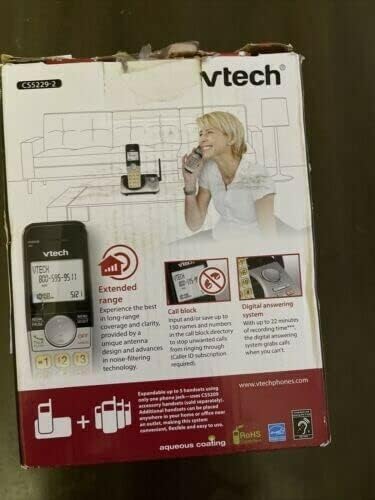
This image displays the product packaging for the vtech CS5209 DECT 6.0 Cordless Phone Expansion Handset. The box highlights key features including extended range for better coverage and clarity, a call block function capable of storing up to 150 numbers to prevent unwanted calls (requires Caller ID subscription), and a digital answering system with up to 17 minutes of recording time to capture messages when you are unavailable. The packaging also indicates that the system is expandable up to 5 handsets using only one phone jack.
Configurar
1. Instalação da bateria
- Localize o compartimento da bateria na parte de trás do monofone.
- Insert the battery pack into the compartment, ensuring the connector is properly aligned with the socket.
- Close the battery compartment with the battery cover until it clicks into place.
2. Carregando o aparelho
- Connect the small end of the power adapter to the charger cradle.
- Conecte a extremidade maior do adaptador de energia a uma tomada elétrica padrão.
- Place the handset face forward into the charger cradle. The charge indicator light on the handset should illuminate, indicating it is charging.
- Deixe o aparelho carregar por pelo menos 16 horas antes do primeiro uso para garantir a capacidade total da bateria.
3. Registrando o aparelho
The CS5209 is an expansion handset and must be registered to a compatible vtech DECT 6.0 base unit (e.g., CS5229, CS5249) before use. Refer to your base unit's manual for specific registration instructions. Generally, the process involves:
- Place the CS5209 handset in its charger cradle.
- On your base unit, press and hold the PÁGINA or LOCALIZADOR DE MONOFONE button for approximately 4 seconds until the registration light on the base unit begins to flash.
- Em 10 segundos, pressione o botão # key on the CS5209 handset.
- The handset will display "Registering..." and then "Handset Registered" if successful. If registration fails, try again or consult the base unit's manual for troubleshooting.
Instruções de operação
Fazendo e recebendo chamadas
- Fazer uma ligação: Imprensa TALK / FLASH ou qualquer tecla do teclado de discagem e, em seguida, disque o número de telefone.
- Para atender uma chamada: Quando o telefone tocar, pressione TALK / FLASH ou qualquer tecla do teclado de discagem.
- Para encerrar uma chamada: Imprensa DESLIGADO/LIMPAR or place the handset back in the charger cradle.
- Ajuste de volume: Durante uma chamada, pressione VOL+ or vol- on the side of the handset to adjust the earpiece volume.
Recurso de bloqueio de chamadas
The call block feature allows you to stop unwanted calls from ringing through. You can input and save up to 150 names and numbers in the call block directory. This feature requires a Caller ID subscription from your telephone service provider.
- Para bloquear um número no histórico de identificação de chamadas: Enquanto reviewing Caller ID history, press BLOQUEAR to add the number to the block list.
- To Manually Add a Number to Block List: Access the Call Block menu through the handset's menu options and follow the prompts to add a number.
Sistema de Atendimento Digital
The digital answering system, integrated with your base unit, automatically answers calls and records messages when you are unavailable. It offers up to 17 minutes of recording time.
- Mensagens de reprodução: Access the answering system menu on your handset or base unit to play new or old messages.
- Gravação de um anúncio: You can record a personalized outgoing announcement through the answering system menu.
- Excluindo mensagens: Messages can be deleted individually or all at once through the answering system menu.
Interfone
If you have multiple registered handsets, you can use the intercom feature to communicate between them.
- Para iniciar o intercomunicador: Imprensa INT on the handset, then dial the number of the desired handset (e.g., 2 for Handset 2).
- To Answer Intercom: Imprensa TALK / FLASH when an intercom call comes in.
Manutenção
Limpando seu aparelho
Para manter seu telefone limpo, limpe-o com um pano macio e levemente umedecido.amp pano. Não utilize sprays de limpeza ou produtos químicos agressivos, pois estes podem danificar o acabamento ou os componentes elétricos.
Cuidados com a bateria
- Always charge the handset for at least 16 hours before initial use.
- Se o aparelho não for utilizado por um longo período, remova a bateria para evitar vazamentos.
- Replace the battery when the handset consistently shows a low battery warning or has significantly reduced talk/standby time. Use only the specified replacement battery pack.
Solução de problemas
| Problema | Solução |
|---|---|
| O aparelho não se registra na unidade base. | Ensure the handset battery is charged. Follow the registration steps carefully. If issues persist, try resetting the base unit by unplugging its power for a few minutes, then plugging it back in and attempting registration again. |
| Não esta dando sinal. | Check that the base unit is properly connected to the telephone line and power outlet. Ensure the handset is registered to the base unit. |
| Poor call quality (static, interference). | Move the handset closer to the base unit. Avoid placing the base unit near other electronic devices (Wi-Fi routers, microwaves, computers) that may cause interference. |
| A secretária eletrônica não está gravando mensagens. | Check if the answering system is turned ON. Ensure there is sufficient recording time available (up to 17 minutes). Delete old messages to free up space if necessary. |
| Handset battery does not hold a charge. | Ensure the handset is properly seated in the charger cradle. Clean the charging contacts on both the handset and cradle. If the battery is old, it may need to be replaced. |
Especificações
- Modelo: CS5209
- Tipo de telefone: Cordless DECT 6.0 Expansion Handset
- Cor: Preto
- Fonte de energia: Corded Electric (for charger cradle)
- Tipo de discador: Teclado único
- Tipo de sistema de atendimento: Digital (integrated with compatible base unit)
- Capacidade de Gravação: Up to 17 minutes (on compatible base unit)
- Dispositivos compatíveis: PSTN, ISDN (via compatible base unit)
- Operação multilinha: Multi-Line Operation (via compatible base unit)
- Identificação do chamador: Yes (requires subscription from service provider)
- Fabricante: vtech
Garantia e Suporte
For warranty information, technical support, or to purchase replacement parts, please visit the official vtech webou entre em contato com o serviço de atendimento ao cliente. Guarde o comprovante de compra como prova para eventuais solicitações de garantia.
Official vtech website: www.vtechphones.com


